> For the complete documentation index, see [llms.txt](https://hacking-notes.jord4n.pro/llms.txt). Markdown versions of documentation pages are available by appending `.md` to page URLs; this page is available as [Markdown](https://hacking-notes.jord4n.pro/useful-resources/bug-bounty/gitbook-ai-assistant-replay-poc.md).
# GitBook AI Assistant Replay PoC
GitBook AI Assistant server action replay PoC case study covering a fixed entitlement bypass risk, preview-mode replay, impact, detection notes, and remediation.
[Jordanmacia/gitbook-ai-chat-replay-poc](https://github.com/Jordanmacia/gitbook-ai-chat-replay-poc) documents a fixed GitBook AI Assistant issue where the request flow for a Next.js server action could be reconstructed from client-visible runtime data and replayed through an external local client.
{% hint style="success" %}
Status: fixed. The vulnerability was reported to GitBook, and the backend now enforces server-side entitlement, scope, and session controls. Keep this page as a historical bug bounty case study, not as a live exploitation guide.
{% endhint %}
## Why It Matters
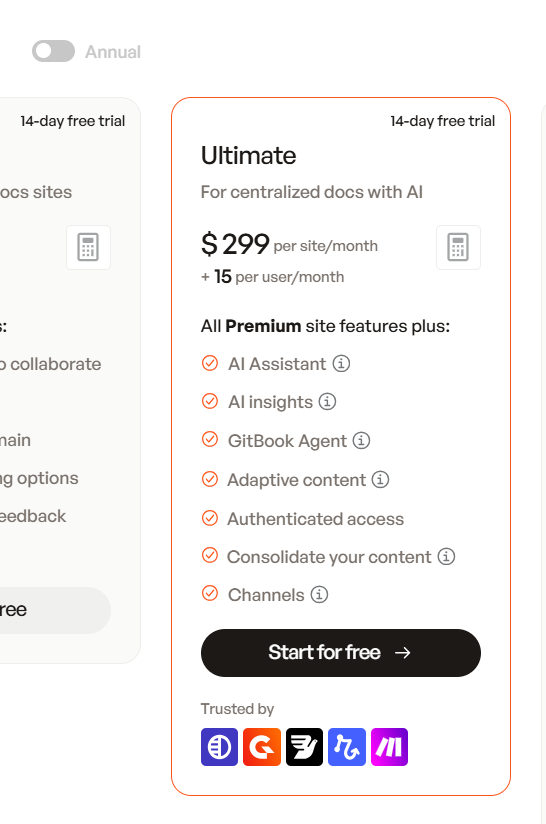
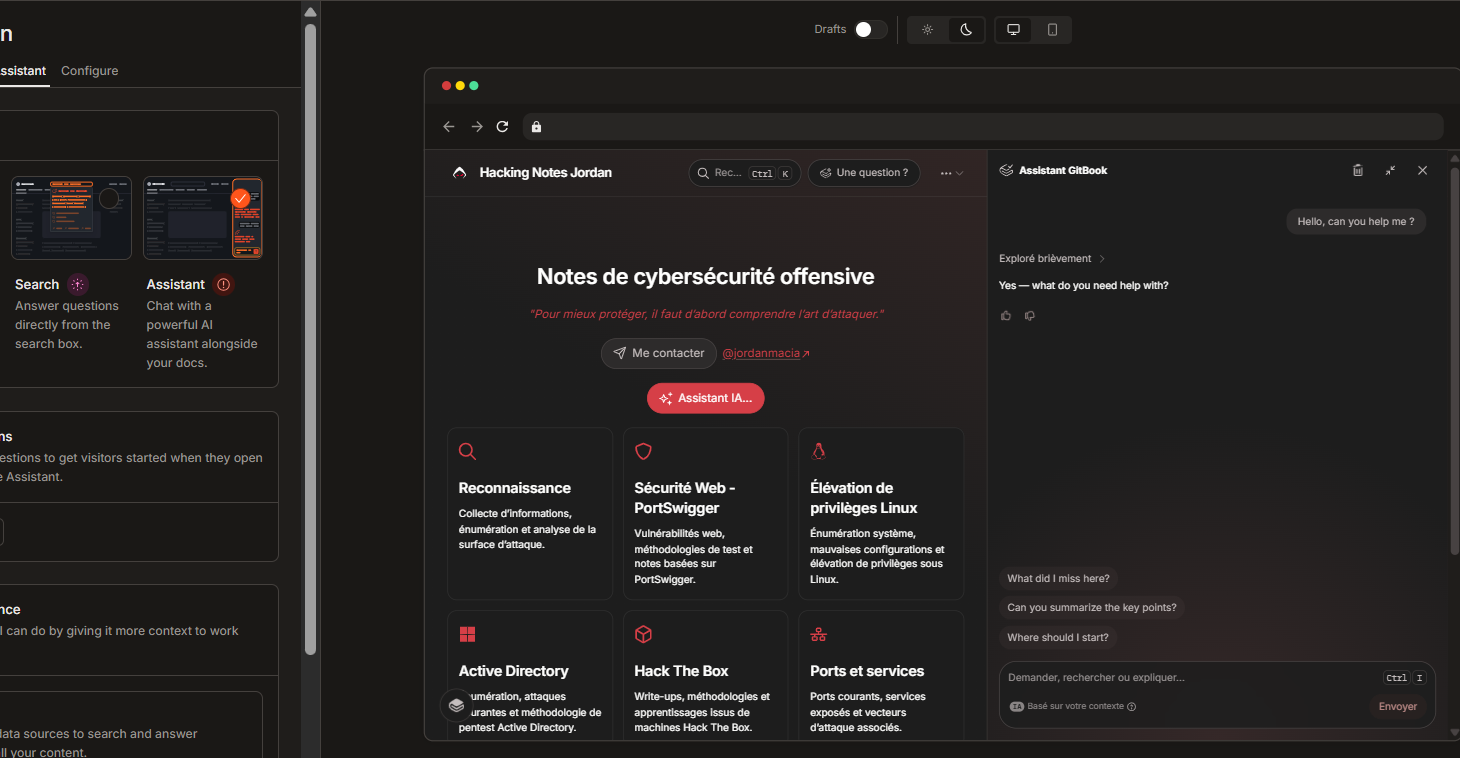
GitBook presents AI Assistant as a paid Ultimate-plan feature. If a preview or customization view exposes replayable production backend metadata, and the backend does not verify entitlement and scope on the server, the issue becomes more than a UI bypass: it can become paid-feature abuse, automation abuse, and potentially resource-cost abuse.
AI Assistant presented as part of GitBook Ultimate pricing.
Assistant preview mode exposed in GitBook customization UI.
## Video PoC
{% embed url="" %}
## Finding Summary
| Area | Notes |
| -------------- | ----------------------------------------------------- |
| Product | GitBook AI Assistant. |
| Research type | Responsible disclosure / bug bounty style case study. |
| Core primitive | Server action request replay. |
| Backend action | `streamAIChatResponse`. |
| Main risk | Entitlement and scope checks must happen server-side. |
| Status | Fixed by GitBook. |
The important lesson is simple: a server action ID can be visible in client-side JavaScript, but it must not act as authorization. The backend still needs to independently check plan entitlement, site ownership, preview/session boundaries, CSRF/origin constraints, and rate limits.
## Impact
| Impact Area | What Could Go Wrong |
| ------------------- | ----------------------------------------------------------------------- |
| Paid feature bypass | AI Assistant could be used outside the intended Ultimate-plan UI path. |
| Preview abuse | Customization or preview mode could expose replayable backend metadata. |
| Automation | Assistant queries could be scripted from a custom client. |
| Cost abuse | AI resources could be consumed without the expected entitlement gate. |
| UI bypass | Frontend-only controls, prompts, or product gates could be skipped. |
Suggested severity depends on what the backend actually permits:
| Confirmed Behavior | Suggested Severity |
| ------------------------------------------------------------------- | ------------------ |
| Replay only works for already entitled users | Medium |
| Replay works from preview/customization without paid entitlement | High |
| Replay works for arbitrary public GitBook sites without entitlement | Critical |
| Replay exposes private documentation without authorization | Critical |
## Root Cause
The vulnerable pattern is a trust-boundary mistake. Client-visible runtime data can help reconstruct the request:
| Exposed Material | Why It Matters |
| ----------------------- | ------------------------------------------------------------- |
| Server action ID | Routes the request to the backend action. |
| `spaceId` | Identifies the GitBook space. |
| `pageId` | Identifies the page context. |
| RSC/router state | Helps match the expected Next.js request shape. |
| Request body shape | Shows how the assistant call is structured. |
| Browser session cookies | Carry the user session if captured during authorized testing. |
The bug is not “server actions are visible.” The bug appears when the backend accepts a replayed request assembled from client-observable metadata without rechecking entitlement, ownership, preview scope, session validity, CSRF/origin, and rate limits.
## PoC Flow
The repository contains a local Node.js PoC that discovers runtime metadata and starts a local HTTPS proxy.
```bash
npm start
```
High-level flow:
1. Ask for a GitBook page or preview URL.
2. Download the page HTML.
3. Download GitBook JavaScript chunks.
4. Extract the current `streamAIChatResponse` server action ID.
5. Extract `spaceId` and `pageId`.
6. Open Chrome, Chromium, or Edge for authentication.
7. Store required runtime values in `.env`.
8. Start a local HTTPS proxy.
Then open:
```
https://localhost:3001
```
The local UI talks to:
```http
POST /api/chat
```
The proxy recreates the GitBook AI Assistant request with headers equivalent to:
```http
accept: text/x-component
content-type: text/plain;charset=UTF-8
next-action:
next-router-state-tree:
origin:
referer:
cookie:
```
Successful replay returns a React Server Components stream containing AI response events. The local proxy parses the final answer and returns a normal JSON response for the PoC UI.
## Common Signals
| Response | Meaning |
| ------------------------ | ----------------------------------------------------- |
| `400 Invalid request` | The server action ID is stale or incorrect. |
| RSC stream with `digest` | The action exists, but body or context is invalid. |
| `401` / `403` | Session or authorization rejected. |
| `text/x-component` | Expected React Server Components stream content type. |
## Requirements
| Requirement | Notes |
| ----------- | --------------------------------------------------- |
| Node.js | Version 18 or newer. |
| Browser | Chrome, Chromium, or Microsoft Edge. |
| OpenSSL | Needed in `PATH` for local HTTPS material. |
| OS | Windows, Linux, and macOS are supported by the PoC. |
## Cleanup
Use the repository cleanup command after testing:
```bash
npm run stop
```
It clears running PoC processes, sensitive `.env` values, generated local TLS files, and the dedicated browser authentication profile.
## Remediation
Recommended controls:
| Control | Purpose |
| ------------------------------------------------------- | ------------------------------------------------------------- |
| Enforce plan entitlement inside `streamAIChatResponse` | Prevent paid feature bypass. |
| Treat `next-action` as routing metadata | Avoid confusing action IDs with authorization. |
| Bind preview calls to short-lived server-issued tokens | Keep preview access inside preview scope. |
| Prevent preview token replay | Stop external reuse outside the intended session. |
| Validate `spaceId` and `pageId` server-side | Ensure the requested context belongs to the authorized scope. |
| Reject mismatched client-supplied context | Prevent context swapping. |
| Enforce CSRF and strict `Origin` checks | Reduce cross-site and scripted abuse. |
| Rate limit by user, organization, site, IP, and session | Limit automation and cost abuse. |
| Monitor scripted server action replay | Detect non-browser or unusual replay patterns. |
## Lessons Learned
1. Preview features are security boundaries when they touch paid or production backends.
2. Client-side gates are useful for UX, but they are not authorization.
3. Next.js server action IDs should be treated as public routing details.
4. AI features need cost and entitlement controls as much as data-access controls.
5. Bug bounty reports are stronger when they separate observed behavior, possible impact, and recommended remediation.
## References
* [Jordanmacia/gitbook-ai-chat-replay-poc](https://github.com/Jordanmacia/gitbook-ai-chat-replay-poc)
* [Repository README](https://github.com/Jordanmacia/gitbook-ai-chat-replay-poc/blob/main/README.md)
* [PoC launcher](https://github.com/Jordanmacia/gitbook-ai-chat-replay-poc/tree/main/scripts)
* [Local proxy](https://github.com/Jordanmacia/gitbook-ai-chat-replay-poc/blob/main/server.js)
---
# Agent Instructions
This documentation is published with GitBook. GitBook is the documentation platform designed so that both humans and AI agents can read, navigate, and reason over technical content effectively. Learn more at gitbook.com.
## Querying This Documentation
If you need additional information that is not directly available in this page, you can query the documentation by asking a question.
Perform an HTTP GET request on the following URL with the `ask` and `goal` query parameters:
```
GET https://hacking-notes.jord4n.pro/useful-resources/bug-bounty/gitbook-ai-assistant-replay-poc.md?ask=&goal=
```
`ask` is the immediate question: it should be specific, self-contained, and written in natural language.
`goal` is what the user is ultimately trying to achieve, the reason they need the answer. Sharing it helps GitBook give you a better, more relevant answer. A goal is most helpful when it describes the outcome the user wants rather than restating the question. For example, with `ask=how do I create an API token`, a goal like `automate deployments from our CI pipeline` lets GitBook tailor the answer to that use case.
The response will contain a direct answer to the question and relevant excerpts and sources from the documentation.
Use this mechanism when the answer is not explicitly present in the current page, you need clarification or additional context, or you want to retrieve related documentation sections.