> For the complete documentation index, see [llms.txt](https://hacking-notes.jord4n.pro/llms.txt). Markdown versions of documentation pages are available by appending `.md` to page URLs; this page is available as [Markdown](https://hacking-notes.jord4n.pro/zh/reconnaissance/subdomains.md).
# 子域名
子域名枚举技术,用于发现公共 DNS 记录、证书透明度条目、已索引主机和暴露的基础设施。
子域名枚举通过发现公共主机、DNS 记录、虚拟主机、证书透明度条目和已编入索引的基础设施来扩大目标攻击面。
{% hint style="info" %}
发现与网站相关的子域名有多种技术。这些技术可以使用在线工具或直接在控制台中执行,并且会根据目标和可用资源而有所不同。下面介绍几种可用于此任务的工具,并附有详细的示例命令。
{% endhint %}
## Gobuster:
> Gobuster 是一款非常流行的工具,它通过对网站执行 DNS 查询来快速发现子域名。它使用词表来测试不同的子域名组合。下面是在命令行中使用它的示例:
```bash
gobuster vhost -u https://website.com --append-domain -w /usr/share/SecLists/Discovery/DNS/subdomains-top1million-110000.txt -t 100
```
* **-u**:指定目标网站的 URL。
* **-w**:设置用于测试子域名的词表文件路径。
* **-t**:设置线程数(此处为 100),以提高搜索速度。
* /| grep -v "403": 忽略 HTTP 403 响应。
## Wfuzz:
> Wfuzz 是另一款模糊测试工具,它允许你通过利用 HTTP 响应来测试不同的子域名。要搜索子域名,请使用以下命令:
```bash
wfuzz -c -t 100 -w /usr/share/SecLists/Discovery/DNS/subdomains-top1million-5000.txt -H "Host: FUZZ.website.com" https://website.com
```
* **-c**:启用彩色模式,以提高结果的可读性。
* **-t 20**:设置并发线程数(此处为 20),以加快处理过程。
* **-H "Host: FUZZ.website.com"**:将列表中的每个值替换到“FUZZ”中,以测试可能的子域名。
* **--hc=404**:忽略 HTTP 404 响应。
## **Sublist3r**
> Sublist3r 是一款 Python 工具,旨在使用 OSINT 枚举网站子域名。它利用 Google、Yahoo、Bing、Baidu 和 Ask 等多个搜索引擎,以及 Netcraft、Virustotal、ThreatCrowd、DNSdumpster 和 ReverseDNS1 等其他来源。
* **Sublist3r**:子域名枚举工具,例如:/ `sublist3r -d website.com`
## Google Dorks:
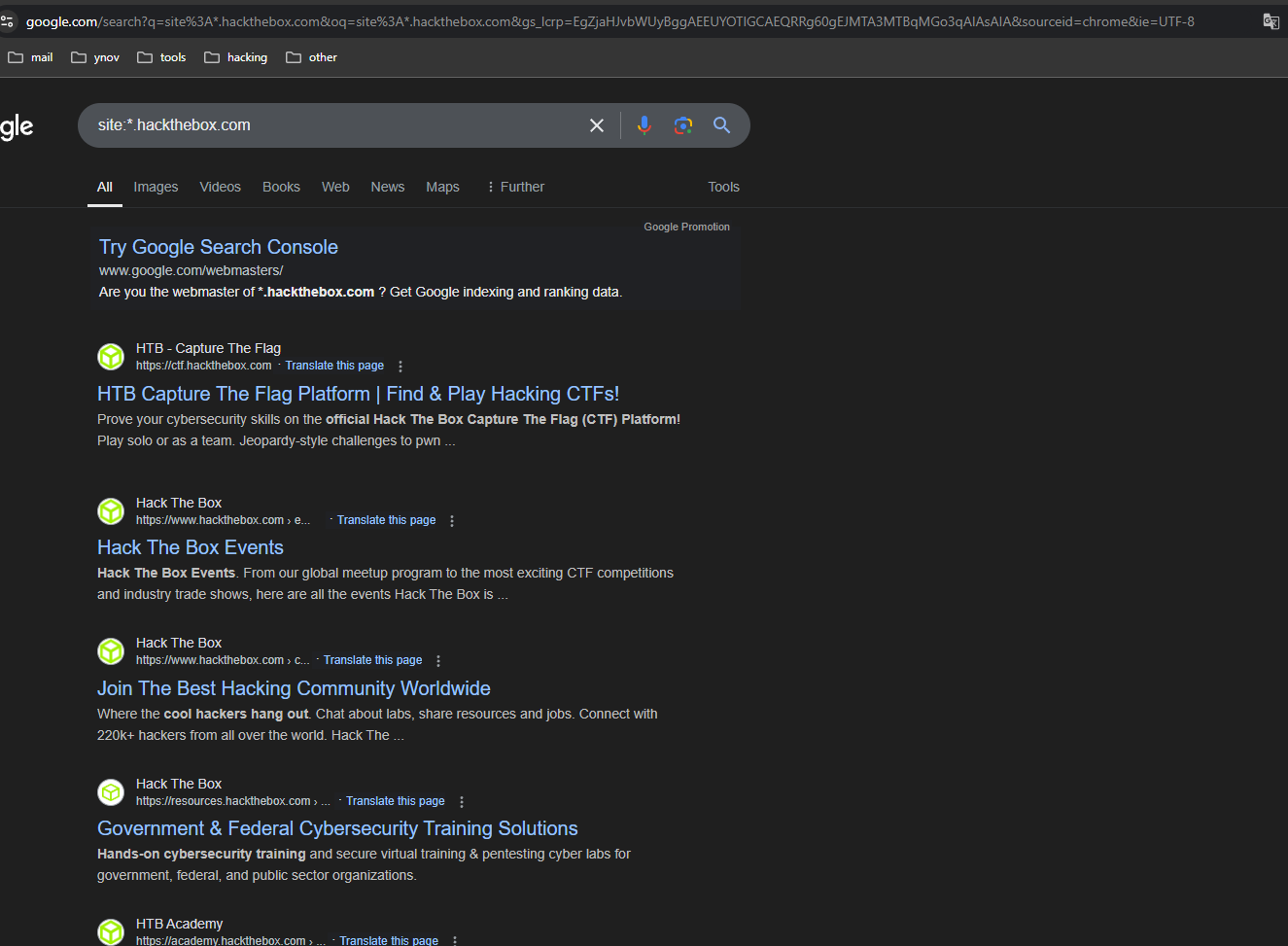
> Google Dorks 是特殊查询,允许你使用 Google 查找特定信息。要发现网站的子域名,可以使用以下查询:
```makefile
site:*.website.com
```
此命令将显示 **website.com** 在 Google 索引中所有已编入索引的子域名。此技术对于快速获取公开可访问子域名列表特别有用。
## DNSDumpster:
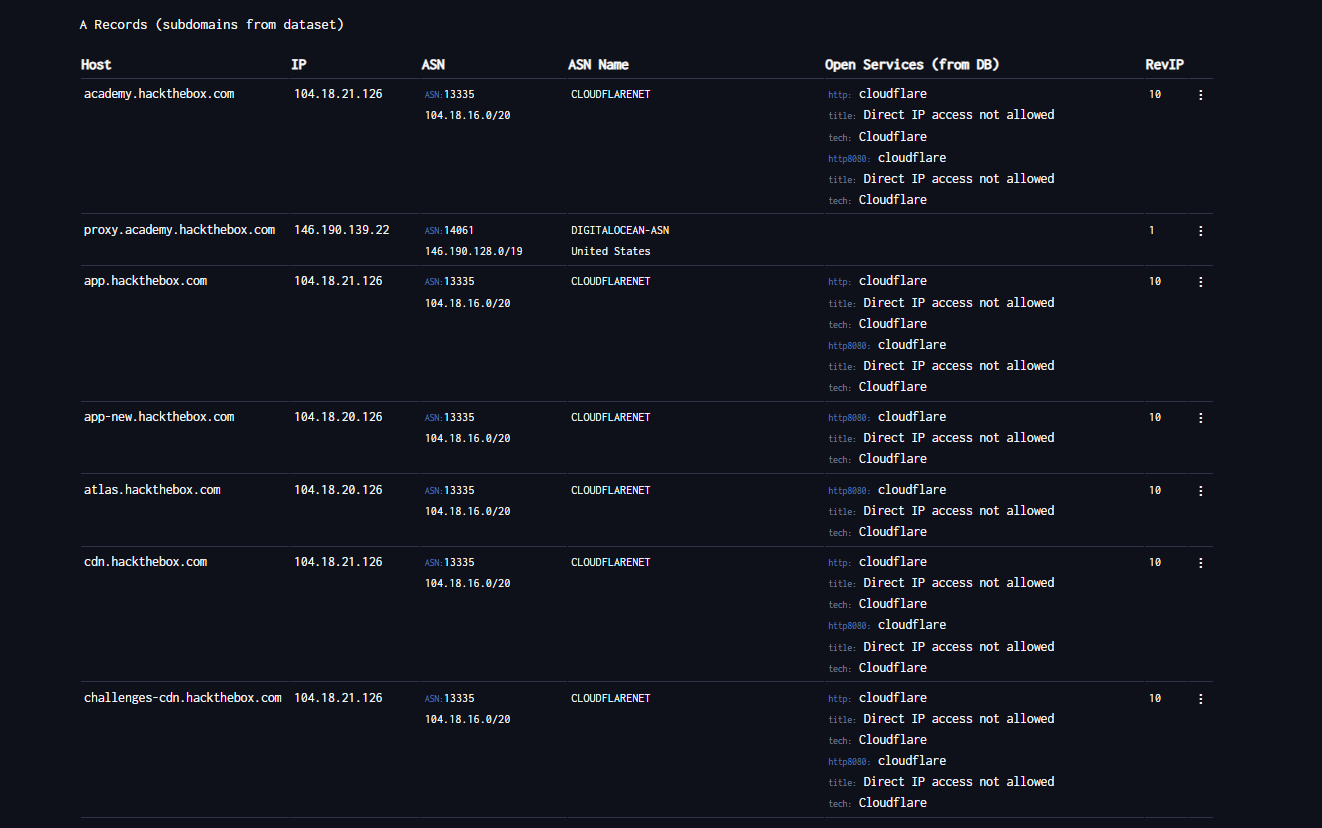
> [DNSDumpster ](https://dnsdumpster.com/)是一个免费的在线工具,用于收集有关网站域名系统(DNS)的信息。它在渗透测试(pentesting)中尤其有用,可帮助获取组织网络基础设施的信息。使用 DNSDumpster,你可以访问某个域的公开 DNS 记录详细信息,并发现关键基础设施组件,例如:
* 服务器。
* 子域名。
* 关联的 IP 地址。
* 其他网络服务。
## 被动域名枚举
优先使用被动来源收集候选子域名,而不直接接触目标基础设施。将 `target.com` 替换为已授权的域名。
```bash
export TARGET="target.com"
```
### 证书透明度
查询 `crt.sh` 并查看原始 JSON 输出:
```bash
curl -s "https://crt.sh/?q=${TARGET}&output=json" | jq .
```
从证书透明度结果中提取唯一主机名:
```bash
curl -s "https://crt.sh/?q=${TARGET}&output=json" \
| jq -r '.[] | .name_value, .common_name' \
| sed 's/\*\.//g' \
| sort -u
```
### Project Sonar
从公开的 Project Sonar 风格数据集中收集子域名、相关 TLD 和反向 DNS 结果:
```bash
curl -s "https://sonar.omnisint.io/subdomains/${TARGET}" | jq -r '.[]' | sort -u
curl -s "https://sonar.omnisint.io/tlds/${TARGET}" | jq -r '.[]' | sort -u
curl -s "https://sonar.omnisint.io/all/${TARGET}" | jq -r '.[]' | sort -u
```
单个 IP 或 CIDR 范围的反向 DNS 查询:
```bash
curl -s "https://sonar.omnisint.io/reverse/192.0.2.10" | jq -r '.[]' | sort -u
curl -s "https://sonar.omnisint.io/reverse/192.0.2.0/24" | jq -r '.[]' | sort -u
```
### 多源收集
运行 `theHarvester` 针对多个已配置的来源:
```bash
while read -r source; do
theHarvester -d "${TARGET}" -b "$source" -f "${source}-${TARGET}"
done < sources.txt
```
### 将子域名解析为 IP
将已确认的子域名转换为唯一的 IP 列表:
```bash
while read -r subdomain; do
host "$subdomain" | awk '/has address/ {print $4}'
done < subdomains.txt | sort -u > ip-addresses.txt
```
### 使用 Shodan 丰富 IP 信息
使用 Shodan 查看每个已解析 IP 地址暴露的服务:
```bash
while read -r ip; do
shodan host "$ip"
done < ip-addresses.txt
```
## 其他 OSINT 资源
Phonebook 和其他公共 OSINT 资源集中在 [人员和泄露研究](/zh/hacking-tools/osint/people-and-breach-research.md). 网站基础设施、Shodan 和归档 URL 资源集中在 [网站与基础设施](/zh/hacking-tools/osint/websites-and-infrastructure.md).
---
# Agent Instructions
This documentation is published with GitBook. GitBook is the documentation platform designed so that both humans and AI agents can read, navigate, and reason over technical content effectively. Learn more at gitbook.com.
## Querying This Documentation
If you need additional information that is not directly available in this page, you can query the documentation by asking a question.
Perform an HTTP GET request on the following URL with the `ask` and `goal` query parameters:
```
GET https://hacking-notes.jord4n.pro/zh/reconnaissance/subdomains.md?ask=&goal=
```
`ask` is the immediate question: it should be specific, self-contained, and written in natural language.
`goal` is what the user is ultimately trying to achieve, the reason they need the answer. Sharing it helps GitBook give you a better, more relevant answer. A goal is most helpful when it describes the outcome the user wants rather than restating the question. For example, with `ask=how do I create an API token`, a goal like `automate deployments from our CI pipeline` lets GitBook tailor the answer to that use case.
The response will contain a direct answer to the question and relevant excerpts and sources from the documentation.
Use this mechanism when the answer is not explicitly present in the current page, you need clarification or additional context, or you want to retrieve related documentation sections.
.png?alt=media)
.png?alt=media)
.png?alt=media)