> For the complete documentation index, see [llms.txt](https://hacking-notes.jord4n.pro/llms.txt). Markdown versions of documentation pages are available by appending `.md` to page URLs; this page is available as [Markdown](https://hacking-notes.jord4n.pro/zh/useful-resources/bug-bounty/gitbook-ai-assistant-replay-poc.md).
# GitBook AI Assistant 回放 PoC
[Jordanmacia/gitbook-ai-chat-replay-poc](https://github.com/Jordanmacia/gitbook-ai-chat-replay-poc) 记录了一个已修复的 GitBook AI Assistant 问题:Next.js 服务器动作的请求流程可以从客户端可见的运行时数据中重建,并通过外部本地客户端进行重放。
{% hint style="success" %}
状态:已修复。该漏洞已报告给 GitBook,后端现在会在服务器端强制执行权限、作用域和会话控制。请将本页作为历史性的漏洞赏金案例研究,而不是实时利用指南。
{% endhint %}
## 这为什么重要
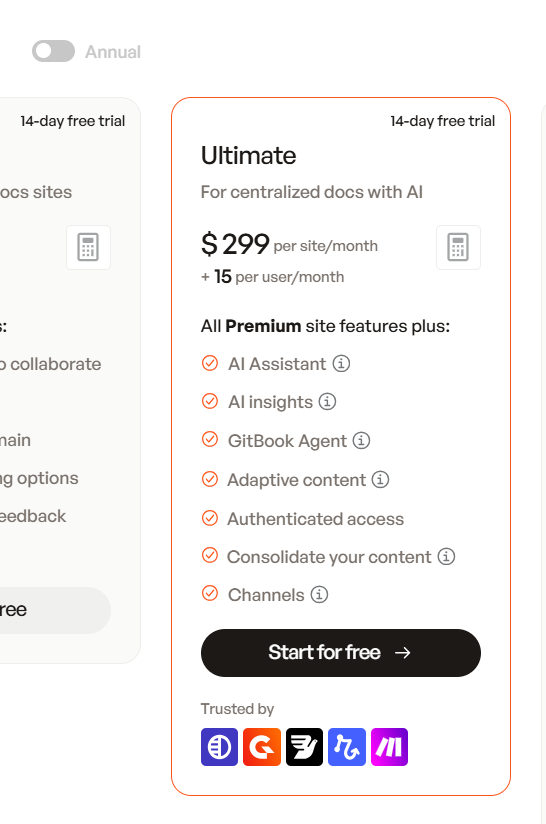
GitBook 将 AI Assistant 作为付费 Ultimate 套餐功能提供。如果预览或自定义视图暴露了可重放的生产后端元数据,而后端又没有在服务器端验证权限和作用域,那么这个问题就不只是 UI 绕过:它还可能成为付费功能滥用、自动化滥用,以及潜在的资源成本滥用。
AI Assistant 被呈现为 GitBook Ultimate 定价方案的一部分。
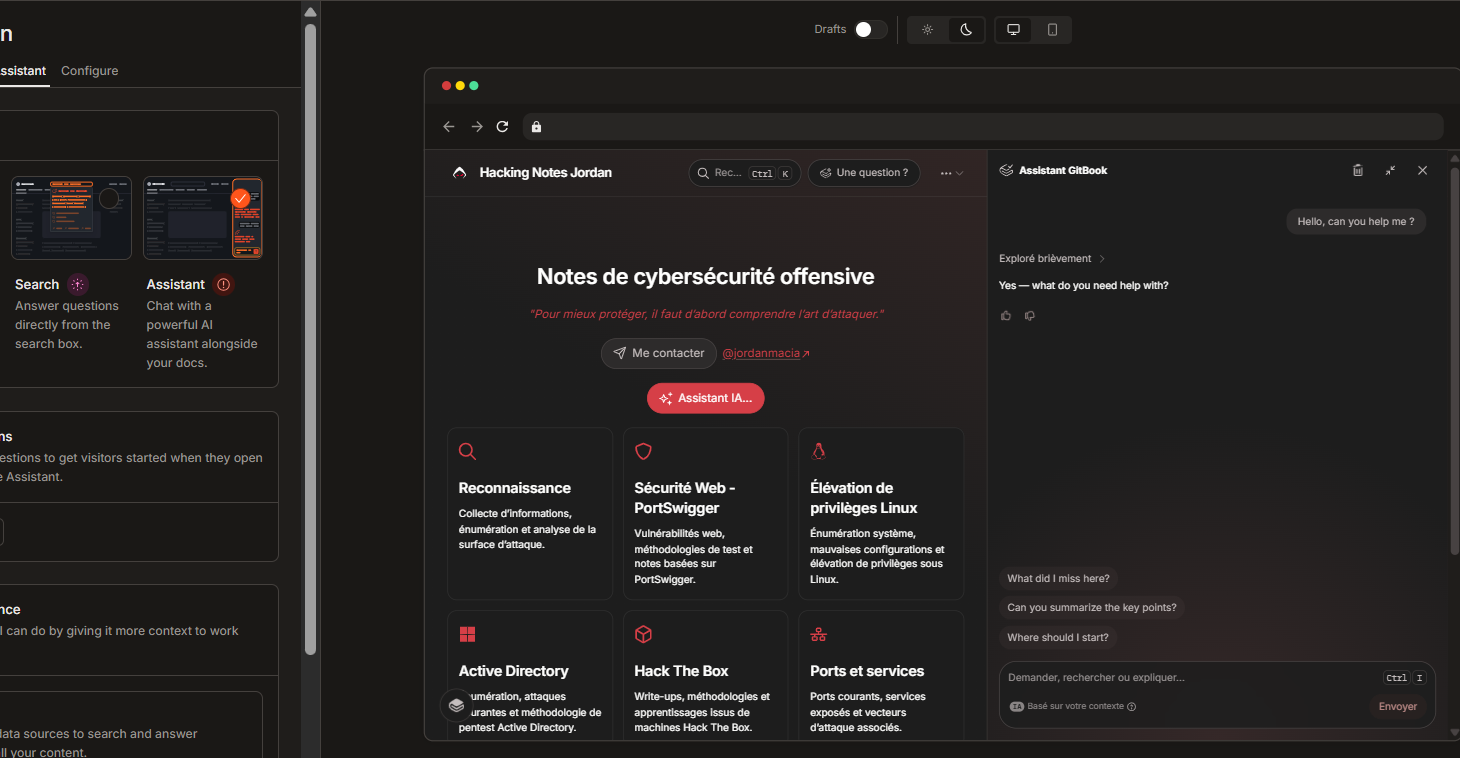
在 GitBook 自定义 UI 中暴露的 Assistant 预览模式。
## 视频 PoC
{% embed url="" %}
## 发现摘要
| 领域 | 备注 |
| ------- | ----------------------- |
| Product | GitBook AI Assistant。 |
| 研究类型 | 负责任披露 / 漏洞赏金风格案例研究。 |
| 核心原语 | 服务器动作请求重放。 |
| 后端动作 | `streamAIChatResponse`. |
| 主要风险 | 权限和作用域检查必须在服务器端进行。 |
| 状态 | 已由 GitBook 修复。 |
重要的教训很简单:服务器动作 ID 可能会出现在客户端 JavaScript 中,但它绝不能充当授权依据。后端仍然需要独立检查套餐权限、站点所有权、预览/会话边界、CSRF/来源限制,以及速率限制。
## 影响
| 影响范围 | 可能出什么问题 |
| ------ | -------------------------------------------- |
| 付费功能绕过 | AI Assistant 可能会在预期的 Ultimate 套餐 UI 路径之外被使用。 |
| 预览滥用 | 自定义或预览模式可能暴露可重放的后端元数据。 |
| 自动化 | Assistant 查询可能通过自定义客户端脚本化执行。 |
| 成本滥用 | AI 资源可能在没有预期权限门槛的情况下被消耗。 |
| UI 绕过 | 仅前端控制、提示或产品门槛可能被跳过。 |
建议严重性取决于后端实际允许的内容:
| 已确认的行为 | 建议严重性 |
| ------------------------- | ----- |
| 重放仅对已拥有权限的用户有效 | 中等 |
| 可从预览/自定义中重放,而无需付费权限 | 高 |
| 可对任意公开 GitBook 站点重放,而无需权限 | 严重 |
| 重放会在未授权情况下暴露私有文档 | 严重 |
## 根本原因
漏洞模式是一个信任边界错误。客户端可见的运行时数据可以帮助重建请求:
| 暴露的材料 | 这为什么重要 |
| ------------ | --------------------- |
| 服务器动作 ID | 将请求路由到后端动作。 |
| `spaceId` | 标识 GitBook 空间。 |
| `pageId` | 标识页面上下文。 |
| RSC/路由器状态 | 帮助匹配预期的 Next.js 请求形状。 |
| 请求正文结构 | 展示 assistant 调用的结构方式。 |
| 浏览器会话 cookie | 如果在授权测试期间捕获到,会携带用户会话。 |
这个漏洞不是“服务器动作可见”。当后端接受了由客户端可观察元数据组装出来的重放请求,却没有重新检查权限、所有权、预览作用域、会话有效性、CSRF/来源以及速率限制时,漏洞才会出现。
## PoC 流程
该仓库包含一个本地 Node.js PoC,它会发现运行时元数据并启动本地 HTTPS 代理。
```bash
npm start
```
高级流程:
1. 输入一个 GitBook 页面或预览 URL。
2. 下载页面 HTML。
3. 下载 GitBook JavaScript 分块。
4. 提取当前 `streamAIChatResponse` 服务器动作 ID。
5. 提取 `spaceId` 和 `pageId`.
6. 打开 Chrome、Chromium 或 Edge 进行身份验证。
7. 将所需的运行时值存储到 `.env`.
8. 启动本地 HTTPS 代理。
然后打开:
```
https://localhost:3001
```
本地 UI 与以下接口通信:
```http
POST /api/chat
```
代理会用与以下内容等效的标头重建 GitBook AI Assistant 请求:
```http
accept: text/x-component
content-type: text/plain;charset=UTF-8
next-action: <发现的 streamAIChatResponse 动作 ID>
next-router-state-tree: <路由状态>
origin: <目标 GitBook 源站>
referer: <目标 GitBook URL>
cookie: <捕获的 GitBook cookie>
```
成功重放会返回一个包含 AI 响应事件的 React Server Components 流。本地代理会解析最终答案,并为 PoC UI 返回一个普通的 JSON 响应。
## 常见信号
| 响应 | 含义 |
| ------------------- | ---------------------------------- |
| `400 无效请求` | 服务器动作 ID 已过期或不正确。 |
| 带有 `digest 的 RSC 流` | 该动作存在,但正文或上下文无效。 |
| `401` / `403` | 会话或授权被拒绝。 |
| `text/x-component` | 预期的 React Server Components 流内容类型。 |
## 要求
| 要求 | 备注 |
| ------- | --------------------------------- |
| Node.js | 18 版或更高版本。 |
| 浏览器 | Chrome、Chromium 或 Microsoft Edge。 |
| OpenSSL | 需要用于 `PATH` 本地 HTTPS 材料。 |
| 操作系统 | PoC 支持 Windows、Linux 和 macOS。 |
## 清理
测试后使用仓库清理命令:
```bash
npm run stop
```
它会清除正在运行的 PoC 进程、敏感 `.env` 值、生成的本地 TLS 文件,以及专用的浏览器身份验证配置文件。
## 修复建议
建议的控制措施:
| 控制 | 用途 |
| ---------------------------- | ------------------ |
| 在 `streamAIChatResponse` | 中强制执行套餐权限。 |
| 将 `next-action` 视为路由元数据 | 避免将动作 ID 与授权混为一谈。 |
| 将预览调用绑定到短期服务器签发的令牌 | 将预览访问保持在预览作用域内。 |
| 防止预览令牌重放 | 防止在预期会话之外被外部复用。 |
| 验证 `spaceId` 和 `pageId` 服务器端 | 确保所请求的上下文属于已授权作用域。 |
| 拒绝不匹配的客户端提供上下文 | 防止上下文替换。 |
| 强制执行 CSRF 和严格 `Origin` 检查 | 减少跨站和脚本化滥用。 |
| 按用户、组织、站点、IP 和会话进行速率限制 | 限制自动化和成本滥用。 |
| 监控脚本化服务器动作重放 | 检测非浏览器或异常的重放模式。 |
## 经验教训
1. 当预览功能接触付费或生产后端时,它们就是安全边界。
2. 客户端门槛对 UX 有帮助,但它们不是授权。
3. Next.js 服务器动作 ID 应被视为公开的路由细节。
4. AI 功能对成本和权限控制的需求,与对数据访问控制同样重要。
5. 漏洞赏金报告在区分已观察到的行为、可能的影响和建议修复时,会更有说服力。
## 参考资料
* [Jordanmacia/gitbook-ai-chat-replay-poc](https://github.com/Jordanmacia/gitbook-ai-chat-replay-poc)
* [仓库 README](https://github.com/Jordanmacia/gitbook-ai-chat-replay-poc/blob/main/README.md)
* [PoC 启动器](https://github.com/Jordanmacia/gitbook-ai-chat-replay-poc/tree/main/scripts)
* [本地代理](https://github.com/Jordanmacia/gitbook-ai-chat-replay-poc/blob/main/server.js)
---
# Agent Instructions
This documentation is published with GitBook. GitBook is the documentation platform designed so that both humans and AI agents can read, navigate, and reason over technical content effectively. Learn more at gitbook.com.
## Querying This Documentation
If you need additional information that is not directly available in this page, you can query the documentation dynamically by asking a question.
Perform an HTTP GET request on the current page URL with the `ask` query parameter, and the optional `goal` query parameter:
```
GET https://hacking-notes.jord4n.pro/zh/useful-resources/bug-bounty/gitbook-ai-assistant-replay-poc.md?ask=&goal=
```
`ask` is the immediate question: it should be specific, self-contained, and written in natural language.
`goal` is optional and describes the broader end goal you are ultimately trying to accomplish on behalf of the user. GitBook uses it to tailor the answer towards what is most useful for that goal.
The response will contain a direct answer to the question and relevant excerpts and sources from the documentation.
Use this mechanism when the answer is not explicitly present in the current page, you need clarification or additional context, or you want to retrieve related documentation sections.